Designing a Large-Scale Video Streaming Platform
Introduction
Suppose someone hands you a blank page and says: build a video platform like YouTube or TikTok. Where do you start?
This is one of the richest design problems I know. It forces you to reason about massive scale, heavy media processing, global delivery, and real-time adaptation — all while keeping cost, performance, and reliability in balance. In this post I'll work the problem the way I actually would: start by nailing down scope, size the system with rough numbers, sketch an architecture, then go deep on the four subsystems that make or break it — the transcoding pipeline, adaptive bitrate streaming, multi-language support, and the CDN.
I won't jump straight to boxes and arrows. The order matters: scope drives requirements, requirements drive the numbers, and the numbers drive the architecture. Let's start there.
Step 1: Scoping the Problem
Before I draw anything, I want to know what I'm actually building — because "a video platform" hides two very different systems.
The first thing I'd pin down
What kind of platform is this? TikTok and YouTube diverge sharply:
- TikTok-style (short-form): 15-60 second videos, mobile-first, vertical format, high upload volume, recommendation-driven discovery
- YouTube-style (long-form): Minutes to hours, horizontal format, search and subscription-driven, lower upload volume per user
I'll design a general platform that handles both and call out where the architectures diverge — the media path is largely shared, and the interesting differences (feed vs. search, prefetch aggressiveness, caching) fall out naturally.
What scale am I targeting? I don't want to hand-wave this, so I'll commit to a concrete assumption and design against it: YouTube-class, ~200 million daily active users. Everything downstream is sized from that number.
VOD, live, or both? Live streaming is a different beast — sub-15-second latency, real-time encoding, no chance to run slow optimized transcodes. I'll design primarily for video-on-demand, since it's the harder problem for storage and global delivery, and note where live diverges.
What's in scope? The core I'll build:
- Video upload and storage
- Streaming playback with quality adaptation
- Search and discovery
- User authentication
- Comments and engagement
And explicitly out of scope for this pass: recommendations, content moderation, and monetization internals. They're real systems, but they're not the spine of the media platform.
Step 2: Requirements and Capacity
With scope fixed, I can turn business needs into technical requirements — and then size them.
Functional Requirements
- Upload videos (from content creators or users)
- Stream videos with adaptive quality based on network conditions
- Search videos by title, tags, and metadata
- User authentication and authorization
- Commenting and engagement features
- Multi-language support (captions, translation, dubbing)
Non-Functional Requirements
This is where the design's character gets set:
- High Availability: Target 99.9%+ uptime (system remains operational even during failures)
- High Reliability: Zero upload losses (every video upload must succeed or fail gracefully)
- Scalability: Handle traffic spikes (viral videos, live events) without degradation
- Performance: Sub-100ms latency for video playback startup
- Global Reach: Serve users worldwide with consistent experience
- Cost Efficiency: Optimize storage and bandwidth at petabyte scale
Back-of-Envelope Capacity Estimation
I always do this early — the numbers decide the architecture, not the other way around.
Assumptions
Based on YouTube-class platforms:
- Daily Active Users (DAU): 200 million users
- Average videos watched per user: 5 videos/day
- Total video views: 1 billion views/day
- Read/write ratio: 200:1 (typical for video platforms)
- Video uploads: 50 million videos/day
Storage Calculations
Average video size: 100 MB (after compression)
Daily storage needs: 50M videos × 100 MB = 5 PB/day
Annual storage: 5 PB × 365 = 1,825 PB/year
10-year projection: ~18,250 PB total storage
At 5 petabytes a day, storage is the biggest cost driver. That points straight at distributed object storage (S3 / GCS) with lifecycle policies to age cold content down to cheaper archival tiers.
Bandwidth Requirements
New playback starts: 1B views / 86,400 seconds ≈ 12,000 per second
Average video duration: 5 minutes (300 seconds)
Concurrent streams: 1B views × 300s / 86,400s ≈ 3.5M streams in flight (average)
Average bitrate: 2 Mbps (mid-quality stream)
Egress bandwidth: 3.5M concurrent × 2 Mbps ≈ 7 Tbps average (higher at peak)
The distinction that trips people up: 12,000 is the rate of new plays per second, but bandwidth is driven by how many streams are running at once. Each play lasts ~5 minutes, so at any instant I'm serving roughly 3.5 million concurrent streams — about 7 Tbps. That's the number that sizes the CDN, and it's the reason a CDN is non-negotiable: with CDN egress at $0.01-0.08 per GB, bandwidth is the second-biggest cost, and a 95%+ cache hit ratio is what keeps it survivable.
Ingress Bandwidth
Upload bandwidth: 50M videos/day × 100 MB = 5 PB/day
Ingress rate: 5 PB / 86,400 seconds ≈ 58 GB/second
That ingress rate is why I'd put geographically distributed upload endpoints in front of the pipeline — both to absorb the throughput and to cut latency for uploaders.
Step 3: High-Level Architecture
Now the numbers justify a shape. Here's the system I'd sketch, then walk through component by component.
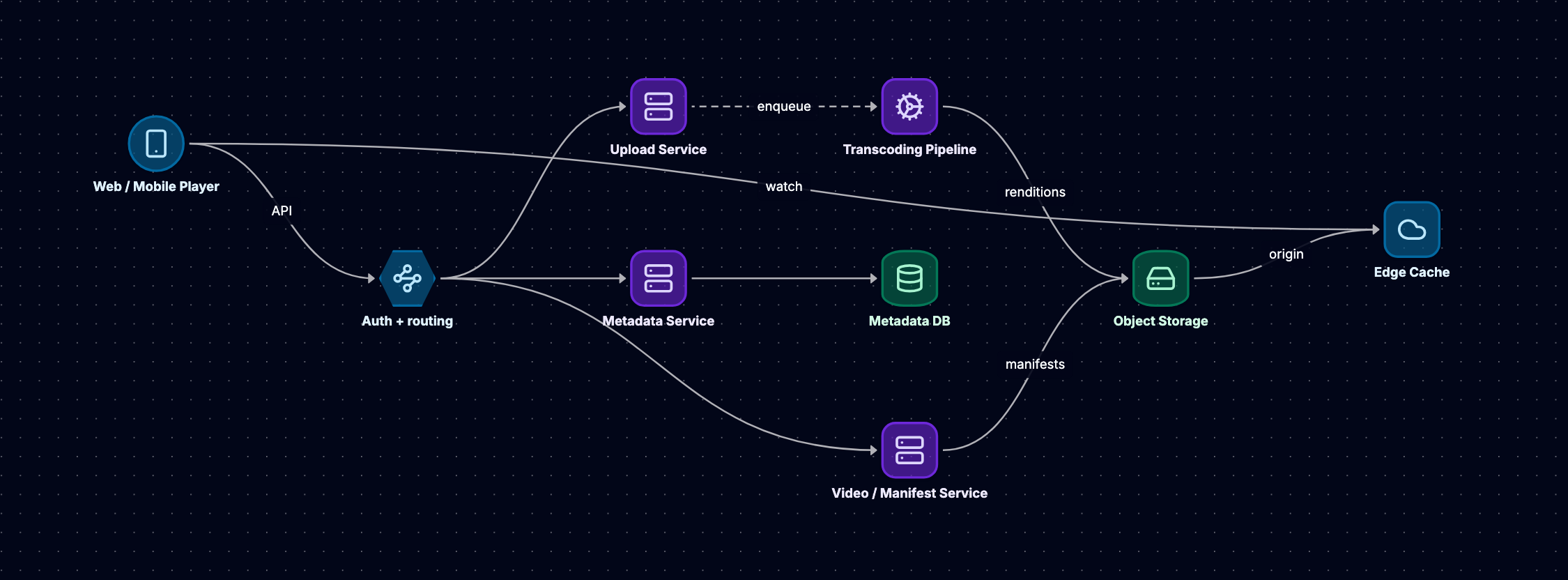
Component Walkthrough
API Gateway
- Single entry point for all client requests
- Handles authentication, rate limiting, routing
- Routes video playback requests to CDN
- Routes metadata queries to appropriate services
Upload Service
- Receives video files from creators
- Generates unique video IDs
- Stores raw uploads in object storage
- Triggers transcoding pipeline
- Implements resumable uploads for large files
Transcoding Pipeline
- Distributed workers pull jobs from queue (SQS/Kafka)
- Encodes videos into multiple resolutions and formats
- Generates thumbnails and preview clips
- Stores encoded outputs back to object storage
- Updates metadata service when complete
Metadata Service
- Manages video information (title, description, tags, duration)
- Handles search queries
- Stores view counts, likes, comments
- Uses hybrid database approach:
- PostgreSQL for structured data (users, video metadata)
- Cassandra for high-write data (views, analytics)
Video Service
- Generates streaming manifests (HLS/DASH)
- Manages video lifecycle (publish, unpublish, delete)
- Handles access control and DRM
CDN (Content Delivery Network)
- Caches encoded videos at edge locations globally
- Serves 95%+ of video requests from cache
- 300-4,000+ Points of Presence worldwide
- Sub-100ms latency to end users
Object Storage
- Stores petabytes of video data
- Raw uploads and all encoded renditions
- Lifecycle policies move cold content to archival storage
- Durability guarantees (99.999999999% for S3)
Scaling It Out
That's the logical view. The clean box diagram hides the components that actually let it survive 200M users, so the next thing I'd draw is the scaled-out topology: DNS and a CDN out front, a load balancer and API gateway spreading traffic across many stateless service replicas, a rate limiter and auth service at the edge, a cache plus read replicas for the read-heavy metadata path, a sharded store for high-write counters (views, likes), a search index, and a queue feeding an autoscaled transcoding fleet — all observed by monitoring.
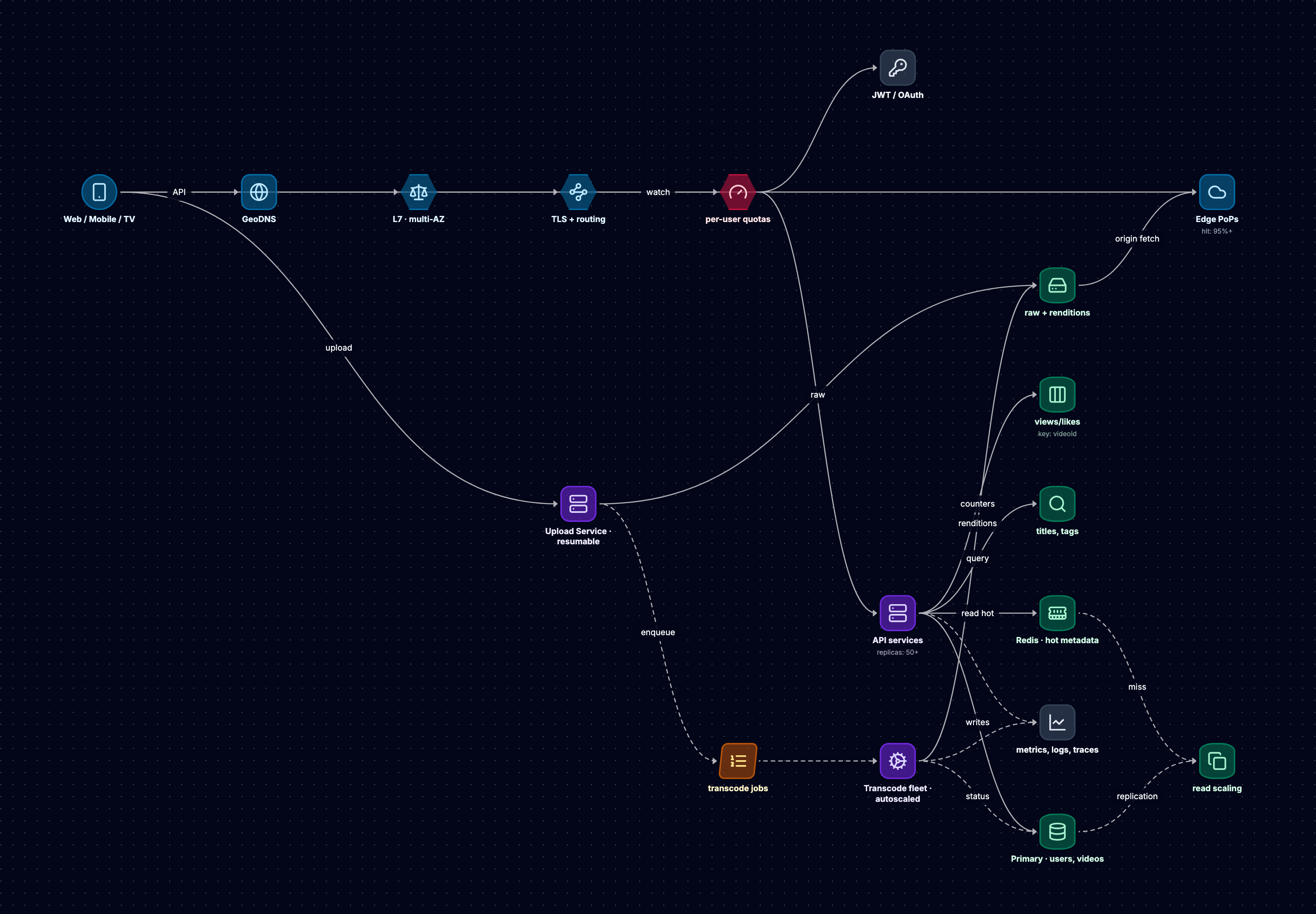
It's worth tracing the read path and the write path separately, because they scale differently. A watch request hits the CDN and never touches the origin ~95% of the time. An API request flows DNS → load balancer → gateway → rate limiter → a stateless service replica, which reads hot data from Redis and falls back to a read replica. Durable writes go to the SQL primary; high-volume counters (views, likes) go to a sharded store. Uploads take a completely separate async path — store the raw bytes, enqueue a job, and let the autoscaled worker fleet transcode without blocking the user.
The property I care about is that each component scales independently: the CDN absorbs the massive read traffic, and the transcoding pipeline chews through uploads asynchronously. With that skeleton in place, the rest of the design is really about four subsystems. Let's go deep on each.
Deep-Dive 1: Upload and Video Transcoding Pipeline
This is the subsystem I'd spend the most care on. Transcoding is CPU-intensive, slow, and has to keep up with 50 million uploads a day, so getting the pipeline shape right matters.
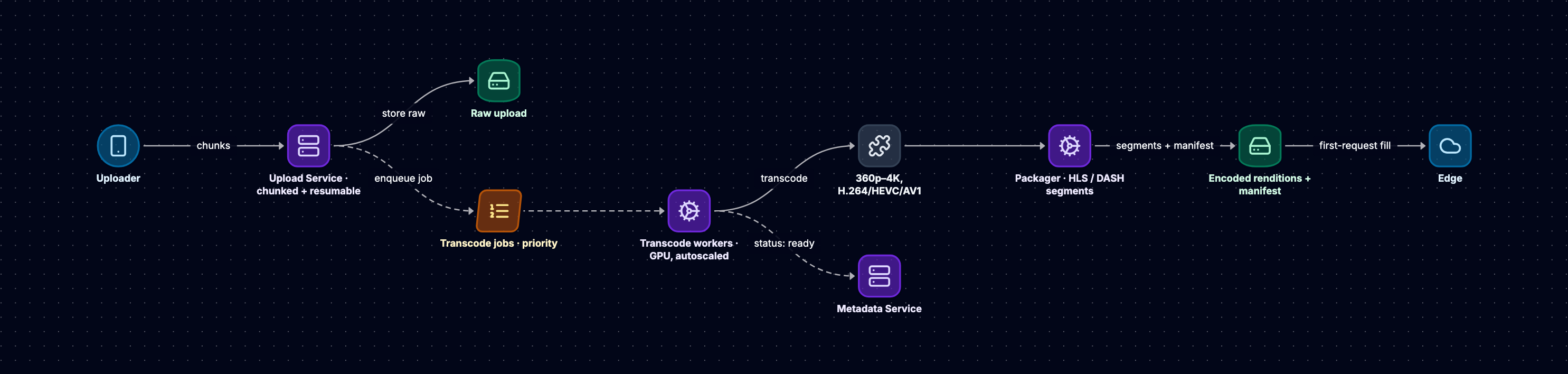
Upload Flow
Step 1: Resumable Upload Protocol
For a 2GB upload, network interruptions are inevitable, so I'd never accept a video in a single request. Chunked, resumable uploads instead:
1. Client requests upload initiation
2. Upload Service returns: uploadID, chunkSize (5MB), uploadURL
3. Client splits video into chunks
4. Client uploads chunks with: uploadID, chunkNumber, chunkData
5. Upload Service acknowledges each chunk
6. Client resumes from last acknowledged chunk on failure
7. Upload Service assembles complete file when all chunks received
This is one place TikTok and YouTube diverge: TikTok's 60-second clips can get away with simple single-request uploads, while YouTube must handle multi-gigabyte files that demand a resumable protocol.
Step 2: Storage and Metadata Creation
1. Upload Service stores raw video in object storage:
   s3://raw-uploads/2024/01/15/{videoID}.mp4
2. Generates metadata record:
   - videoID (UUID)
   - uploaderID
   - uploadTimestamp
   - originalFilename
   - fileSize
   - status: "processing"
3. Publishes message to transcoding queue
Transcoding Pipeline Architecture
Message Queue (SQS/Kafka)
{
  "videoID": "abc123",
  "sourceURL": "s3://raw-uploads/2024/01/15/abc123.mp4",
  "priority": "normal",
  "targetFormats": ["h264", "hevc", "av1"],
  "targetResolutions": ["1080p", "720p", "480p", "360p"]
}
Distributed Transcoding Workers
I'd run hundreds to thousands of workers (containerized on Kubernetes):
1. Worker polls queue for transcoding job
2. Downloads source video from object storage
3. Analyzes video characteristics:
   - Resolution: 1920×1080
   - Duration: 600 seconds
   - Codec: H.264
   - Bitrate: 8 Mbps
4. Executes parallel transcoding tasks
Codec Selection Strategy
H.264 (AVC) — the safe default. H.264 is still the industry baseline because it's universally supported — from 10-year-old Android phones to smart TVs. Every video gets an H.264 rendition.
H.265 (HEVC) — efficiency vs. complexity. HEVC offers 40-50% better compression than H.264, which translates directly into reduced CDN bandwidth costs — at this scale, millions of dollars a year. But it carries licensing cost and patchier device support, so I'd generate it alongside H.264, not instead of it.
AV1 — the future. AV1 is royalty-free and gives 30-50% bandwidth reduction versus H.264, which is why YouTube and Netflix are pushing it hard. The catch is encoding time — AV1 is very CPU-intensive. So I'd reserve AV1 for popular content, where the one-time encoding cost amortizes over millions of views.
Encoding Parameters Deep-Dive
Bitrate: constant or variable? For VOD I'd use Variable Bitrate (VBR) — it spends more bits on complex scenes (fast motion) and fewer on simple ones (talking heads), improving quality-per-bit. For live streaming I'd switch to Constant Bitrate (CBR), because it's more predictable for real-time buffers.
Bitrate Ladder Design
Resolution    Bitrate    Use Case
1080p         5 Mbps     High-speed connections
720p          2.5 Mbps   Standard broadband
480p          1 Mbps     Mobile networks
360p          500 Kbps   Poor connections
That's a static ladder. The optimization I'd reach for is Netflix's per-title encoding — a convex-hull approach that analyzes each video's complexity and tailors the ladder to it. A cartoon needs far fewer bits at 1080p than a nature documentary, and per-title encoding captures that, cutting bandwidth 20-40% versus a static ladder.
Keyframe intervals (GOP size). A keyframe (I-frame) is a complete frame that doesn't reference others; the P- and B-frames after it store only differences. That's great for compression but creates a dependency chain — and for adaptive streaming, every 2-6 second segment must start on a keyframe so players can switch quality cleanly at segment boundaries. So if I use 2-second segments, the keyframe interval has to be ≤2 seconds.
Encoder Presets
Preset        Encoding Speed    Compression Efficiency    Use Case
ultrafast     Fastest          Lowest                    Live streaming
veryfast      Very fast        Low                       Live streaming
medium        Moderate         Moderate                  Balanced VOD
slow          Slow             High                      High-quality VOD
veryslow      Slowest          Highest                   Archive/premium
For 50 million daily uploads I'd sit around 'fast' or 'medium' to balance throughput against quality. Live streaming forces 'ultrafast'/'veryfast' because encoding has to happen in real time.
Parallel Processing and Job Distribution
Horizontal Scaling
Transcoding job for 10-minute video:
- Split into 10 one-minute segments
- Distribute to 10 workers in parallel
- Each worker encodes all resolutions for their segment
- Reassemble segments after encoding
- Result: 10× faster than sequential processing
Worker autoscaling. I'd scale the fleet on queue depth. If 100,000 jobs are queued and average processing time is 5 minutes, I need to scale to 1,000+ workers to clear the backlog in reasonable time — Kubernetes' Horizontal Pod Autoscaler handles this dynamically.
Output Storage and Packaging
Storage Structure
s3://encoded-videos/
  ├── {videoID}/
      ├── h264/
      │   ├── 1080p/
      │   │   ├── segment_0.ts
      │   │   ├── segment_1.ts
      │   │   └── ...
      │   ├── 720p/
      │   ├── 480p/
      │   └── 360p/
      ├── hevc/
      ├── av1/
      └── manifest.m3u8 (HLS) or manifest.mpd (DASH)
Packaging for streaming. Transcoded files aren't directly streamable — I have to package them into HLS or DASH: segment the video into 2-6 second chunks and generate a manifest that lists every available quality level. The player reads that manifest to request the right segments.
Completion Workflow
1. All encoding tasks complete
2. Worker updates metadata service:
   - status: "ready"
   - availableQualities: ["1080p", "720p", "480p", "360p"]
   - manifestURL: "https://cdn.example.com/{videoID}/manifest.m3u8"
3. Video becomes available for playback
4. CDN begins caching segments on first requests
Error Handling and Retries
Transient failures — network timeouts or a flaky worker — get automatic retries with exponential backoff. After 3 attempts the job goes to a dead-letter queue for investigation.
Permanent failures — corrupted uploads or unsupported codecs — fail fast: I notify the uploader and mark the video 'failed' in the metadata service.
Deep-Dive 2: Adaptive Bitrate Streaming (ABR)
ABR is the piece that makes streaming work across wildly different networks — gigabit fiber and spotty mobile alike.
The Core Problem
Static quality doesn't work. Stream 1080p at 5 Mbps to someone on a 2 Mbps connection and they buffer constantly; stream 480p to everyone and fast connections get needlessly poor quality.
The fix is Adaptive Bitrate Streaming — the player switches quality dynamically based on the bandwidth and buffer it's actually seeing.
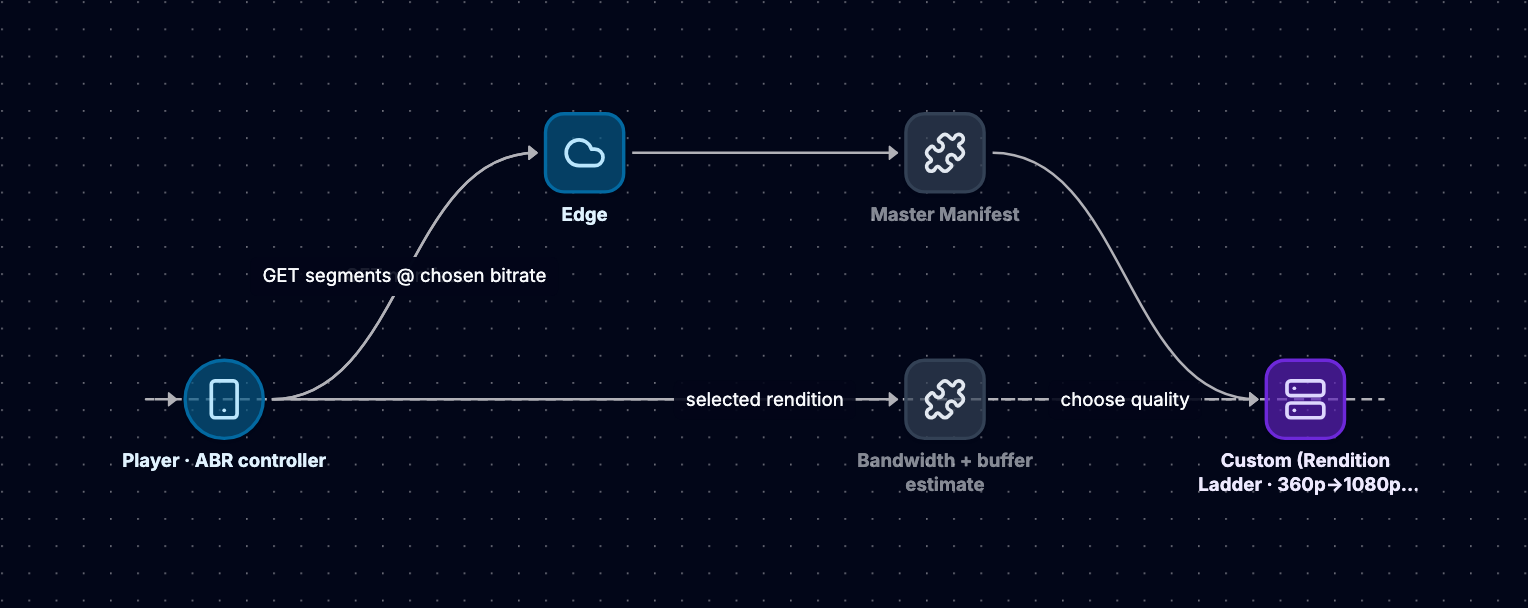
ABR Architecture: HLS and DASH
HLS (HTTP Live Streaming) — Apple's protocol
Master Playlist (manifest.m3u8):
#EXTM3U
#EXT-X-STREAM-INF:BANDWIDTH=5000000,RESOLUTION=1920x1080
1080p/playlist.m3u8
#EXT-X-STREAM-INF:BANDWIDTH=2500000,RESOLUTION=1280x720
720p/playlist.m3u8
#EXT-X-STREAM-INF:BANDWIDTH=1000000,RESOLUTION=854x480
480p/playlist.m3u8

Quality-Specific Playlist (1080p/playlist.m3u8):
#EXTM3U
#EXT-X-TARGETDURATION:6
#EXTINF:6.0,
segment_0.ts
#EXTINF:6.0,
segment_1.ts
#EXTINF:6.0,
segment_2.ts
DASH (Dynamic Adaptive Streaming over HTTP) — the vendor-neutral standard. Same concept, but XML manifests (.mpd) and codec-agnostic.
Client-Side ABR Algorithm
The intelligence lives in the player. Here's the decision loop I'd expect it to run:
1. Player starts playback:
   - Fetches master manifest
   - Selects lowest quality (360p) for instant startup
   - Begins downloading first segment

2. Player measures download performance:
   - Segment size: 2 MB
   - Download time: 0.5 seconds
   - Calculated bandwidth: 2 MB / 0.5s = 4 MB/s = 32 Mbps

3. Player evaluates buffer state:
   - Current buffer: 12 seconds of video queued
   - Target buffer: 30 seconds
   - Buffer is healthy, can increase quality

4. Player selects next quality level:
   - Available bandwidth: 32 Mbps
   - 1080p requires: 5 Mbps
   - Safe margin: 1.5× (allow for variance)
   - Required: 5 × 1.5 = 7.5 Mbps
   - Decision: Switch to 1080p

5. Player continues monitoring:
   - Every segment download updates bandwidth estimate
   - If bandwidth drops below threshold, step down quality
   - If buffer drains to <10 seconds, aggressively reduce quality
ABR Algorithm Types
There are three families of algorithm worth knowing, and I'd pick a hybrid:
1. Throughput-based — use recent download speeds to predict future bandwidth. Simple but reactive: they respond to problems after they happen. ExoPlayer and AVPlayer use variants of this.
2. Buffer-based (BOLA) — decide purely on current buffer level, ignoring bandwidth. If the buffer is full, try higher quality; if it's draining, back off. BOLA (Buffer Occupancy based Lyapunov Algorithm) is provably near-optimal under certain assumptions and ships in dash.js.
3. Hybrid — combine throughput and buffer. dash.js's DYNAMIC algorithm leans on bandwidth estimates but reacts hard when the buffer drops below thresholds. This is what most production systems use, and what I'd ship.
Segment Duration Trade-offs
Segment length is a genuine trade-off:
2-second segments
- Pros: Fast quality switching, lower startup latency, better adaptation to network changes
- Cons: 3× more CDN requests than 6-second segments, more manifest overhead
6-second segments
- Pros: 50% fewer CDN requests, reduced per-request overhead
- Cons: Slower adaptation, higher startup latency, coarser quality switches
I'd land around 2-5 second segments for responsive VOD adaptation (roughly what YouTube uses), and drop to 1-2 second segments — or Low-Latency HLS with sub-second parts — for live.
Bandwidth Drop Response Hierarchy
When bandwidth suddenly craters, the player degrades gracefully in this order:
1. Step Down Quality (Least Disruptive)
   - Switch from 1080p → 720p
   - Maintains smooth playback
   - User notices quality reduction but no interruption

2. Drain Buffer (Buys Time)
   - Use queued video segments
   - Typical buffer: 10-30 seconds
   - Gives network time to recover

3. Drop Frames (Sacrifice Smoothness)
   - Skip frames to maintain playback
   - Visible stuttering but avoids complete stall
   - Rarely used in modern players

4. Stall/Rebuffer (Last Resort)
   - Playback pauses, loading spinner appears
   - Worst user experience
   - Only when bandwidth insufficient for lowest quality
Live Streaming vs. VOD Differences
ABR for live has fundamentally different constraints:
Latency Requirements:
- VOD: Latency doesn't matter, can buffer 30+ seconds
- Live: Target 2-15 seconds glass-to-glass latency
Adaptation Speed:
- VOD: Can afford gradual quality changes
- Live: Must adapt aggressively to maintain real-time sync
Buffer Management:
- VOD: Large buffers (30+ seconds) for smooth experience
- Live: Small buffers (2-6 seconds) to minimize delay
Encoder Coordination:
- VOD: Pre-encoded, all qualities always available
- Live: Encoder must generate multiple qualities in real-time
For live I'd reach for Low-Latency HLS (LL-HLS) or WebRTC, both of which use sub-second parts and more aggressive adaptation.
Quality Metrics and Monitoring
I'd instrument playback against these, because ABR is only as good as what you measure:
1. Startup Time: Time from play button to first frame
   - Target: <2 seconds
   - Impacted by: Initial quality selection, CDN latency

2. Rebuffering Ratio: Percentage of playback time spent buffering
   - Target: <1%
   - Primary quality indicator

3. Average Bitrate Delivered: Quality delivered to users
   - Higher is better (indicates good network utilization)
   - But not at expense of rebuffering

4. Quality Switches: Frequency of resolution changes
   - Too frequent: Distracting to users
   - Too infrequent: Poor adaptation
Then I'd A/B test ABR algorithms across user cohorts against these metrics, tuning the trade-off between quality and stability.
Advanced: Per-Title Encoding and ABR
Static bitrate ladders leave a lot on the table. A cartoon at 2 Mbps can look identical to 5 Mbps, while a nature documentary needs every bit. Netflix's per-title encoding analyzes each video's complexity and generates a bespoke ladder:
Simple Content (Cartoon):
- 1080p @ 2 Mbps (instead of 5 Mbps)
- 720p @ 1 Mbps (instead of 2.5 Mbps)

Complex Content (Nature Documentary):
- 1080p @ 6 Mbps (instead of 5 Mbps)
- 720p @ 3 Mbps (instead of 2.5 Mbps)
That's a 20-40% bandwidth reduction with no perceptible quality loss — at the cost of analyzing every video individually, which is worth it at scale.
Deep-Dive 3: Multi-Language Captions, Translation, and Dubbing
A global platform serves users in hundreds of languages, and manual translation can't touch millions of daily uploads. So I'd design localization as an automated, staged pipeline.
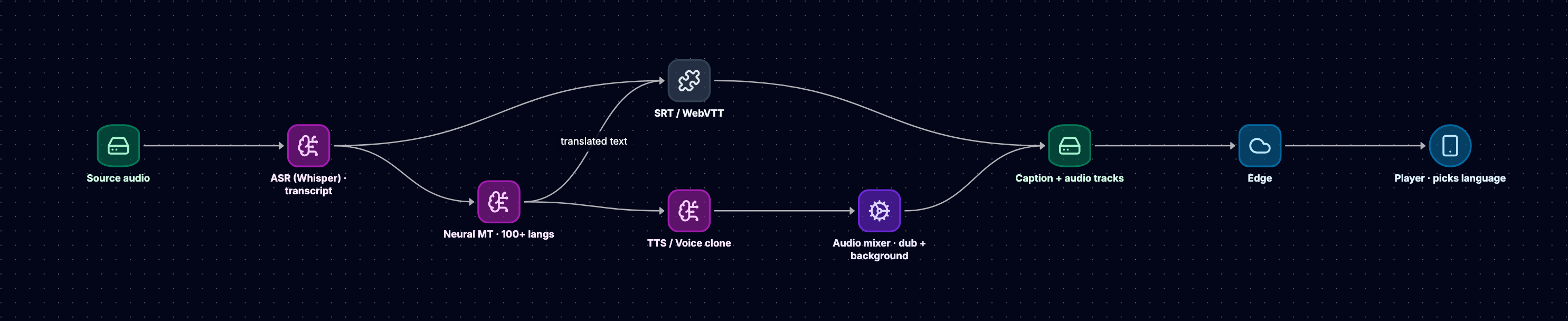
The Complete Pipeline
Phase 1: Automatic Speech Recognition (ASR)
ASR is the foundation — it turns spoken audio into a timestamped transcript that everything else builds on.
1. Audio Extraction:
   - Transcoding pipeline extracts audio track
   - Converts to optimal format for ASR (16kHz WAV/FLAC)

2. ASR Processing:
   - Send audio to ASR service (AWS Transcribe, Google Speech-to-Text, OpenAI Whisper)
   - ASR returns timestamped transcript:
     [
       {"start": 0.0, "end": 2.5, "text": "Welcome to our channel"},
       {"start": 2.5, "end": 5.0, "text": "Today we're discussing system design"},
       ...
     ]

3. Language Detection:
   - Identify source language automatically
   - Confidence scoring for multi-language content
Modern ASR models like OpenAI Whisper use transformer architectures trained on 680,000 hours of multilingual data. They handle background noise and music, multiple speakers (diarization), accents and dialects, technical terminology, and 99+ languages. Accuracy is typically 90-95% for clear audio and 70-85% under challenging conditions.
Phase 2: Caption Generation (Subtitles)
Formatting and Timing
SRT Format (SubRip):
1
00:00:00,000 --> 00:00:02,500
Welcome to our channel

2
00:00:02,500 --> 00:00:05,000
Today we're discussing system design

WebVTT Format (Web Video Text Tracks):
WEBVTT

00:00:00.000 --> 00:00:02.500
Welcome to our channel

00:00:02.500 --> 00:00:05.000
Today we're discussing system design
Storage and Delivery:
s3://captions/
  ├── {videoID}/
      ├── en.vtt (English original)
      ├── es.vtt (Spanish translation)
      ├── zh.vtt (Chinese translation)
      └── ...

HLS Manifest Integration:
#EXTM3U
#EXT-X-MEDIA:TYPE=SUBTITLES,GROUP-ID="subs",NAME="English",LANGUAGE="en",URI="en.vtt"
#EXT-X-MEDIA:TYPE=SUBTITLES,GROUP-ID="subs",NAME="Spanish",LANGUAGE="es",URI="es.vtt"
Phase 3: Machine Translation
For millions of videos, manual translation is impossible — so the captions feed a neural machine translation stage.
1. Translation Service:
   - Input: Source transcript (English) + target languages
   - Model: Transformer-based NMT (e.g., Facebook NLLB-200)
   - Output: Translated transcripts for each target language

2. Model Selection:
   - Facebook NLLB-200: Supports 200 languages
   - Parameter sizes: 600M, 1.3B, 3.3B (trade-off: quality vs. speed)
   - For our scale, we'd use the 1.3B parameter model

3. Quality Assurance:
   - Confidence scoring for each translation
   - Human review for high-priority content
   - User feedback loop for corrections
The scale here is real: translating 50 million videos daily into 20 languages is on the order of a billion translation jobs a day. So the pipeline needs GPU clusters for inference, batch processing for efficiency, caching for common phrases, and — critically — to run asynchronously so translation never blocks video publication. Cost lands around $0.001-0.01 per translation depending on length and model.
Phase 4: AI Dubbing (Audio Translation)
Dubbing is three steps: translation (already done for captions), voice synthesis, and audio mixing.
Step 1: Script Translation
- Use NMT to translate transcript (already done for captions)
- Adjust for lip-sync timing (advanced: modify translation to match mouth movements)
- Preserve emotional tone and context
Step 2: Voice Synthesis
1. Select voice profile:
   - Match original speaker's gender, age, tone
   - Use voice cloning for consistent character voices
   - Models: ElevenLabs, Google WaveNet, AWS Polly

2. Generate synthetic speech:
   - Input: Translated text + timestamps + prosody hints
   - Output: Dubbed audio track in target language
   - Preserve timing to align with video

3. Quality enhancement:
   - Add natural pauses and breathing
   - Match emotional inflection
   - Adjust speed for natural delivery
Step 3: Audio Mixing
1. Background audio separation:
   - Extract music and sound effects from original
   - Remove original speech (using source separation models)

2. Mix dubbed audio:
   - Layer synthetic speech over background audio
   - Balance levels for clarity
   - Apply EQ to match acoustic environment

3. Output multiple audio tracks:
   video.mp4
     ├── audio_en.aac (English original)
     ├── audio_es.aac (Spanish dub)
     ├── audio_zh.aac (Chinese dub)
     └── ...
Delivery Architecture
Multi-Track Audio in HLS/DASH
HLS Manifest:
#EXTM3U
#EXT-X-MEDIA:TYPE=AUDIO,GROUP-ID="audio",NAME="English",LANGUAGE="en",URI="audio_en/playlist.m3u8",DEFAULT=YES
#EXT-X-MEDIA:TYPE=AUDIO,GROUP-ID="audio",NAME="Spanish",LANGUAGE="es",URI="audio_es/playlist.m3u8"
#EXT-X-MEDIA:TYPE=AUDIO,GROUP-ID="audio",NAME="Chinese",LANGUAGE="zh",URI="audio_zh/playlist.m3u8"

#EXT-X-STREAM-INF:BANDWIDTH=5000000,RESOLUTION=1920x1080,AUDIO="audio"
video/1080p/playlist.m3u8
The player detects the viewer's language preference (browser settings, account preferences) and picks the matching audio track and captions automatically, and lets them switch languages mid-playback without reloading the video.
Platform Differences: TikTok vs. YouTube
TikTok — with 15-60 second clips, full dubbing matters less, so it leans on auto-generated captions (often on by default), translated captions overlaid on the video, and minimal dubbing (mostly ads and promoted content). The short duration makes ASR and translation nearly instant.
YouTube — long-form content justifies full dubbing tracks for major languages, community-contributed captions, professional translation for high-value creators, and a multi-hour processing pipeline. YouTube's 'Auto-translate' generates captions in 100+ languages on demand.
Cost-Benefit Analysis
Localization cost scales linearly with content volume, but it unlocks disproportionate reach:
Per-video costs (10-minute video) — illustrative order-of-magnitude estimates:
- ASR transcription: ~$0.10-0.50
- Translation (20 languages): ~$2-10
- AI dubbing (5 major languages): ~$5-25
Total: roughly $10-35 per video
The revenue side is directional rather than a promise: localization meaningfully expands reach and watch time, grows the addressable audience well beyond English-only viewers, and drives higher engagement and ad revenue. At 50M uploads a day, automation isn't optional — manual translation would cost billions annually and introduce unacceptable delays.
Quality and Human-in-the-Loop
I'd tier the pipeline so human effort goes where it pays off:
Tier 1 (High-Value Content):
- Professional creators, viral videos
- Human review of ASR transcripts
- Professional translation and dubbing
- Quality assurance before publication

Tier 2 (Standard Content):
- Fully automated pipeline
- Spot-checking by quality team
- User feedback for corrections
- Iterative model improvement

Tier 3 (Long-Tail Content):
- Automated only
- User-reported issues trigger review
- Acceptable error rate: 5-10%
Deep-Dive 4: CDN and Global Content Delivery
The CDN is the unsung hero of the whole design. Without it, origin servers collapse under load and users see multi-second latency.
Why a Central Origin Fails
Picture serving all 1 billion daily views from a single origin. Two things break:
Latency from US origin to:
- California: 20ms
- New York: 80ms
- London: 120ms
- Tokyo: 150ms
- Sydney: 180ms
- Mumbai: 200ms

Add TCP handshake (1 RTT), TLS handshake (2 RTTs), HTTP request (1 RTT):
Total: 4 RTTs before first byte
Mumbai user: 4 × 200ms = 800ms just for connection setup

Plus: Origin bandwidth becomes bottleneck
- ~3.5M concurrent streams × 2 Mbps ≈ 7 Tbps of egress
- No single datacenter can serve this
- Origin server costs explode
The answer is a CDN — geographically distributed caches that serve content from close to users.
CDN Architecture Layers
Three-tier hierarchy
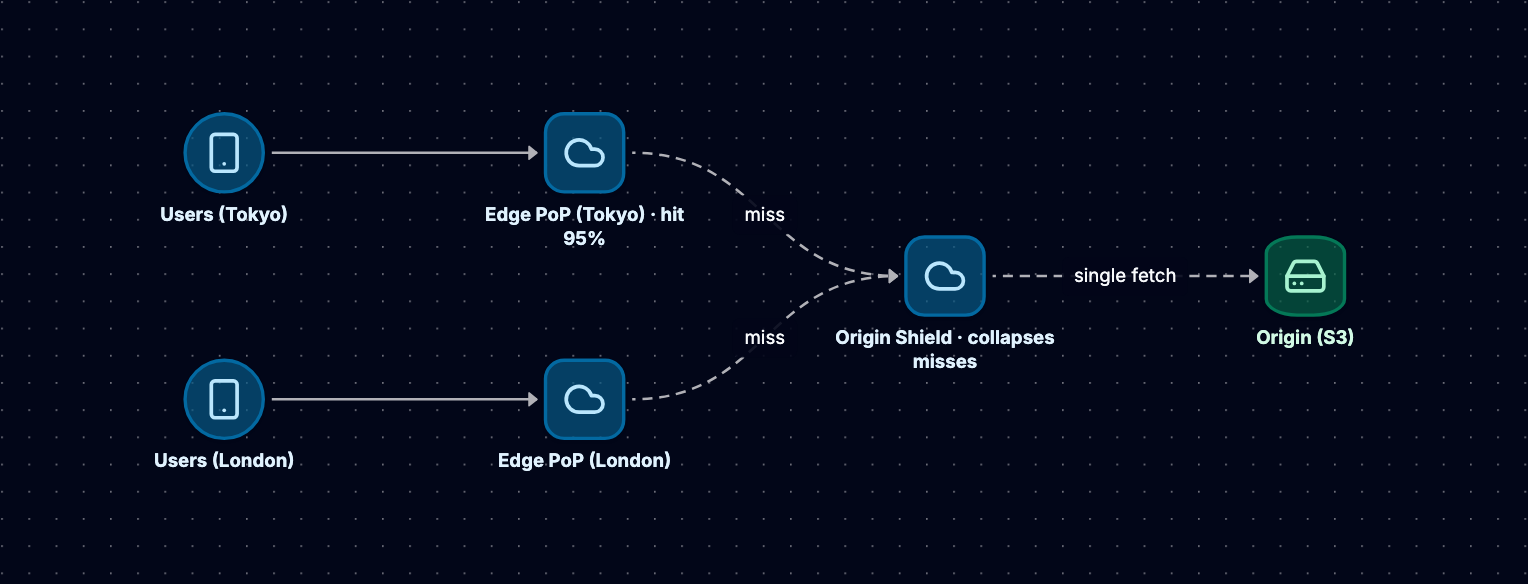
Layer 1: Origin Server
The origin is the authoritative source of everything — all encoded renditions, HLS/DASH manifests, captions and metadata, thumbnails and previews. It never serves end users directly; that would defeat the purpose. It only ever answers CDN cache misses.
- Object Storage: AWS S3, Google Cloud Storage, Azure Blob Storage
- Durability: 99.999999999% (11 nines)
- Lifecycle Policies: Move old content to cheaper storage tiers
- Access Control: Signed URLs, IAM policies
Layer 2: Origin Shield
The origin shield is the layer people forget, and it's the one that saves the origin. It's a caching tier sitting between the edge and the origin, and it exists to collapse simultaneous misses:
Without Origin Shield:
- 1,000 edge servers all cache miss simultaneously for new video
- 1,000 requests hit origin server
- Origin overload, potential failure

With Origin Shield:
- 1,000 edge servers request from shield
- Shield makes single request to origin
- Shield caches and serves all 1,000 edge requests
- Result: 99%+ reduction in origin requests
I'd deploy shields in 5-10 strategic locations (US-East, US-West, Europe, Asia, South America), and route each edge server through its nearest one.
Layer 3: Edge Servers (Points of Presence)
The edge is where bytes meet users. Major CDN providers operate 300-4,000+ PoPs worldwide:
- Cloudflare: 300+ cities
- Akamai: 4,100+ locations
- AWS CloudFront: 450+ PoPs
- Fastly: 70+ PoPs
Each PoP has multiple servers with 10-100TB of cache. The payoff is latency:
User in Mumbai:
- Without CDN: 200ms to US origin (4 RTTs = 800ms for connection)
- With CDN: 10ms to local PoP (4 RTTs = 40ms for connection)

Result: 20× latency improvement
Caching Strategies
What I cache, and for how long, depends on the content:
1. Live Content Caching
Live stream segments:
- TTL: 2-6 seconds (matches segment duration)
- Reasoning: Must serve current content, can't cache stale segments
- Cache hit ratio: 80-90% (many concurrent viewers watching same segment)

Manifest files:
- TTL: 1-2 seconds
- Reasoning: Points to latest segments, must be fresh
- Lightweight, minimal bandwidth impact
2. Popular VOD Content
Viral videos, trending content:
- TTL: 24 hours to 7 days
- Cache hit ratio: 95-99%
- Reasoning: Millions of views, worth keeping in cache
- Dramatically reduces origin load
3. Long-Tail Content
Rarely-viewed videos:
- TTL: Short (1 hour) or no edge caching
- Served from origin shield or mid-tier cache
- Reasoning: Cache space is valuable, don't waste on content viewed once per week
- Cost optimization: Long-tail is 80% of content but 20% of views
For eviction I'd use LRU — when the cache fills, drop whatever hasn't been requested longest. That naturally keeps popular content hot and ages out the long tail.
Request Flow: Cache Hit vs. Cache Miss
Cache Hit (95% of requests):
1. User in Tokyo requests: video123/720p/segment_42.ts
2. DNS resolves to nearest edge PoP (Tokyo)
3. Edge server checks cache: HIT
4. Serves segment from cache (10ms latency)
5. Total time: ~50ms from click to first byte
Cache Miss (5% of requests):
1. User requests: video789/1080p/segment_5.ts
2. Edge server checks cache: MISS
3. Edge requests from origin shield (Asia region)
4. Shield checks cache: MISS
5. Shield requests from origin (S3)
6. Origin serves segment to shield (100ms)
7. Shield caches and forwards to edge (50ms)
8. Edge caches and serves to user (10ms)
9. Total time: ~200ms for first request
10. Subsequent requests: Cache HIT at edge (50ms)
Multi-CDN Strategy
At this scale I'd run 2-3 CDN providers at once, for four reasons:
1. Redundancy and failover — if CDN A has a regional outage, route to CDN B on health-check failure. That's the difference between 99.99% and 99.9% availability.
2. Performance — monitor quality per CDN in real time and send users to the best performer for their region. Some CDNs are stronger in Asia, others in Europe.
3. Cost — pricing varies by region ($0.01-0.08 per GB), so route to the cheapest CDN that meets quality thresholds, and use volume to negotiate.
4. Feature differentiation — one CDN may be best for live (low latency), another for VOD (high hit ratio), another for security (DDoS protection).
I'd implement the routing with DNS-based selection or client-side logic.
CDN Optimization Techniques
1. Pre-positioning (cache warming)
Scenario: New video uploaded, expect viral traffic

Process:
1. Predict popular content (ML models, creator history)
2. Proactively push segments to edge PoPs
3. Cache is "warm" before first user request
4. Result: 100% cache hit ratio from start

Timing:
- Off-peak hours (3-6 AM local time)
- Lower CDN costs during off-peak
2. Intelligent prefetching
Video playback at segment 10:
1. Player prefetches segments 11, 12, 13
2. Edge server prefetches from origin shield
3. Segments ready in cache before needed
4. Zero latency for upcoming segments
3. Connection optimization — the edge should squeeze the network stack: HTTP/2 multiplexing, TCP Fast Open, QUIC to kill head-of-line blocking, and TLS 1.3 for a faster handshake. Together that's a 30-50% cut in connection overhead.
Monitoring and Metrics
The CDN is where cost and quality both live, so I'd watch:
1. Cache Hit Ratio:
   - Target: 95%+ for popular content
   - Formula: (Cache Hits / Total Requests) × 100
   - Low ratio = High origin costs

2. Latency (Time to First Byte):
   - Target: <100ms globally
   - Measured per PoP
   - Alerts if >200ms

3. Origin Offload:
   - Percentage of traffic served from cache vs. origin
   - Target: 95%+
   - Direct cost savings metric

4. Error Rates:
   - 4xx errors (client errors): Monitor for bad requests
   - 5xx errors (server errors): Immediate alerts
   - Target: <0.1%

5. Bandwidth Utilization:
   - GB delivered per hour
   - Cost tracking: GB × $0.01-0.08
   - Optimization opportunities
On top of that I'd build a dashboard showing PoP health on a global map, hit ratio by region, latency percentiles (p50/p95/p99), origin request rate, and bandwidth spend — with alerting on anomalies (Grafana, Datadog, and the CDN providers' own dashboards).
Cost Analysis
CDN egress is the second-largest expense after storage, and it's big enough to shape the whole business:
Assumptions:
- 1 billion video views per day
- Average video: 5 minutes (300 seconds)
- Average bitrate: 2 Mbps
- Data delivered per day: 1B × 300s × 2 Mbps / 8 = 75 PB/day
- Data delivered per month: ~2,250 PB ≈ 2.25 billion GB

CDN egress costs (delivery to end users, per month):
- Premium tier:    $0.08/GB × 2.25B GB ≈ $180M/month
- Standard tier:   $0.02/GB × 2.25B GB ≈ $45M/month
- Negotiated rate: $0.01/GB × 2.25B GB ≈ $22.5M/month

Annual cost: ~$270M-$2.2B depending on tier and negotiation.
(This scale is exactly why hyperscalers build their own CDNs and peer
directly with ISPs rather than paying commercial per-GB rates.)

Optimization strategies:
1. Better codecs (AV1, ~30% bitrate reduction):
   - 2,250 PB → ~1,575 PB/month
   - Saves ~$6.7M/month at the negotiated rate

2. Higher cache hit ratio (95% → 98%):
   - Cuts the expensive origin/mid-tier egress on cache misses (not edge delivery)
   - Fewer origin fetches → lower origin bandwidth and compute

3. Multi-CDN routing to the cheapest provider meeting quality SLAs:
   - 10-20% blended cost reduction
Platform Differences: TikTok vs. YouTube
TikTok — short-form enables aggressive optimizations:
- Aggressive prefetching: pre-load the next 3-5 videos in the feed; users swipe fast, so wasting a little bandwidth on unseen videos is worth instant playback
- Smaller cache footprint: a 60-second clip at 2 Mbps is ~15 MB, so ~10× more videos fit in the same cache as 10-minute YouTube videos
- Mobile-first: optimize for 4G/5G, accept lower bitrates (1-2 Mbps), vertical format (smaller files)
- Regional CDNs: strong Asia presence (ByteDance origins), with per-region infrastructure for data sovereignty
YouTube — long-form pushes the other way:
- Selective caching: cache popular content hard, serve long-tail from the origin shield; the full catalog (exabytes) can't be cached
- Higher bitrates: 1080p at 5 Mbps, 4K at 20 Mbps, so larger cache footprints per video
- Watch-time optimization: ~40-minute average sessions favor sustained streaming over rapid switching
- Owned infrastructure: Google Global Cache deployed inside ISP networks, peering agreements to cut transit, and owned undersea cables for inter-region traffic
Conclusion: Bringing It All Together
Working from a blank page, the design falls out of the numbers. 200M DAU and a billion daily views mean ~3.5M concurrent streams (~7 Tbps of egress) and 5 PB of new content a day — and once you internalize those, the architecture is largely forced.
The constraints that drove everything:
- 200 million DAU generating 1 billion video views daily
- 5 PB of new content uploaded every day
- ~12,000 new plays/second, ~3.5M concurrent streams (~7 Tbps egress) at sub-100ms latency
- 95%+ cache hit ratio essential for cost control
The four subsystems that carry the design:
-
Upload and Transcoding: Distributed worker pools processing 50 million videos daily, generating multiple codecs (H.264, HEVC, AV1) and resolutions (1080p to 360p) with per-title optimization reducing bandwidth 20-40%.
-
Adaptive Bitrate Streaming: Client-side algorithms dynamically switching quality based on measured bandwidth and buffer state, using 2-6 second segments in HLS/DASH formats for seamless adaptation.
-
Multi-Language Localization: Automated ASR transcription, neural machine translation to 100+ languages, and AI-powered dubbing expanding global reach while keeping automated per-video localization costs low (roughly $10-35 per video).
-
Global CDN Delivery: Three-tier architecture (origin, shield, edge) with 300-4,000+ PoPs worldwide, achieving sub-100ms latency and 95%+ cache hit ratios, optimizing tens-to-hundreds of millions in monthly bandwidth costs through better codecs and multi-CDN strategies.
The trade-offs I kept returning to:
- Codec selection: H.264 compatibility vs. HEVC/AV1 efficiency
- Segment duration: 2-second adaptation speed vs. 6-second CDN efficiency
- Bitrate ladder: Static simplicity vs. per-title optimization
- Caching strategy: Popular content vs. long-tail cost optimization
And where the two platforms pull apart:
- TikTok: Short-form, aggressive prefetching, mobile-optimized, rapid content consumption
- YouTube: Long-form, selective caching, multi-device, sustained viewing sessions
If I were building this for real, the through-line is simple: let the CDN absorb reads, let queues and an autoscaled fleet absorb writes, and spend the engineering effort on the media path — transcoding, ABR, localization, and delivery — because that's where scale, cost, and user experience all collide. From there, the obvious next layers to design are the recommendation system, content moderation, and monetization — each its own deep-dive.