Building Global-Scale Notification Systems: Architecture, Trade-offs, and Implementation Patterns
Introduction
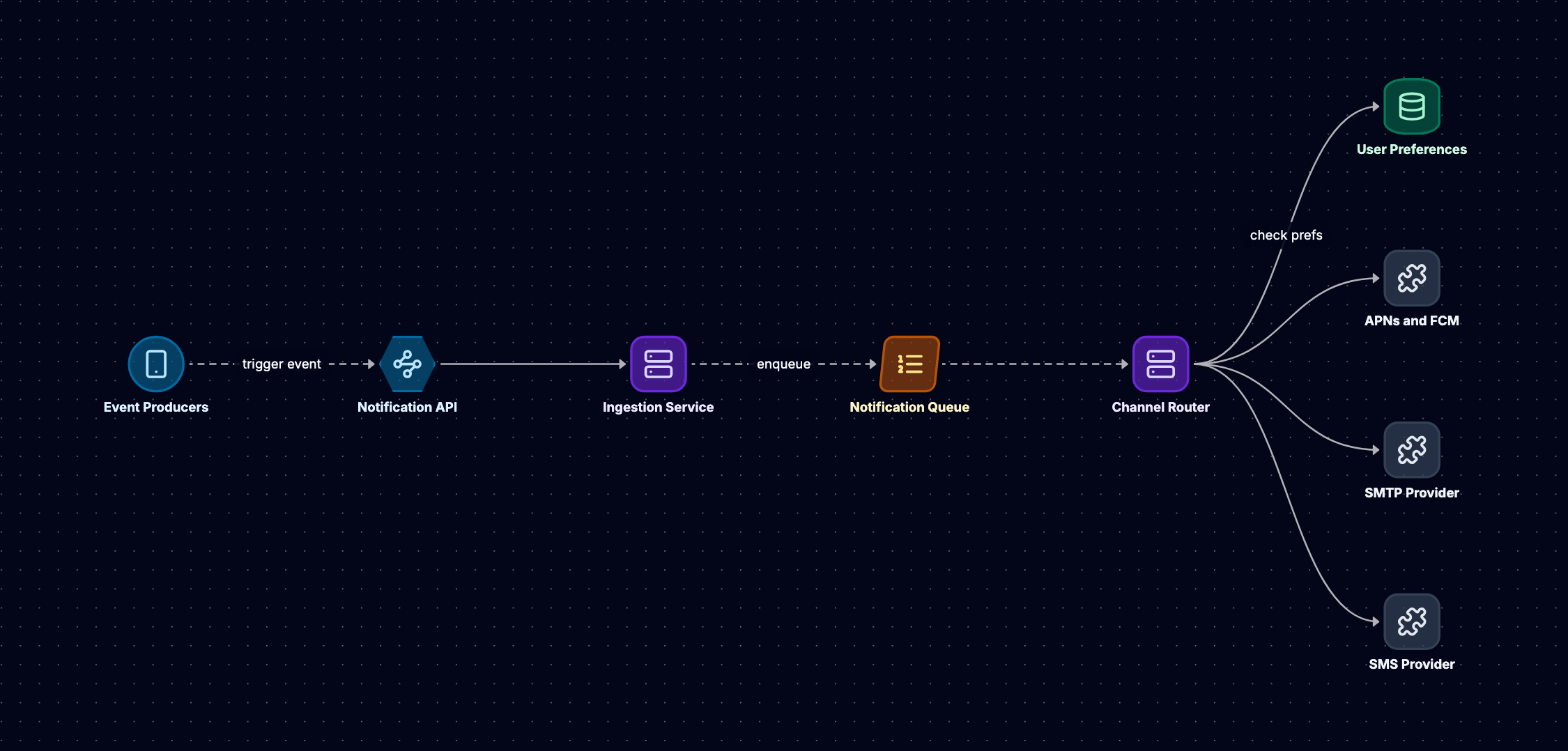
A notification system that reaches billions of users across continents faces challenges that go far beyond "send this message to that user." When a celebrity tweets, millions of followers expect near-instant delivery. When a payment fails, the user needs an SMS, an email, and an in-app alert, but not three copies of each. When a data center fails at 2 AM, messages must reroute without waking engineers or losing a single transaction.
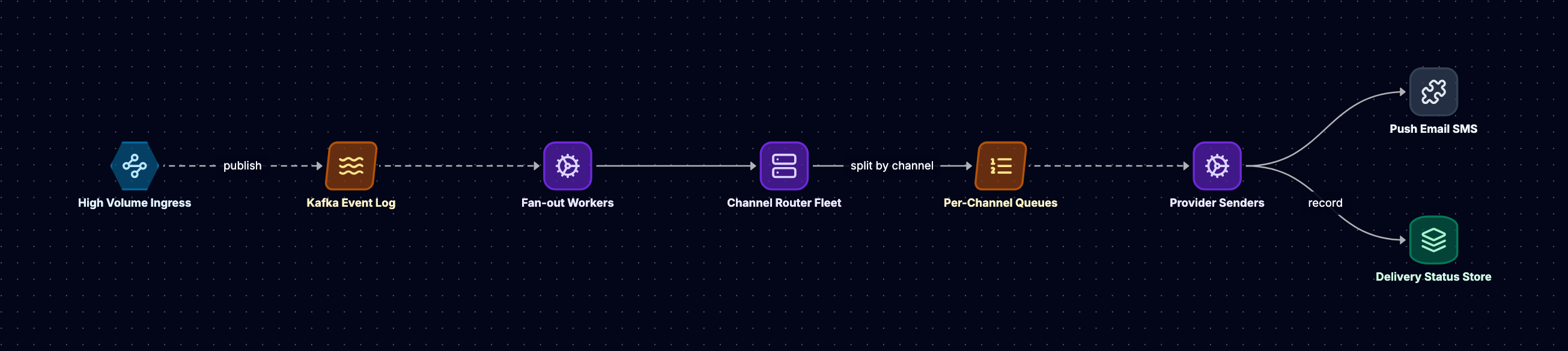
This post examines the architecture of global-scale notification systems that handle push notifications, email, SMS, and in-app messages. We'll explore the trade-offs between fan-out strategies, the abstractions that let you swap SMS providers in minutes, the deduplication logic that prevents notification storms, and the delivery guarantees that determine whether your system loses messages during failures.
We'll cover: fan-out on write versus fan-out on read and when each strategy collapses under load; channel routing with provider abstraction layers; deduplication and throttling mechanisms that protect users and infrastructure; delivery guarantees with retry patterns and backoff strategies; and user preference management including quiet hours and channel selection. Each section includes failure scenarios and concrete implementation patterns used in production systems.
Fan-Out on Write vs Fan-Out on Read
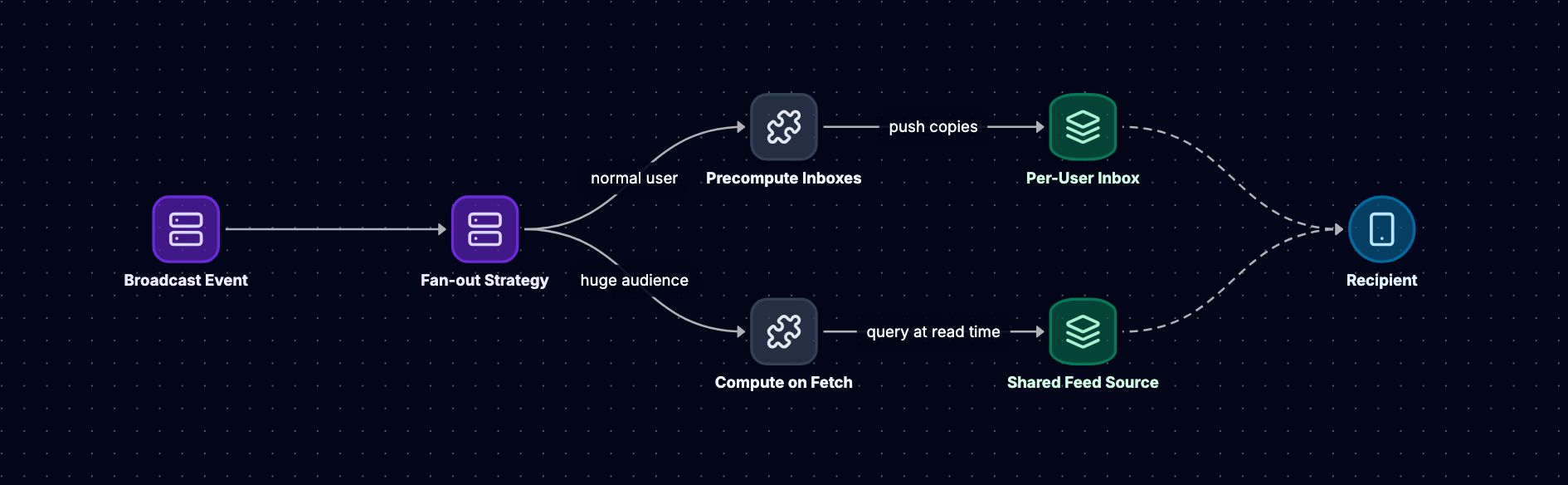
The fan-out problem appears whenever one event triggers notifications for multiple recipients. A user posts content, and their followers need alerts. A system event occurs, and thousands of devices need updates. The architectural choice between fan-out on write and fan-out on read determines your system's scalability ceiling, latency characteristics, and failure modes.
Fan-Out on Write
Fan-out on write materializes all notifications at event creation time. When a user publishes content, the system immediately writes a notification record for every follower. This approach trades write amplification for read simplicity.
A simplified fan-out on write implementation:
class FanOutOnWriteService:
    def __init__(self, notification_store, user_graph):
        self.notification_store = notification_store
        self.user_graph = user_graph

    def create_notification(self, event):
        """
        Materializes notifications for all followers.
        Uses batch writes to reduce database round-trips.
        """
        followers = self.user_graph.get_followers(event.user_id)

        # Batch notifications to reduce write overhead
        batch_size = 1000
        for i in range(0, len(followers), batch_size):
            batch = followers[i:i + batch_size]
            notifications = [
                Notification(
                    user_id=follower_id,
                    event_id=event.id,
                    created_at=event.timestamp,
                    status='pending'
                )
                for follower_id in batch
            ]
            self.notification_store.batch_insert(notifications)
This pattern works well when follower counts remain moderate. Each user's notification feed becomes a simple database query: "SELECT * FROM notifications WHERE user_id = ? ORDER BY created_at DESC LIMIT 50." The read path stays fast regardless of how many users the original poster has.
The approach breaks down with large follower counts. A single post can trigger millions of database writes. Even with batch inserts, the write load overwhelms databases. Storage costs grow linearly with the product of posts and followers. Systems using this pattern often implement tiering: fan-out on write for most users, but switch to fan-out on read for accounts exceeding follower thresholds.
Fan-Out on Read
Fan-out on read stores events once and constructs notification feeds at query time. When a user checks their notifications, the system finds all accounts they follow, retrieves recent events from those accounts, and merges the results.
class FanOutOnReadService:
    def __init__(self, event_store, user_graph, cache):
        self.event_store = event_store
        self.user_graph = user_graph
        self.cache = cache

    def get_notifications(self, user_id, limit=50):
        """
        Constructs feed by querying events from followed users.
        Caches results to amortize query cost.
        """
        cache_key = f"notifications:{user_id}"
        cached = self.cache.get(cache_key)
        if cached:
            return cached

        following = self.user_graph.get_following(user_id)

        # Query events from all followed users
        all_events = []
        for followed_id in following:
            events = self.event_store.get_user_events(
                followed_id,
                limit=limit
            )
            all_events.extend(events)

        # Merge and sort by timestamp
        all_events.sort(key=lambda e: e.timestamp, reverse=True)
        result = all_events[:limit]

        self.cache.set(cache_key, result, ttl=300)
        return result
This strategy eliminates write amplification but moves the cost to read time. Each feed query must scatter across multiple indexes and merge results. Caching becomes critical: without it, every page load triggers expensive queries. Cache invalidation introduces complexity, as events from any followed user can invalidate a feed cache.
The pattern suits scenarios where users follow many accounts but check notifications infrequently. Social networks with asymmetric follow graphs (where some accounts have massive followings) often combine both strategies: fan-out on write for accounts with modest follower counts, fan-out on read for high-follower accounts, and aggressive caching to mask the read-time cost.
Hybrid Approaches
Production systems rarely commit to a single strategy. A hybrid approach might:
- Use fan-out on write for users with fewer than a threshold number of followers (illustrative threshold: 10,000)
- Switch to fan-out on read for high-follower accounts
- Maintain a hot cache of recent events from popular accounts
- Pre-compute feeds asynchronously during low-traffic periods
What happens when a high-follower account suddenly becomes active? If the system hasn't cached their recent events, millions of users experience slow feed loads simultaneously. Some systems maintain a "celebrity event cache" that keeps recent posts from high-follower accounts in memory, serving fan-out on read queries without hitting the database.
Channel Routing and Provider Abstraction
A notification system must deliver messages through multiple channels: push notifications via FCM and APNs, emails through SendGrid or Amazon SES, SMS via Twilio or Nexmo, and in-app messages through WebSocket connections. Each channel has distinct APIs, rate limits, delivery semantics, and failure modes.
Provider Abstraction Layer
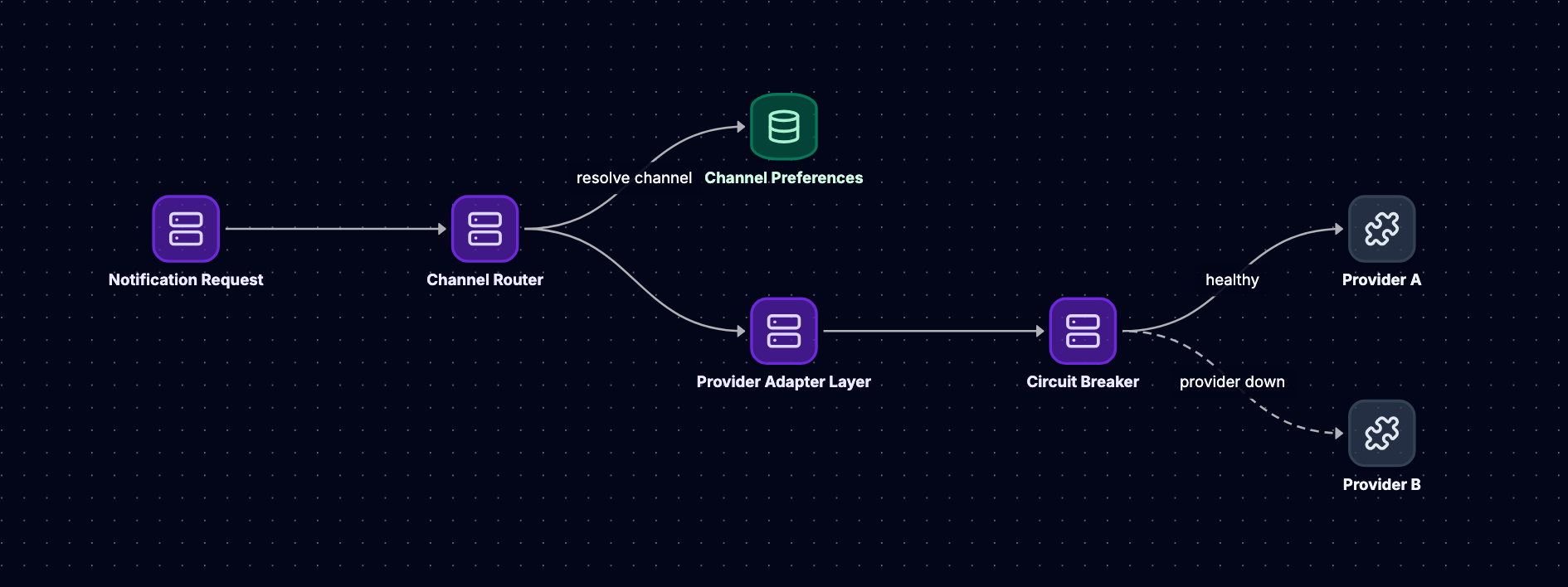
A provider abstraction layer decouples notification logic from channel-specific implementations. This separation enables provider switching, multi-provider failover, and channel-specific optimizations without modifying business logic.
from abc import ABC, abstractmethod
from enum import Enum

class DeliveryResult(Enum):
    SUCCESS = "success"
    TRANSIENT_FAILURE = "transient_failure"  # Retry
    PERMANENT_FAILURE = "permanent_failure"  # Don't retry
    RATE_LIMITED = "rate_limited"            # Backoff and retry

class NotificationProvider(ABC):
    @abstractmethod
    def send(self, recipient, message, metadata):
        """
        Send notification through this provider.
        Returns (DeliveryResult, provider_message_id, error_details)
        """
        pass

    @abstractmethod
    def get_rate_limit(self):
        """Returns (requests_per_second, burst_capacity)"""
        pass

class FCMProvider(NotificationProvider):
    def __init__(self, api_key, http_client):
        self.api_key = api_key
        self.http_client = http_client

    def send(self, recipient, message, metadata):
        payload = {
            'to': recipient.device_token,
            'notification': {
                'title': message.title,
                'body': message.body
            },
            'priority': metadata.get('priority', 'normal')
        }

        try:
            response = self.http_client.post(
                'https://fcm.googleapis.com/fcm/send',
                headers={'Authorization': f'key={self.api_key}'},
                json=payload,
                timeout=5
            )

            if response.status_code == 200:
                result = response.json()
                if result.get('success') == 1:
                    return (
                        DeliveryResult.SUCCESS,
                        result['results'][0]['message_id'],
                        None
                    )
                elif 'NotRegistered' in result.get('results', [{}])[0]:
                    # Device token invalid, don't retry
                    return (
                        DeliveryResult.PERMANENT_FAILURE,
                        None,
                        'Device token invalid'
                    )
            elif response.status_code == 429:
                return (DeliveryResult.RATE_LIMITED, None, 'Rate limit exceeded')
            elif response.status_code >= 500:
                return (DeliveryResult.TRANSIENT_FAILURE, None, f'Server error: {response.status_code}')

            return (DeliveryResult.PERMANENT_FAILURE, None, f'Unexpected status: {response.status_code}')

        except TimeoutError:
            return (DeliveryResult.TRANSIENT_FAILURE, None, 'Request timeout')
        except Exception as e:
            return (DeliveryResult.TRANSIENT_FAILURE, None, str(e))

    def get_rate_limit(self):
        # Example limits, actual limits vary by FCM plan
        return (5000, 10000)
Error classification matters. Transient failures (network timeouts, 503 responses) warrant retries with backoff. Permanent failures (invalid device tokens, malformed messages) should not retry, as they will never succeed. Rate limit errors need specialized handling: back off and redistribute load across time or alternative providers.
Channel Selection and Routing
The routing layer selects channels based on message priority, user preferences, and provider health. A high-priority payment failure might trigger push, SMS, and email simultaneously. A low-priority content recommendation might only send an in-app message.
class ChannelRouter:
    def __init__(self, providers, health_checker):
        self.providers = providers  # Dict[Channel, List[Provider]]
        self.health_checker = health_checker

    def route_notification(self, notification, user_preferences):
        """
        Determines which channels to use and selects healthy providers.
        Returns list of (channel, provider) tuples.
        """
        channels = self._select_channels(notification, user_preferences)

        routes = []
        for channel in channels:
            provider = self._select_provider(channel)
            if provider:
                routes.append((channel, provider))

        return routes

    def _select_channels(self, notification, preferences):
        """Apply user preferences and message priority to pick channels."""
        if not preferences.notifications_enabled:
            return []

        channels = []

        # High-priority messages override some preferences
        if notification.priority == 'critical':
            if preferences.push_enabled:
                channels.append(Channel.PUSH)
            if preferences.sms_enabled:
                channels.append(Channel.SMS)
            channels.append(Channel.IN_APP)
        else:
            # Respect user's channel preferences
            if preferences.push_enabled and notification.type in preferences.push_types:
                channels.append(Channel.PUSH)
            if preferences.email_enabled and notification.type in preferences.email_types:
                channels.append(Channel.EMAIL)
            channels.append(Channel.IN_APP)

        return channels

    def _select_provider(self, channel):
        """Pick healthy provider with capacity, fallback to secondary."""
        available_providers = self.providers.get(channel, [])

        for provider in available_providers:
            health = self.health_checker.get_status(provider)
            if health.is_healthy and health.has_capacity:
                return provider

        return None
What happens when the primary SMS provider goes down? The routing layer detects the outage through health checks (failed delivery attempts, timeout rates exceeding thresholds) and redirects traffic to a secondary provider. This failover must happen automatically, as manual intervention at 3 AM is unrealistic. Health checks run continuously, tracking success rates, latency percentiles, and error patterns. When a provider's error rate crosses a threshold (example: 5% of requests failing over a 60-second window), the circuit breaker opens and traffic shifts to alternatives.
Multi-Provider Strategy
Running multiple providers for each channel provides redundancy and negotiating leverage. Some systems split traffic across providers by default (70% to primary, 30% to secondary) to keep both relationships active and detect issues before they become critical. Others use strict primary/failover separation but send synthetic test messages through backup providers to verify their continued operation.
Provider costs vary by volume, geography, and contract terms. A sophisticated routing layer might consider cost when selecting providers for low-priority messages, while always using the most reliable (expensive) provider for critical alerts.
Deduplication and Throttling
Without deduplication and throttling, notification systems become spam generators. A bug in event processing might send the same notification hundreds of times. A misconfigured trigger might alert users every second. Protective mechanisms must operate at multiple layers: per-message deduplication, per-user rate limiting, and global throttling.
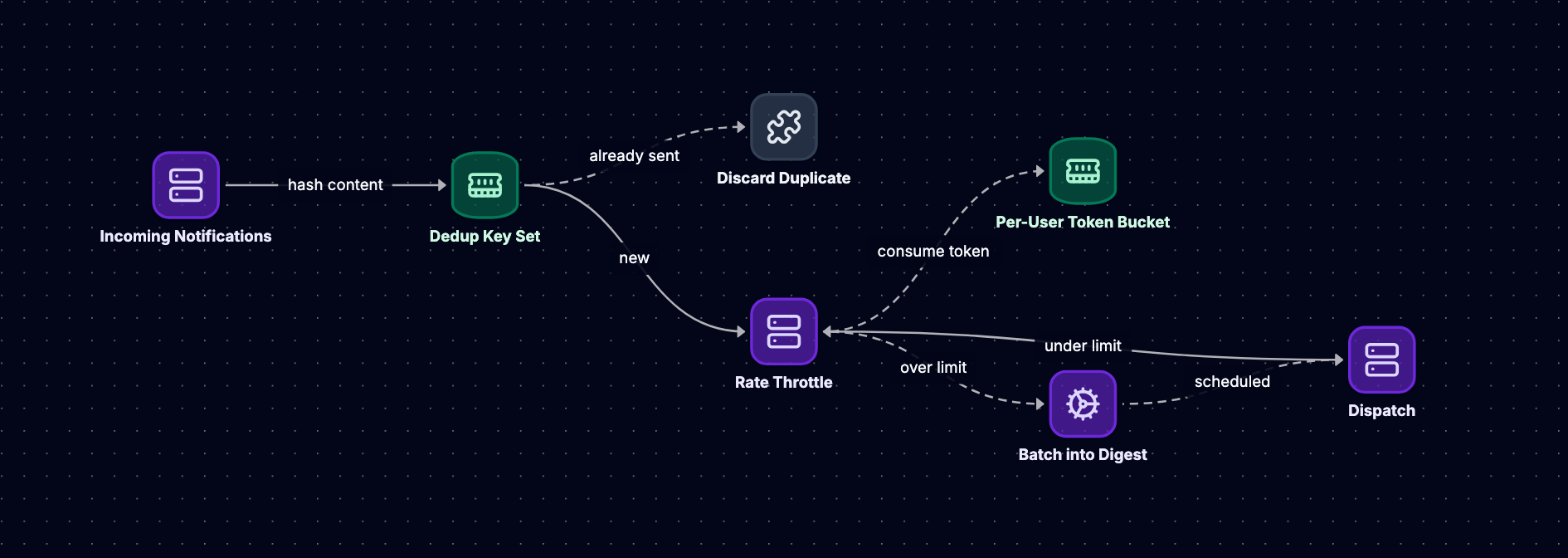
Deduplication Strategies
Deduplication prevents sending identical notifications multiple times. The challenge lies in defining "identical." Two notifications about the same event are duplicates. Two notifications about different events but with identical text might not be.
import hashlib
from datetime import datetime, timedelta

class DeduplicationService:
    def __init__(self, redis_client):
        self.redis = redis_client

    def should_send(self, user_id, notification):
        """
        Returns True if notification should be sent.
        Uses Redis with TTL for deduplication window.
        """
        dedup_key = self._compute_key(user_id, notification)

        # Use Redis SET with NX (only set if not exists) and EX (expiry)
        # Returns True if key was set (first time seeing this notification)
        result = self.redis.set(
            dedup_key,
            '1',
            nx=True,
            ex=3600  # 1-hour deduplication window
        )

        return result is not None

    def _compute_key(self, user_id, notification):
        """
        Compute deduplication key from notification attributes.
        Trade-off: more attributes = stricter deduplication but higher memory.
        """
        # Include user_id, type, and content hash
        content = f"{notification.type}:{notification.title}:{notification.body}"
        content_hash = hashlib.sha256(content.encode()).hexdigest()[:16]

        return f"dedup:{user_id}:{content_hash}"
The deduplication window (time period during which duplicates are suppressed) trades memory for correctness. A 24-hour window prevents duplicates across a full day but requires storing more keys. Some systems use tiered windows: 1 hour for most notifications, 24 hours for critical alerts that should never duplicate.
Content hashing has trade-offs. Hashing only the notification type allows different messages of the same type. Hashing the full content prevents any duplicate text but might suppress legitimate updates. A middle ground hashes type, title, and entity ID (like "order:12345") but not the full body, allowing minor content variations while preventing true duplicates.
Per-User Rate Limiting
Rate limiting protects users from notification floods. Even if each notification is unique, receiving 100 alerts in an hour creates a poor experience. Token bucket algorithms provide smooth rate limiting with burst tolerance.
import time
import threading

class TokenBucket:
    """
    Token bucket rate limiter.
    Note: This in-memory implementation is not thread-safe for distributed systems.
    Production systems should use Redis with Lua scripts for atomic operations.
    """
    def __init__(self, rate, capacity):
        self.rate = rate          # Tokens per second
        self.capacity = capacity  # Maximum burst
        self.tokens = capacity
        self.last_update = time.time()
        self.lock = threading.Lock()

    def consume(self, tokens=1):
        """Returns True if tokens were consumed, False if insufficient."""
        with self.lock:
            now = time.time()
            elapsed = now - self.last_update

            # Add tokens based on elapsed time
            self.tokens = min(
                self.capacity,
                self.tokens + elapsed * self.rate
            )
            self.last_update = now

            if self.tokens >= tokens:
                self.tokens -= tokens
                return True
            return False
A distributed implementation requires atomic operations. Redis provides this through Lua scripts that execute atomically:
-- Redis Lua script for token bucket
local key = KEYS[1]
local rate = tonumber(ARGV[1])
local capacity = tonumber(ARGV[2])
local tokens_requested = tonumber(ARGV[3])
local now = tonumber(ARGV[4])

local bucket = redis.call('HMGET', key, 'tokens', 'last_update')
local tokens = tonumber(bucket[1]) or capacity
local last_update = tonumber(bucket[2]) or now

local elapsed = now - last_update
tokens = math.min(capacity, tokens + elapsed * rate)

if tokens >= tokens_requested then
    tokens = tokens - tokens_requested
    redis.call('HMSET', key, 'tokens', tokens, 'last_update', now)
    redis.call('EXPIRE', key, 3600)
    return 1
else
    return 0
end
Different notification types warrant different rate limits. A system might allow higher rates for critical alerts (example: 50 per hour) while restricting promotional content (example: 5 per hour). User preferences can override defaults: power users might opt into higher notification rates.
Global Throttling
Beyond per-user limits, systems need global throttling to prevent infrastructure overload. If a bug triggers millions of notifications simultaneously, per-user limits won't prevent the outgoing request flood from overwhelming downstream providers.
Global throttling uses sliding window counters or distributed rate limiters:
class GlobalThrottler:
    def __init__(self, redis_client, max_per_minute):
        self.redis = redis_client
        self.max_per_minute = max_per_minute

    def should_allow(self, channel):
        """
        Returns True if global capacity available for this channel.
        Uses Redis sorted set for sliding window.
        """
        key = f"throttle:{channel}"
        now = time.time()
        window_start = now - 60  # 1-minute sliding window

        # Use Redis pipeline for atomic operations
        pipe = self.redis.pipeline()

        # Remove old entries
        pipe.zremrangebyscore(key, '-inf', window_start)

        # Count entries in current window
        pipe.zcard(key)

        results = pipe.execute()
        current_count = results[1]

        if current_count < self.max_per_minute:
            # Add current request with pipeline to avoid race condition
            pipe = self.redis.pipeline()
            pipe.zadd(key, {str(now): now})
            pipe.expire(key, 120)  # Cleanup after 2 minutes
            pipe.execute()
            return True

        return False
Circuit breakers complement throttling by detecting provider failures and stopping traffic before rate limits trigger. When a provider's error rate exceeds a threshold, the circuit opens and requests fail fast rather than queuing and timing out.
Delivery Guarantees and Retries
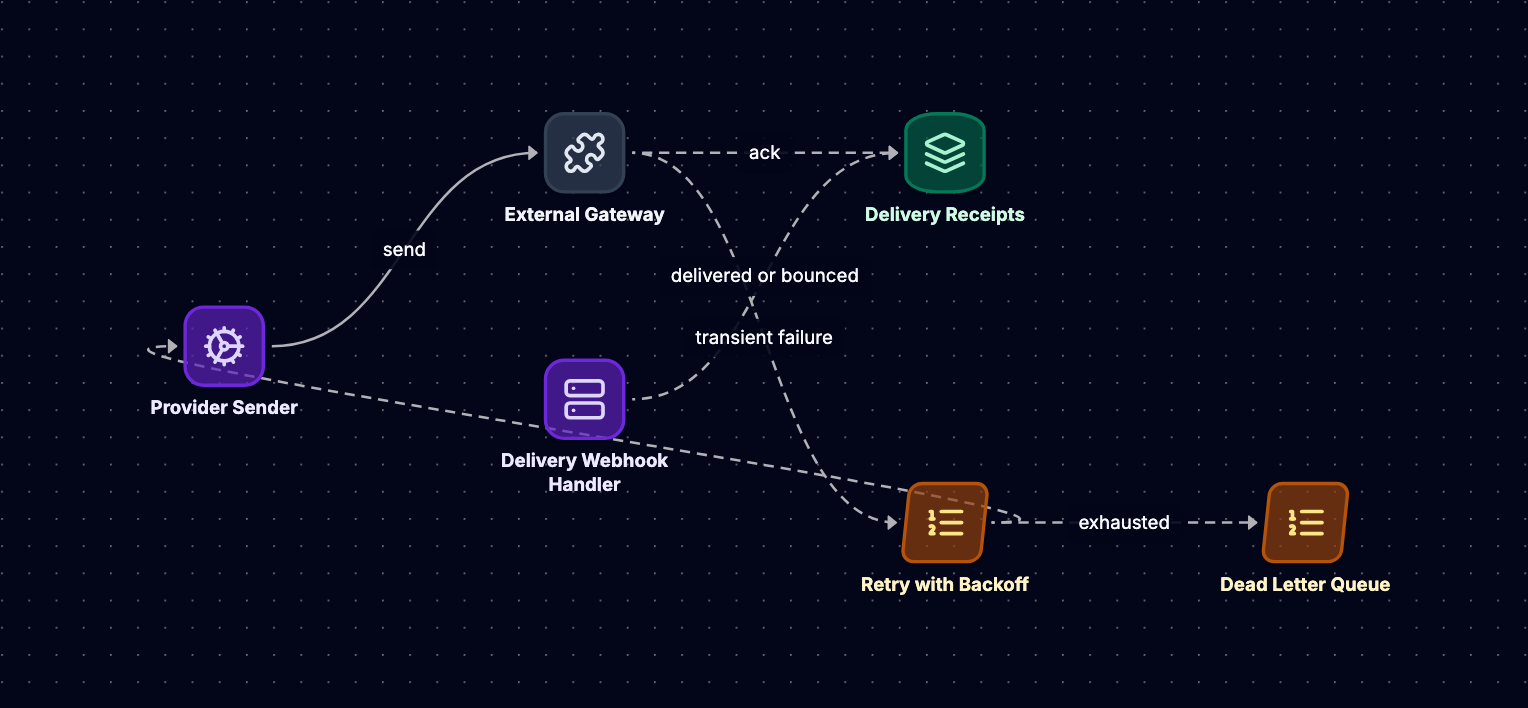
Notification systems must define their delivery semantics: at-most-once, at-least-once, or exactly-once. Each choice involves trade-offs between complexity, performance, and user experience.
Delivery Semantics
At-most-once delivery is the simplest: send the notification once and move on. If the send fails, the notification is lost. This approach suits low-priority notifications where occasional loss is acceptable.
At-least-once delivery retries failures until success. The notification might arrive multiple times if the send succeeds but the acknowledgment fails. This pattern works well with idempotent notifications or when combined with client-side deduplication.
Exactly-once delivery guarantees each notification arrives precisely once. Achieving this requires distributed transactions or two-phase commit protocols, adding significant complexity. Few notification systems implement true exactly-once semantics, instead combining at-least-once delivery with strong deduplication.
Retry Strategies
Retry logic must balance persistence (ensuring delivery) with resource consumption (not overwhelming systems with retry storms). Exponential backoff with jitter provides a robust pattern:
import random
import time
from dataclasses import dataclass
from typing import Optional

@dataclass
class RetryConfig:
    max_attempts: int = 5
    base_delay: float = 1.0      # Initial delay in seconds
    max_delay: float = 300.0     # Maximum delay (5 minutes)
    exponential_base: float = 2.0
    jitter: bool = True

class RetryManager:
    def __init__(self, config: RetryConfig):
        self.config = config

    def execute_with_retry(self, operation, notification):
        """
        Execute operation with exponential backoff retry.
        Returns (success, final_result, attempts_made).
        """
        attempt = 0

        while attempt < self.config.max_attempts:
            attempt += 1
            result, message_id, error = operation(notification)

            if result == DeliveryResult.SUCCESS:
                return (True, message_id, attempt)

            if result == DeliveryResult.PERMANENT_FAILURE:
                # Don't retry permanent failures
                return (False, None, attempt)

            if attempt < self.config.max_attempts:
                delay = self._calculate_delay(attempt, result)
                time.sleep(delay)

        return (False, None, attempt)

    def _calculate_delay(self, attempt, result):
        """Calculate delay with exponential backoff and jitter."""
        base_delay = self.config.base_delay * (
            self.config.exponential_base ** (attempt - 1)
        )

        # Cap at max_delay
        delay = min(base_delay, self.config.max_delay)

        # Add jitter to prevent thundering herd
        if self.config.jitter:
            delay = delay * (0.5 + random.random() * 0.5)

        # Rate-limited failures might include retry-after header
        if result == DeliveryResult.RATE_LIMITED:
            # Use longer delay for rate limits
            delay = max(delay, 60.0)

        return delay
Exponential backoff spaces retries over increasing intervals: 1 second, 2 seconds, 4 seconds, 8 seconds, and so on. This prevents retry storms where thousands of failed requests all retry simultaneously, overwhelming the recovering service.
Jitter adds randomness to retry delays. Without jitter, if 10,000 requests fail at the same moment, they all retry at the same moment after the backoff period. Jitter spreads the retries across time, smoothing the load.
Dead Letter Queues
After exhausting retries, failed notifications move to a dead letter queue (DLQ) for investigation. The DLQ preserves the notification, failure details, and retry history:
@dataclass
class FailedNotification:
    notification_id: str
    user_id: str
    channel: str
    payload: dict
    attempts: int
    last_error: str
    failure_timestamp: datetime
    retry_history: list

class DeadLetterQueue:
    def __init__(self, storage):
        self.storage = storage

    def enqueue(self, notification, error_details, attempts):
        """Store failed notification for later analysis."""
        failed = FailedNotification(
            notification_id=notification.id,
            user_id=notification.user_id,
            channel=notification.channel,
            payload=notification.to_dict(),
            attempts=attempts,
            last_error=error_details,
            failure_timestamp=datetime.utcnow(),
            retry_history=notification.retry_history
        )

        self.storage.insert('dead_letter_queue', failed)

    def replay(self, notification_id):
        """Retry a failed notification after fixing underlying issues."""
        failed = self.storage.get('dead_letter_queue', notification_id)
        if failed:
            # Reconstruct notification and retry