Message Queues, Logs, and Pub/Sub: SQS, RabbitMQ, Kafka, Kinesis, SNS, and Redis Streams Compared
Introduction
Almost every system design interview reaches the same moment: the candidate draws a box between two services, labels it "Kafka", and moves on. Then the interviewer asks what matters. Why Kafka and not SQS? What happens when a consumer crashes halfway through a message? Does order matter, and ordered relative to what?
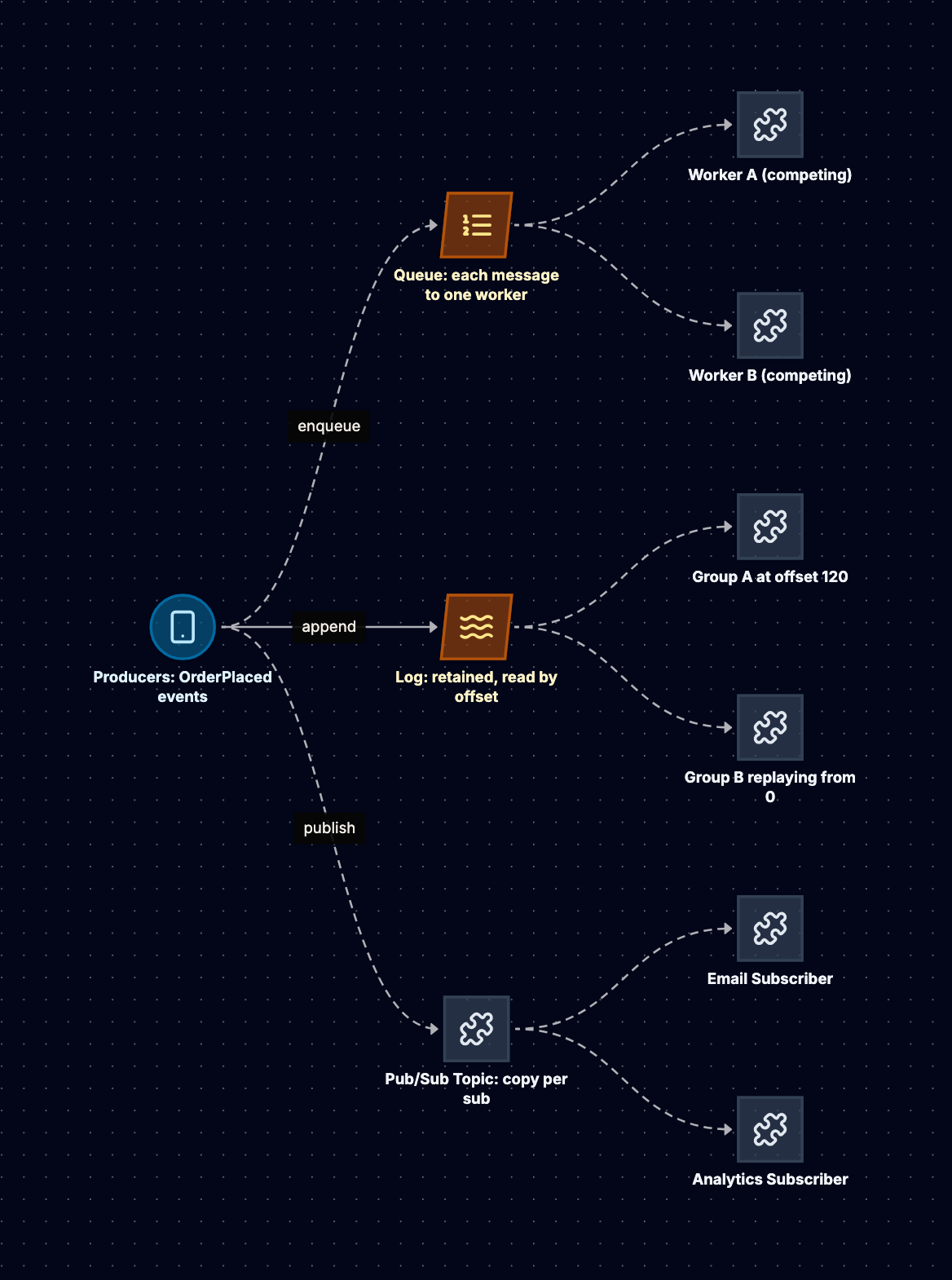
Those questions are about which messaging model the box implements. There are three, and every product in this post is one of them (or a deliberate hybrid):
- A queue hands each message to exactly one of many competing workers and forgets it once acknowledged.
- A log appends messages to a durable, ordered sequence that any number of readers can traverse at their own pace, and replay.
- Pub/sub pushes a copy of each message to every current subscriber, with no memory of the past.
This post covers Amazon SQS, RabbitMQ, Apache Kafka, Amazon Kinesis Data Streams, Amazon SNS, and Redis Streams: when to use each, how it works internally, a concrete configuration on one running example, how it scales, and how it fails. Then we compare delivery guarantees, ordering, and backpressure, put all six in one table, and walk through a decision flowchart and three scenarios.
The running example. An e-commerce platform emits an OrderPlaced event every time a checkout succeeds. Four consumers care: inventory (reserve stock, must not double-reserve), email (send a confirmation, a duplicate is embarrassing but survivable), fraud (only interested in orders above 500), and analytics (wants every event, and wants to reprocess history when its model changes). Peak load is 2,000 orders per second, each event about 1 KB. That is 2 MB per second, about 173 GB per day.
The Three Messaging Models
Queues: Work Distribution
A queue models work to be done. Producers enqueue tasks; a pool of workers competes for them. Each message is delivered to one worker, and once that worker acknowledges it, the message is deleted. If the worker dies without acknowledging, the message becomes visible again and another worker picks it up.
Consumption is destructive, scaling is by adding workers, and there is no replay. The broker tracks state per message (in flight, acknowledged, failed), which makes individual retries and dead-lettering natural. It fits "resize this image" or "charge this card".
Logs: Durable, Ordered History
A log models facts that happened. Producers append records to the end of an ordered, immutable sequence, partitioned for scale. Records are not deleted on read; they are retained by time or size. Each consumer tracks its own offset (a position in the log), so ten independent consumers can read the same data without interfering, and any of them can rewind and reprocess.
The broker tracks only a committed offset per partition per consumer group, which is why logs scale to very high throughput. The trade-off: you cannot acknowledge or retry one message in isolation. Ordering holds within a partition, and parallelism is capped by the partition count.
Pub/Sub: Broadcast
Pub/sub models notifications. A publisher sends a message to a topic; the system delivers a copy to every subscriber registered at that moment. There is typically no retention: a subscriber that was not registered (or not reachable after retries) simply misses the message.
Pure pub/sub couples delivery to subscriber availability, so in backend systems it is usually combined with queues: the topic fans out to one durable queue per consumer, each with its own buffer, retries, and dead-letter queue. That is the SNS plus SQS pattern below.
Why the Model Matters More Than the Product
If inventory and email both read one queue, each event reaches only one of them, which is a bug. In a log, both read every event and analytics can replay last month. In pub/sub, both get a copy, but if email is down for an hour those events are gone unless something durable sits in between. Choose the model from the consumption pattern first; the product comes second.
Amazon SQS: Standard vs FIFO
When to Use It
SQS is the default queue on AWS: fully managed, no brokers to size, priced per request. Use it to distribute work across stateless workers, absorb bursts, or decouple services with independent retries and dead-lettering. It is not a log: no replay, and two consumers cannot both read a message without fan-out upstream.
How It Works Internally
SQS stores each message redundantly across multiple servers. A consumer calls ReceiveMessage (up to 10 messages per call), and SQS hides those messages from other consumers for the visibility timeout (default 30 seconds, maximum 12 hours). If the consumer calls DeleteMessage before the timeout expires, the message is gone. If not, it reappears and is redelivered. Every receive increments a receive count; once it exceeds the maxReceiveCount in the queue's redrive policy, SQS moves the message to a dead-letter queue.
Retention is 1 minute to 14 days (default 4 days), long polling waits up to 20 seconds (cutting empty receives and cost), and delay queues postpone delivery by up to 15 minutes. The maximum message size is 1 MiB (raised from 256 KiB in August 2025), and for anything large use the claim-check pattern (payload in S3, pointer in the message).
Standard queues offer nearly unlimited throughput, at-least-once delivery (a message can occasionally be delivered more than once even if you deleted it correctly), and best-effort ordering.
FIFO queues (the name must end in .fifo) add two guarantees:
- Ordering per message group. Every message carries a
MessageGroupId. Messages in the same group are delivered strictly in order, and while messages from a group are in flight, no further messages from that group are handed out (one receive can still return several messages from the same group, in order). Different groups are processed in parallel. - Deduplication within a 5-minute window. A
MessageDeduplicationId(or a SHA-256 of the body if content-based deduplication is enabled) makes repeated sends within 5 minutes succeed without enqueuing a second copy. AWS calls this exactly-once processing, but a consumer can still crash after doing the work and before deleting.
FIFO throughput is quota-bound: 300 transactions per second per API action without batching, or 3,000 messages per second with batches of 10. High throughput mode raises this considerably, with limits that vary by region.
The Running Example
Inventory needs per-order ordering (an OrderPlaced followed by OrderCancelled for the same order must not be reversed) and no duplicate reservations. Email does not care about order. So inventory gets a FIFO queue grouped by order_id, email gets a standard queue.
import boto3, json
sqs = boto3.client("sqs")

# Producer: FIFO, grouped by order so events for one order stay ordered
sqs.send_message(
    QueueUrl=INVENTORY_FIFO_URL,                 # .../inventory.fifo
    MessageBody=json.dumps({"type": "OrderPlaced", "order_id": "o-981", "sku": "LAPTOP-15", "qty": 1}),
    MessageGroupId="o-981",
    MessageDeduplicationId="o-981:OrderPlaced",  # stable id, not a random UUID
)

# Consumer: long poll, process, delete only after success
while True:
    resp = sqs.receive_message(QueueUrl=INVENTORY_FIFO_URL,
                               MaxNumberOfMessages=10, WaitTimeSeconds=20,
                               VisibilityTimeout=60)
    for m in resp.get("Messages", []):
        event = json.loads(m["Body"])
        reserve_stock_idempotently(event)        # keyed on order_id in the DB
        sqs.delete_message(QueueUrl=INVENTORY_FIFO_URL, ReceiptHandle=m["ReceiptHandle"])
{
  "RedrivePolicy": "{\"deadLetterTargetArn\":\"arn:aws:sqs:ap-south-1:123456789012:inventory-dlq.fifo\",\"maxReceiveCount\":\"5\"}",
  "VisibilityTimeout": "60",
  "ContentBasedDeduplication": "false"
}
Back-of-envelope: 2,000 orders per second is far beyond 300 unbatched FIFO sends per second. The unbatched send_message shown above caps at 300 per second. Batching (send_message_batch, 10 per call) raises the quota to 3,000 per second, a thin margin over peak, so enable high throughput mode as well. A standard queue handles 2,000 per second without planning.
Scaling
Standard queues scale transparently; you scale consumers on ApproximateNumberOfMessagesVisible and ApproximateAgeOfOldestMessage. FIFO parallelism is bounded by how many message groups have messages ready.
Failure Modes and Anti-Patterns
- Visibility timeout shorter than processing time. A second worker processes the message too. Set it above p99 processing time, or heartbeat with
ChangeMessageVisibility. - No dead-letter queue. A poison message is retried until retention expires, burning compute and, on FIFO, blocking its whole group.
- Deleting before processing. Silently drops work on crash.
- One message group for everything on FIFO: a single-threaded pipeline no matter how many workers run.
- Two services on one queue. They split the messages. Fan out with SNS or EventBridge.
RabbitMQ: Exchanges and Routing
When to Use It
RabbitMQ is a general-purpose broker implementing AMQP 0-9-1 (with plugins for MQTT and STOMP, and native AMQP 1.0 in 4.x). Choose it for rich routing (by event type, region, priority) without producer code, low-latency per-message acks, deployments outside one cloud, or features like priority queues, per-message TTL, and request-reply. You operate it, or buy it managed (for example, Amazon MQ).
How It Works Internally
Producers never write to a queue directly. They publish to an exchange with a routing key. The exchange consults its bindings (rules linking it to queues) and copies the message into every matching queue. Four exchange types cover most needs:
- Direct: routes when the routing key equals the binding key.
- Fanout: copies to every bound queue, ignoring the key.
- Topic: matches dot-separated keys against patterns, where
*matches exactly one word and#matches zero or more words. - Headers: matches on message header values instead of the key.
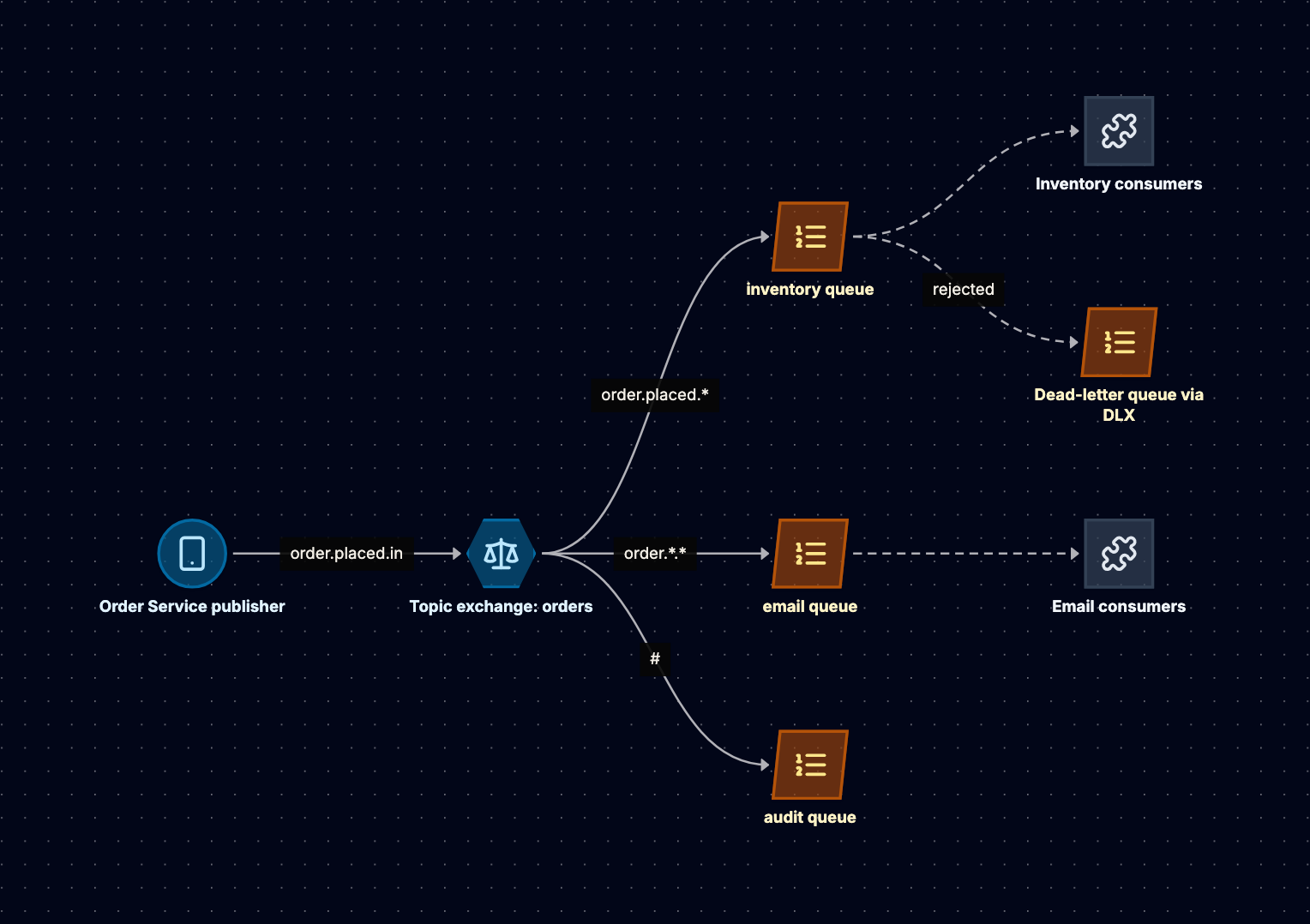
Messages are pushed to consumers, bounded by the prefetch count (basic.qos), which is unlimited by default. Consumers ack, or nack/reject with or without requeue. A dead-letter exchange receives messages rejected without requeue, expired by TTL, or dropped by a length limit.
Durability changed across versions. Quorum queues (3.8) replicate a queue with Raft and are the recommended durable type; classic mirrored queues were removed in 4.0. Streams (3.9) add a replayable, log-structured queue type. Publisher confirms tell the producer the broker safely accepted a message; without them, a publish can vanish in a crash with no error.
The Running Example
import pika, json
conn = pika.BlockingConnection(pika.ConnectionParameters("rabbit.internal"))
ch = conn.channel()

ch.exchange_declare("orders", exchange_type="topic", durable=True)
ch.exchange_declare("orders.dlx", exchange_type="fanout", durable=True)
ch.queue_declare("inventory.dlq", durable=True, arguments={"x-queue-type": "quorum"})
ch.queue_bind("inventory.dlq", "orders.dlx")

ch.queue_declare("inventory", durable=True, arguments={
    "x-queue-type": "quorum",
    "x-dead-letter-exchange": "orders.dlx",
    "x-delivery-limit": 5,                     # quorum queues: dead-letter after 5 redeliveries
})
ch.queue_bind("inventory", "orders", routing_key="order.placed.*")
ch.queue_declare("email", durable=True, arguments={"x-queue-type": "quorum"})
ch.queue_bind("email", "orders", routing_key="order.*.*")

# Publisher with confirms
ch.confirm_delivery()
ch.basic_publish("orders", "order.placed.in",
                 json.dumps({"order_id": "o-981", "total": 740}),
                 pika.BasicProperties(delivery_mode=2, message_id="o-981:OrderPlaced"))

# Consumer with bounded prefetch and manual ack
ch.basic_qos(prefetch_count=50)
def handle(ch, method, props, body):
    try:
        reserve_stock_idempotently(json.loads(body))
        ch.basic_ack(method.delivery_tag)
    except PermanentError:
        ch.basic_reject(method.delivery_tag, requeue=False)   # goes to DLX
ch.basic_consume("inventory", handle)
ch.start_consuming()
Routing keys follow order.<event>.<country>. Adding a new consumer for Indian orders only is a binding (order.*.in), not a producer change.
Scaling
A queue lives on one node (its leader, for quorum queues), so you scale by spreading load across many queues: shard a logical queue by hashing a key (the consistent hash exchange plugin does this), add consumers per queue where ordering allows, and keep queues short. RabbitMQ performs best when messages are consumed nearly as fast as they arrive.
Failure Modes and Anti-Patterns
- Unbounded prefetch. One consumer hoards thousands of messages and starves the others.
- Long queues as storage. Deep backlogs trigger memory and disk alarms, and the broker then blocks publishers.
- Requeue loops.
nackwith requeue on a poison message puts it straight back at the head. Use delivery limits and a dead-letter exchange. - Assuming ordering with multiple consumers. A queue is FIFO, but with several consumers and redeliveries, processing order is not. Use single active consumer or partition into per-key queues.
- No publisher confirms. Fire-and-forget publishing loses messages during broker failover with no signal to the producer.
Apache Kafka: Partitions, Consumer Groups, Retention, and Replay
When to Use It
Kafka is a distributed, partitioned, replicated log. Choose it when many independent consumers need the same events, when consumers must replay history (rebuild a read model, backfill a service, reprocess after a bug), when throughput is high and sustained, or when events feed stream processing (Kafka Streams, Flink). It is a poor fit for work queues with per-message retries and delays, though share groups (KIP-932, introduced as early access in Kafka 4.0 and maturing in later releases) target that gap.
How It Works Internally
A topic is split into partitions. Each partition is an append-only sequence of records stored as segment files on disk, and each record gets a monotonically increasing offset. Producers choose a partition by hashing the record key (so all events for one key land in one partition, in order); records without a key are spread across partitions.
Each partition has a leader replica taking writes and followers fetching from it; caught-up replicas form the in-sync replica set (ISR). With acks=all and min.insync.replicas=2 on a topic with replication factor 3, a write is acknowledged only when at least two replicas have it, so losing one broker loses no acknowledged data.
Consumer groups are how Kafka does both queueing and pub/sub. Within one group, each partition is assigned to exactly one consumer, so the group shares the work. Across groups, every group reads every record independently. Committed offsets (in the internal __consumer_offsets topic) are all the state kept about consumers.
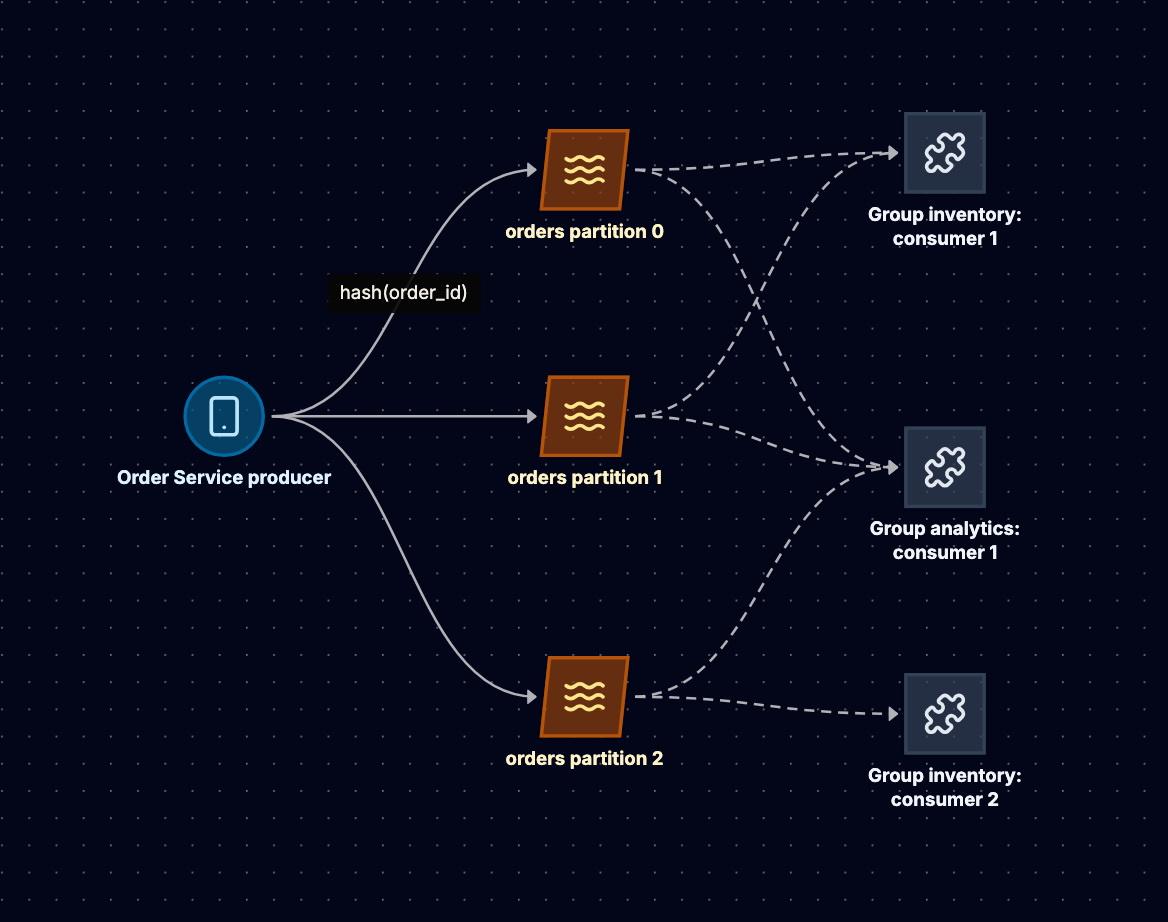
Retention is independent of consumption. The default retention.ms is 7 days; you can set it by size, by time, or to forever. With cleanup.policy=compact, Kafka keeps at least the latest record per key, turning a topic into a changelog of current state. Replay is just resetting a group's offset (to the earliest offset, or to a timestamp) and reading again.
Version notes: KRaft replaced ZooKeeper for metadata (production-ready in 3.3; ZooKeeper removed in Kafka 4.0). The idempotent producer is on by default since 3.0, and transactions exist since 0.11.
The Running Example
# Topic: orders, keyed by order_id
# kafka-topics.sh --create --topic orders --partitions 12 --replication-factor 3 \
#   --config min.insync.replicas=2 --config retention.ms=604800000

# Producer
acks=all
enable.idempotence=true
compression.type=lz4
linger.ms=5

# Consumer (inventory group)
group.id=inventory
enable.auto.commit=false
auto.offset.reset=earliest
max.poll.records=500
isolation.level=read_committed
from confluent_kafka import Consumer
c = Consumer({"bootstrap.servers": BROKERS, "group.id": "inventory",
              "enable.auto.commit": False, "auto.offset.reset": "earliest"})
c.subscribe(["orders"])
while True:
    msg = c.poll(1.0)
    if msg is None or msg.error():
        continue
    reserve_stock_idempotently(json.loads(msg.value()))   # dedupe on order_id
    c.commit(message=msg, asynchronous=False)              # commit after processing
Analytics is simply another group (group.id=analytics). When its model changes, it resets its offsets to seven days ago and replays, without touching inventory.
Back-of-envelope. 2 MB per second for 7 days is about 1.2 TB of log, about 3.6 TB with replication factor 3, before compression. Partition count follows consumer parallelism: at 200 orders per second per consumer, 2,000 per second needs 10 consumers, so 12 partitions gives headroom. You can add partitions but not remove them, and adding them remaps keys, breaking per-key ordering across the change.
Scaling
Throughput scales with partitions and brokers; each group parallelizes up to one consumer per partition, and extra consumers sit idle. Rebalancing (a consumer joins, leaves, or misses heartbeats) used to pause the whole group; cooperative rebalancing and the new consumer group protocol (KIP-848, generally available in Kafka 4.0) reduce that disruption.
Failure Modes and Anti-Patterns
- Hot partitions. A skewed key (one giant merchant, one celebrity user) sends a large share of traffic to one partition, and one consumer falls behind while others idle. Choose keys with high cardinality, or salt the hot key and give up strict ordering for it.
- Poison records. One record that always fails blocks its partition, because the consumer cannot skip it without committing past it. Catch, publish to a dead-letter topic, and move on.
- Committing before processing (or auto-commit with slow processing). A crash loses records. Commit after the side effect, and make the side effect idempotent.
- Treating Kafka as a task queue. No per-message delay, retry, or visibility timeout; building them reinvents SQS badly.
- Too many partitions. Each partition costs file handles, memory, and leader elections. Size for parallelism you need, with headroom, not "thousands, just in case".
Amazon Kinesis Data Streams
When to Use It
Kinesis Data Streams is AWS's managed log: the Kafka model (partitioned, ordered, retained, replayable) with AWS operating the storage. Choose it on AWS when you want log semantics without brokers and your consumers are Lambda, the Kinesis Client Library, Firehose, or Managed Service for Apache Flink. For the Kafka protocol on AWS, use Amazon MSK instead.
How It Works Internally
A stream is made of shards. A record's partition key is hashed with MD5 to a 128-bit value, and each shard owns a contiguous range of hash keys. Within a shard, records are strictly ordered and get a sequence number. The documented per-shard limits shape every design:
- Writes: 1 MB per second or 1,000 records per second, whichever comes first.
- Reads (shared): 2 MB per second per shard, and 5
GetRecordscalls per second per shard, shared across all standard consumers. - Enhanced fan-out: each registered consumer gets its own 2 MB per second per shard, delivered by push over HTTP/2.
Retention defaults to 24 hours and can be extended to 7 days, or to as long as 365 days with long-term retention, at extra cost. Streams run in provisioned mode (you choose shard count and reshard by splitting or merging shards) or on-demand mode (AWS scales shards for you based on observed traffic).
Consumers built on the Kinesis Client Library (KCL) coordinate shard ownership and store checkpoints in a DynamoDB lease table, the equivalent of Kafka's committed offsets. Lambda's event source mapping does the same for you, with settings for batch size, bisect-on-error, and an on-failure destination.
The Running Example
kinesis = boto3.client("kinesis")
kinesis.put_records(StreamName="orders", Records=[
    {"Data": json.dumps(evt).encode(), "PartitionKey": evt["order_id"]}
    for evt in batch
])
# Lambda event source mapping for the analytics consumer
FunctionName: orders-analytics
EventSourceArn: arn:aws:kinesis:ap-south-1:123456789012:stream/orders
StartingPosition: TRIM_HORIZON
BatchSize: 500
ParallelizationFactor: 2          # 2 concurrent batches per shard (max 10), order kept per partition key
BisectBatchOnFunctionError: true
MaximumRetryAttempts: 3
DestinationConfig:
  OnFailure:
    Destination: arn:aws:sqs:ap-south-1:123456789012:orders-analytics-dlq
Back-of-envelope. 2 MB per second and 2,000 records per second each need at least 2 shards; plan for 4 to absorb skew. On reads, 4 shards give 8 MB per second shared, and four consumers each reading the full stream demand exactly 8, with no headroom. That is where enhanced fan-out earns its cost.
Scaling
Provisioned streams scale by resharding into child shards; KCL and Lambda finish a parent shard before its children to keep per-key ordering. On-demand mode removes capacity planning but not the per-key limit: one partition key still lands on one shard.
Failure Modes and Anti-Patterns
- Hot partition key. It throttles (
ProvisionedThroughputExceededException) regardless of shard count. - Too many standard consumers sharing 2 MB per second and 5 reads per second per shard. Use enhanced fan-out.
- Poison batches with Lambda retried until they expire, blocking the shard. Configure bisect, retry limits, and an on-failure destination.
- Default 24-hour retention with a consumer down over a long weekend. Size retention to your worst recovery time.
- Expecting Kafka features such as compaction or transactions. Use MSK for those.
Amazon SNS and the Fan-Out Pattern
When to Use It
SNS is managed pub/sub. A publisher sends one message to a topic, and SNS pushes it to every subscription: SQS queues, Lambda, HTTP/S endpoints, email, SMS, mobile push, and Firehose. Use it when one event must reach several independent consumers without the publisher knowing who they are. SNS does not retain messages for later reading; its strength appears when paired with SQS.
How It Works Internally
SNS stores each message across availability zones, then delivers to every subscription with retries (configurable for HTTP/S). Each subscription can have its own dead-letter queue for messages SNS could not deliver.
Subscription filter policies let each subscriber declare which messages it wants, matching on message attributes or (since 2022) on the message body. The fraud queue never receives orders under 500.
SNS FIFO topics preserve ordering per message group and deduplicate within 5 minutes, mirroring SQS FIFO. They deliver only to SQS queues, and have lower throughput quotas than standard topics.
The Fan-Out Pattern
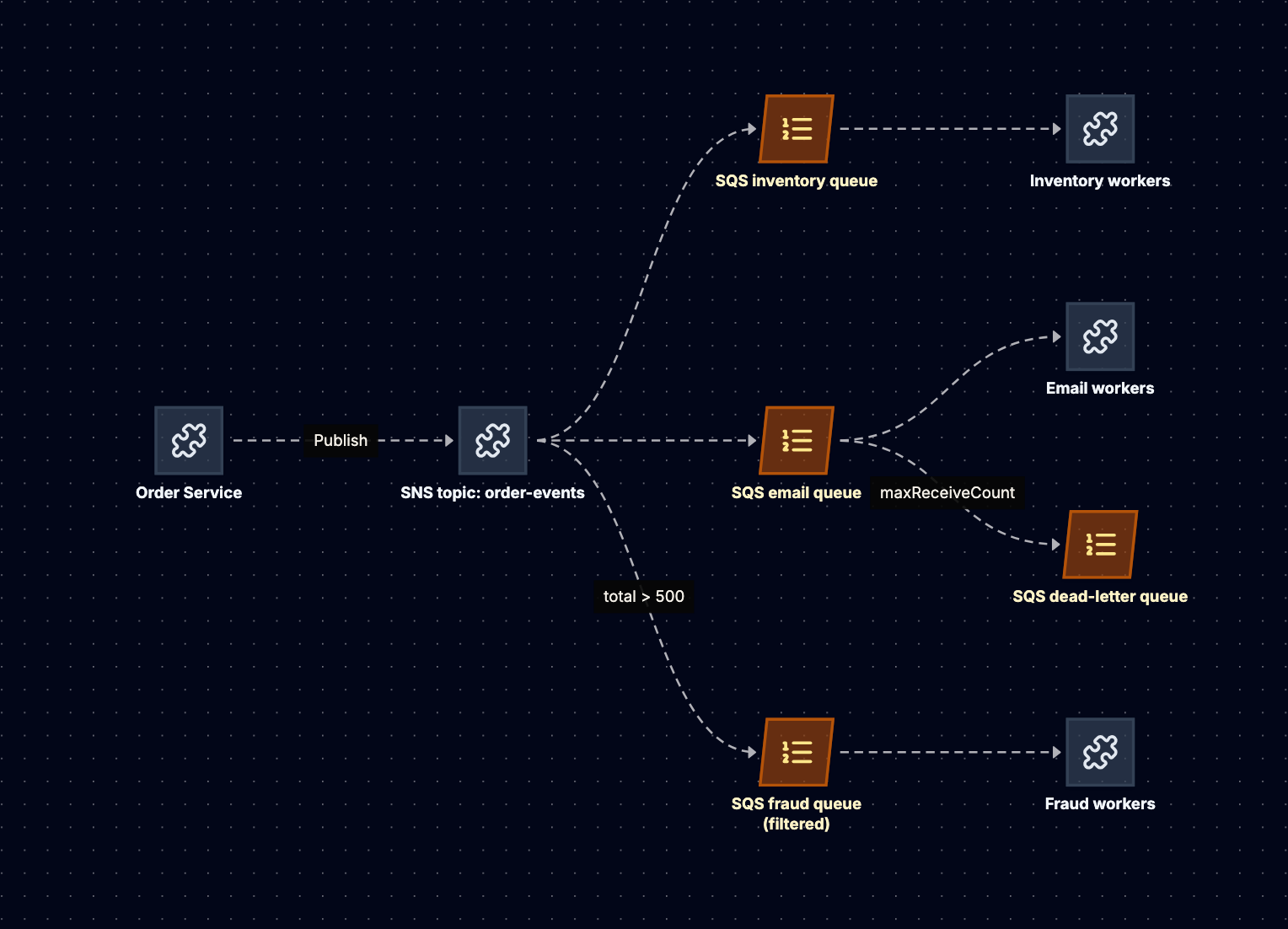
One topic, one SQS queue per consumer. Each consumer gets a private, durable buffer: email being down for an hour grows its queue and leaves inventory unaffected. A new consumer is a new queue and subscription, with no producer change.
{
  "TopicArn": "arn:aws:sns:ap-south-1:123456789012:order-events",
  "Protocol": "sqs",
  "Endpoint": "arn:aws:sqs:ap-south-1:123456789012:fraud",
  "Attributes": {
    "RawMessageDelivery": "true",
    "FilterPolicyScope": "MessageBody",
    "FilterPolicy": "{\"type\": [\"OrderPlaced\"], \"total\": [{\"numeric\": [\">\", 500]}]}",
    "RedrivePolicy": "{\"deadLetterTargetArn\":\"arn:aws:sqs:ap-south-1:123456789012:fraud-sns-dlq\"}"
  }
}
RawMessageDelivery sends the original body to SQS without the SNS JSON envelope. Each queue's access policy must allow the topic to send to it, a common setup mistake that silently drops deliveries.
Amazon EventBridge is the other AWS fan-out option, adding rule-based routing, archive and replay, and many SaaS sources. A reasonable rule: SNS for high-volume, low-latency fan-out; EventBridge for event buses with many rule-based routes across teams.
Scaling
Standard topics scale without capacity planning for typical workloads, and each queue scales independently. Note the cost shape: one publish to five SQS subscribers produces five sends, five receives, and five deletes.
Failure Modes and Anti-Patterns
- Subscribing services directly via HTTP. A down subscriber loses messages once retries run out.
- Filtering in code instead of in SNS, paying for events you discard.
- Expecting replay. SNS has no history; use a log, an EventBridge archive, or an S3 copy via Firehose.
- No subscription DLQ. Messages SNS cannot deliver are dropped: client-side errors (deleted queue, permissions) are not retried at all, and server-side errors are dropped once the retry policy is exhausted.
Redis Streams
When to Use It
Redis Streams (since Redis 5.0) is a log data type inside Redis: an append-only sequence of entries plus consumer groups with acknowledgements. Choose it when you already run Redis, volumes are moderate, latency must be very low, and you want log semantics without adding Kafka. It suits job dispatch, activity feeds, and lightweight event buses inside one product.
Do not confuse it with Redis Pub/Sub, which is pure fire-and-forget: messages go to connected subscribers only, with no persistence and no acknowledgements.
How It Works Internally
A stream is a single Redis key. XADD appends an entry whose ID is <milliseconds>-<sequence>, so entries are ordered by insertion time. Entries persist until trimmed, typically with MAXLEN ~ N (approximate trimming, which is cheaper) or MINID.
Consumer groups track a last-delivered ID and a pending entries list (PEL) of delivered but unacknowledged entries. XREADGROUP reads, XACK acknowledges. Entries of a dead consumer stay pending until another consumer reclaims them with XCLAIM or XAUTOCLAIM (added in 6.2). Delivery counts are tracked, which gives you the hook for dead-lettering.
Durability is Redis durability: data lives in memory, persisted by RDB snapshots and/or the AOF. Replication is asynchronous, so an entry acknowledged to the producer can be lost if the primary fails before replicating it. WAIT can block until replicas acknowledge, narrowing but not eliminating that window.
The Running Example
# Producer: append with an approximate cap of ~1M entries
XADD orders MAXLEN ~ 1000000 * type OrderPlaced order_id o-981 total 740

# Create the group once, starting from new entries
XGROUP CREATE orders email $ MKSTREAM

# Worker email-1 reads up to 100 new entries, blocking up to 5s
XREADGROUP GROUP email email-1 COUNT 100 BLOCK 5000 STREAMS orders >

# After sending the email
XACK orders email 1728100000000-0

# Recovery loop: take over entries idle > 60s from dead workers
XAUTOCLAIM orders email email-2 60000 0-0 COUNT 100
Memory check: at 1 KB per entry, keeping the most recent 1 million entries is roughly 1 GB of RAM before Redis overhead. At 2,000 orders per second, that is about 8 minutes of history. Redis Streams can buffer minutes or hours, not weeks.
Scaling
One stream is one key, and in Redis Cluster one key lives on one shard, so a stream is bounded by one node. To scale, shard manually into orders:{0} through orders:{N} with consumer groups per shard: you are now building Kafka partitions yourself.
Failure Modes and Anti-Patterns
- Unbounded streams. Without
MAXLENorMINID, the stream grows until Redis hitsmaxmemory, and eviction or write errors follow. - Never reclaiming pending entries. Crashed consumers leave entries in the PEL forever. Run an
XAUTOCLAIMloop and dead-letter entries with high delivery counts. - Assuming durability on failover. Asynchronous replication means recent writes can vanish. Do not use it as the system of record for payments.
- Using Pub/Sub when you meant Streams. A subscriber that reconnects after a blip misses everything published in between.
- One giant stream pinning one core on one shard.
Delivery Guarantees: At-Most-Once, At-Least-Once, Exactly-Once
Define the three by when the consumer acknowledges relative to the side effect.
At-most-once. Acknowledge (or commit the offset) first, then process. A crash loses the message, but it is never processed twice. Fine for metrics sampling or cache invalidation hints.
At-least-once. Process first, then acknowledge. A crash between the two causes redelivery and a second processing. This is the default for every system here and the right choice for nearly everything, provided consumers are idempotent.
Exactly-once. Distributed systems cannot guarantee exactly-once delivery over an unreliable network. What systems offer is exactly-once effect within a boundary:
- Kafka transactions make a consume, process, produce cycle atomic: output records and the input offset commit are written in one transaction, and downstream consumers with
isolation.level=read_committedsee only committed results. Calling an external API or writing to a database falls outside it. - SQS FIFO deduplication suppresses duplicate sends within 5 minutes, but not consumer-side duplicates.
- The idempotency pattern works everywhere: give each message a stable ID (the
order_idplus event type), and record it in the same database transaction as the side effect. A unique constraint orINSERT ... ON CONFLICT DO NOTHINGturns a redelivery into a no-op.
BEGIN;
  -- the UPDATE only runs if this message ID was not seen before
  WITH ins AS (
    INSERT INTO processed_messages (message_id) VALUES ('o-981:OrderPlaced')
    ON CONFLICT DO NOTHING
    RETURNING message_id
  )
  UPDATE inventory SET reserved = reserved + 1
   WHERE sku = 'LAPTOP-15' AND EXISTS (SELECT 1 FROM ins);
COMMIT;
The producer-side twin is publishing when a database write commits. Write then publish can lose the event on a crash; publish then write can announce something that never committed. The transactional outbox fixes it: write the business row and an outbox row in one transaction, and let a relay or change data capture publish outbox rows.
The interview answer in one line: "At-least-once delivery with idempotent consumers, and an outbox on the producer side. Exactly-once only inside Kafka's transactional boundary."
Ordering and Backpressure
Ordering
No system here gives you global ordering at scale, because global ordering means one sequence, which means one writer path. What they offer is ordering within a key:
| System | Ordering unit |
|---|---|
| SQS Standard | None (best effort) |
| SQS FIFO / SNS FIFO | Message group ID |
| RabbitMQ | Per queue, with a single consumer and no redelivery |
| Kafka | Partition (choose the key) |
| Kinesis | Shard (choose the partition key) |
| Redis Streams | Per stream |
Two subtleties catch candidates. A consumer that processes a partition with a thread pool has discarded the order the broker preserved. And retries reorder: if record 5 goes to a retry topic while record 6 succeeds, 6 is applied first. If per-key order is a correctness requirement, block the key on failure or carry versions and apply only if newer. Usually you need ordering per entity, which maps to "key by order_id".
Backpressure
Backpressure is what happens when consumers are slower than producers. The models differ fundamentally:
- Pull-based logs (Kafka, Kinesis, Redis Streams) have natural backpressure: consumers read at their own pace, and the backlog shows as consumer lag. The producer is unaffected until retention deletes unread data. Alert on lag measured in time, not record count.
- SQS is also pull-based and effectively unbounded; the risk is messages aging past the retention period. Alert on
ApproximateAgeOfOldestMessage. - RabbitMQ pushes to consumers, bounded by prefetch. When queues grow and the broker hits memory or disk watermarks, it applies flow control and blocks publishing connections. That can stall producers on request paths.
- SNS pushes into subscribers. With SQS subscribers, the queue absorbs it. With HTTP subscribers, backpressure appears as failed deliveries and retries.
The design rule: put a durable buffer (queue or log) between any producer on a user-facing path and any consumer that can fall behind, and autoscale consumers on lag or age, not CPU.
Head-to-Head Comparison
| Dimension | SQS | RabbitMQ | Kafka | Kinesis | SNS | Redis Streams |
|---|---|---|---|---|---|---|
| Model | Queue | Queue with routing (plus streams) | Partitioned log | Partitioned log | Pub/sub | Log in memory |
| Delivery model | Pull (long poll) | Push with prefetch | Pull | Pull or push (enhanced fan-out) | Push | Pull (blocking read) |
| Retention | 1 min to 14 days, deleted on ack | Until consumed (streams: by size or time) | Time, size, or compaction; can be indefinite | 24 hours to 365 days | None | Until trimmed, bounded by RAM |
| Replay | No | Only with streams | Yes, by offset or timestamp | Yes, by sequence or timestamp | No | Yes, by entry ID |
| Ordering | FIFO: per group | Per queue, single consumer | Per partition | Per shard | FIFO topics: per group | Per stream |
| Multiple consumer groups | No (fan out upstream) | Via bindings to many queues | Native | Native, limited by read quotas | Native | Native |
| Per-message ack and retry | Yes, with DLQ | Yes, with DLX | No (offset commits) | No (checkpoints) | Delivery retries and DLQ | Yes, with PEL and claim |
| Exactly-once support | FIFO dedup (5 min window) | No (idempotent consumers) | Transactions within Kafka | No (idempotent consumers) | FIFO dedup | No |
| Scaling unit | Transparent; FIFO by group | Queues and nodes | Partitions and brokers | Shards | Transparent | Shards (manual) |
| Operational cost | Lowest (serverless) | Moderate to high | High self-managed; moderate on MSK or Confluent | Low to moderate | Lowest | Low if Redis already runs |
| Typical workloads | Task queues, decoupling, buffering | Complex routing, RPC, multi-protocol | Event backbone, CDC, stream processing | AWS clickstreams, telemetry, Lambda pipelines | Fan-out, notifications | Lightweight jobs, feeds, small event buses |
Two rows carry most of the decision. Replay separates logs from everything else: if any consumer may need to reread history, you need Kafka, Kinesis, RabbitMQ streams, or Redis Streams. Per-message ack and retry separates queues from logs: if individual messages fail independently and need delays, retries, and dead-lettering, a queue does that natively and a log makes you build it.
When to Pick Which
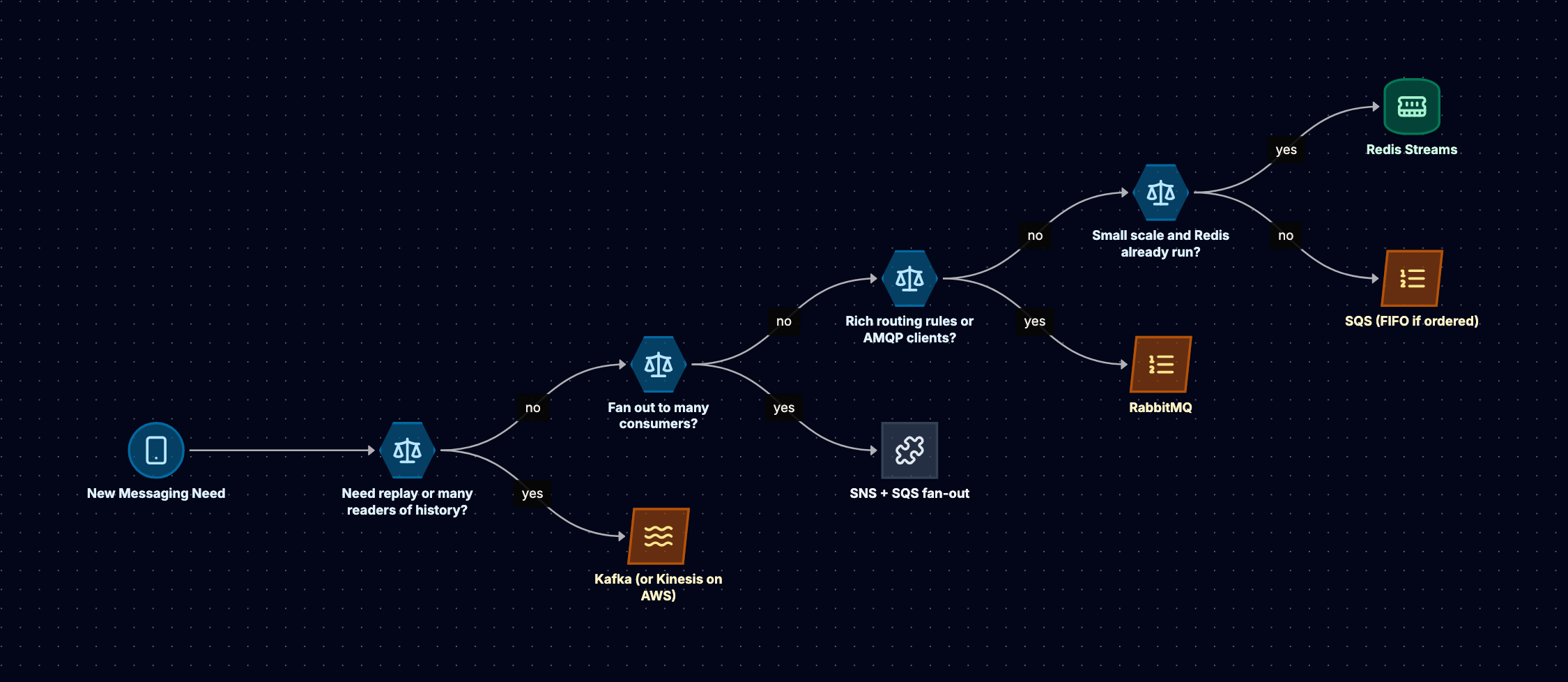
Replay comes first because it is the hardest property to add later. A queue-based system needs a separate archive and backfill job; a log just resets an offset.
Scenario 1: Order Processing on AWS
Requirements: the OrderPlaced event from the running example. Inventory needs per-order ordering and no double-reservations. Email and fraud are independent. Analytics wants history. The team is small and fully on AWS.
Choice: SNS fanning out to SQS queues for inventory (a standard queue here, because a standard SNS topic cannot deliver to a FIFO queue; idempotent, version-checked writes make reordering harmless), email, and fraud (filter total > 500). Firehose subscribes to land events in S3 as replayable history. The order service publishes through a transactional outbox.
Why not Kafka: four consumers at 2,000 events per second do not justify a cluster, and SQS gives per-message retries for free. When it changes: when many more teams consume the events or stream processing appears, move the backbone to Kinesis or MSK.
Scenario 2: Clickstream and Change Data Capture Backbone
Requirements: 50 services emit events; 20 consumers (search indexing, recommendations, a data lake, real-time dashboards) read overlapping subsets; new consumers must backfill 30 days; database changes from PostgreSQL flow out via Debezium.
Choice: Kafka (self-managed, MSK, or Confluent). Topics per domain keyed by entity ID, acks=all, replication factor 3, 30-day retention, compacted topics for entity state. Each consumer is a group; backfills are offset resets. Why not Kinesis: 20 consumers per stream exceed shared read quotas without enhanced fan-out, and Debezium and Kafka Connect are Kafka-native.
Scenario 3: Background Jobs Inside One Product
Requirements: a web app already runs Redis for sessions and caching. It needs to dispatch a few hundred thumbnail and email jobs per second, with retries, and workers on a handful of machines.
Choice: Redis Streams with a consumer group per job type, MAXLEN ~ trimming, an XAUTOCLAIM loop, and a dead-letter stream. When it changes: if jobs must survive failover without loss, or streams need sharding by hand, move to SQS or RabbitMQ with quorum queues.
In the Interview
How to Justify a Choice
- Name the consumption pattern: "Each order needs to be processed by four independent services; one of them wants to reprocess history."
- Name the model: "That is fan-out plus replay, so a log, or pub/sub with an archive."
- Name the delivery and ordering requirement: "At-least-once with idempotent consumers; ordered per
order_id, no global order." - Name the product and the key: "Kafka, topic
orders, keyed byorder_id, 12 partitions, replication factor 3, 7-day retention." - Name the cost you accept: "We give up per-message retries, so poison records go to a dead-letter topic, and we operate a cluster or pay for MSK."
Interviewers listen hardest for step 5.
Common Traps
- "Kafka for everything." A job queue with delays and per-message retries is a queue problem. Say why you want a log.
- Claiming exactly-once. Say "at-least-once with idempotent consumers" unless you can describe the precise boundary (Kafka transactions, FIFO deduplication window) and what falls outside it.
- Promising global ordering. Ask what actually needs ordering. It is almost always per entity, which maps to a key.
- Forgetting the dead-letter path. Every design needs an answer for the message that always fails.
- Ignoring the producer side. Dual writes to a database and a broker are the most common source of lost events. Mention the outbox.
- Unsourced throughput numbers. Derive capacity from the stated load and documented quotas, not benchmarks.
Likely Follow-Up Questions
- "A consumer crashes after doing the work but before acknowledging. What happens?" The message is redelivered. The consumer must be idempotent: record the message ID in the same transaction as the side effect.
- "How do you handle a poison message?" Bounded retries with backoff, then a dead-letter queue or topic, with alerting and a redrive tool. On a log, never let it block the partition.
- "Your Kafka consumer lag is growing. What do you do?" One partition lagging means a hot key or poison record; all lagging means too few consumers. Add consumers up to the partition count, then partitions, knowing that remaps keys.
- "How would you add a new consumer that needs the last 30 days of events?" With a log and sufficient retention, a new consumer group starting from a timestamp. With SNS and SQS, replay from the S3 archive into the new queue, then subscribe it.
- "How do you guarantee order for one customer's events with SQS?" FIFO queue with
MessageGroupIdset to the customer ID; throughput then depends on the number of active customers, not on the number of workers. - "Kafka or Kinesis?" Kinesis for AWS-native, lower-ops pipelines with few consumers per stream. Kafka (or MSK) for many consumers, long retention, compaction, transactions, and the Connect and Streams ecosystem.
Related reading: Designing a Notification System, Designing a Log Aggregation System, and Database Types Compared.