Hot vs Cold Storage: The Ultimate Guide to Scalable Data Architecture
So you're building a system that needs to handle data, and suddenly you're faced with this question: should you go with hot storage or cold storage? Maybe you're thinking "storage is storage, right?" Well, not exactly. The choice between hot and cold storage can literally make or break your system's performance and your budget.
Let me walk you through everything you need to know about hot vs cold storage, from the basics to the nitty-gritty technical details that'll help you make the right call for your specific use case.
What's the Deal with Hot and Cold Storage Anyway?
Think of hot and cold storage like the difference between keeping your favorite snacks in your kitchen counter versus storing your winter clothes in the attic. Hot storage is your kitchen counter - everything's right there, instantly accessible, but you can't fit everything and it costs more to maintain that prime real estate. Cold storage is your attic - tons of space, super cheap, but you need to climb up there and dig around when you actually need something.
Hot storage is all about speed and immediate access. We're talking microseconds to milliseconds response times, high throughput, and the ability to handle thousands of concurrent requests without breaking a sweat. It's expensive, but when you need data NOW, it's worth every penny.
Cold storage is the opposite - it's optimized for cost, not speed. You can store massive amounts of data for pennies on the dollar, but accessing it might take minutes, hours, or even days depending on how "cold" we're talking.
The Technical Deep Dive: How Hot Storage Actually Works
Let's get into the weeds here. Hot storage systems are engineered around three core principles:
1. Low Latency Through Smart Hardware Choices
Hot storage leverages high-speed storage media like NVMe SSDs, which can deliver sub-millisecond access times. But it's not just about the drives - the entire I/O stack is optimized:
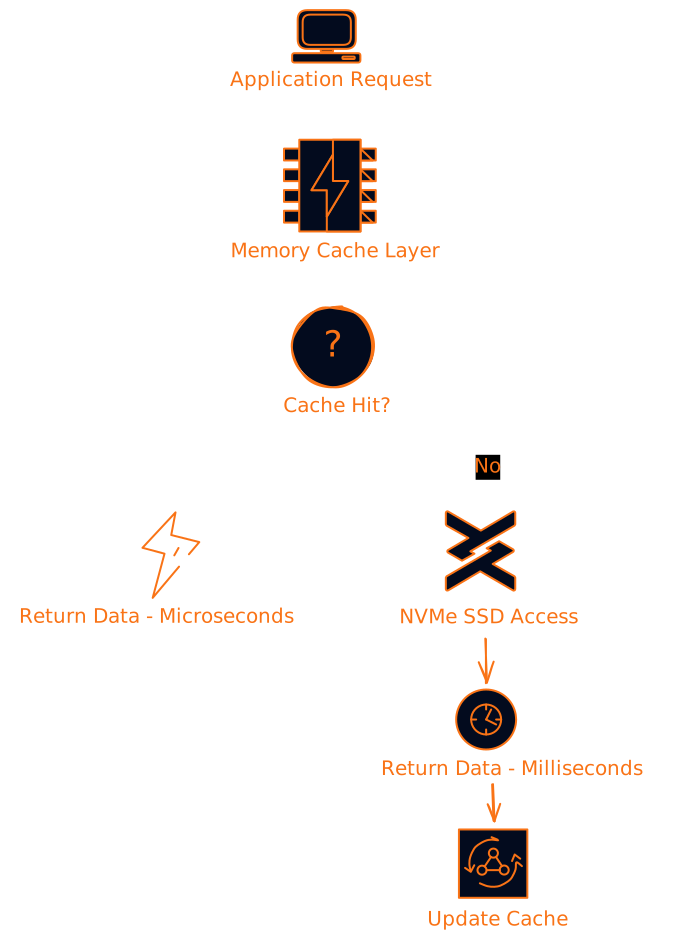
The magic happens in that cache layer. Systems like Redis and Memcached keep your most frequently accessed data in RAM, where access times are measured in microseconds. When you have a cache miss, you're hitting those blazing-fast NVMe drives instead of waiting for traditional spinning disks.
2. Horizontal Scaling and Elasticity
Hot storage systems are built to scale out, not just up. Instead of buying one massive, expensive server, you distribute your data across multiple nodes:
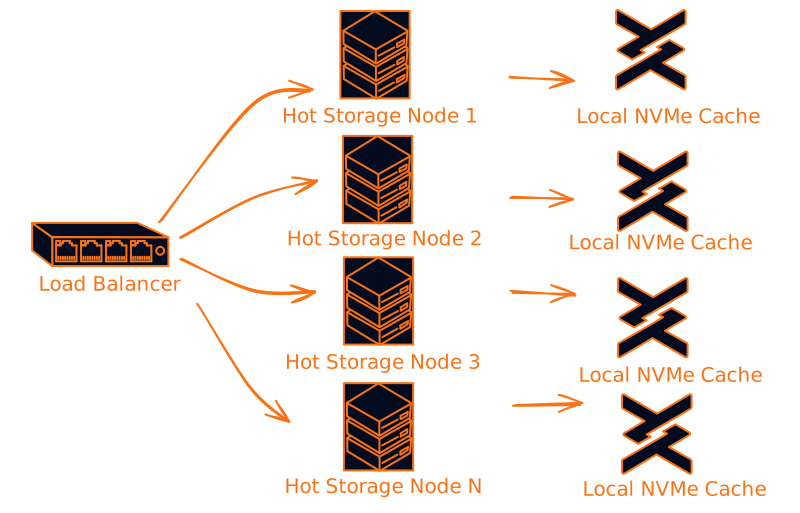
This approach gives you two huge advantages:
- Performance scales linearly - need more throughput? Add more nodes
- Fault tolerance - if one node dies, the others keep serving requests
3. Advanced Data Protection Without Performance Penalties
Hot storage systems use techniques like erasure coding and distributed replication to protect your data without killing performance. Instead of simple mirroring (which doubles your storage costs), erasure coding can give you the same protection with only 25-50% storage overhead.
When Hot Storage Makes Sense (And When It Doesn't)
Here's where most people mess up - they either go all-hot or all-cold without thinking about their actual access patterns. Let me break down the real-world scenarios:
Perfect Hot Storage Use Cases:
Real-time Analytics Dashboards If you're building something like a trading platform or IoT monitoring system where users need to see data updates in real-time, hot storage is non-negotiable. You can't have your dashboard showing stock prices from 5 minutes ago.
E-commerce Product Catalogs When someone searches for "wireless headphones" on your site, they expect results instantly. Your product database, search indices, and recommendation engine data should all live in hot storage.
Gaming and Interactive Applications Player state, leaderboards, matchmaking data - anything that affects the user experience in real-time needs to be hot.
Database Caching Layers This is probably the most common use case. Your main database might be on regular storage, but you keep frequently accessed queries cached in Redis or Memcached.
When Hot Storage Is Overkill:
Log Files and Audit Data Sure, you might need to access last week's logs occasionally, but do you really need microsecond access to logs from 6 months ago?
Backup and Archive Data By definition, backups are for disaster recovery. If you're accessing your backups regularly, you have bigger problems.
Historical Analytics Data That detailed clickstream data from 2019? Probably doesn't need to be instantly accessible.
Cold Storage: The Unsung Hero of Cost Optimization
Now let's talk about cold storage, which honestly doesn't get the respect it deserves. People think "slow = bad," but that's missing the point entirely.
The Economics Are Insane
We're talking about storage costs that are literally 90-95% cheaper than hot storage. AWS S3 Glacier Deep Archive costs 0.10-$1.00+ per GB per month.
Let's do some quick math: storing 100TB of data for a year:
- Hot storage: 1,200,000
- Cold storage: $1,200
Yeah, you read that right. The difference is literally orders of magnitude.
But What About Retrieval Times?
This is where cold storage gets interesting from a technical perspective. Different cold storage tiers have different retrieval characteristics:
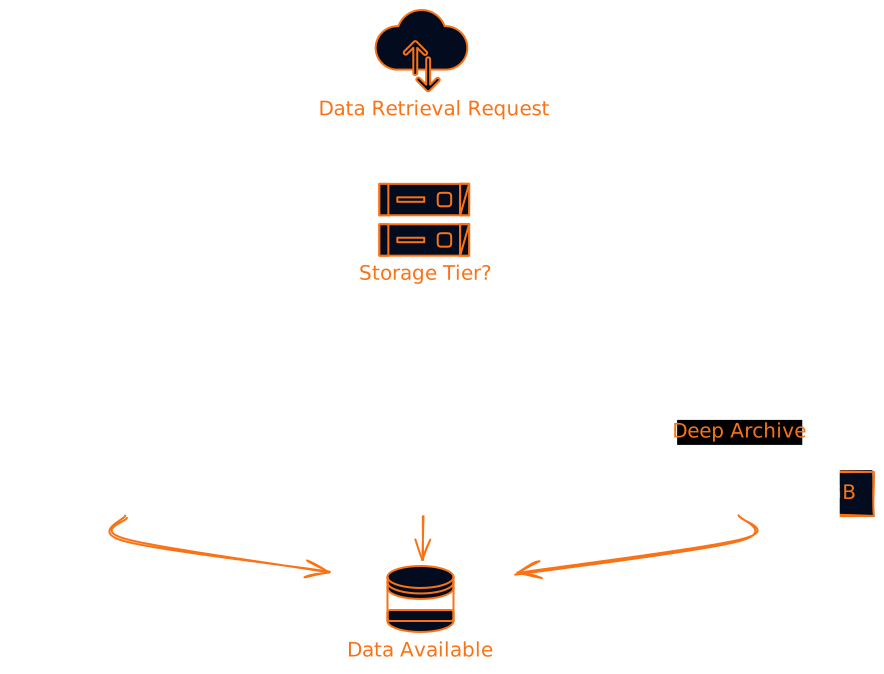
The key insight here is that retrieval time isn't always a dealbreaker. If you're doing batch analytics on historical data, does it really matter if the job starts in 12 hours instead of 12 seconds?
Smart Cold Storage Implementation
Here's where it gets really interesting - modern cold storage isn't just "dump and forget." You can implement intelligent retrieval strategies:
Predictive Pre-fetching: Use machine learning to predict which archived data you'll need and pre-fetch it to warm storage.
Bulk Operations: Instead of retrieving individual files, batch your requests to minimize retrieval costs.
Metadata Indexing: Keep searchable metadata in hot storage so you can find what you need in cold storage without expensive scanning operations.
The Hybrid Approach: Why You Probably Need Both
Here's the thing - most real-world systems aren't purely hot or cold. They're hybrid, and that's where the magic happens.
Intelligent Data Tiering
Modern storage systems can automatically move data between tiers based on access patterns:
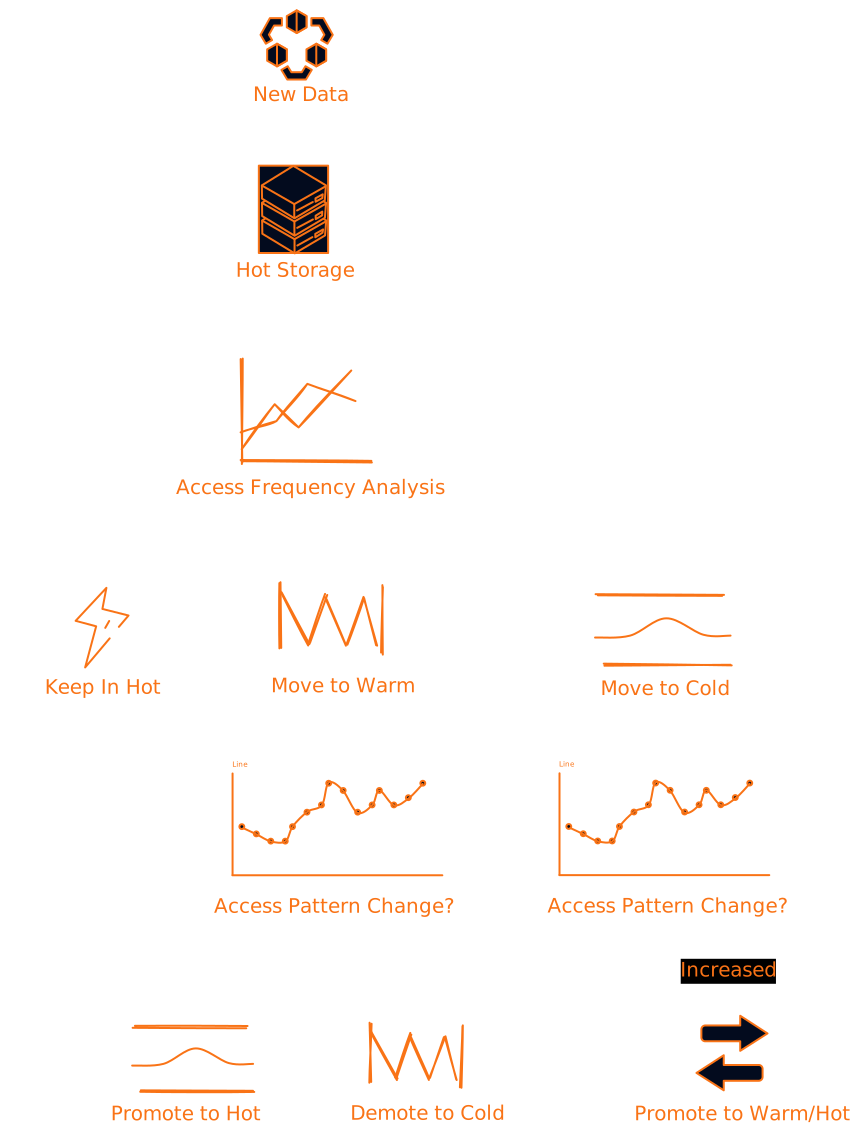
This isn't just theory - AWS S3 Intelligent Tiering, Azure Blob Storage lifecycle management, and Google Cloud Storage lifecycle policies all do exactly this.
Data Lifecycle Management Policies
You can set up rules like:
- Keep data in hot storage for 30 days
- Move to warm storage for the next 90 days
- Archive to cold storage after 120 days
- Delete after 7 years (for compliance)
The beauty is that this happens automatically. Your application doesn't need to know or care about the underlying storage tier.
Real-World Architecture Patterns
Let me show you how this actually works in practice with some common patterns:
Pattern 1: The Lambda Architecture for Analytics
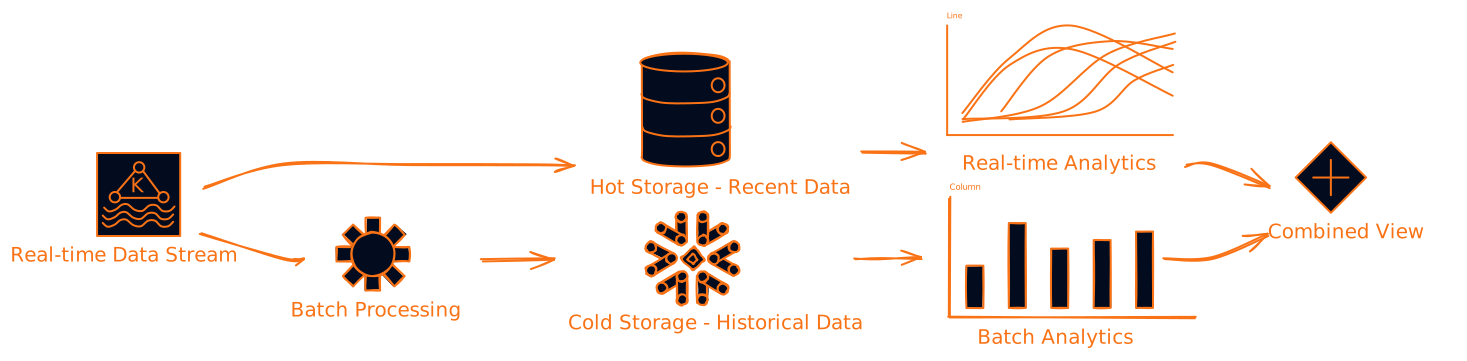
This pattern is perfect for something like a business intelligence platform. Users get real-time insights from recent data (hot storage) and can run historical analysis on archived data (cold storage) when needed.
Pattern 2: Content Delivery with Intelligent Caching
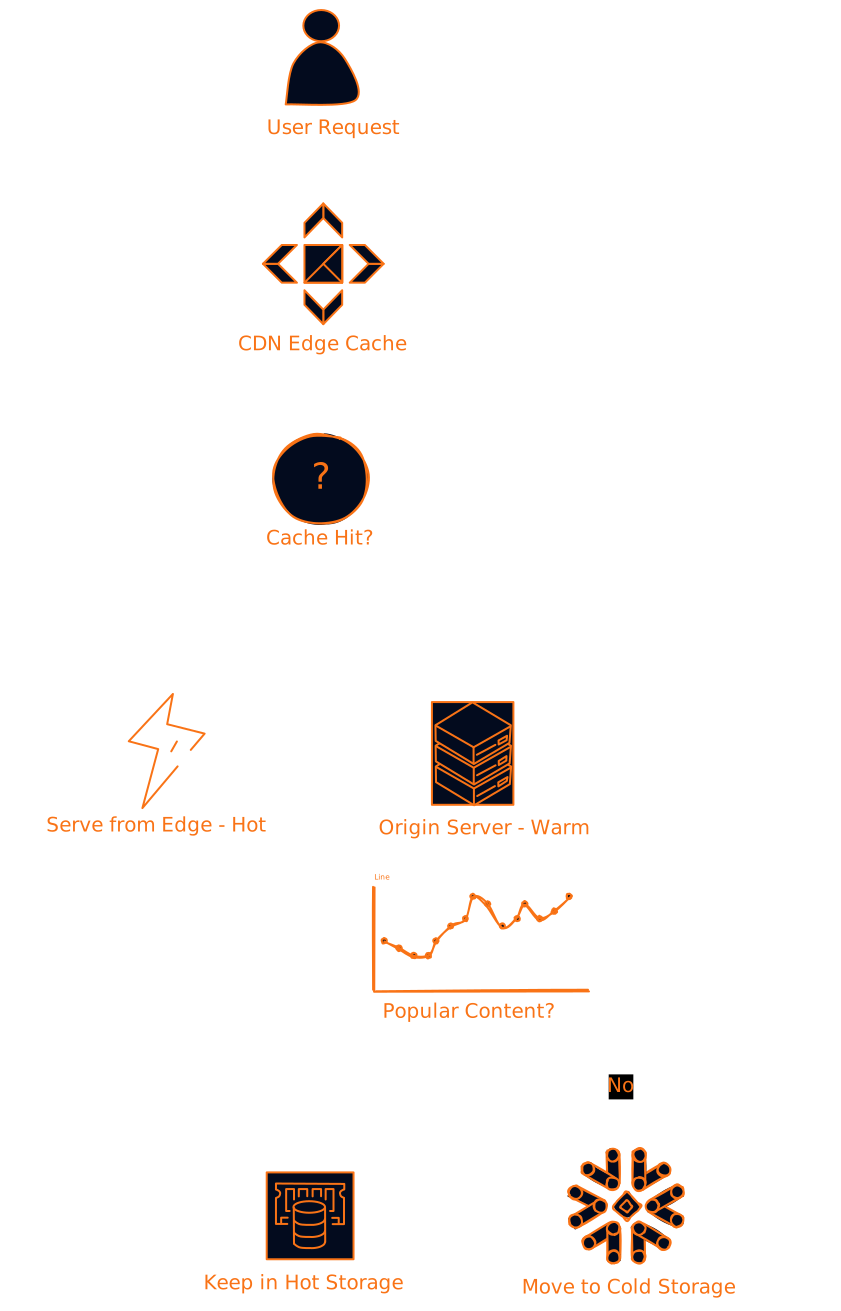
This is how Netflix, YouTube, and other content platforms work. Popular content stays hot and gets served instantly. Less popular content gets moved to cheaper storage but can be retrieved when needed.
Pattern 3: Database with Intelligent Archiving

This pattern is common in systems that need to maintain years of historical data but only actively work with recent records.
The Hidden Costs Everyone Forgets About
Here's where most people screw up their storage strategy - they only look at the obvious costs and miss the hidden ones.
Hot Storage Hidden Costs:
- Power and cooling - High-performance storage generates heat and needs serious cooling
- Management overhead - More complex systems need more skilled people to run them
- Over-provisioning - You typically need to provision for peak load, not average load
Cold Storage Hidden Costs:
- Retrieval fees - These can add up fast if you're not careful
- Minimum storage duration - Most cold storage has minimum billing periods (30-180 days)
- Data transfer costs - Moving data between regions or out of the cloud provider
The Real TCO Calculation
Let's say you have 50TB of data with these access patterns:
- 5TB accessed daily (hot storage candidate)
- 15TB accessed monthly (warm storage candidate)
- 30TB accessed rarely (cold storage candidate)
All-hot approach: ~600/year + retrieval costs (could be 8,000/year
The hybrid approach gives you 90% of the performance benefits at 15% of the all-hot cost.
Performance Optimization Techniques That Actually Matter
Let's get into some advanced techniques that can make or break your storage performance:
1. Data Partitioning Strategies
Don't just dump all your data in one bucket. Partition by:
- Time - Most recent data in hot storage, older data in cold
- Geography - Data for active regions in hot storage
- User segments - Premium users get hot storage, free users get warm/cold
- Data type - Metadata in hot storage, actual content in cold
2. Compression and Deduplication
This is especially important for cold storage where you're paying for every byte:
# Example: Smart compression strategy
def choose_compression_algorithm(data_type, access_pattern):
    if access_pattern == "hot":
        # Fast compression for hot data
        return "lz4"  # Fast compression/decompression
    elif data_type == "text":
        return "gzip"  # Good compression ratio for text
    elif data_type == "media":
        return "none"  # Already compressed
    else:
        return "zstd"  # Balanced compression for cold storage
3. Intelligent Caching Layers
Don't just cache everything - be smart about it:
# Example: Multi-tier caching strategy
class IntelligentCache:
    def __init__(self):
        self.l1_cache = {}  # In-memory, hot data
        self.l2_cache = {}  # SSD cache, warm data
        self.access_patterns = {}

    def get(self, key):
        # Check L1 first (hot)
        if key in self.l1_cache:
            self.update_access_pattern(key, "hot")
            return self.l1_cache[key]

        # Check L2 (warm)
        if key in self.l2_cache:
            self.update_access_pattern(key, "warm")
            # Promote to L1 if access pattern suggests it
            if self.should_promote_to_hot(key):
                self.l1_cache[key] = self.l2_cache[key]
            return self.l2_cache[key]

        # Fetch from cold storage
        data = self.fetch_from_cold_storage(key)
        self.update_access_pattern(key, "cold")
        return data
Common Mistakes and How to Avoid Them
Mistake 1: Not Monitoring Access Patterns
I see this all the time - people set up their storage tiers based on gut feeling and never look at the actual data. Set up monitoring from day one:
# Example: Access pattern monitoring
class AccessPatternMonitor:
    def __init__(self):
        self.access_log = {}

    def log_access(self, key, timestamp):
        if key not in self.access_log:
            self.access_log[key] = []
        self.access_log[key].append(timestamp)

    def analyze_patterns(self):
        recommendations = {}
        for key, accesses in self.access_log.items():
            if len(accesses) > 100 and self.recent_access_frequency(accesses) > 10:
                recommendations[key] = "move_to_hot"
            elif len(accesses) < 5 and self.days_since_last_access(accesses) > 90:
                recommendations[key] = "move_to_cold"
        return recommendations
Mistake 2: Ignoring Data Lifecycle Policies
Set up automated lifecycle policies from the beginning. Don't wait until your storage bill becomes a problem:
# Example: AWS S3 Lifecycle Policy
lifecycle_policy:
  rules:
    - id: "intelligent_tiering"
      status: "Enabled"
      transitions:
        - days: 30
          storage_class: "STANDARD_IA"
        - days: 90
          storage_class: "GLACIER"
        - days: 365
          storage_class: "DEEP_ARCHIVE"
      expiration:
        days: 2555  # 7 years for compliance
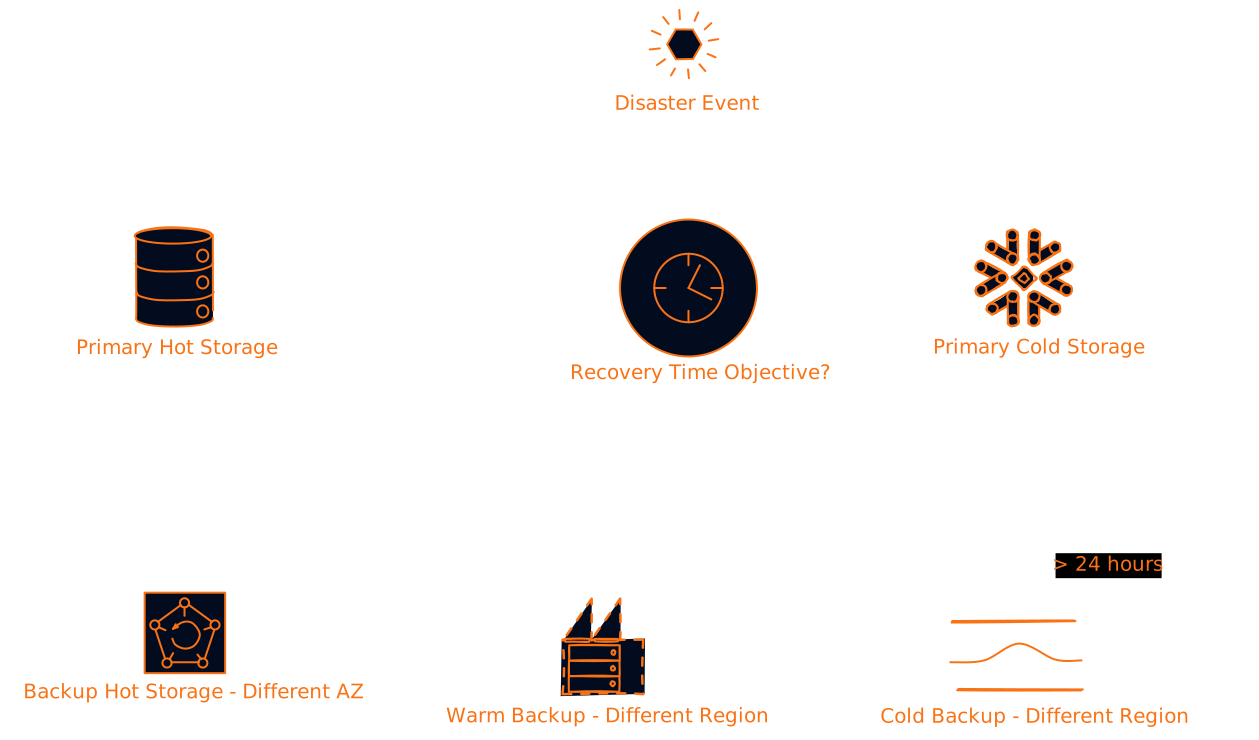
Mistake 3: Not Planning for Disaster Recovery
Your disaster recovery strategy needs to account for both hot and cold storage:
Emerging Trends: What's Coming Next?
AI-Driven Storage Management
Machine learning is starting to revolutionize how we manage storage tiers. Instead of static rules, AI can predict access patterns and optimize placement in real-time:
# Example: ML-based storage tier prediction
class MLStorageTierPredictor:
    def __init__(self):
        self.model = self.load_trained_model()

    def predict_optimal_tier(self, file_metadata):
        features = self.extract_features(file_metadata)
        prediction = self.model.predict([features])

        if prediction[0] > 0.8:
            return "hot"
        elif prediction[0] > 0.3:
            return "warm"
        else:
            return "cold"

    def extract_features(self, metadata):
        return [
            metadata['file_size'],
            metadata['access_frequency_last_30_days'],
            metadata['user_tier'],
            metadata['file_type_encoded'],
            metadata['creation_time_days_ago']
        ]
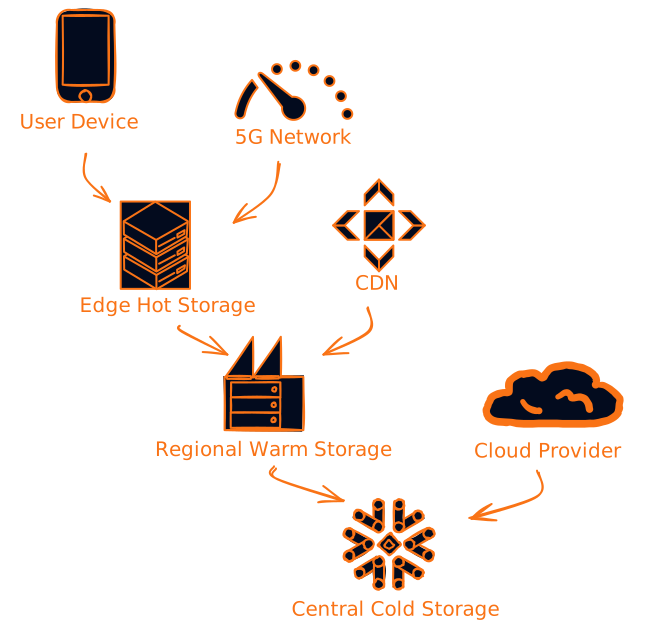
Edge Storage and 5G
With 5G and edge computing, we're seeing new hybrid patterns where hot storage moves closer to users:
Quantum Storage (Future)
This is still experimental, but quantum storage could revolutionize cold storage by allowing massive data density with instant access. We're probably 10-15 years away from practical implementation, but it's worth keeping an eye on.
Making the Decision: A Practical Framework
Here's a simple framework I use when helping teams decide on their storage strategy:
Step 1: Analyze Your Data
def analyze_data_characteristics(dataset):
    analysis = {
        'total_size': calculate_total_size(dataset),
        'access_frequency': analyze_access_patterns(dataset),
        'growth_rate': calculate_growth_rate(dataset),
        'compliance_requirements': check_compliance_needs(dataset),
        'performance_requirements': assess_performance_needs(dataset)
    }
    return analysis
Step 2: Calculate Costs
Don't just look at storage costs - include everything:
def calculate_total_cost_of_ownership(storage_strategy, data_size, access_pattern):
    costs = {
        'storage': calculate_storage_costs(storage_strategy, data_size),
        'retrieval': calculate_retrieval_costs(access_pattern),
        'transfer': calculate_transfer_costs(access_pattern),
        'operational': calculate_operational_costs(storage_strategy),
        'opportunity': calculate_opportunity_costs(storage_strategy)
    }
    return sum(costs.values())
Step 3: Consider Your Team's Capabilities
Be honest about what your team can handle:
- Simple setup: Go with managed cloud services
- Complex requirements: Consider hybrid on-premises/cloud
- Limited budget: Aggressive cold storage with intelligent tiering
- Performance critical: Hot storage with proper caching
The Bottom Line
Here's what I want you to take away from this:
-
There's no one-size-fits-all solution - Your storage strategy should match your specific access patterns and requirements
-
Monitor everything - Set up access pattern monitoring from day one and adjust your strategy based on real data
-
Automate lifecycle management - Don't manually manage data tiers, set up policies that do it automatically
-
Think total cost of ownership - Include all costs, not just the obvious storage fees
-
Plan for growth - Your access patterns will change as you scale, build flexibility into your architecture
-
Don't over-engineer - Start simple and add complexity only when you need it
The choice between hot and cold storage isn't really a choice at all - it's about finding the right balance for your specific situation. Most successful systems use a hybrid approach that gives users the performance they need while keeping costs under control.
Remember, storage is just a means to an end. The goal is to build systems that serve your users well while staying within budget. Whether that means blazing-fast hot storage, dirt-cheap cold storage, or a smart hybrid approach depends entirely on your specific requirements.
What's your experience with hot vs cold storage? Have you run into any gotchas that I didn't cover? Drop a comment and let's discuss - I'm always curious to hear about real-world implementations and the challenges people face.
Want to dive deeper into storage architecture? Check out my other posts on database sharding strategies and caching patterns that actually work in production.