Database Partitioning
Database Partitioning
Ever tried to query a table with 100 million rows and watched your database crawl to a halt? Yeah, we've all been there. That moment when your perfectly crafted SQL query decides to take a coffee break for 10 minutes while your users start sending angry emails.
Here's the thing: throwing more RAM at the problem isn't always the answer. Sometimes you need to get smart about how you organize your data. That's where database partitioning comes in, and trust me, it's not just another buzzword your DBA throws around to sound important.
What Actually Is Data Partitioning?
Think of partitioning like organizing your massive music collection. Instead of dumping 50,000 songs into one giant folder, you create separate folders by genre, artist, or decade. When you want to find that one Taylor Swift song, you don't have to scan through death metal albums.
Database partitioning works the same way. You split your massive table into smaller, more manageable chunks called partitions. Each partition contains a subset of your data based on some logical criteria.
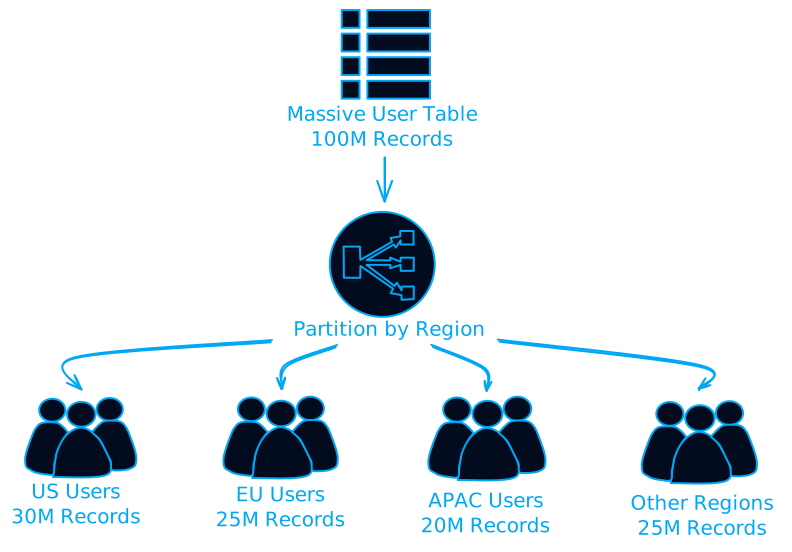
But wait, there's more to this story than just "split big table into smaller tables." Let's dive into why this actually matters.
Why Your Database Is Crying for Partitioning
Performance That Actually Makes Sense
Remember that 10-minute query? With proper partitioning, your database can use something called "partition pruning." Instead of scanning all 100 million rows, it only looks at the relevant partition.
Here's a real example:
-- Without partitioning: scans entire table
SELECT * FROM orders WHERE order_date >= '2024-01-01';

-- With date-based partitioning: only scans 2024 partitions
-- Database automatically eliminates 2023, 2022, etc.
The database optimizer gets smart and says, "Oh, you want 2024 data? Let me just ignore these 50 other partitions and focus on the one that matters."
Maintenance That Doesn't Require Downtime
Ever tried to rebuild an index on a 500GB table? It's like watching paint dry, except the paint takes 8 hours and blocks all your users.
With partitioning, you can:
- Rebuild indexes on one partition at a time
- Archive old data by simply dropping partitions
- Add new partitions without touching existing data
-- Drop old data instantly (no DELETE statement needed)
ALTER TABLE orders DROP PARTITION p_2020;

-- Add new partition for 2025
ALTER TABLE orders ADD PARTITION p_2025
VALUES LESS THAN ('2026-01-01');
Parallel Processing That Actually Works
Modern databases can process different partitions simultaneously. It's like having multiple workers tackle different sections of a warehouse instead of one person doing everything.
The Partitioning Strategies That Actually Matter
Horizontal Partitioning (The Popular Kid)
This is what most people think of when they hear "partitioning." You split rows across multiple partitions based on some criteria.
Range Partitioning: Perfect for time-series data
-- Partition by date ranges
CREATE TABLE orders (
    order_id INT,
    order_date DATE,
    customer_id INT,
    amount DECIMAL(10,2)
)
PARTITION BY RANGE (YEAR(order_date)) (
    PARTITION p_2022 VALUES LESS THAN (2023),
    PARTITION p_2023 VALUES LESS THAN (2024),
    PARTITION p_2024 VALUES LESS THAN (2025)
);
Hash Partitioning: When you want even distribution
-- Distribute data evenly across partitions
CREATE TABLE users (
    user_id INT,
    username VARCHAR(50),
    email VARCHAR(100)
)
PARTITION BY HASH(user_id)
PARTITIONS 8;
List Partitioning: For categorical data
-- Partition by specific values
CREATE TABLE sales (
    sale_id INT,
    region VARCHAR(20),
    amount DECIMAL(10,2)
)
PARTITION BY LIST (region) (
    PARTITION p_north VALUES IN ('US', 'CA'),
    PARTITION p_europe VALUES IN ('UK', 'DE', 'FR'),
    PARTITION p_asia VALUES IN ('JP', 'CN', 'IN')
);
Vertical Partitioning (The Underrated Hero)
Sometimes the problem isn't too many rows, it's too many columns. Vertical partitioning splits tables by columns instead of rows.
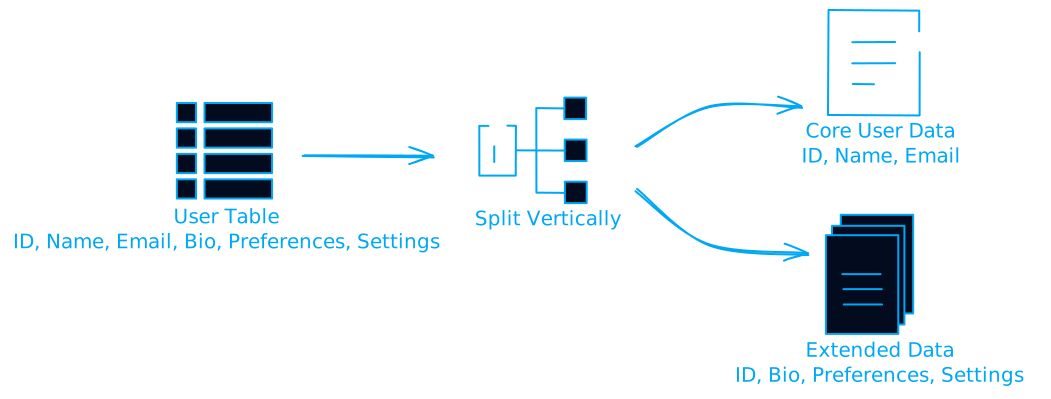
This is brilliant when you have:
- Frequently accessed columns mixed with rarely used ones
- Large text/blob columns that slow down queries
- Different access patterns for different column groups
Functional Partitioning (The Smart Choice)
This is where you separate data based on how it's used, not just its characteristics.
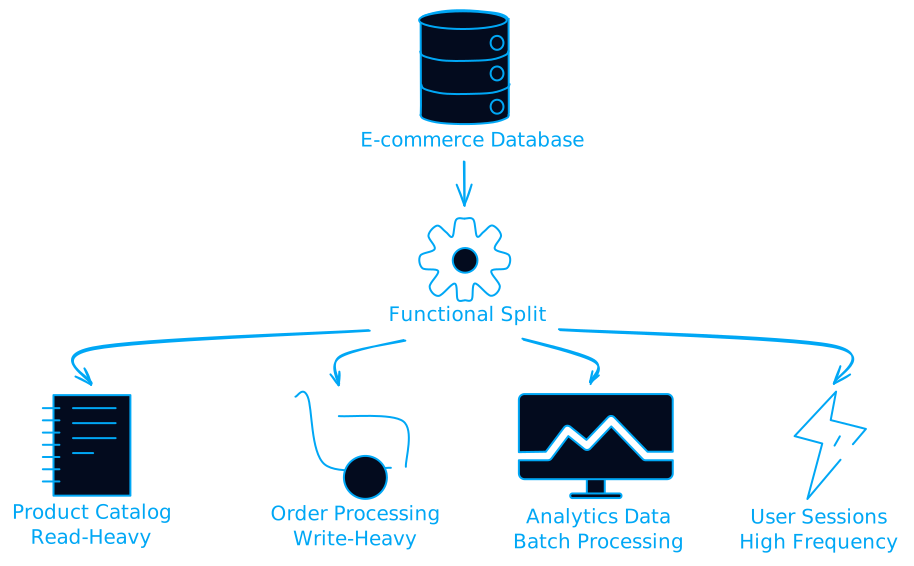
The Real-World Implementation Challenges
Challenge 1: Cross-Partition Queries
Here's where things get tricky. What happens when you need data from multiple partitions?
-- This query might hit multiple partitions
SELECT customer_id, SUM(amount)
FROM orders
WHERE order_date BETWEEN '2023-12-15' AND '2024-01-15'
GROUP BY customer_id;
Solution: Design your partitioning strategy around your most common query patterns. If you frequently query across date ranges, maybe hash partitioning by customer_id makes more sense.
Challenge 2: Rebalancing Nightmares
Data grows unevenly. Your 2024 partition might explode while 2020 sits there collecting digital dust.
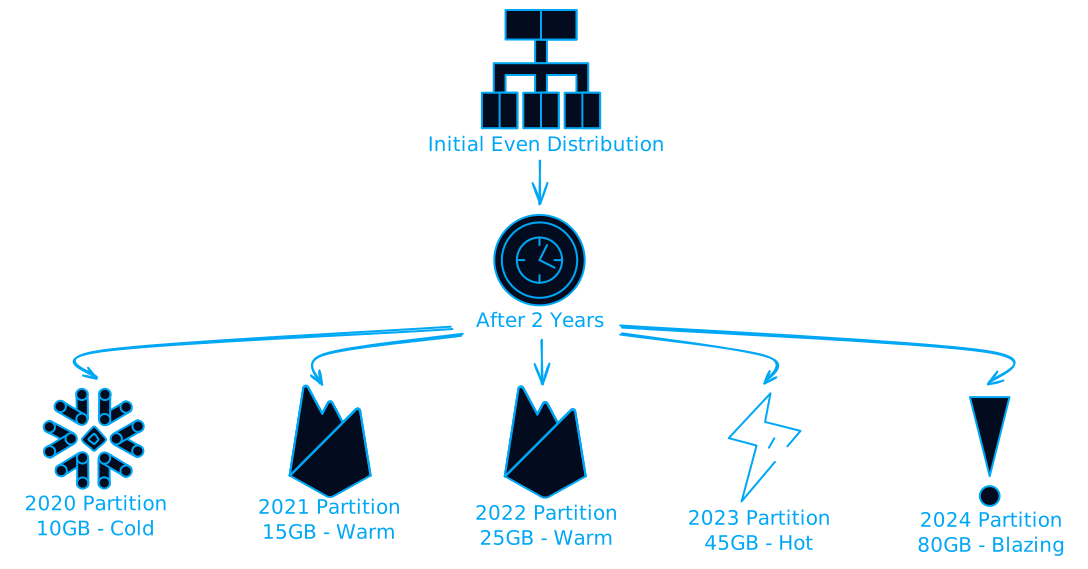
Solution: Plan for growth patterns and consider sub-partitioning hot partitions.
Challenge 3: Foreign Key Headaches
Foreign keys across partitions? Good luck with that. Most databases either don't support it or make it painfully slow.
Workaround:
- Keep related data in the same partition when possible
- Use application-level constraints instead of database FKs
- Consider denormalization for frequently joined data
Cloud-Native Partitioning Strategies
AWS RDS and Aurora
Amazon RDS supports table partitioning, but Aurora takes it further with automatic scaling:
-- Aurora MySQL example
CREATE TABLE user_events (
    event_id BIGINT AUTO_INCREMENT,
    user_id INT,
    event_type VARCHAR(50),
    created_at TIMESTAMP DEFAULT CURRENT_TIMESTAMP,
    PRIMARY KEY (event_id, created_at)
)
PARTITION BY RANGE (UNIX_TIMESTAMP(created_at)) (
    PARTITION p_202401 VALUES LESS THAN (UNIX_TIMESTAMP('2024-02-01')),
    PARTITION p_202402 VALUES LESS THAN (UNIX_TIMESTAMP('2024-03-01'))
);
Sharding with Amazon RDS Proxy
For horizontal scaling across multiple database instances:
# Python example with database routing
class DatabaseRouter:
    def __init__(self):
        self.shards = {
            'shard_1': 'db1.cluster-xxx.us-east-1.rds.amazonaws.com',
            'shard_2': 'db2.cluster-xxx.us-east-1.rds.amazonaws.com',
            'shard_3': 'db3.cluster-xxx.us-east-1.rds.amazonaws.com'
        }

    def get_shard(self, user_id):
        shard_key = user_id % len(self.shards)
        return self.shards[f'shard_{shard_key + 1}']

    def execute_query(self, user_id, query):
        shard = self.get_shard(user_id)
        # Execute query on appropriate shard
        return execute_on_shard(shard, query)
Monitoring and Automation
Key Metrics to Watch
- Partition Size Distribution
-- MySQL example to check partition sizes
SELECT
    PARTITION_NAME,
    TABLE_ROWS,
    DATA_LENGTH / 1024 / 1024 AS size_mb
FROM INFORMATION_SCHEMA.PARTITIONS
WHERE TABLE_NAME = 'your_table'
ORDER BY DATA_LENGTH DESC;
- Query Performance Across Partitions
-- Check which partitions are being accessed
EXPLAIN PARTITIONS
SELECT * FROM orders
WHERE order_date >= '2024-01-01';
- Partition Pruning Effectiveness Look for queries that scan more partitions than necessary.
Automated Partition Management
# Python script for automatic partition management
import datetime
from sqlalchemy import create_engine

class PartitionManager:
    def __init__(self, db_url):
        self.engine = create_engine(db_url)

    def create_monthly_partition(self, table_name, date):
        next_month = date.replace(day=1) + datetime.timedelta(days=32)
        next_month = next_month.replace(day=1)

        partition_name = f"p_{date.strftime('%Y%m')}"

        sql = f"""
        ALTER TABLE {table_name}
        ADD PARTITION (
            PARTITION {partition_name}
            VALUES LESS THAN ('{next_month.strftime('%Y-%m-%d')}')
        )
        """

        with self.engine.connect() as conn:
            conn.execute(sql)

    def drop_old_partitions(self, table_name, months_to_keep=12):
        cutoff_date = datetime.datetime.now() - datetime.timedelta(days=30 * months_to_keep)
        # Implementation to drop old partitions
        pass
When NOT to Partition
Let's be real for a second. Partitioning isn't always the answer.
Don't partition if:
- Your table is under 10GB (seriously, just add an index)
- You frequently need data from all partitions
- Your queries don't align with partition boundaries
- You're just starting out and don't have clear access patterns yet
Consider alternatives:
- Better indexing strategies
- Query optimization
- Caching layers (Redis, Memcached)
- Read replicas for read-heavy workloads
The Future of Database Partitioning
Auto-Partitioning and AI
Modern databases are getting smarter. PostgreSQL 13+ has better partition-wise joins, and cloud providers are adding auto-partitioning features.
Serverless and Partitioning
With serverless databases like Aurora Serverless v2, partitioning strategies need to account for automatic scaling and pausing.
Practical Next Steps
-
Audit Your Current Setup
- Identify your largest, slowest tables
- Analyze query patterns over the last 30 days
- Look for tables that could benefit from archival strategies
-
Start Small
- Pick one table that's clearly causing problems
- Choose the most obvious partitioning strategy (usually date-based)
- Test thoroughly in a staging environment
-
Monitor and Iterate
- Set up monitoring for partition sizes and query performance
- Plan for automated partition management
- Document your partitioning strategy for the team
Wrapping Up
Database partitioning isn't magic, but it's pretty close when done right. It's like organizing your digital life, you don't realize how much mental overhead you're carrying until everything has its proper place.
The key is understanding your data access patterns and choosing the right strategy. Don't just partition because everyone else is doing it. Do it because it solves a real problem you're facing.
Start with the basics, monitor everything, and remember that the best partitioning strategy is the one that makes your queries faster and your maintenance easier. Your future self (and your users) will thank you.
Got questions about implementing partitioning in your specific setup? The database community is pretty helpful, and most cloud providers have detailed guides for their specific implementations. Just remember to test everything in staging first, because nobody wants to be the person who accidentally dropped the production partition.