Database Indexing vs Write Speed
Ever wondered why your database suddenly crawls to a halt after adding "just one more index"? You're not alone. Let's dive deep into one of the most critical trade-offs in system design.
The Problem Every Developer Faces (And Why It Matters)
Picture this: You've built an amazing app, users are flooding in, and suddenly your database starts choking. Your first instinct? Add some indexes to speed up those slow queries. But then something weird happens - your write operations start taking forever, users complain about slow signups, and your monitoring dashboard lights up like a Christmas tree.
Welcome to the indexing vs write speed dilemma, one of the most fundamental trade-offs in database design. It's like trying to organize your closet - the more organized it gets, the longer it takes to put new clothes away.
According to Oracle's performance studies, well-designed indexes can boost query performance by up to 100x. But here's the kicker: every index you add makes write operations slower. Sometimes dramatically slower.
What Exactly Are Database Indexes? (The Simple Explanation)
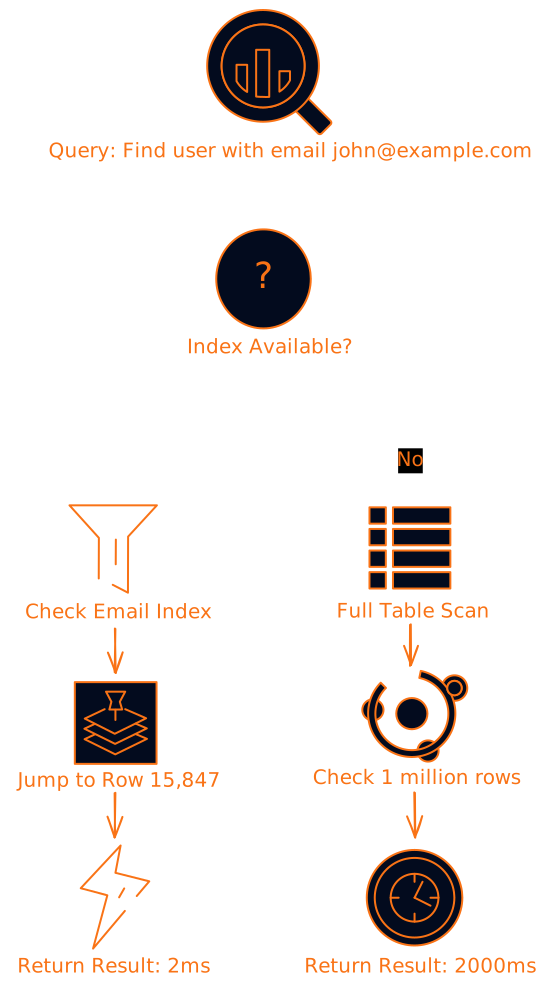
Think of a database index like the index at the back of a textbook. Instead of flipping through every single page to find information about "machine learning," you check the index, see it's on page 247, and jump straight there.
Database indexes work similarly. They're separate data structures that point to where your actual data lives. When you query for all users with the email "john@example.com," the database checks the email index, finds the pointer, and retrieves the data directly instead of scanning every single row.
Why Indexes Slow Down Write Operations (The Technical Reality)
Here's where things get interesting. Every time you insert, update, or delete data, the database doesn't just modify the main table. It has to update every single index that references the changed data.
Let's break down what happens during a simple user registration:

What should be one write operation becomes six or seven operations. This is called write amplification, and it's the hidden performance killer in many systems.
The Different Types of Indexes (And Their Write Costs)
Not all indexes are created equal. Let's look at the main types and how they impact write performance:
B-Tree Indexes: The Reliable Workhorses
B-tree indexes are like a well-organized filing cabinet. They keep data sorted and balanced, making searches fast. But when you need to add new data, sometimes you have to reorganize entire sections.
Write Impact: Moderate to high, especially when the tree needs rebalancing Best For: General-purpose indexing, range queries, sorting
Hash Indexes: The Speed Demons (With Limitations)
Hash indexes are like having a perfect memory for exact matches. You ask for "user ID 12345" and boom, instant result. But they can't help with range queries like "all users created between January and March."
Write Impact: Low for simple operations, but can spike during hash table resizing Best For: Exact match lookups, unique constraints
LSM Trees: The Write-Optimized Champions
Log-Structured Merge trees flip the script entirely. Instead of updating indexes immediately, they batch writes and optimize them later. It's like having a messy desk but knowing exactly where everything is.
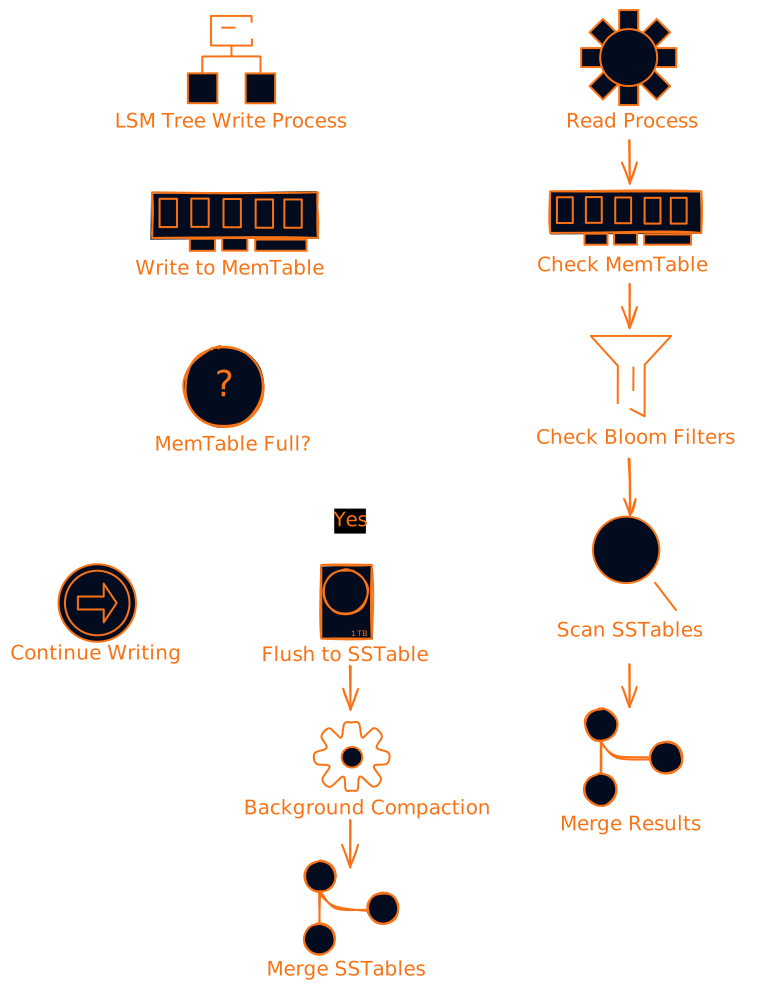
Write Impact: Very low, writes are sequential Read Impact: Higher, may need to check multiple levels Best For: Write-heavy workloads, time-series data
When to Prioritize Read Performance (The OLAP Scenario)
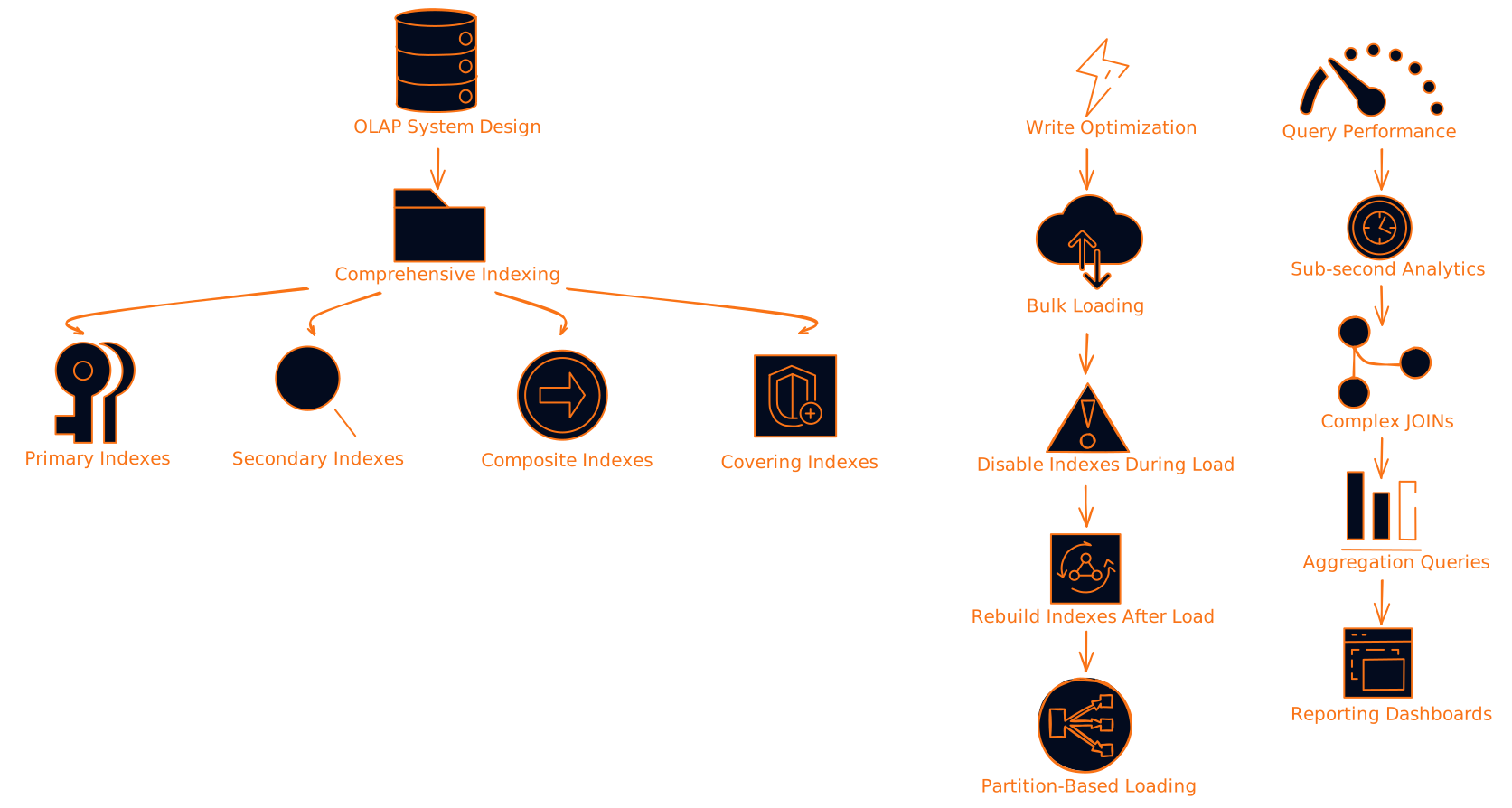
If you're building a data warehouse or analytics system where reads vastly outnumber writes, you can go crazy with indexes. Think of it like a library - it takes time to properly catalog and shelve new books, but finding any book becomes lightning fast.
OLAP Characteristics:
- 80%+ read operations
- Complex analytical queries
- Large datasets
- Batch data loading
Indexing Strategy:
- Multiple indexes per table
- Composite indexes for multi-column queries
- Covering indexes to avoid table lookups
- Materialized views for complex aggregations
When to Prioritize Write Performance (The OLTP Reality)
On the flip side, if you're building a high-traffic application where users are constantly creating, updating, and deleting data, write performance becomes critical. This is like a busy restaurant kitchen - you need to serve orders fast, not spend time organizing the spice rack.
OLTP Characteristics:
- High write volume
- Short transactions
- Point queries (find specific records)
- Real-time processing requirements
Indexing Strategy:
- Minimal essential indexes only
- Focus on primary keys and foreign keys
- Avoid redundant indexes
- Monitor for lock contention
Real-World Example: E-commerce During Black Friday
Imagine an e-commerce site during Black Friday. Every second, thousands of users are:
- Creating accounts
- Adding items to carts
- Placing orders
- Updating inventory
If your database is spending too much time maintaining indexes, these operations slow down, users get frustrated, and you lose sales. In this scenario, you might temporarily disable non-critical indexes during peak hours and rebuild them later.
The Hybrid Approach: HTAP Systems
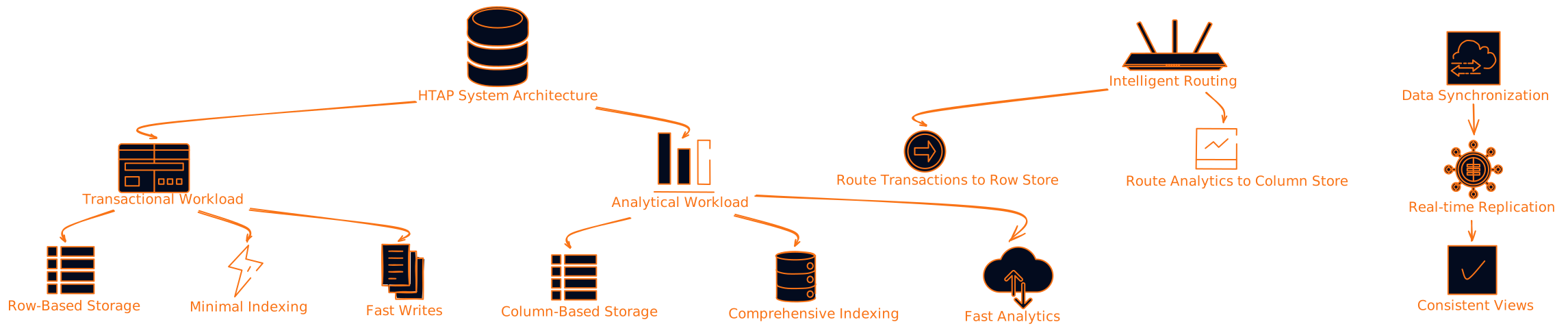
Modern applications often need both fast reads AND fast writes. This is where Hybrid Transactional/Analytical Processing (HTAP) systems shine. They're like having both a fast-food counter and a fine dining experience in the same restaurant.
Advanced Optimization Techniques
Write-Ahead Logging (WAL): The Safety Net
WAL is like having a detailed diary of everything that happens to your database. Before making any changes, the database writes them to a log file. This ensures data safety and can actually improve write performance through batching.
Bulk Loading: The Efficiency Hack
When you need to load large amounts of data, the smart approach is:
- Drop or disable indexes
- Load all the data
- Rebuild indexes from scratch
It's like moving to a new house - you don't organize as you pack, you pack everything first, then organize in the new place.
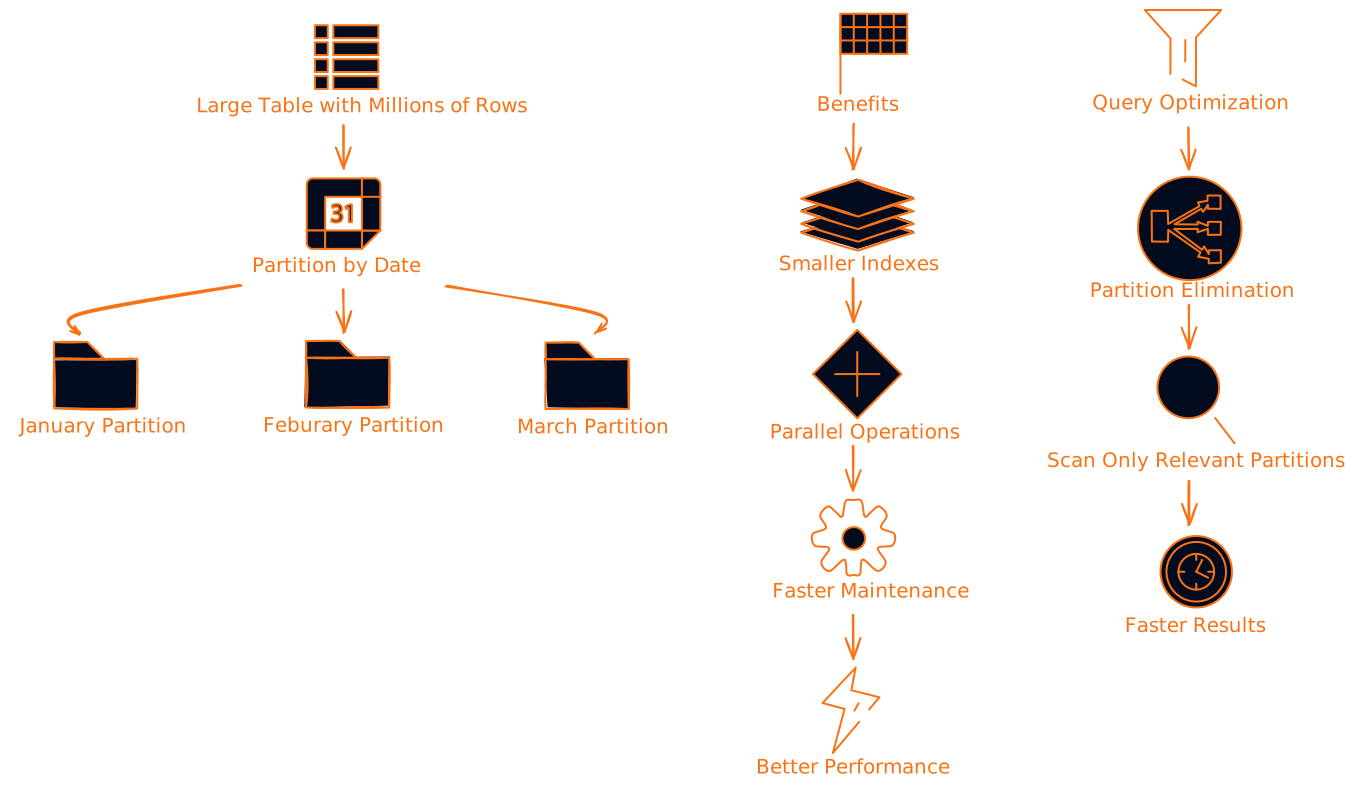
Partitioning: Divide and Conquer
Partitioning splits large tables into smaller, more manageable pieces. Each partition can have its own indexes, reducing contention and improving both read and write performance.
Making the Right Decision: A Practical Framework
Here's a decision framework I use when designing systems:
Step 1: Analyze Your Workload
Ask yourself these questions:
- What's your read-to-write ratio?
- How complex are your queries?
- What are your performance requirements?
- How much can you spend on hardware?
Step 2: Start Minimal, Add Strategically
Begin with only essential indexes:
- Primary keys (always needed)
- Foreign keys (for referential integrity)
- Unique constraints (for data quality)
Then add indexes based on actual query patterns, not assumptions.
Step 3: Monitor and Measure
Track these key metrics:
- Query response times
- Write operation latency
- Index usage statistics
- Lock wait times
- Storage growth

Common Pitfalls (And How to Avoid Them)
The "Index Everything" Trap
I've seen developers create indexes on every column "just in case." This is like having 20 different filing systems for the same documents - it creates more confusion than clarity.
Solution: Only create indexes for columns actually used in WHERE clauses, JOIN conditions, or ORDER BY statements.
The "Set It and Forget It" Mistake
Indexes aren't fire-and-forget. As your data and query patterns evolve, your indexing strategy should too.
Solution: Regular index maintenance and monitoring. Set up alerts for unused indexes and performance degradation.
The "One Size Fits All" Fallacy
Different parts of your application may have different performance requirements. Your user authentication system needs fast writes, while your reporting system needs fast reads.
Solution: Design indexing strategies per table or even per partition based on actual usage patterns.
Real-World Case Studies
Case Study 1: Social Media Platform
Challenge: A social media platform was struggling with slow timeline generation while maintaining fast posting capabilities.
Solution:
- Minimal indexes on the posts table for fast writes
- Heavily indexed read replicas for timeline generation
- Asynchronous replication between write and read databases
Result: 90% improvement in posting speed, maintained sub-second timeline generation
Case Study 2: Financial Trading System
Challenge: A trading system needed microsecond latency for both order placement and market data queries.
Solution:
- In-memory database for active trading data
- LSM trees for historical data storage
- Specialized hardware with NVMe SSDs
Result: Achieved 99.9th percentile latency under 500 microseconds
Case Study 3: IoT Data Platform
Challenge: Processing millions of sensor readings per second while providing real-time analytics.
Solution:
- Time-series database with automatic partitioning
- Delayed index creation during off-peak hours
- Columnar storage for analytical queries
Result: 10x improvement in data ingestion rate while maintaining query performance
The Future of Database Indexing
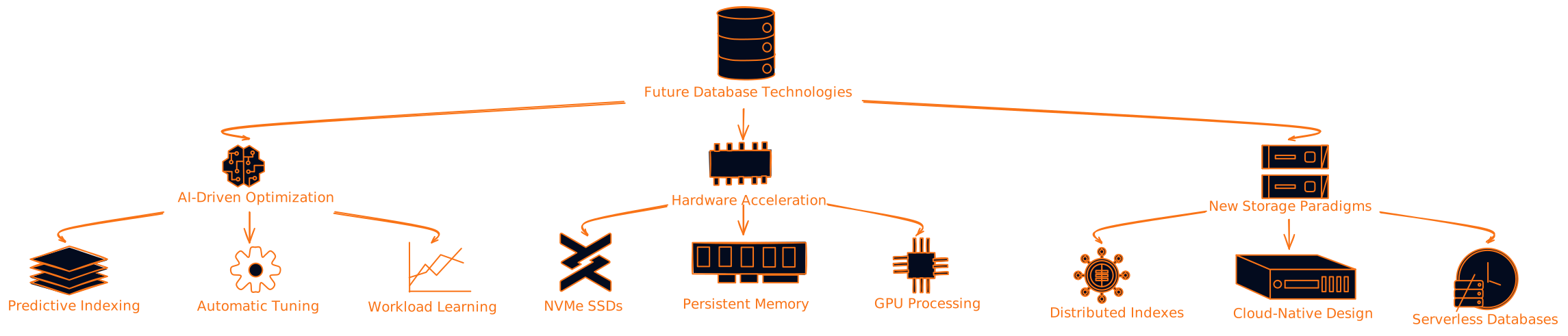
AI-Driven Index Optimization
Machine learning is starting to revolutionize how we manage indexes. Instead of manually tuning, AI systems can:
- Predict query patterns
- Automatically create and drop indexes
- Optimize index structures in real-time
Hardware Acceleration
New hardware technologies are changing the game:
- NVMe SSDs: Making random writes much faster
- Persistent Memory: Blurring the line between RAM and storage
- GPU Acceleration: Parallel index operations
- Custom ASICs: Purpose-built indexing hardware
Practical Takeaways and Action Items
For New Projects
- Start Simple: Begin with primary keys and foreign keys only
- Measure First: Implement monitoring before optimizing
- Add Incrementally: Create indexes based on actual performance issues
- Document Decisions: Keep track of why each index was created
For Existing Systems
- Audit Current Indexes: Find and remove unused indexes
- Analyze Query Patterns: Use database query analyzers to understand actual usage
- Benchmark Changes: Always test index changes in a staging environment
- Plan Maintenance Windows: Schedule regular index maintenance
Monitoring Checklist
Set up alerts for:
- Query response time > 100ms
- Write latency > 50ms
- Index usage < 1% over 30 days
- Lock wait time > 10% of transaction time
- Storage growth > 20% per month
What's Next?
The indexing vs write speed trade-off isn't going away anytime soon. As systems become more complex and data volumes grow, making the right decisions becomes even more critical.
Here's what you should focus on:
- Understand Your Workload: Spend time analyzing actual usage patterns, not assumptions
- Embrace Monitoring: You can't optimize what you don't measure
- Stay Flexible: Be ready to adapt your strategy as requirements change
- Learn Continuously: Database technology evolves rapidly, stay updated
The key is finding the sweet spot for your specific use case. There's no universal answer, but with the right approach and tools, you can build systems that perform well under any workload.
Remember: the best database design is one that evolves with your application. Start simple, measure everything, and optimize based on evidence, not guesswork.
Further Reading
Want to dive deeper? Check out these resources:
- Use The Index, Luke! - Comprehensive guide to database indexing
- High Performance MySQL - Deep dive into MySQL optimization
- Designing Data-Intensive Applications - Modern approaches to data system design
- Database Internals - Understanding how databases work under the hood
The world of database performance is fascinating and constantly evolving. The more you understand these fundamentals, the better equipped you'll be to build systems that scale gracefully and perform reliably under any load.
What's your experience with database indexing? Have you faced similar trade-offs in your projects? Share your stories and questions in the comments below.