Block, File, and Object Storage: EBS, EFS, S3, Parquet, and Iceberg Compared
Introduction
Almost every system design answer eventually says "and we store it." Where "it" lives decides your latency, your failure domain, your bill, and how many machines can touch the data at once. Interviewers probe whether you know why "put it in S3" and "put it on a disk" are not interchangeable.
This post compares block, file, and object storage through the AWS services interviews reference most (EBS and instance store, EFS with a nod to FSx, and S3), then the formats that turn a bucket into a queryable data lake: Parquet and Apache Iceberg. For each we cover when to use it, how it works, concrete config, scaling, and failure modes.
The running example is Clipstream, a video-sharing app. It runs a PostgreSQL database, accepts user uploads, transcodes them into several renditions, shares a set of model files and templates across a worker fleet, and keeps a year of playback events for analytics. Every storage type in this post earns a place in that design.
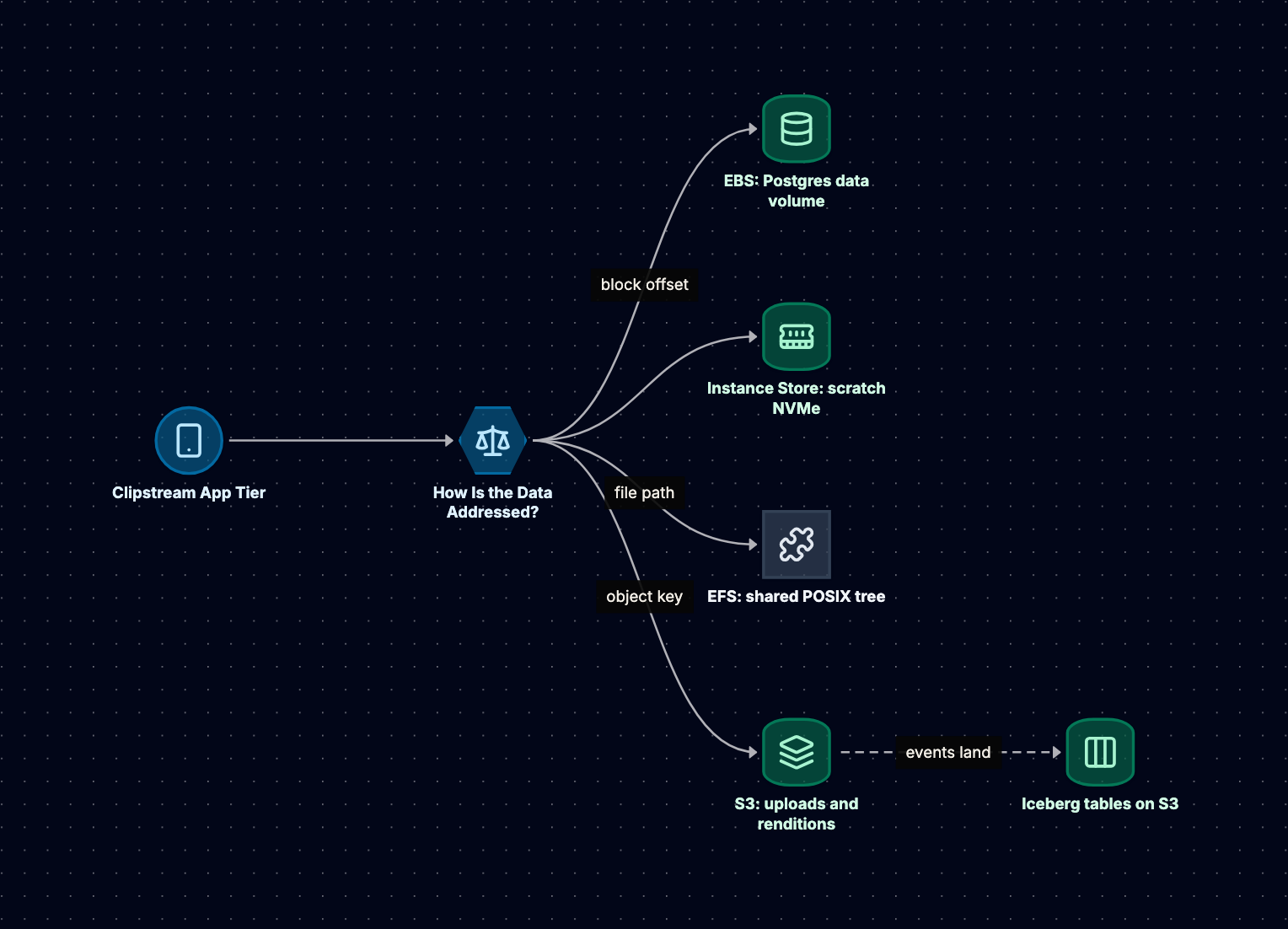
Three Ways to Address Bytes
The cleanest way to separate the three types is by how you name a piece of data and what operations you get.
Block storage exposes a raw array of fixed-size blocks. The client (the operating system kernel) reads and writes by offset: "give me 4 KiB at block 1,048,576." There are no files, no names, and no permissions at this layer. A file system such as ext4 or XFS, or a database that manages its own pages, sits on top and decides what the blocks mean. The kernel caches aggressively and assumes nobody else is writing, which is why a block volume is normally attached to one host at a time.
File storage exposes a hierarchy of directories and files with POSIX semantics: open, read, write at an offset, rename, chmod, and locks. The file system runs on the server side and speaks a network protocol (NFS or SMB), so many clients can mount the same tree concurrently. The server, not each client, owns metadata, which is what makes sharing safe and also what makes metadata-heavy operations slow over a network.
Object storage exposes a flat map from a key to an immutable blob plus metadata, over HTTP. You PUT a whole object, GET it (optionally a byte range), DELETE it, and LIST keys by prefix. There is no in-place partial update and no rename: to change one byte you write a new object. In exchange, the service can spread data across many machines and facilities, scale to effectively unlimited capacity, and be reached from anywhere with credentials.
| Property | Block | File | Object |
|---|---|---|---|
| Address | Volume + block offset | Path in a directory tree | Bucket + key |
| Protocol | NVMe or SCSI to the host | NFS or SMB over the network | HTTPS REST API |
| Update model | Overwrite any block | Overwrite any byte range | Replace whole object |
| Sharing | One host (with narrow exceptions) | Many hosts concurrently | Any client with credentials |
| Typical latency | Sub-millisecond | Around a millisecond and up | Tens of milliseconds to first byte |
The latency row is order of magnitude, not a benchmark. Each step from block to file to object adds coordination and trades latency for sharing and scale.
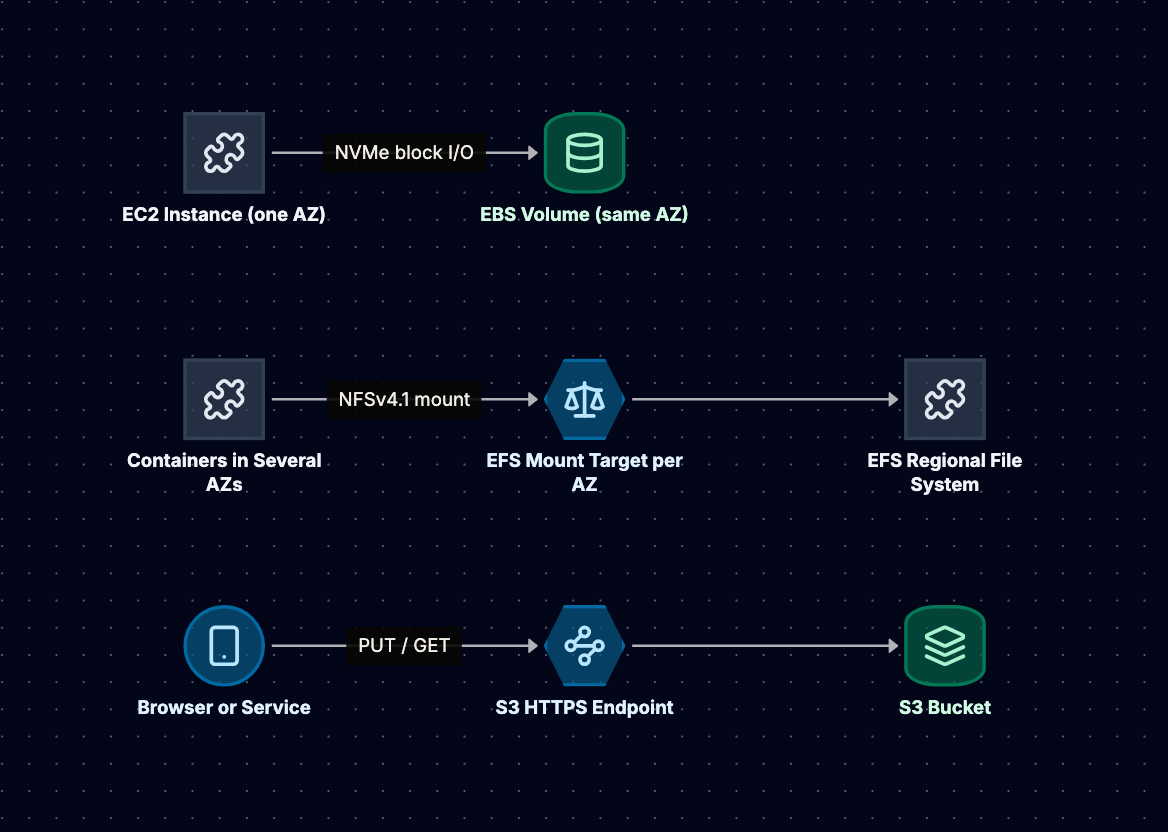
Block Storage: EBS, IOPS, Throughput, and Snapshots
When to Use It
Use block storage when one host needs a fast, persistent, random-access disk. That covers database data directories (PostgreSQL, MySQL, self-managed Kafka or Elasticsearch), boot volumes, and any software that expects a local file system and calls fsync often. In Clipstream, the PostgreSQL primary's data directory lives on EBS.
Do not use it as a shared drive, an archive, or the place user uploads accumulate. It is billed by provisioned size and lives in one availability zone.
How EBS Works
An EBS volume is network-attached block storage. It looks like a local NVMe device to the instance (on Nitro-based instances), but the data lives on a storage fleet in the same availability zone, replicated within that AZ to protect against component failure. Two consequences follow, and both come up in interviews:
- A volume can only attach to an instance in the same AZ. To move data to another AZ you snapshot and restore.
- An AZ outage takes the volume with it. High availability for a database on EBS comes from replication at the database layer (a standby in another AZ), not from EBS itself.
Volume types fall into SSD-backed and HDD-backed families:
- gp3 (general purpose SSD) is the sensible default because performance is decoupled from size: every gp3 volume gets a baseline of 3,000 IOPS and 125 MiB/s regardless of capacity, and you provision more IOPS and throughput independently. The ceilings have been raised over time (16,000 IOPS and 1,000 MiB/s at the 2020 launch, higher for large volumes since), so check current documentation before quoting a maximum.
- gp2 is the older general purpose type, where IOPS scale with size (3 IOPS per GiB) and small volumes rely on burst credits. A classic trap was over-sizing gp2 volumes just to buy IOPS; gp3 removed that reason.
- io2 Block Express (provisioned IOPS SSD) is for latency-sensitive databases that need high, consistent IOPS. It supports far higher IOPS per volume than gp3, is designed for higher durability than the other types, and supports Multi-Attach to several instances in the same AZ. Multi-Attach only helps with cluster-aware software; mounting ext4 on two hosts at once will corrupt it.
- st1 and sc1 (HDD) suit large sequential workloads such as log processing. They cannot be boot volumes and perform poorly on small random I/O.
Two numbers describe performance. IOPS matters for small random I/O (database pages of 8 KiB to 16 KiB). Throughput matters for large sequential I/O (scans, backups). A volume hits whichever limit comes first. The third limit people forget: each instance type has its own maximum EBS bandwidth and IOPS, so a fast volume on a small instance buys nothing.
Instance Store vs EBS
Some instance types include instance store: NVMe SSDs physically attached to the host. It is the fastest storage on EC2 and costs nothing extra, but it is ephemeral: data survives a reboot but is lost when the instance stops, terminates, or the hardware fails. Use it for caches, scratch space, and replicated systems (Cassandra, Kafka) that can rebuild a lost node from peers. In Clipstream, transcoding workers write intermediate frames there, then upload renditions to S3.
Snapshots
An EBS snapshot is a point-in-time copy of a volume stored in S3 (AWS-managed, not a bucket you browse). Snapshots are incremental at the block level: each stores only blocks changed since the previous one, yet behaves as a complete image by referencing earlier blocks. Deleting a snapshot only removes blocks no other snapshot references, so deleting the first one does not break later ones.
Three details are worth knowing:
- Snapshots are crash-consistent, like pulling the power cord. A database will recover through its WAL, but for application consistency, flush or freeze writes first, or use the database's own backup tooling.
- Restored volumes load lazily. A volume created from a snapshot is usable at once, but blocks are fetched from S3 on first access, so the first read of each block is slow. For a database you are about to put into service, either pre-read the volume or enable Fast Snapshot Restore for that snapshot in that AZ, which costs extra.
- Snapshots are regional and copyable. Copying them to another Region is the standard building block for cross-Region disaster recovery of EBS-based systems.
Example: Clipstream's Database Volume
# A 500 GiB gp3 volume with IOPS and throughput provisioned above baseline
aws ec2 create-volume \
  --availability-zone ap-south-1a \
  --volume-type gp3 \
  --size 500 \
  --iops 6000 \
  --throughput 250 \
  --encrypted \
  --tag-specifications 'ResourceType=volume,Tags=[{Key=app,Value=clipstream-db}]'

# Daily snapshot via Data Lifecycle Manager is preferable; ad hoc version:
aws ec2 create-snapshot \
  --volume-id vol-0abc123 \
  --description "clipstream-db pre-migration"

# Raise IOPS later without detaching (Elastic Volumes)
aws ec2 modify-volume --volume-id vol-0abc123 --iops 9000
Elastic Volumes change size, type, IOPS, and throughput while the volume is in use. After growing a volume you still extend the file system, and AWS enforces a waiting period between modifications of the same volume, so plan changes rather than toggling them mid-incident.
Scaling and Failure Modes
Scaling block storage is mostly vertical: a bigger volume, more provisioned IOPS, a larger instance, or striping volumes with RAID 0 or LVM (which makes consistent snapshots of the set harder). Beyond that, you scale the software: shard the database or add replicas, each with its own volume.
Anti-patterns to name in an interview:
- Treating EBS as highly available across AZs. It is not. Replicate at the application layer.
- Over-provisioning IOPS "to be safe." Provisioned IOPS are billed whether you use them or not. Measure with CloudWatch volume metrics and right-size.
- Ignoring the instance limit. A high-IOPS volume on an instance that cannot drive it throttles silently.
- Running a database on instance store without replication. One stop or host failure and the data is gone.
- No tested restore. Snapshots that have never been restored, with lazy loading measured, are not a recovery plan.
File Storage: EFS, NFS, and Shared POSIX
When to Use It
Use a shared file system when several hosts need the same files through normal POSIX calls and rewriting the software for an object API is not an option: legacy apps with an uploads/ directory, home directories, build caches, and model files read by many containers. In Clipstream, containers across three AZs read the same watermark templates, fonts, and model files from EFS.
Avoid it for huge volumes of user content (S3 fits better) and for databases unless the vendor supports NFS.
How EFS Works
Amazon EFS is a managed, elastic NFS file system. Clients mount it over NFSv4.0 or NFSv4.1 through a mount target, which is an elastic network interface in each AZ's subnet. A Regional file system stores data redundantly across multiple AZs, so clients in any AZ of the Region can read and write the same files, and the file system survives the loss of an AZ. A cheaper One Zone option keeps data in a single AZ. Capacity grows and shrinks with the bytes you store; there is nothing to provision.
Semantics. NFS gives close-to-open consistency: when one client closes a file, another client that opens it afterwards sees the changes. Two clients writing the same file at the same time without coordination will interleave or overwrite each other. For coordination, NFSv4 supports advisory byte-range locks, which EFS honors (fcntl locks work across clients). Advisory means a process that does not ask for the lock is not stopped. Locks are leased, so a client that crashes eventually loses its locks after the lease expires.
Throughput modes. EFS offers Elastic throughput (scales automatically with demand and is billed by data transferred; AWS recommends it for spiky or unpredictable workloads), Provisioned throughput (you pay for a fixed level independent of size), and the original Bursting mode (baseline throughput grows with stored data, with burst credits on top). The Bursting trap is classic: a small file system with a busy workload burns its credits and drops to a low baseline, which looks like the application suddenly "freezing."
Storage classes. EFS has Standard, Infrequent Access, and Archive classes (Archive was added in late 2023), with lifecycle policies that move files that have not been accessed for a set period. Reads from colder classes carry per-GB access charges.
Latency vs EBS. Every EFS operation crosses the network, and a write to a Regional file system is stored across AZs before it is acknowledged. Per-operation latency is therefore higher than EBS, typically low milliseconds rather than sub-millisecond, with cached reads faster. Parallel sequential reads perform well. What hurts is metadata-heavy work: git clone, npm install, or a PHP app that stats hundreds of files per request, each a stream of small round trips.
Example: Mounting Clipstream's Shared Assets
# /etc/fstab entry using the EFS mount helper (amazon-efs-utils) with TLS
fs-0123456789abcdef0:/ /mnt/assets efs _netdev,tls,iam,noresvport 0 0
On ECS you declare the volume in the task definition (on EKS, the EFS CSI driver plays this role) instead of editing fstab:
{
  "volumes": [{
    "name": "assets",
    "efsVolumeConfiguration": {
      "fileSystemId": "fs-0123456789abcdef0",
      "transitEncryption": "ENABLED",
      "authorizationConfig": { "accessPointId": "fsap-0aa11bb22cc33dd44", "iam": "ENABLED" }
    }
  }]
}
An access point pins each application to a root directory and a POSIX user and group, which is a cleaner multi-tenant boundary than relying on each container to run as the right UID.
FSx at a Glance
EFS is Linux NFS. For other needs AWS offers FSx: FSx for Windows File Server (SMB, Active Directory), FSx for Lustre (a parallel file system for HPC and ML training that can link to an S3 bucket), FSx for NetApp ONTAP (multi-protocol), and FSx for OpenZFS. Naming the right one for the requirement is usually enough.
Scaling and Failure Modes
EFS scales capacity automatically and throughput by mode. Aggregate throughput grows with the number of parallel clients and threads; a single client with a single thread is bounded by per-operation latency.
Anti-patterns:
- Using EFS for a database or a write-heavy single-host workload. It is slower and more expensive than EBS for one writer.
- Assuming file-level atomicity across clients. Without locks or an atomic
renameof a temp file into place, readers can see partial writes. - Millions of tiny files in one directory. Listing and metadata operations become the bottleneck. Shard into subdirectories.
- Bursting mode on a small file system. Credits run out under load; switch to Elastic.
Object Storage: S3 Durability, Consistency, and Storage Classes
When to Use It
Use object storage for anything written once and read many times, by many readers, at any scale: user uploads, images and video, static web assets, backups, logs, ML datasets, and data lake files. In Clipstream, original uploads and every transcoded rendition live in S3, and the CDN reads from it.
S3 is a poor fit for data that changes in small pieces in place, for workloads that need POSIX semantics, and for single-digit millisecond lookups of small records (a key-value database is better).
How S3 Works
Flat namespace. A bucket is a flat map from key to object. videos/2026/10/v42.mp4 is one key; the slashes are just characters. The console and ListObjectsV2 with Delimiter=/ present "folders" by grouping keys on a prefix, but there is no directory object to rename or lock. Renaming a "folder" means copying and deleting every object under the prefix, which is why tools that treat S3 like a file system get slow on renames.
Durability. S3 Standard is designed for 99.999999999% (11 nines) durability over a year. The design behind that number: objects in most classes are stored redundantly across at least three AZs, a PUT succeeds only after data is durably stored, checksums are verified on upload and in the background, and damaged copies are repaired from healthy ones. Durability is not availability (S3 Standard is designed for 99.99%), and it does not protect you from your own DELETE; versioning, Object Lock, and replication do. One Zone classes keep data in a single AZ.
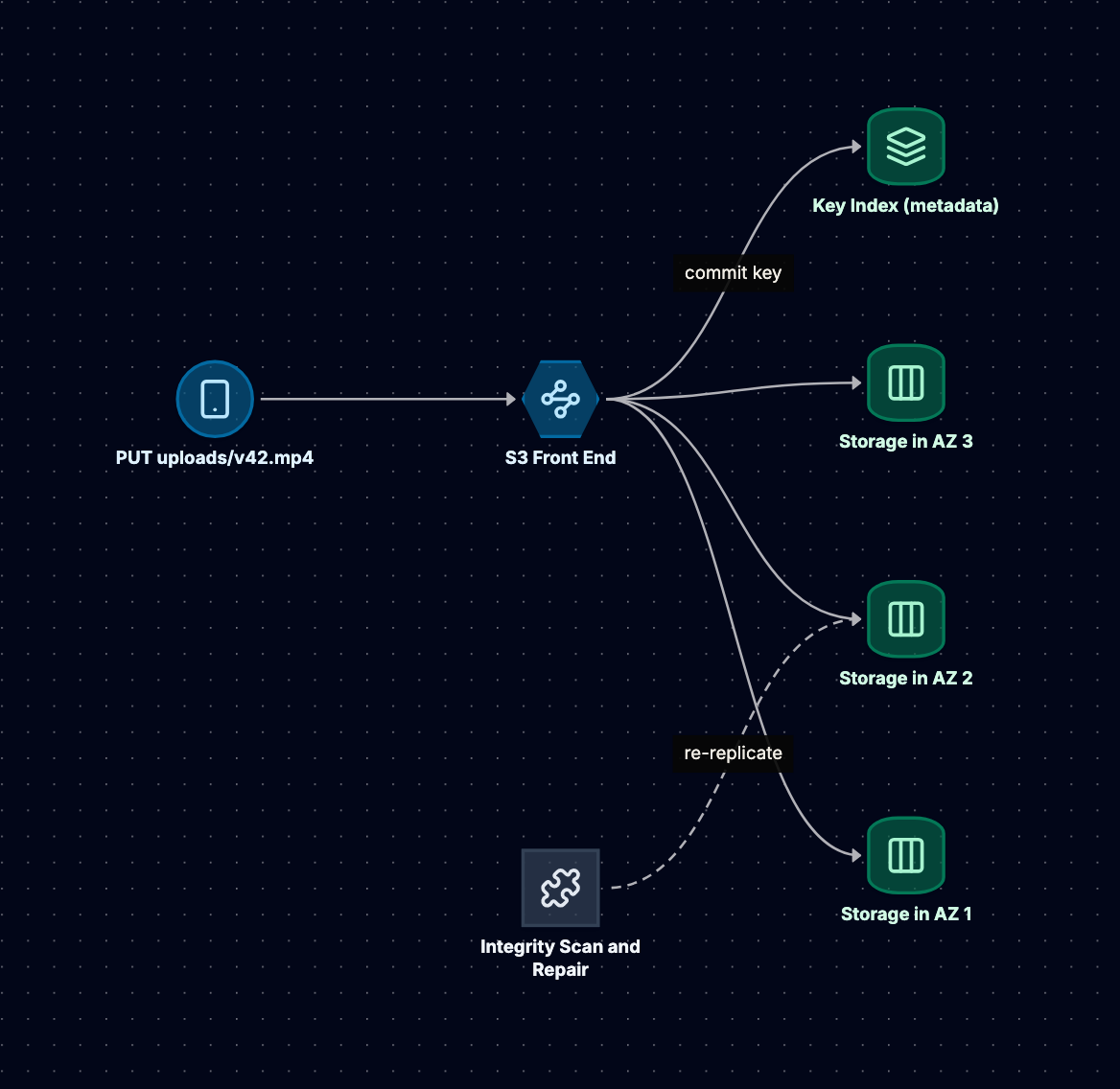
Consistency. Since December 2020, S3 provides strong read-after-write consistency for all PUT and DELETE operations, including overwrites, and LIST reflects completed writes. Before that, overwrites and deletes were eventually consistent, which is why older tools (EMRFS consistent view, S3Guard) worked around it. Two caveats remain: there is no multi-object transaction, and concurrent writers to one key race with the last one winning. Conditional writes (If-None-Match, added August 2024, and If-Match, added later in 2024) enable safe single-key coordination. Bucket configuration changes can take a short time to propagate.
Multipart upload. A single PUT can upload up to 5 GB. Larger objects must use multipart upload: initiate, upload parts in parallel (each part from 5 MiB to 5 GiB, up to 10,000 parts), then complete. AWS recommends multipart for objects above roughly 100 MB because parallel parts improve throughput and a failed part can be retried alone. Uploaded parts of an incomplete upload are stored and billed until you complete or abort it.
Request rates. S3 supports at least 3,500 PUT/COPY/POST/DELETE and 5,500 GET/HEAD requests per second per partitioned prefix, and scales by partitioning further as sustained load grows. During that scaling you may see 503 Slow Down responses, so clients should retry with exponential backoff. Spreading hot traffic across several prefixes raises the aggregate ceiling. The old advice to hash-prefix every key predates AWS's 2018 request-rate increase and is rarely needed now.
Storage classes and lifecycle. You choose a class per object:
- S3 Standard: frequent access, no retrieval fee.
- S3 Intelligent-Tiering: S3 moves objects between access tiers based on observed access, for a small per-object monitoring fee. Good when access is unknown.
- S3 Standard-IA and One Zone-IA: cheaper storage, per-GB retrieval fee, 30-day minimum storage duration, and a 128 KB minimum billable object size.
- S3 Glacier Instant Retrieval: archive pricing with millisecond access, 90-day minimum.
- S3 Glacier Flexible Retrieval: restore takes minutes to hours, 90-day minimum.
- S3 Glacier Deep Archive: lowest storage price, restores take hours, 180-day minimum.
- S3 Express One Zone: a single-AZ class in "directory buckets" for very low, consistent latency, priced for performance rather than for archive.
Lifecycle rules transition objects between classes by age and expire them, including old noncurrent versions and incomplete multipart uploads.
Presigned URLs. A presigned URL embeds a SigV4 signature, so whoever holds it can perform one specific operation (usually GET or PUT on one key) until it expires, without AWS credentials. This lets clients upload directly to S3 instead of streaming gigabytes through your servers. The maximum validity is seven days when signed with long-term IAM user credentials, and no longer than the session when signed with temporary credentials (for example, a role assumed by a Lambda function).
Example: Clipstream's Upload Path
import boto3

s3 = boto3.client("s3", region_name="ap-south-1")

def start_upload(user_id: str, video_id: str) -> str:
    # The client PUTs the file straight to S3; our API never touches the bytes.
    return s3.generate_presigned_url(
        "put_object",
        Params={
            "Bucket": "clipstream-uploads",
            "Key": f"originals/{user_id}/{video_id}.mp4",
            "ContentType": "video/mp4",
        },
        ExpiresIn=900,  # 15 minutes
    )
For multi-gigabyte files the client uses multipart upload with a presigned URL per part (or the SDK's transfer manager on the server side). An S3 event notification on originals/ enqueues a transcoding job, and the workers write renditions to renditions/{video_id}/720p.mp4 and so on.
{
  "Rules": [
    {
      "ID": "originals-to-cold",
      "Filter": { "Prefix": "originals/" },
      "Status": "Enabled",
      "Transitions": [
        { "Days": 30, "StorageClass": "STANDARD_IA" },
        { "Days": 180, "StorageClass": "GLACIER_IR" }
      ]
    },
    {
      "ID": "cleanup-multipart",
      "Filter": { "Prefix": "" },
      "Status": "Enabled",
      "AbortIncompleteMultipartUpload": { "DaysAfterInitiation": 7 }
    }
  ]
}
Originals are rarely re-read after transcoding, so they cool down. Renditions stay in Standard or Intelligent-Tiering because the CDN fetches them unpredictably.
Scaling and Failure Modes
S3 capacity is effectively unlimited, and throughput scales horizontally with parallel connections and prefixes. A single large download goes faster with parallel ranged GETs.
Anti-patterns:
- Using S3 as a database. Listing a prefix to find "the latest record" or reading-modifying-writing a JSON object under concurrency invites lost updates. Put the index in a database and the blobs in S3.
- Millions of tiny objects. Request costs and per-request latency dominate. Batch small records into larger objects.
- Public buckets. Keep Block Public Access on and serve through a CDN with origin access control or presigned URLs.
- Treating durability as backup. 11 nines protects against hardware loss, not against a bad deploy that deletes a prefix. Enable versioning on critical buckets.
Data Lake File Formats: Parquet and Iceberg vs Plain Files
When to Use Them
Once Clipstream holds a year of playback events in S3, teams want to query them: "average watch time by country last month." Plain JSON or CSV works at small volume, but every query reads every byte. Parquet fixes the file layout so engines read only what they need; Iceberg makes many files behave like one table with transactions and history. Use them for scan-heavy analytics, not point lookups or frequent single-row updates.
Parquet: Columnar Layout
A Parquet file stores data by column rather than by row. Internally, a file is divided into row groups (horizontal slices, commonly sized in the range of 128 MB to 1 GB depending on the writer). Inside each row group, each column is stored as a column chunk, which is split into pages. A footer at the end of the file holds the schema and, for each column chunk, statistics such as min, max, and null count.
That layout gives three wins:
- Projection pushdown: a query that touches 3 of 40 columns reads only those column chunks, using ranged
GETs against S3. - Predicate pushdown: the reader checks footer statistics and skips whole row groups whose min/max range cannot match
WHERE country = 'IN'. This works best when data is sorted or clustered on the filter column. - Compression: values in one column are similar, so dictionary encoding, run-length encoding, and a codec such as Snappy or ZSTD shrink them far more than row-oriented text.
import pyarrow as pa
import pyarrow.parquet as pq

table = pa.table({
    "event_time": pa.array([...], type=pa.timestamp("us")),
    "video_id":   pa.array([...], type=pa.string()),
    "country":    pa.array([...], type=pa.string()),
    "watch_ms":   pa.array([...], type=pa.int64()),
})
# Sort by country so row-group min/max stats are selective for country filters
table = table.sort_by("country")
pq.write_table(table, "events.parquet", compression="zstd", row_group_size=1_000_000)
The Small-Files Problem
Streaming ingestion produces many small files, one per writer per minute. Each file costs a LIST entry, an open, a footer read, and planning overhead, so thousands of 1 MB files are far slower and costlier to query than a few 256 MB files with the same rows. The fix is compaction: rewrite small files into larger ones. With plain Hive-style folders (s3://lake/events/day=2026-10-05/) that is risky, because a reader listing mid-rewrite can see old and new files and double-count rows.
Iceberg: A Table Format on Top of Files
Apache Iceberg is a table format: a specification for metadata files that track exactly which data files make up a table at each point in time. Engines such as Spark, Trino, Flink, Athena, and Snowflake read and write it. Delta Lake and Apache Hudi solve similar problems with different designs.
The layout is a tree:
- A catalog (AWS Glue, a REST catalog, Hive Metastore, or others) stores one thing per table: a pointer to the current metadata file.
- The metadata file (
metadata.json) holds the schema history, partition spec history, and the list of snapshots. - Each snapshot points to a manifest list, which lists manifest files along with partition ranges for each.
- Each manifest lists data files (Parquet, usually) with their partition values and per-column statistics.
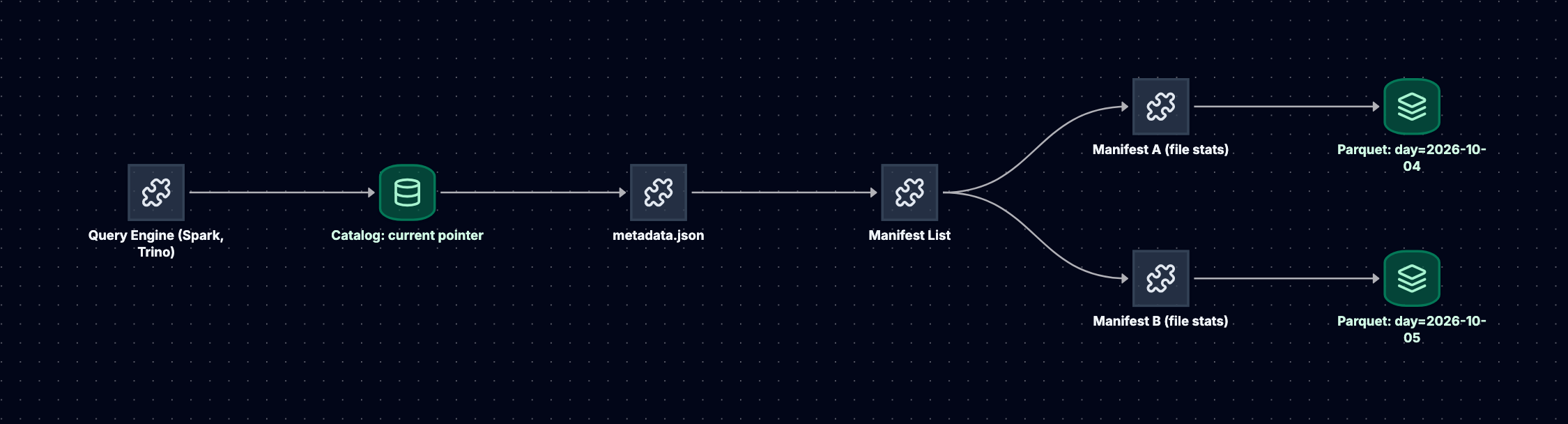
ACID commits. A writer writes new data files, manifests, and a metadata file, then asks the catalog to atomically swap the table pointer to the new metadata file, only if the pointer has not moved since it started (optimistic concurrency). If another writer won, it retries against the new state. Readers start from one metadata file, so they never see partial writes or half-finished compaction. That is how Iceberg gets transactions without a database server.
Time travel. Old snapshots remain until you expire them, so you can query the table as of a snapshot ID or timestamp, audit what changed, or roll back a bad write.
Schema evolution. Columns are tracked by ID, not by name or position. Adding, dropping, renaming, or reordering columns is a metadata change, and old files stay readable.
Partition evolution and hidden partitioning. Partitions are defined as transforms of columns, such as days(event_time) or bucket(16, video_id), and queries filter on the original column, not a synthetic day string. You can change the partition spec (say, from daily to hourly as volume grows) without rewriting old data: old files keep the old spec, new files use the new one, and planning handles both.
-- Spark SQL with an Iceberg catalog named lake
CREATE TABLE lake.analytics.playback_events (
  event_time TIMESTAMP,
  video_id   STRING,
  user_id    STRING,
  country    STRING,
  watch_ms   BIGINT
) USING iceberg
PARTITIONED BY (days(event_time));

-- Later: hourly partitions for new data, no rewrite of old files
ALTER TABLE lake.analytics.playback_events
  REPLACE PARTITION FIELD days(event_time) WITH hours(event_time);

-- Time travel for an audit
SELECT count(*) FROM lake.analytics.playback_events
  TIMESTAMP AS OF '2026-10-01 00:00:00';

-- Housekeeping
CALL lake.system.rewrite_data_files(table => 'analytics.playback_events');
CALL lake.system.expire_snapshots(table => 'analytics.playback_events', older_than => TIMESTAMP '2026-09-01 00:00:00');
Row-level deletes and updates (for example, a user's right-to-erasure request) are supported either by rewriting affected data files (copy-on-write, any format version) or through delete files (merge-on-read, format version 2 and later), with compaction later folding them into rewritten data files. Managed offerings exist as well; for example, S3 Tables, launched in December 2024, provides Iceberg tables with automatic compaction.
Failure Modes
- Never compacting or expiring. Small files and thousands of retained snapshots slow planning and inflate storage. Schedule
rewrite_data_files,expire_snapshots, and orphan-file cleanup. - Many concurrent writers on one table. Optimistic commits retry on conflict; dozens of streaming writers committing every few seconds spend their time retrying. Batch commits or funnel through fewer writers.
- Bypassing the catalog. Writing Parquet files directly into the table's S3 prefix does not add them to the table; deleting files by hand corrupts it.
- Over-partitioning. Partitioning by
user_idcreates millions of tiny partitions. Partition by time and maybe a bucket transform.
Head-to-Head Comparison
| Dimension | EBS (block) | Instance store | EFS (file) | S3 (object) | Iceberg on S3 |
|---|---|---|---|---|---|
| Access interface | Block device, local file system | Block device | NFSv4 mount, POSIX | HTTPS API | SQL via an engine |
| Concurrent writers | One host (io1/io2 Multi-Attach is the exception) | One host | Many hosts | Many clients, per key last-writer-wins | Many, via optimistic commits |
| Failure domain | One AZ | One host | Region (or one AZ for One Zone) | Region (most classes) | Region |
| Persistence | Until deleted | Lost on stop or host failure | Until deleted | Until deleted or expired | Until snapshots expire |
| Latency | Sub-millisecond | Lowest | Low milliseconds | Tens of milliseconds | Seconds per query |
| Scaling | Vertical per volume | Fixed by instance type | Automatic capacity, throughput by mode | Effectively unlimited | Scales with S3 and engine |
| Consistency | Single writer, local | Single writer, local | Close-to-open, advisory locks | Strong read-after-write (since Dec 2020) | Snapshot isolation per commit |
| Billing driver | Provisioned GiB, IOPS, throughput | Included in instance | GiB stored, throughput, access | GiB stored, requests, retrieval, egress | S3 costs plus compute |
| Typical workloads | Databases, boot disks | Caches, scratch, replicated stores | Shared content, home dirs, ML models | Media, backups, logs, static assets | Analytics, event history |
The pattern to say out loud: moving right across the table trades latency and in-place updates for sharing, durability, and scale. No column wins every row.
When to Pick Which
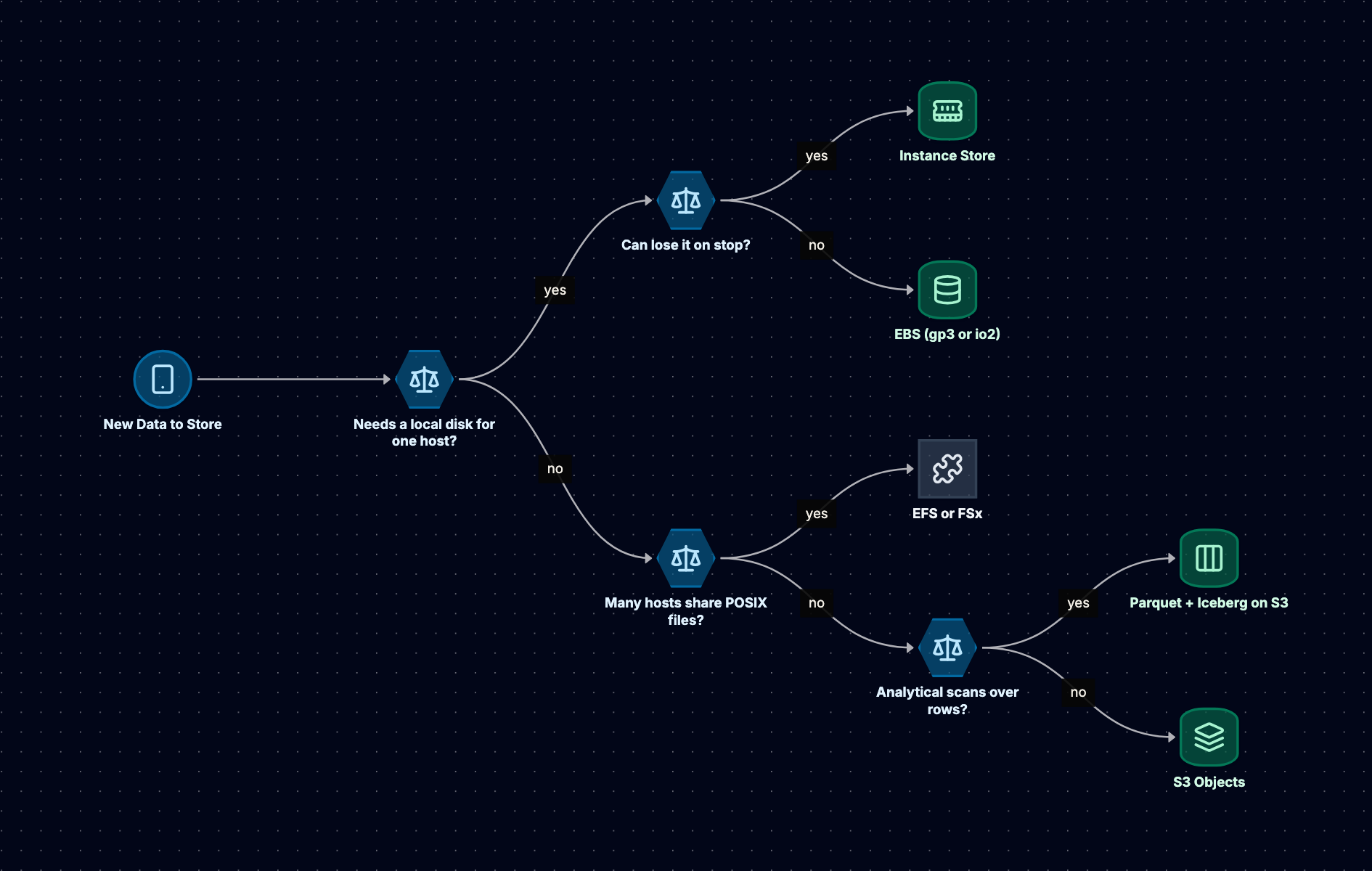
Start with the access pattern: who reads it, how they name it, and how it changes. Then the failure domain you can tolerate. Cost comes third, because it is usually tunable within the right type (gp3 vs io2, Standard vs IA) but not across the wrong one.
Scenario 1: Video Uploads and Playback
Requirements: users upload files up to several gigabytes, videos are transcoded into several renditions, and playback is global.
Choice: presigned multipart uploads straight into S3, an event per upload feeding a transcoding queue, workers using instance store for scratch, renditions written back to S3 and served through a CDN. Metadata lives in PostgreSQL on EBS, and originals move to cheaper classes after a month. Nothing here needs a shared file system.
Scenario 2: A Legacy CMS Moving to Containers
Requirements: an application writes uploaded images into /var/www/uploads and expects every web server to see them immediately. Rewriting it is out of scope this quarter.
Choice: EFS with Elastic throughput, mounted through an access point on every task, a Regional file system for AZ resilience. Put a CDN in front for reads so EFS serves only cache misses. EFS is the bridge; the follow-up is moving uploads to S3 with presigned URLs.
Scenario 3: Playback Analytics
Requirements: billions of playback events per month, dashboards by day and country, occasional privacy deletes, and reproducible quarterly numbers.
Choice: events stream into an Iceberg table on S3, written as Parquet and partitioned by days(event_time). A compaction job rewrites small files hourly; snapshots are kept for 30 days for time travel and audits, and quarterly figures are made reproducible by materializing each quarter's aggregates (Iceberg tags can pin a snapshot, but pinned snapshots keep erased rows alive). Privacy deletes use row-level deletes followed by compaction, and the erased rows are physically gone only after the older snapshots that reference them are expired. Queries run through Athena, Trino, or Spark.
Cost Traps
Prices change, so reason about the drivers rather than the numbers. These are the ones that show up on real bills:
- Data transfer out. Storage is often the smaller part of an object storage bill. Serving video directly from S3 to the internet is billed as egress; a CDN in front reduces origin fetches and is usually cheaper per GB delivered. Cross-Region replication and cross-Region reads are also billed per GB.
- Request costs on small objects. Each
PUT,GET, andLISTis charged. A pipeline that writes one object per event pays per event; batch records into larger objects. Lifecycle transitions are charged per object too, so moving billions of tiny objects to a colder class can cost more than it saves. - Minimum storage duration and minimum object size. IA and Glacier classes bill a minimum number of days (30, 90, or 180) even if you delete earlier, and IA classes bill small objects as if they were 128 KB. Putting short-lived or tiny objects in cold classes increases the bill.
- Retrieval fees. IA and Glacier classes charge per GB retrieved, and Glacier Flexible Retrieval and Deep Archive charge for most restores (bulk restores from Flexible Retrieval are free). A "cold" bucket that an analytics job scans every week is not cold.
- Over-provisioned IOPS and throughput. io2 IOPS and gp3 IOPS above baseline are billed hourly whether used or not. Check volume metrics before raising them, and lower them after migrations and backfills.
- Cross-AZ traffic. Data between AZs is billed in both directions. Chatty replication, a client in one AZ hitting an EFS mount target in another, or a Kafka cluster with replicas in three AZs all add up. Mount the EFS target in the client's own AZ.
- Unattached volumes and orphaned snapshots. Volumes left behind after instances terminate keep billing at full provisioned size. Snapshots from deleted volumes and AMIs persist until deleted. Use Data Lifecycle Manager or AWS Backup retention rules and tag ownership.
- NAT gateway charges for S3 access. Instances in private subnets that reach S3 through a NAT gateway pay NAT data processing on every byte. A gateway VPC endpoint for S3 routes that traffic privately at no extra charge for the endpoint itself. For a transcoding fleet, this single change can be a large saving.
- Incomplete multipart uploads and noncurrent versions. Both are invisible in a normal listing and both are billed. Lifecycle rules should abort incomplete uploads and expire old versions.
In the Interview
How to Justify a Choice
A four-step structure works for any storage decision:
- State how the data is accessed: "Uploads are written once, read many times by the CDN, and never modified in place."
- State the sharing and failure requirement: "Any worker in any AZ must read them, and we cannot lose them if an AZ fails."
- Name the type, then the service and configuration: "That is object storage: S3 Standard, presigned multipart uploads, lifecycle to Standard-IA after 30 days."
- Name the cost you accept: "We give up in-place edits and low single-object latency, so per-video metadata goes in Postgres."
Common Traps
- "S3 is a file system." A general purpose bucket has no rename, no append, no partial update, and no real directories (S3 Express One Zone directory buckets add appends and single-object rename, but are still not POSIX). Tools that pretend otherwise hide expensive copies.
- "EBS is replicated, so it is highly available." It is replicated within one AZ. For AZ failure you need a standby or a restore from snapshot.
- "EFS is just a bigger disk." It is a network file system with higher per-operation latency, good for sharing, poor for a single-writer database.
- "S3 is eventually consistent." Not for object reads after writes since December 2020. The remaining gap is multi-object atomicity, which Iceberg's commit protocol addresses.
- Quoting prices. Name the drivers (provisioned capacity, requests, retrieval, egress) instead.
Likely Follow-Up Questions
- "How do you back up the database on EBS and recover in another Region?" Automated snapshots plus database-native backups and WAL archiving to S3, snapshot copies to the second Region, and a tested restore that accounts for lazy loading.
- "A user uploads a 20 GB file over a flaky connection. How?" Multipart upload with presigned part URLs; retry failed parts; complete when all parts arrive; a lifecycle rule aborts abandoned uploads.
- "Your S3 client is seeing 503 errors." That is
Slow Downduring partition scaling. Retry with exponential backoff and jitter, and spread hot keys across prefixes. - "Why not just write JSON files to S3 and query them with Athena?" That works at small scale. Parquet cuts bytes scanned through column pruning and statistics; Iceberg adds atomic commits, safe compaction, schema and partition evolution, and time travel.
- "Two writers commit to the same Iceberg table at once." Both write their files; the catalog's atomic pointer swap accepts one commit, and the other retries against the new snapshot, succeeding if the changes do not conflict.
Related reading: System Design of a Large-Scale Video Streaming Platform, Designing a CDN, and Database Types Compared.