System Reliability: Why It Matters and How to Build It Right
Look, I've been in tech long enough to see systems fail spectacularly at the worst possible moments. You know that feeling when your production app crashes during Black Friday? Yeah, that's what happens when reliability becomes an afterthought.
Today we're diving deep into reliability as a non-functional system characteristic. This isn't just another buzzword, it's the difference between a system users trust and one that makes them switch to your competitor.
What Actually Is System Reliability?
Reliability is basically your system's ability to do what it's supposed to do, when it's supposed to do it, for as long as it's supposed to do it. Sounds simple, right? But here's the thing, it's measured as the probability of failure-free operation over a specific time period.
Think of it like this: if your system has 99.9% reliability, it means there's only a 0.1% chance it'll fail during any given operation. That might sound great until you realize that for a system handling a million requests per day, you're looking at about 1,000 failures daily.
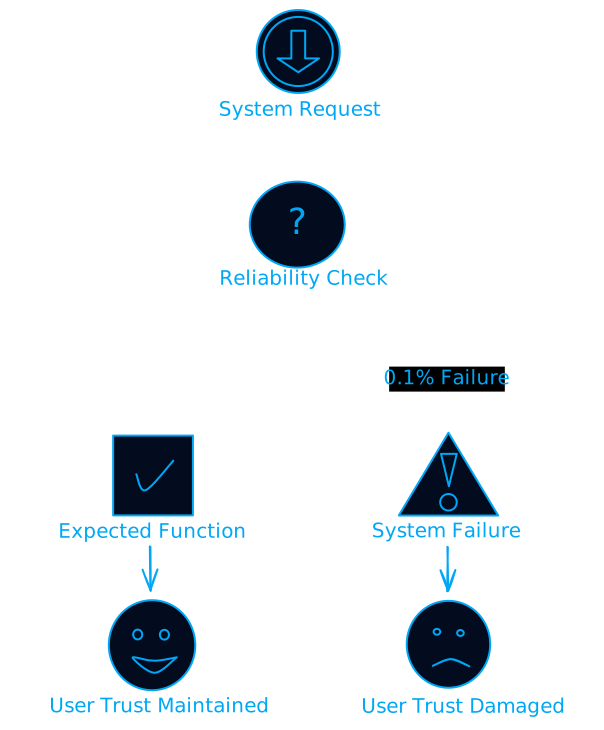
But why does this matter so much? Let me break it down.
The Real Cost of Unreliable Systems
Trust Is Everything (And It's Fragile)
Users develop trust when your system consistently delivers. But here's the brutal truth: it takes years to build trust and seconds to destroy it. One major outage during a critical moment, and users start looking for alternatives.
I've seen companies lose millions in revenue because their payment system went down for just 30 minutes during peak shopping hours. The immediate loss was bad enough, but the long-term damage to user confidence? That's what really hurt.
Downtime Costs More Than You Think
Let's talk numbers. For a typical e-commerce site, every minute of downtime can cost anywhere from 50,000. But that's just the immediate impact. The hidden costs include:
- Customer support tickets flooding in
- Engineering teams dropping everything to fix issues
- Marketing campaigns that suddenly become useless
- Reputation damage that takes months to repair
The Maintenance Trap
Unreliable systems are expensive to maintain. It's like owning a car that breaks down every week, you end up spending more on repairs than the car is worth. Reliable systems, on the other hand, run smoothly with minimal intervention.
What Makes Systems Unreliable? (The Usual Suspects)
Complexity Is the Enemy
Modern software systems are incredibly complex. We're talking millions of lines of code, dozens of microservices, multiple databases, third-party APIs, and cloud infrastructure. Each component is a potential failure point.
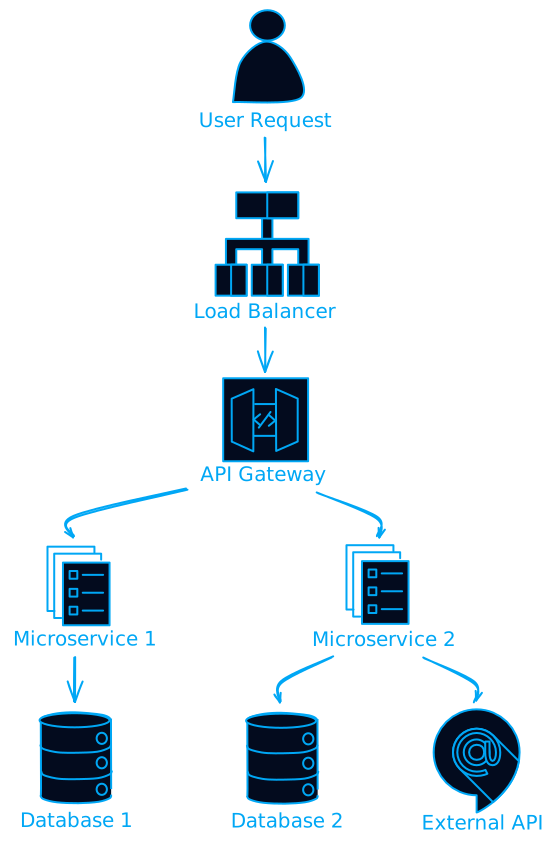
The more components you have, the higher the chance something will go wrong. It's basic probability math.
The Moving Target Problem
Requirements change constantly. New features get added, old ones get modified, and each change introduces potential bugs. It's like trying to fix a plane while it's flying, possible, but risky.
Environment Chaos
Your system needs to work across different environments: development, staging, production. Different operating systems, various hardware configurations, network conditions, and user behaviors. What works perfectly in your controlled test environment might fail miserably in the real world.
The Trade-off Dilemma
Here's where it gets tricky. Achieving high reliability often conflicts with other requirements:
- Performance vs Reliability: Adding redundancy and error checking slows things down
- Cost vs Reliability: More reliable systems typically cost more to build and maintain
- Speed to Market vs Reliability: Thorough testing takes time, but the market waits for no one
Factors That Determine Your Reliability Requirements
How Critical Is Your System?
Not all systems are created equal. A medical device controlling life support needs 99.999% reliability (that's less than 5 minutes of downtime per year). A social media app? Maybe 99.9% is acceptable.
The consequences of failure determine your reliability requirements:
- Life-critical systems: Aviation, medical devices, nuclear power
- Business-critical systems: Banking, e-commerce, communication platforms
- Convenience systems: Entertainment apps, social media, gaming
Where Does Your System Live?
The operational environment matters huge. A system running in a climate-controlled data center has different reliability challenges than one deployed on oil rigs in the North Sea.
Environmental factors include:
- Temperature extremes
- Power stability
- Network reliability
- Physical security
- Electromagnetic interference
What Do Your Users Expect?
User expectations vary wildly. Enterprise customers might tolerate scheduled maintenance windows, but consumer app users expect 24/7 availability. Understanding your users' tolerance for failures helps set realistic reliability targets.
Regulatory Requirements
Some industries have strict reliability requirements mandated by law. Healthcare systems must comply with HIPAA, financial systems with SOX, automotive with ISO 26262. Failure to meet these standards isn't just bad for business, it's illegal.
How to Actually Build Reliable Systems
Establish a Reliability Culture
This starts at the top. Leadership needs to prioritize reliability alongside features and performance. It's not just the ops team's job, everyone from developers to product managers needs to think about reliability.
Key practices:
- Make reliability metrics visible to everyone
- Encourage blameless postmortems
- Reward teams for preventing failures, not just fixing them
- Invest in reliability engineering training
Implement Site Reliability Engineering (SRE)
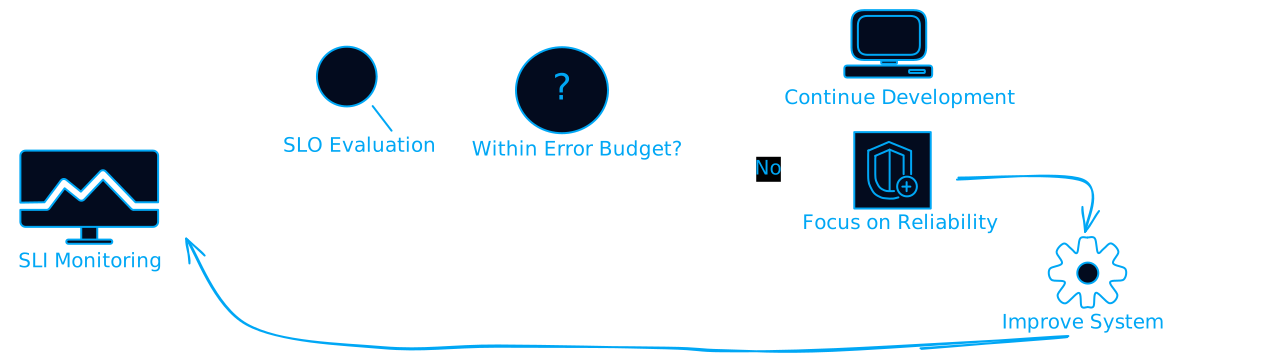
Google popularized SRE, and for good reason. It combines software engineering practices with operational concerns. SRE teams focus on:
- Defining Service Level Objectives (SLOs)
- Monitoring Service Level Indicators (SLIs)
- Managing error budgets
- Automating operational tasks
Embrace Chaos Engineering
This might sound counterintuitive, but intentionally breaking your system helps you understand how it fails. Chaos engineering involves:
- Randomly terminating services
- Introducing network latency
- Simulating hardware failures
- Testing during peak traffic
Tools like Chaos Monkey, Gremlin, and Chaos Mesh make this easier. The goal isn't to break things for fun, it's to discover weaknesses before they cause real outages.
Observability Is Key
You can't improve what you can't measure. Modern observability goes beyond simple monitoring:
- Metrics: Quantitative measurements (response time, error rate, throughput)
- Logs: Detailed records of system events
- Traces: Request flows through distributed systems
Tools like Datadog, New Relic, and Dynatrace provide comprehensive observability platforms.
Reliability Testing: Beyond "It Works on My Machine"
Stress Testing
Push your system beyond normal operating conditions. Gradually increase load until something breaks, then figure out why. This helps identify bottlenecks and capacity limits.
# Example stress test scenario
def stress_test():
    concurrent_users = 100
    while system_responsive():
        concurrent_users *= 2
        simulate_load(concurrent_users)
        measure_response_time()
        check_error_rate()

    return find_breaking_point()
Endurance Testing
Run your system continuously for extended periods. This reveals issues like memory leaks, resource exhaustion, and gradual performance degradation.
Fault Injection Testing
Deliberately introduce failures to see how your system responds:
- Kill random processes
- Corrupt data
- Simulate network partitions
- Overload dependencies
Measuring Reliability: The Metrics That Matter
Mean Time Between Failures (MTBF)
MTBF tells you how long your system typically runs without failing. Calculate it by dividing total operational time by the number of failures.
MTBF = Total Operational Time / Number of Failures
A higher MTBF means better reliability. But here's the catch: MTBF alone doesn't tell the whole story.
Mean Time to Recovery (MTTR)
MTTR measures how quickly you can restore service after a failure. This is often more important than MTBF because failures will happen.
MTTR = Total Repair Time / Number of Failures
Focus on reducing MTTR through:
- Automated monitoring and alerting
- Runbook automation
- Faster deployment processes
- Better incident response procedures
Availability
The percentage of time your system is operational and accessible:
Availability = (Total Time - Downtime) / Total Time × 100%
Common availability targets:
- 99% = 3.65 days downtime per year
- 99.9% = 8.77 hours downtime per year
- 99.99% = 52.6 minutes downtime per year
- 99.999% = 5.26 minutes downtime per year
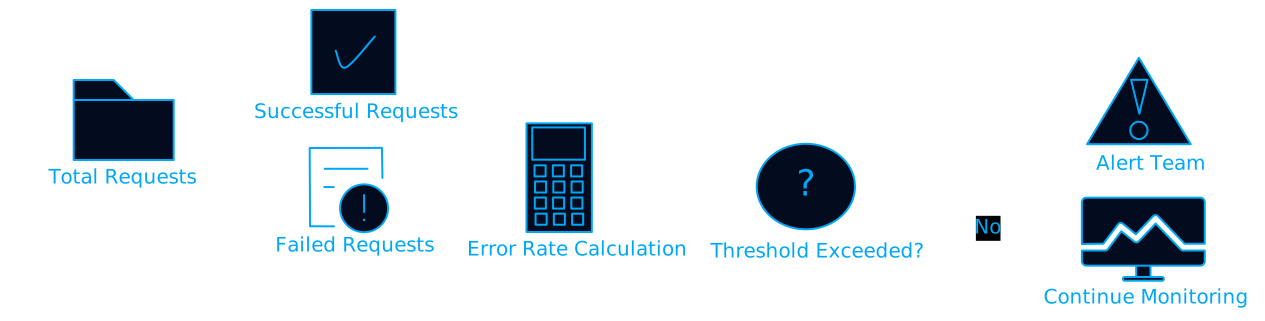
Error Rates
Track the frequency of errors within specific time periods. This helps identify trends and potential issues before they become outages.
Advanced Reliability Techniques
Fault-Tolerant Design
Build systems that continue operating even when components fail:
- Redundancy: Multiple instances of critical components
- Circuit breakers: Prevent cascading failures
- Graceful degradation: Reduce functionality instead of complete failure
- Bulkheads: Isolate failures to prevent spread
Reliability Modeling
Use mathematical models to predict system reliability:
Software Reliability Growth Models (SRGM): Predict reliability based on defect discovery and resolution during testing.
Reliability Block Diagrams (RBD): Model system reliability based on component relationships and their individual reliability.
Continuous Improvement
Reliability isn't a one-time achievement, it's an ongoing process:
- Collect data from production systems
- Analyze patterns in failures and performance
- Identify improvements in design, process, or tooling
- Implement changes systematically
- Measure impact and iterate
Common Reliability Anti-Patterns (Don't Do These)
The "It's Never Failed Before" Trap
Just because something hasn't failed doesn't mean it won't. Plan for failures, even unlikely ones.
Over-Engineering Everything
Not every component needs five-nines reliability. Focus your efforts where they matter most.
Ignoring Human Factors
Most outages are caused by human error, not technical failures. Design systems that are hard to break accidentally.
Treating Reliability as Someone Else's Problem
Reliability is everyone's responsibility, from developers writing code to product managers defining requirements.
The Future of System Reliability
AI-Powered Reliability
Machine learning is starting to predict failures before they happen. AI can analyze patterns in system behavior and identify anomalies that humans might miss.
Self-Healing Systems
Systems that automatically detect and recover from failures without human intervention. This includes auto-scaling, automatic failover, and self-correcting configurations.
Reliability as Code
Infrastructure as Code (IaC) is evolving to include reliability requirements. Define your reliability policies in code and enforce them automatically.
Wrapping Up: Your Reliability Action Plan
Here's what you should do starting tomorrow:
- Define your reliability requirements based on system criticality and user expectations
- Establish baseline metrics for MTBF, MTTR, and availability
- Implement comprehensive monitoring across all system components
- Start small with chaos engineering - kill a few processes and see what happens
- Create incident response procedures and practice them regularly
- Foster a reliability culture where everyone thinks about failure scenarios
Remember, reliability isn't about preventing all failures, it's about failing gracefully and recovering quickly. The most reliable systems aren't the ones that never break, they're the ones that break in predictable ways and recover automatically.
Your users don't care about your architecture diagrams or technology stack. They care about whether your system works when they need it. Make reliability a first-class citizen in your development process, and your users (and your on-call engineers) will thank you.
The next time someone asks why you're spending time on reliability instead of new features, remind them: features don't matter if the system is down.
FAQs on System Reliability
1. What is system reliability in software engineering?
System reliability refers to a system’s ability to perform its intended functions correctly and consistently over a specified period without failure. It is measured as the probability of failure-free operation within a defined timeframe.
2. Why is system reliability important?
Reliable systems build user trust, reduce operational costs, prevent revenue loss, and ensure stable business operations. Unreliable systems can cause outages, customer dissatisfaction, and long-term reputational damage.
3. What factors commonly make systems unreliable?
Systems often become unreliable due to:
- Architectural complexity
- Frequent requirement changes
- Environmental differences across environments
- Trade-offs between performance, cost, and delivery speed
4. How does downtime impact a business?
Downtime can lead to:
- Direct revenue loss
- Increased customer support load
- Engineering fire-fighting
- Broken marketing or sales campaigns
- Loss of user trust and brand value
5. What is MTBF (Mean Time Between Failures)?
MTBF is the average time a system operates before experiencing a failure. It is calculated as:
MTBF = Total Operational Time / Number of Failures
6. How do SLOs and SLIs help improve reliability?
- SLIs (Service Level Indicators) measure actual system behavior.
- SLOs (Service Level Objectives) define reliability targets based on user expectations.
Together, they help teams track performance and manage error budgets.
7. What is chaos engineering, and why is it used?
Chaos engineering intentionally introduces failures—like killing services or adding latency—to uncover weaknesses and improve system resilience before real incidents occur.
8. What testing strategies improve system reliability?
Key reliability testing methods include:
- Stress testing: pushing systems beyond capacity
- Endurance testing: long-duration, continuous load
- Fault injection: simulating component or network failures
9. How can organizations build a culture of reliability?
A reliability-focused culture includes:
- Visibility into reliability metrics
- Blameless postmortems
- Rewarding prevention over firefighting
- SRE principles and automation adoption
- Shared responsibility across engineering and product teams
What's your biggest reliability challenge? Have you implemented any of these techniques in your systems? Share your experiences in the comments below.