Workflow Orchestration Engines: Architecture and Design Patterns
Introduction
Modern distributed systems must handle workflows that span minutes, hours, or even months: processing payments with third-party fraud checks, coordinating multi-step user onboarding, orchestrating complex data pipelines, or managing order fulfillment across warehouses. These workflows face network partitions, service restarts, and transient failures, yet must guarantee exactly-once execution semantics without losing state or duplicating side effects.
Traditional approaches fail at this scale. REST API chains lose context on failure. Message queues require manual state tracking. Database polling wastes resources. Kubernetes CronJobs can't handle dynamic branching logic. You need a workflow orchestration engine: a system that persists execution state, survives failures, and replays workflow logic deterministically to resume exactly where it left off.
However, these engines introduce complexity. When should you accept that overhead versus building simpler retry logic? Use workflow orchestration when your process has multiple steps with different failure modes, requires human input or external callbacks, needs audit trails of every state transition, or must coordinate distributed transactions. Avoid it for simple CRUD operations, stateless request-response patterns, or workflows that complete in seconds with no external dependencies.
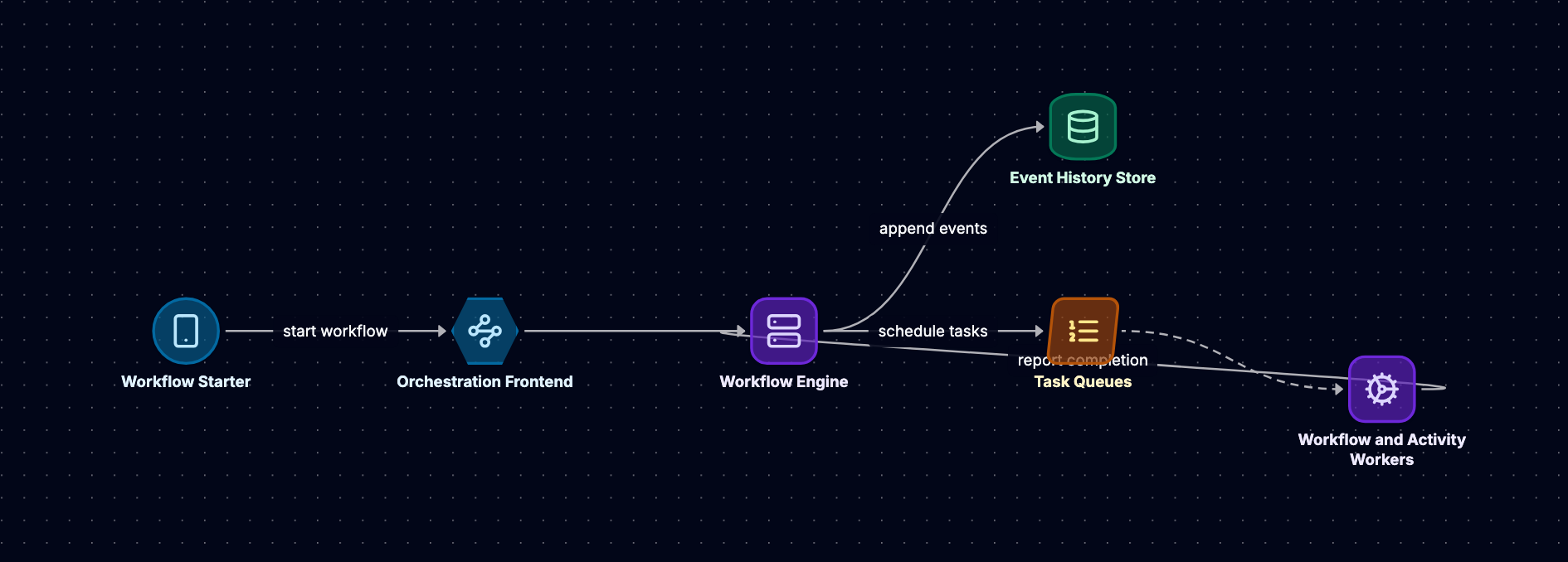
This post dissects the architecture of systems like Temporal and its predecessor Cadence, examining how event sourcing enables durable state, how deterministic replay reconstructs workflow context, and how versioning allows safe updates to running workflows. We'll trace a payment processing workflow from submission through fraud check to settlement, showing how each architectural decision ensures fault tolerance.
Event Sourcing and Durable State
The Core Principle
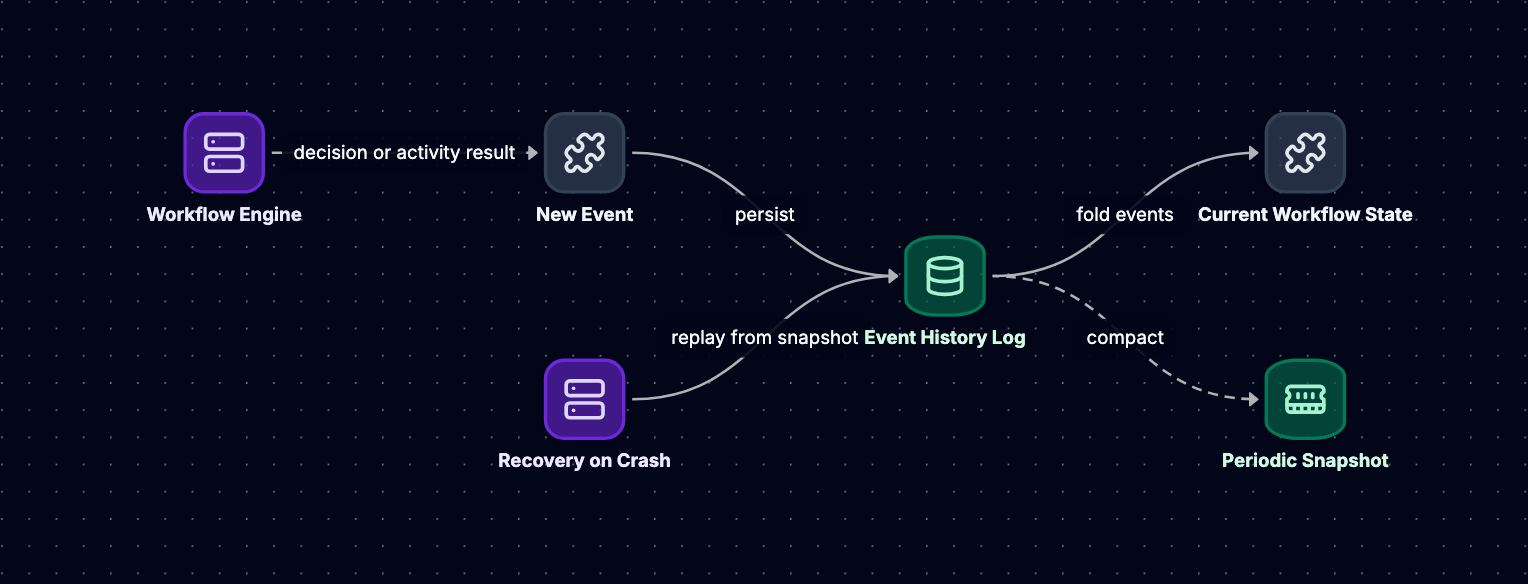
Workflow orchestration engines like Temporal don't store workflow state as mutable records. Instead, they persist an append-only log of events that describe every state transition. When a workflow starts, schedules an activity, receives a signal, or completes, the engine writes an immutable event to durable storage. The current state of any workflow is the result of replaying this event history from the beginning.
This is event sourcing: state as a function of events. For a payment workflow that charges a card, calls a fraud detection service, and settles funds, the event log might contain:
WorkflowExecutionStarted { workflow_id: "pay_12345", input: {"amount": 100, "card": "..."}  }
ActivityTaskScheduled { activity_id: "1", type: "ChargeCard" }
ActivityTaskStarted { activity_id: "1" }
ActivityTaskCompleted { activity_id: "1", result: {"charge_id": "ch_abc"} }
ActivityTaskScheduled { activity_id: "2", type: "CheckFraud" }
TimerStarted { timer_id: "t1", duration: 30s }
Each event is immutable and sequentially numbered. To determine whether the fraud check completed, the engine replays events until it reconstructs the workflow's position in its logic.
Why Event Sourcing for Workflows
Event sourcing solves three critical problems:
Fault tolerance: If a workflow worker crashes mid-execution, another worker reads the event history, replays it to rebuild in-memory state, and continues from the last recorded event. No state is lost because the log is the source of truth.
Audit and debugging: Every decision point is recorded. When a payment fails, you can replay the exact sequence of events: which activities ran, what they returned, when timers fired. This is invaluable for compliance and troubleshooting.
Deterministic replay: The engine can re-execute workflow code against historical events to verify it reaches the same decisions. This enables safe deployments and versioning, which we'll explore later.
Storage and Durability
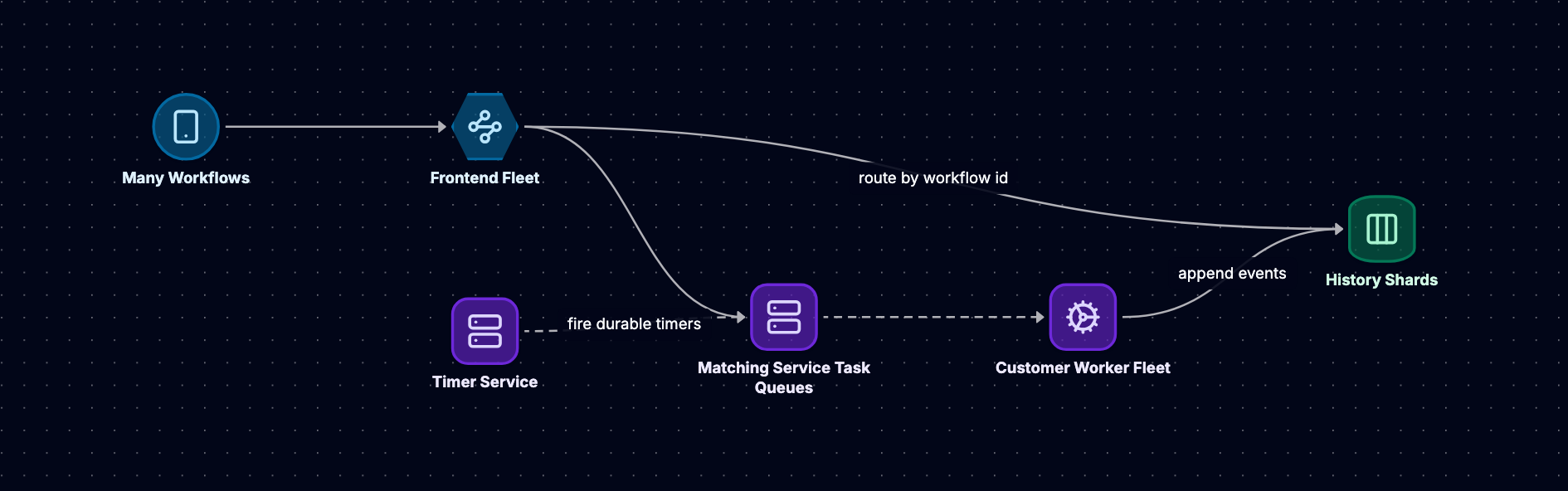
Temporal stores events in a database (Cassandra, PostgreSQL, or MySQL). Each workflow execution maps to a partition or row identified by its workflow ID. Events are appended to this partition with monotonically increasing sequence numbers. The database provides durability: once an event is persisted, it survives node failures.
When a workflow completes or is terminated, its event history can be archived to cheaper storage. Some implementations maintain a working set of "open" workflows in faster storage and move completed workflows to an archive tier. The engine queries the event log only when a workflow needs to execute, not continuously, which keeps read load manageable even with thousands of concurrent workflows.
State Reconstruction Example
Consider our payment workflow after the fraud check returns "approved":
# Workflow code (simplified)
def payment_workflow(amount, card):
    charge_id = execute_activity(charge_card, amount, card)
    fraud_result = execute_activity(check_fraud, charge_id, timeout=30s)
    if fraud_result == "approved":
        execute_activity(settle_funds, charge_id)
    else:
        execute_activity(refund_charge, charge_id)
After the fraud check completes, the event log contains:
[1] WorkflowExecutionStarted
[2] ActivityTaskScheduled (ChargeCard)
[3] ActivityTaskCompleted (charge_id: ch_abc)
[4] ActivityTaskScheduled (CheckFraud)
[5] TimerStarted (30s timeout)
[6] ActivityTaskCompleted (result: "approved")
[7] ActivityTaskScheduled (SettleFunds)
When a worker picks up this workflow to execute the settle_funds activity, it replays events 1-7. The replay executes the workflow code, but instead of actually calling activities, it returns cached results from the event log. The charge_card activity returns ch_abc from event 3, the check_fraud activity returns "approved" from event 6, and the code reaches the settle_funds call. The worker then executes this activity, persists an ActivityTaskStarted event, and waits for completion.
This replay mechanism is why workflow code must be deterministic, a constraint we'll examine in depth.
Worker and Task Queue Model
Architecture Overview
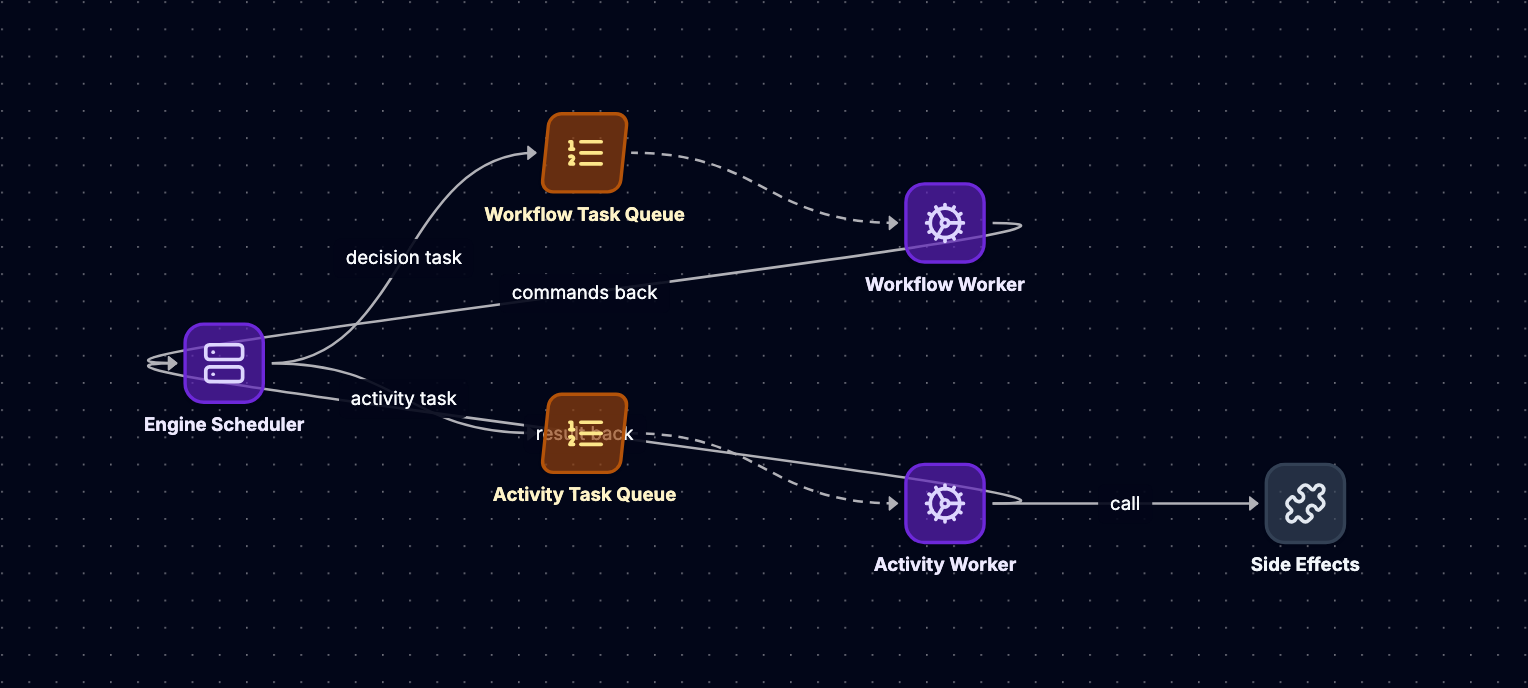
Workflow orchestration engines separate coordination from execution. The server (or cluster) persists events, manages workflow state, and routes tasks. Workers are stateless processes that execute workflow and activity code. Workers poll task queues for work, execute tasks, and report results back to the server.
This decoupling provides horizontal scalability: you can run dozens of workers across multiple hosts, each polling the same task queue. If a worker crashes, its in-flight tasks time out and are reassigned to healthy workers. The server doesn't need to track worker health; it only needs to ensure tasks are delivered and completed.
Task Queue Mechanics
Task queues are logical, not physical message queues. In Temporal, they're implemented as database tables or in-memory structures with pointers to workflow executions that need work. When a workflow schedules an activity, the server creates an activity task and adds it to the appropriate queue. Workers long-poll this queue (holding an HTTP connection open for seconds), receive tasks, execute them, and return results.
There are two types of tasks:
Workflow tasks: Instruct a worker to execute workflow code (the orchestration logic). These tasks are generated when a workflow starts, when an activity completes, when a timer fires, or when a signal is received. The worker replays the event history, runs the workflow function until it schedules more activities or timers, then returns the decisions (new events to persist).
Activity tasks: Instruct a worker to execute a specific activity (the actual work, like calling an API or writing to a database). These tasks contain the activity type, input parameters, and retry policy. The worker executes the activity code and returns success or failure.
Execution Flow: Payment Workflow
Let's trace our payment workflow through the task queue model:
-
Client starts workflow: Calls
start_workflow("payment_workflow", amount=100, card="..."). Server persistsWorkflowExecutionStartedevent and enqueues a workflow task. -
Worker polls for workflow task: Receives task with workflow ID
pay_12345and event history[WorkflowExecutionStarted]. Executespayment_workflowcode, which callsexecute_activity(charge_card, ...). This doesn't execute the activity; it returns a promise/future. The workflow code reaches the first activity call and yields control. -
Worker returns decisions: Sends
[ActivityTaskScheduled(ChargeCard)]to server. Server persists this event and enqueues an activity task on the "payment-activities" queue. -
Worker polls for activity task: Receives
ChargeCardtask, executes the actual card-charging logic (calls Stripe API), and returnsresult: {charge_id: "ch_abc"}. -
Server persists completion: Writes
ActivityTaskCompletedevent and enqueues another workflow task (because the workflow is waiting on this activity). -
Worker replays workflow: Receives workflow task with event history
[WorkflowExecutionStarted, ActivityTaskScheduled, ActivityTaskCompleted]. Replays: thecharge_cardactivity now returnsch_abcfrom the event log (no actual Stripe call). Code proceeds toexecute_activity(check_fraud, ch_abc), yields. -
Cycle repeats: Worker returns
[ActivityTaskScheduled(CheckFraud), TimerStarted(30s)]. Server enqueues activity task. Worker executes fraud check, returns result, server enqueues workflow task, worker replays and schedulessettle_funds, etc.
This model ensures that workflow logic (coordination) and activity logic (work) are separately retryable. If the fraud check fails transiently, the server retries the activity task without re-executing the workflow code. If the worker crashes during replay, another worker picks up the workflow task and replays from the same event history.
Scaling and Partitioning
Workers are stateless and can scale horizontally. You can run 10 workers for a task queue during peak load and scale down to 2 at night. The server handles load balancing by delivering tasks to whichever worker polls next.
Task queues provide logical partitioning. You might have a "fast-activities" queue for lightweight tasks and a "slow-activities" queue for long-running jobs, each with dedicated worker pools. Workflows can route activities to specific queues based on their requirements. This prevents slow tasks from blocking fast ones and allows per-queue rate limiting or resource allocation.
Deterministic Replay
The Replay Contract
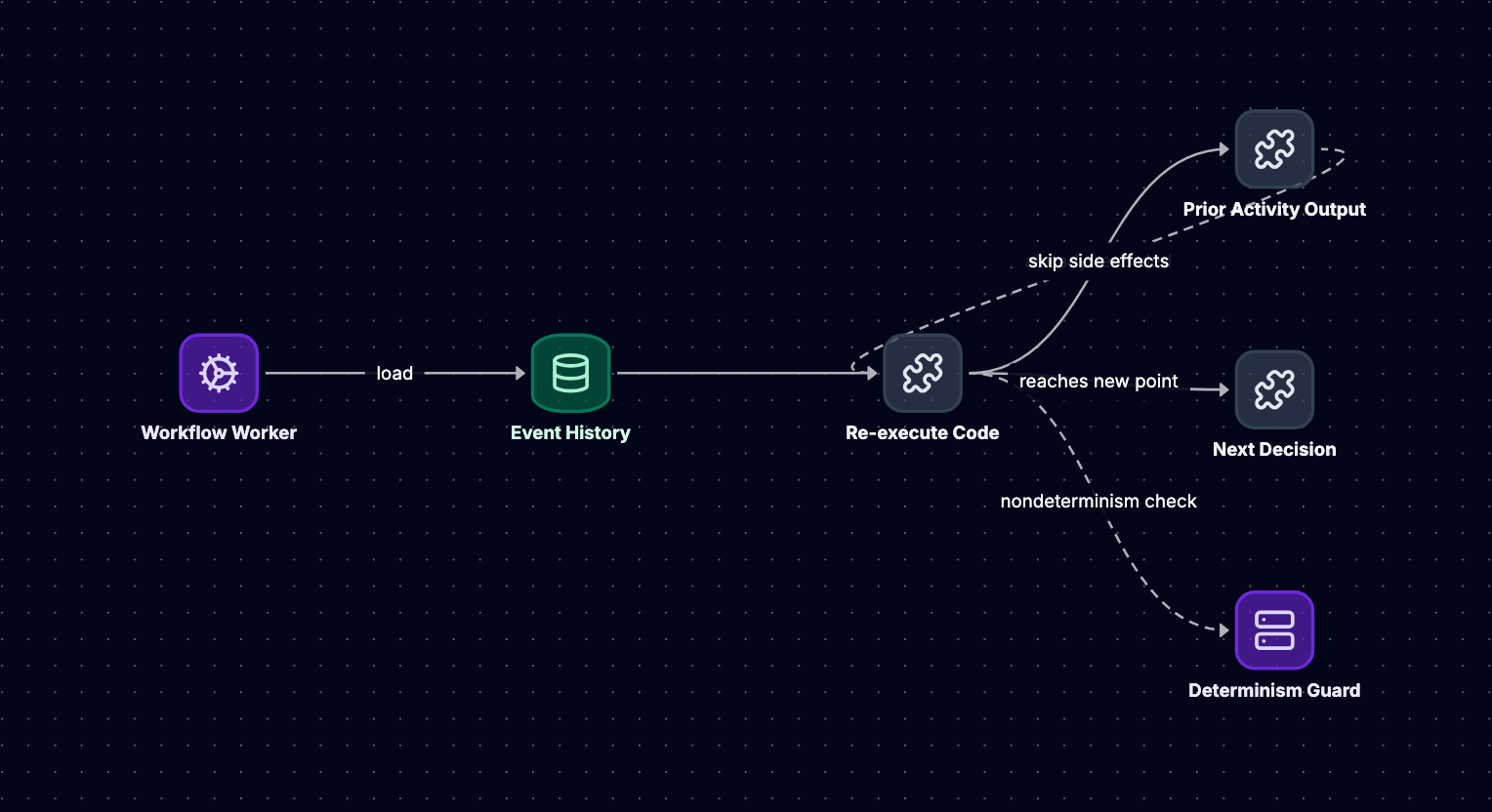
Workflow code must be deterministic: given the same event history, it must make the same decisions every time. This is the engine's core invariant. When a worker replays a workflow, it executes the workflow function, but instead of performing side effects (calling APIs, generating random numbers, reading the clock), it returns cached values from the event log. The code must reach the exact same sequence of activity schedules, timer starts, and conditional branches.
Why? Because the engine uses replay to reconstruct state. If a workflow scheduled ActivityA during its initial execution, but on replay it schedules ActivityB instead, the event log diverges from the code's expectations. The workflow becomes corrupted.
Non-Determinism Hazards
Common sources of non-determinism:
System clock: Calling time.now() returns different values on each replay. Instead, use the workflow's logical clock, which the engine provides. When you call workflow.now(), it returns a timestamp derived from the event history, which is consistent across replays.
Random number generation: random() produces different values. Use a seeded RNG where the seed is part of the workflow input, or generate random values in activities (which are not replayed, only their results are).
External I/O: Reading from a database, calling an API, or even iterating over a map in languages with non-deterministic iteration order (like Go's range over maps, which randomizes order for security reasons) can break determinism. All external interactions must go through activities.
Non-deterministic control flow: Conditionals based on non-deterministic inputs. For example:
# BAD: Non-deterministic
if random() > 0.5:
    execute_activity(send_email)
else:
    execute_activity(send_sms)
On the first execution, random() might return 0.7, scheduling send_email. On replay, it might return 0.3, scheduling send_sms. The events diverge.
Code changes: Modifying workflow logic between executions. If version 1 schedules activities A then B, but version 2 schedules B then A, replaying old workflows with new code breaks. This is why versioning is critical.
Determinism in Practice: Payment Workflow
Our payment workflow makes decisions based on activity results:
def payment_workflow(amount, card):
    charge_id = execute_activity(charge_card, amount, card)
    fraud_result = execute_activity(check_fraud, charge_id)
    if fraud_result == "approved":  # Decision point
        execute_activity(settle_funds, charge_id)
    else:
        execute_activity(refund_charge, charge_id)
The if statement is deterministic because fraud_result comes from an activity. On the initial execution, the check_fraud activity returns "approved", and the engine persists ActivityTaskCompleted(result: "approved"). On every replay, the workflow code reaches the if statement, but instead of executing the activity, it reads "approved" from the event log. The condition evaluates the same way, and the code schedules settle_funds.
If we accidentally wrote:
if time.now().hour < 12:  # BAD
    execute_activity(settle_funds, charge_id)
The workflow would schedule settle_funds during morning execution, but on an afternoon replay (after a worker restart), it would skip the activity. The event log would contain ActivityTaskScheduled(SettleFunds), but the replay wouldn't reach that call. The engine detects this mismatch and raises a non-determinism error, halting the workflow.
Enforcement and Detection
Temporal enforces determinism by comparing replay decisions to the event log. When a worker replays a workflow, the engine tracks which activities it schedules, which timers it starts, and which signals it waits for. If the code schedules an activity that doesn't match the next ActivityTaskScheduled event in the log, the engine throws a non-determinism exception.
This validation happens on every workflow task. If your code changes in a non-deterministic way, the next time a worker picks up an old workflow, replay fails immediately. This is a safety mechanism: better to halt the workflow than to execute incorrect logic.
Timers, Signals, and Timeouts
Durable Timers
Workflows often need to wait: for a fraud check to complete, for a user to confirm an action, or for a scheduled time to arrive. Naive approaches like sleep() don't work in a distributed, fault-tolerant system. If a worker sleeps for 10 minutes, then crashes at minute 9, the sleep state is lost.
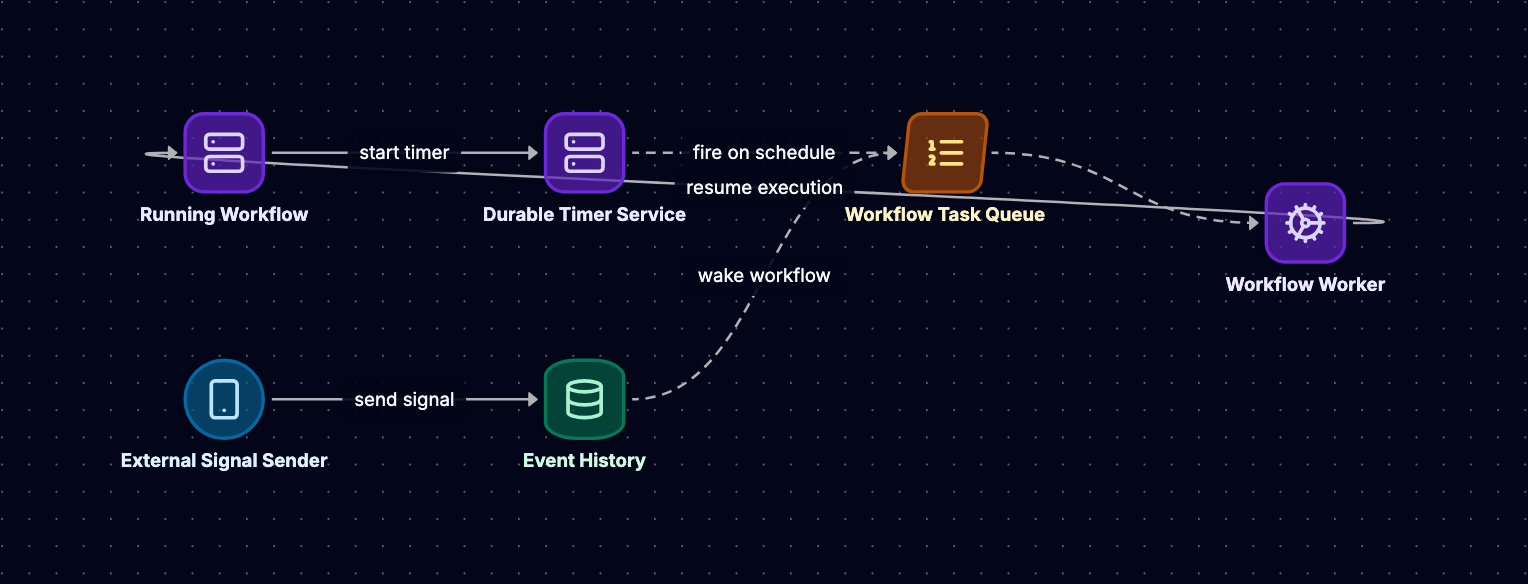
Workflow engines provide durable timers: you call workflow.sleep(duration), the engine persists a TimerStarted event with a fire time, and the workflow task completes. The server tracks active timers (often using a priority queue or database index) and enqueues a workflow task when the timer fires, persisting a TimerFired event. When the worker replays the workflow, it sees the TimerFired event and the code proceeds past the sleep.
Example: waiting for a fraud check with a timeout:
def payment_workflow(amount, card):
    charge_id = execute_activity(charge_card, amount, card)
    fraud_result = execute_activity(check_fraud, charge_id, timeout=30s)
    if fraud_result == "approved":
        execute_activity(settle_funds, charge_id)
    else:
        execute_activity(refund_charge, charge_id)
When check_fraud is scheduled, the engine starts a 30-second timer. If the activity completes first, the timer is canceled (persisting TimerCanceled). If the timer fires first, the activity is canceled, and the workflow code receives a timeout exception. The workflow can handle this:
try:
    fraud_result = execute_activity(check_fraud, charge_id, timeout=30s)
except TimeoutError:
    execute_activity(refund_charge, charge_id)  # Refund on timeout
The timer and timeout logic are durable. If the worker crashes after the timer starts but before it fires, another worker replays the workflow, sees the TimerStarted event, and waits for the TimerFired event (which the server will eventually persist).
Signals: External Events
Workflows often need to react to external events: a user clicks a confirmation link, a webhook arrives, or an admin cancels an order. Signals are named messages sent to a running workflow. The server persists a SignalReceived event, and the next workflow task includes this event in the history.
Workflow code waits for signals using a blocking call:
def approval_workflow(order_id):
    execute_activity(reserve_inventory, order_id)
    signal_result = workflow.wait_for_signal("user_approval", timeout=3600s)
    if signal_result == "approved":
        execute_activity(ship_order, order_id)
    else:
        execute_activity(release_inventory, order_id)
The workflow reserves inventory, then blocks on wait_for_signal. The worker returns, and the workflow task completes. The server tracks that this workflow is waiting for a signal named "user_approval". When a client calls signal_workflow(workflow_id, "user_approval", "approved"), the server persists SignalReceived(name: "user_approval", payload: "approved") and enqueues a workflow task. The worker replays, reaches the wait_for_signal call, reads the signal from the event log, and proceeds.
Signals are durable and ordered. If multiple signals arrive while the workflow is waiting, they're queued and processed in order. If a signal arrives before the workflow reaches the wait_for_signal call, it's buffered in the event log and consumed when the code reaches the wait.
Timeouts and Retries
Activities can fail: the fraud service is down, the database connection times out, or the API rate limit is hit. Workflow engines handle this with configurable retry policies:
execute_activity(
    check_fraud,
    charge_id,
    start_to_close_timeout=30s,  # Activity must complete within 30s
    retry_policy={
        "initial_interval": 1s,
        "backoff_coefficient": 2.0,
        "maximum_attempts": 5
    }
)
If the activity fails, the engine persists ActivityTaskFailed, waits for the retry interval, and enqueues a new activity task. The workflow code doesn't see the failure unless all retries are exhausted. This decouples transient failure handling (automatic retries) from business logic (workflow code).
Timeouts are also durable. A start_to_close_timeout starts a timer when the activity task is delivered to a worker. If the timer fires before the activity completes, the server persists ActivityTaskTimedOut and retries (if the policy allows). If the worker crashes mid-activity, the timeout eventually fires, and another worker retries the activity.
Versioning Running Workflows
The Versioning Problem
Workflows can run for days or months. During that time, you'll deploy new code: fix bugs, add features, or change business logic. But there are already thousands of workflows in progress, each with an event history based on the old code. How do you deploy new workflow logic without breaking running workflows?
Naive deployment breaks determinism. If your old code scheduled activities A, B, C, and your new code schedules A, C, B, replaying old workflows with new code will fail: the event log says ActivityTaskScheduled(B) comes after A, but the new code schedules C. The engine detects the mismatch and halts the workflow.
Versioning Strategies
Systems like Temporal provide versioning APIs that let you branch workflow logic based on whether the workflow is new or replayed from an old version:
def payment_workflow(amount, card):
    charge_id = execute_activity(charge_card, amount, card)

    if workflow.get_version("fraud_check_v2", min_supported=1, max_supported=2) == 2:
        # New version: use improved fraud check
        fraud_result = execute_activity(check_fraud_v2, charge_id)
    else:
        # Old version: use legacy fraud check
        fraud_result = execute_activity(check_fraud, charge_id)

    if fraud_result == "approved":
        execute_activity(settle_funds, charge_id)
    else:
        execute_activity(refund_charge, charge_id)
When a new workflow starts, get_version returns 2 (the max supported version) and persists MarkerRecorded(version_id: "fraud_check_v2", version: 2) in the event log. The code uses check_fraud_v2.
When an old workflow (started before the deployment) is replayed, the event log contains MarkerRecorded(version: 1) or no marker at all. get_version returns 1, and the code uses check_fraud. The replay is deterministic because the version is read from the event log, not computed dynamically.
Migration Example: Adding a Notification Step
Suppose we want to add an email notification after settling funds. The old workflow:
def payment_workflow_v1(amount, card):
    charge_id = execute_activity(charge_card, amount, card)
    fraud_result = execute_activity(check_fraud, charge_id)
    if fraud_result == "approved":
        execute_activity(settle_funds, charge_id)
The new workflow:
def payment_workflow_v2(amount, card):
    charge_id = execute_activity(charge_card, amount, card)
    fraud_result = execute_activity(check_fraud, charge_id)
    if fraud_result == "approved":
        execute_activity(settle_funds, charge_id)
        execute_activity(send_confirmation_email, charge_id)  # New step
Deploying v2 directly would break replays: old workflows have [ActivityTaskScheduled(SettleFunds), ActivityTaskCompleted] as their final events, but the new code schedules send_confirmation_email after settle_funds. The replay would expect this activity to already be in the log.
With versioning:
def payment_workflow(amount, card):
    charge_id = execute_activity(charge_card, amount, card)
    fraud_result = execute_activity(check_fraud, charge_id)
    if fraud_result == "approved":
        execute_activity(settle_funds, charge_id)
        if workflow.get_version("add_email", min_supported=1, max_supported=2) == 2:
            execute_activity(send_confirmation_email, charge_id)
Old workflows (version 1) skip the email. New workflows (version 2) send it. Both replay deterministically because the version is stored in the event log. Once all old workflows complete, you can remove the version check and the else branch.
Version Cleanup
Over time, you accumulate version checks. To clean them up, you must ensure no workflows are running with old versions. Temporal provides visibility into workflow versions: you can query how many workflows are on version 1, wait for them to complete, then deploy code that removes the version 1 branch. If you try to remove a version while workflows still depend on it, replays will fail (the event log contains version 1, but the code only supports version 2), which is a safety mechanism.
For long-running workflows, you might need to support multiple versions indefinitely. Some teams maintain separate workflow definitions (v1, v2, v3) and route new workflows to the latest version, keeping old definitions deployed for legacy workflows. This avoids complex branching logic but increases code maintenance.
Comparing Alternatives
Traditional workflow tools address different use cases. Apache Airflow focuses on batch-oriented data pipelines with scheduled DAGs, typically running on a cron-like schedule. It lacks durable state across task retries and doesn't support long-lived workflows waiting on external events. AWS Step Functions provides serverless orchestration with visual workflow definitions, but its state machine model is less expressive for complex branching and doesn't support versioning of in-flight executions. Kubernetes Jobs and CronJobs handle container-based task execution but require manual state management for multi-step workflows.
Temporal-style engines prioritize long-lived workflows with exactly-once guarantees, event-sourced state, and deterministic replay. This makes them ideal for business processes spanning hours or days, but introduces complexity that simpler tools avoid for short-lived, stateless tasks.
Conclusion
Workflow orchestration engines like Temporal solve a specific problem: coordinating long-lived, fault-tolerant processes across distributed systems with exactly-once execution guarantees. The architecture rests on four pillars. Event sourcing provides durable state by persisting an append-only log of every workflow decision, enabling fault tolerance and audit trails. The worker and task queue model decouples coordination from execution, allowing horizontal scaling and separate retry policies for workflow logic versus activities. Deterministic replay