system Availability: The 99.9% Promise That Can Make or Break Your Business
System Availability: The 99.9% Promise That Can Make or Break Your Business
Ever wonder why Netflix never seems to go down during your weekend binge sessions, but your favorite local restaurant's ordering app crashes every Friday night? The difference isn't luck – it's availability engineering. Let's dive into one of the most critical yet misunderstood aspects of system design that literally determines whether your users love you or leave you.
The Real Cost of Downtime (Spoiler: It's Brutal)
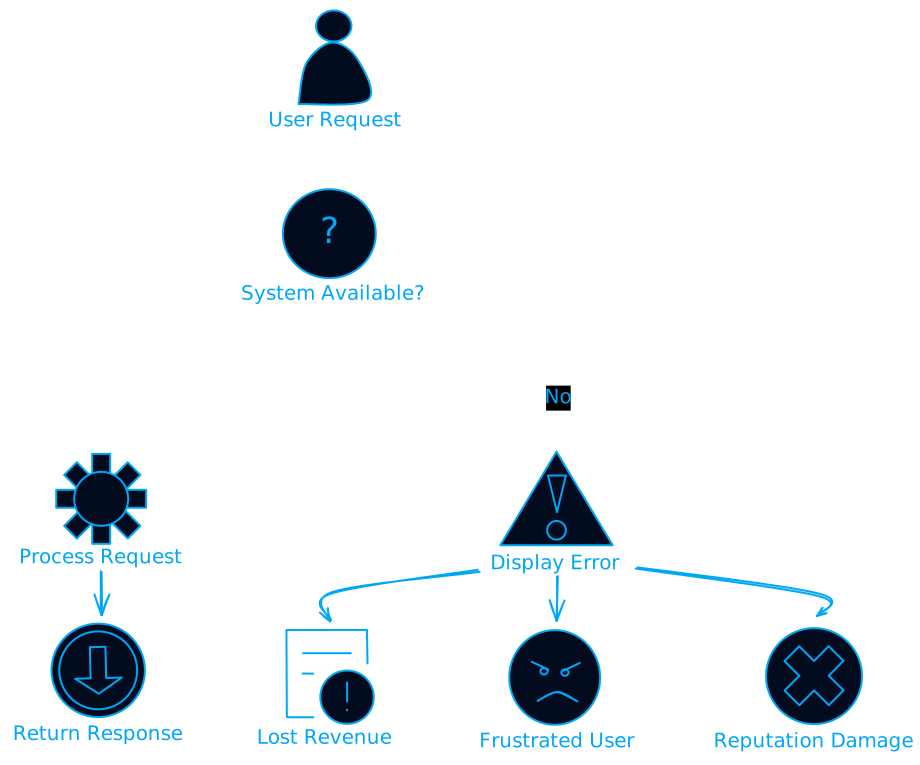
Picture this: it's Black Friday, your e-commerce site is getting hammered with traffic, and suddenly... everything goes dark. Your servers are down. In the next hour, you lose $100,000 in sales, your customer service gets flooded with angry calls, and your competitors are probably celebrating.
This isn't a hypothetical scenario. Amazon loses approximately 90,000 per minute. Even smaller businesses can lose thousands of dollars and countless customers during outages.
But here's what most people don't realize – availability isn't just about preventing catastrophic failures. It's about building systems that gracefully handle the constant stream of small failures that happen every day in distributed systems.
Understanding the Numbers Game
When engineers talk about "five nines" availability (99.999%), they're not just showing off with fancy percentages. These numbers translate directly to real-world downtime:
- 99% availability = 3.65 days of downtime per year
- 99.9% availability = 8.76 hours of downtime per year
- 99.99% availability = 52.56 minutes of downtime per year
- 99.999% availability = 5.26 minutes of downtime per year
The difference between 99% and 99.9% might seem small, but it's the difference between your system being down for almost 4 days versus less than 9 hours per year. That's huge.
// Simple availability calculator
class AvailabilityCalculator {
    static calculateDowntime(availabilityPercent, periodDays = 365) {
        const uptimePercent = availabilityPercent / 100;
        const totalMinutes = periodDays * 24 * 60;
        const downtimeMinutes = totalMinutes * (1 - uptimePercent);

        return {
            minutes: downtimeMinutes,
            hours: downtimeMinutes / 60,
            days: downtimeMinutes / (60 * 24),
            formatted: this.formatDowntime(downtimeMinutes)
        };
    }

    static formatDowntime(minutes) {
        if (minutes < 60) {
            return `${minutes.toFixed(1)} minutes`;
        } else if (minutes < 1440) {
            return `${(minutes / 60).toFixed(1)} hours`;
        } else {
            return `${(minutes / 1440).toFixed(1)} days`;
        }
    }
}

// Examples
console.log(AvailabilityCalculator.calculateDowntime(99.9));
// Output: { minutes: 525.6, hours: 8.76, days: 0.365, formatted: "8.8 hours" }
The Anatomy of System Failures
Before we talk about preventing failures, let's understand what actually causes systems to go down. It's not always what you'd expect.
Hardware Failures: The Obvious Culprit
Hard drives crash, servers overheat, network cables get unplugged by janitors (yes, this really happens). Hardware failures are inevitable, but they're also the easiest to plan for because they're predictable.
Software Bugs: The Silent Killers
A memory leak that slowly consumes all available RAM. A race condition that only manifests under high load. A null pointer exception in a rarely-used code path. Software bugs are responsible for more outages than hardware failures, and they're much harder to predict.
Human Error: The Uncomfortable Truth
Someone deploys code to production instead of staging. A database administrator accidentally drops the wrong table. A network engineer misconfigures a router. Human error accounts for a significant percentage of outages, which is why good systems are designed to be resilient against human mistakes.
Cascading Failures: The Domino Effect
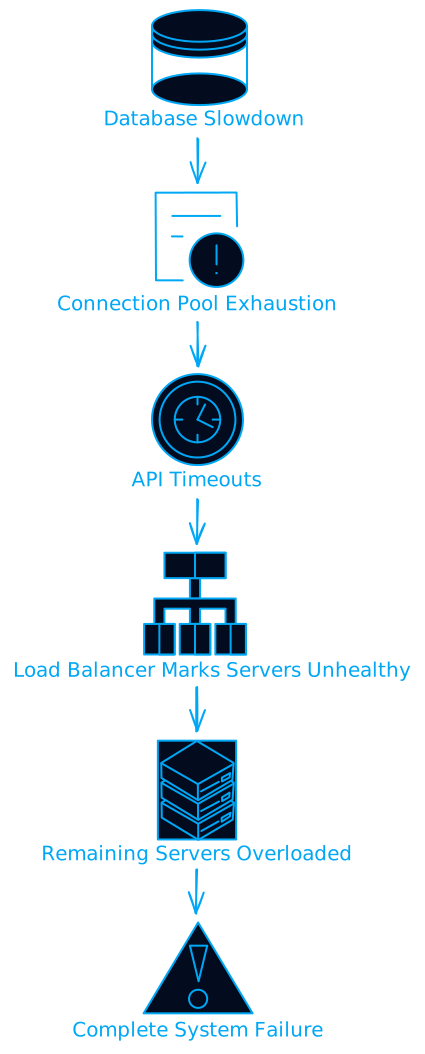
This is where things get really interesting. One small failure triggers another, which triggers another, until your entire system collapses like a house of cards. These are the failures that turn minor incidents into major disasters.
Building Redundancy: The Art of Having Backups for Your Backups
The fundamental principle of high availability is simple: eliminate single points of failure. If any single component can bring down your entire system, you have a problem.
Hardware Redundancy: The Foundation
class RedundantSystem:
    def __init__(self):
        self.primary_server = Server("primary")
        self.backup_servers = [
            Server("backup-1"),
            Server("backup-2"),
            Server("backup-3")
        ]
        self.health_checker = HealthChecker()

    def process_request(self, request):
        # Try primary server first
        if self.health_checker.is_healthy(self.primary_server):
            try:
                return self.primary_server.handle(request)
            except Exception as e:
                self.mark_unhealthy(self.primary_server)

        # Failover to backup servers
        for backup in self.backup_servers:
            if self.health_checker.is_healthy(backup):
                try:
                    return backup.handle(request)
                except Exception as e:
                    self.mark_unhealthy(backup)

        raise SystemUnavailableException("All servers are down")
Geographic Redundancy: Surviving Natural Disasters
Having multiple servers in the same data center protects against hardware failures, but what happens when the entire data center loses power? Or gets hit by a hurricane? Geographic redundancy means spreading your infrastructure across multiple locations.
Database Replication: Keeping Your Data Safe
Your database is often the most critical component of your system. Database replication ensures that if your primary database fails, you have up-to-date copies ready to take over.
-- Setting up master-slave replication
-- On the master database
CHANGE MASTER TO
    MASTER_HOST='replica-server.example.com',
    MASTER_USER='replication_user',
    MASTER_PASSWORD='secure_password',
    MASTER_LOG_FILE='mysql-bin.000001',
    MASTER_LOG_POS=154;

START SLAVE;
Load Balancing: Distributing the Load
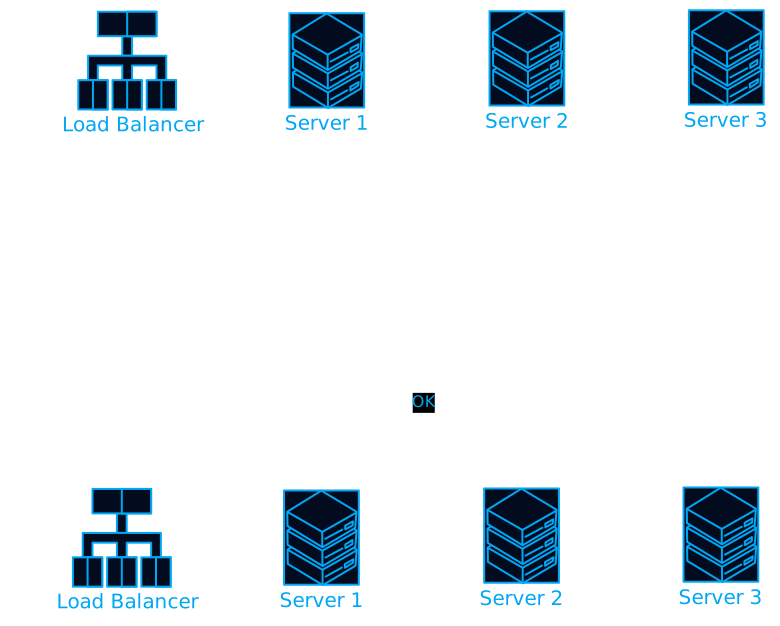
Load balancers are like traffic controllers for your servers. They distribute incoming requests across multiple servers, ensuring no single server gets overwhelmed.
Round Robin: The Simple Approach
The simplest load balancing algorithm just sends requests to servers in order: server 1, server 2, server 3, then back to server 1.
class RoundRobinBalancer {
    constructor(servers) {
        this.servers = servers;
        this.currentIndex = 0;
    }

    getNextServer() {
        const server = this.servers[this.currentIndex];
        this.currentIndex = (this.currentIndex + 1) % this.servers.length;
        return server;
    }
}
Weighted Load Balancing: Accounting for Different Capacities
Not all servers are created equal. Some might have more CPU power or memory. Weighted load balancing lets you send more traffic to more powerful servers.
import random

class WeightedLoadBalancer:
    def __init__(self, servers_with_weights):
        self.servers = []
        self.weights = []

        for server, weight in servers_with_weights:
            self.servers.append(server)
            self.weights.append(weight)

    def get_server(self):
        return random.choices(self.servers, weights=self.weights)[0]
Health-Aware Load Balancing: The Smart Approach
The best load balancers don't just distribute traffic – they monitor server health and stop sending traffic to unhealthy servers.
Monitoring: Your Early Warning System
You can't fix what you don't know is broken. Effective monitoring is about detecting problems before they become outages.
The Four Golden Signals
Google's Site Reliability Engineering team identified four key metrics that matter most:
- Latency: How long requests take to process
- Traffic: How many requests you're handling
- Errors: How many requests are failing
- Saturation: How full your services are
class SystemMonitor:
    def __init__(self):
        self.metrics = {
            'latency': [],
            'traffic': 0,
            'errors': 0,
            'cpu_usage': 0,
            'memory_usage': 0
        }

    def record_request(self, duration, success):
        self.metrics['latency'].append(duration)
        self.metrics['traffic'] += 1

        if not success:
            self.metrics['errors'] += 1

    def get_error_rate(self):
        if self.metrics['traffic'] == 0:
            return 0
        return self.metrics['errors'] / self.metrics['traffic']

    def get_average_latency(self):
        if not self.metrics['latency']:
            return 0
        return sum(self.metrics['latency']) / len(self.metrics['latency'])

    def check_alerts(self):
        alerts = []

        if self.get_error_rate() > 0.05:  # 5% error rate
            alerts.append("High error rate detected")

        if self.get_average_latency() > 1000:  # 1 second
            alerts.append("High latency detected")

        if self.metrics['cpu_usage'] > 80:
            alerts.append("High CPU usage")

        return alerts
Synthetic Monitoring: Testing Like a User
Don't wait for users to discover problems. Synthetic monitoring continuously tests your system by simulating user interactions.
// Example synthetic monitoring test
async function syntheticTest() {
    const startTime = Date.now();

    try {
        // Test critical user journey
        const loginResponse = await fetch('/api/login', {
            method: 'POST',
            body: JSON.stringify({ username: 'test', password: 'test' })
        });

        if (!loginResponse.ok) {
            throw new Error(`Login failed: ${loginResponse.status}`);
        }

        const dashboardResponse = await fetch('/api/dashboard');

        if (!dashboardResponse.ok) {
            throw new Error(`Dashboard failed: ${dashboardResponse.status}`);
        }

        const endTime = Date.now();
        const duration = endTime - startTime;

        // Record successful test
        recordMetric('synthetic_test_success', 1);
        recordMetric('synthetic_test_duration', duration);

    } catch (error) {
        // Record failed test
        recordMetric('synthetic_test_failure', 1);
        sendAlert(`Synthetic test failed: ${error.message}`);
    }
}

// Run test every minute
setInterval(syntheticTest, 60000);
Circuit Breakers: Failing Fast to Prevent Cascading Failures
When a downstream service is failing, continuing to call it just makes things worse. Circuit breakers detect failures and temporarily stop making calls to failing services.
import time
from enum import Enum

class CircuitState(Enum):
    CLOSED = "closed"
    OPEN = "open"
    HALF_OPEN = "half_open"

class CircuitBreaker:
    def __init__(self, failure_threshold=5, recovery_timeout=60, expected_exception=Exception):
        self.failure_threshold = failure_threshold
        self.recovery_timeout = recovery_timeout
        self.expected_exception = expected_exception

        self.failure_count = 0
        self.last_failure_time = None
        self.state = CircuitState.CLOSED

    def call(self, func, *args, **kwargs):
        if self.state == CircuitState.OPEN:
            if self._should_attempt_reset():
                self.state = CircuitState.HALF_OPEN
            else:
                raise Exception("Circuit breaker is OPEN")

        try:
            result = func(*args, **kwargs)
            self._on_success()
            return result
        except self.expected_exception as e:
            self._on_failure()
            raise e

    def _should_attempt_reset(self):
        return (time.time() - self.last_failure_time) >= self.recovery_timeout

    def _on_success(self):
        self.failure_count = 0
        self.state = CircuitState.CLOSED

    def _on_failure(self):
        self.failure_count += 1
        self.last_failure_time = time.time()

        if self.failure_count >= self.failure_threshold:
            self.state = CircuitState.OPEN
Disaster Recovery: Planning for the Worst
Even with all the redundancy and monitoring in the world, disasters can still happen. Disaster recovery is about having a plan to restore service when everything goes wrong.
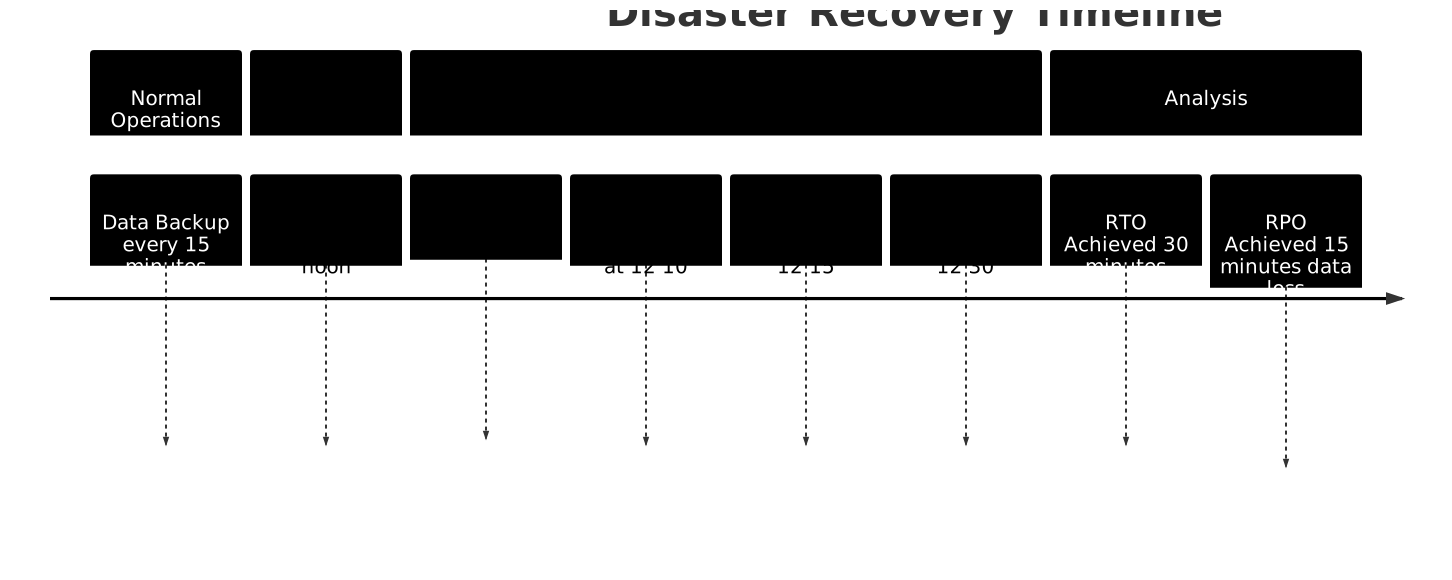
Recovery Time Objective (RTO) vs Recovery Point Objective (RPO)
- RTO: How long can you afford to be down?
- RPO: How much data can you afford to lose?
These two metrics drive your entire disaster recovery strategy.
Backup Strategies: The 3-2-1 Rule
- 3 copies of your data
- 2 different storage media
- 1 offsite backup
#!/bin/bash
# Automated backup script
DATE=$(date +%Y%m%d_%H%M%S)
BACKUP_DIR="/backups"
DATABASE="production_db"

# Create database backup
mysqldump -u backup_user -p$BACKUP_PASSWORD $DATABASE > $BACKUP_DIR/db_backup_$DATE.sql

# Compress the backup
gzip $BACKUP_DIR/db_backup_$DATE.sql

# Upload to cloud storage (offsite backup)
aws s3 cp $BACKUP_DIR/db_backup_$DATE.sql.gz s3://disaster-recovery-backups/

# Keep only last 7 days of local backups
find $BACKUP_DIR -name "db_backup_*.sql.gz" -mtime +7 -delete

echo "Backup completed: db_backup_$DATE.sql.gz"
Chaos Engineering: Breaking Things on Purpose
Netflix pioneered the practice of chaos engineering – intentionally breaking parts of your system to test its resilience. The idea is simple: if you're going to have failures anyway, better to have them during business hours when your team is ready to respond.
import random
import time

class ChaosMonkey:
    def __init__(self, servers):
        self.servers = servers
        self.is_enabled = False

    def enable(self):
        self.is_enabled = True
        print("Chaos Monkey enabled - may the odds be ever in your favor")

    def disable(self):
        self.is_enabled = False
        print("Chaos Monkey disabled - systems are safe... for now")

    def wreak_havoc(self):
        if not self.is_enabled:
            return

        # Randomly select a server to "break"
        target_server = random.choice(self.servers)

        # Choose a random failure mode
        failure_modes = [
            self.simulate_high_cpu,
            self.simulate_memory_leak,
            self.simulate_network_partition,
            self.simulate_disk_full
        ]

        failure_mode = random.choice(failure_modes)
        failure_mode(target_server)

    def simulate_high_cpu(self, server):
        print(f"Simulating high CPU load on {server.name}")
        server.cpu_usage = 95

    def simulate_memory_leak(self, server):
        print(f"Simulating memory leak on {server.name}")
        server.memory_usage += 20

    def simulate_network_partition(self, server):
        print(f"Simulating network partition for {server.name}")
        server.network_accessible = False

    def simulate_disk_full(self, server):
        print(f"Simulating disk full on {server.name}")
        server.disk_usage = 100
Real-World Availability Patterns
The Netflix Approach: Embrace Failure
Netflix runs on AWS, which means they don't control the underlying infrastructure. Instead of fighting this reality, they embraced it by building systems that assume failures will happen.
Key principles:
- Stateless services that can be killed and restarted anywhere
- Circuit breakers to prevent cascading failures
- Bulkhead pattern to isolate failures
- Chaos engineering to test resilience
The Google Approach: Redundancy at Scale
Google operates at such massive scale that hardware failures are a daily occurrence. Their approach focuses on:
- Massive redundancy across multiple data centers
- Automatic failover and load balancing
- Sophisticated monitoring and alerting
- Gradual rollouts to minimize blast radius
The Banking Approach: Zero Tolerance for Failure
Financial institutions have different requirements – they often prioritize consistency over availability. Their approach includes:
- Extensive testing and validation
- Conservative change management
- Multiple layers of approval
- Comprehensive audit trails
Common Availability Anti-Patterns
The Single Point of Failure
Having any component that can bring down your entire system is a recipe for disaster. Common single points of failure include:
- Single database instance
- Single load balancer
- Single network connection
- Single data center
The Shared Database Anti-Pattern
When multiple services share the same database, a problem with one service can affect all others. This violates the principle of service isolation.
The Synchronous Chain Anti-Pattern
When services call each other synchronously in a chain, the availability of the entire chain is the product of individual service availabilities:
Service A (99.9%) → Service B (99.9%) → Service C (99.9%)
Total availability = 0.999 × 0.999 × 0.999 = 99.7%
Measuring and Improving Availability
Service Level Indicators (SLIs)
SLIs are the metrics you use to measure availability:
- Request success rate
- Request latency
- System throughput
- Error rate
Service Level Objectives (SLOs)
SLOs are the targets you set for your SLIs:
- 99.9% of requests should succeed
- 95% of requests should complete within 100ms
- Error rate should be below 0.1%
Error Budgets
If your SLO is 99.9% availability, you have a 0.1% error budget. This budget can be "spent" on:
- Planned maintenance
- New feature deployments
- Experiments and testing
class ErrorBudget:
    def __init__(self, slo_percentage, time_period_hours):
        self.slo = slo_percentage / 100
        self.time_period = time_period_hours
        self.total_budget = time_period_hours * (1 - self.slo)
        self.consumed = 0

    def record_downtime(self, downtime_hours):
        self.consumed += downtime_hours

    def remaining_budget(self):
        return max(0, self.total_budget - self.consumed)

    def budget_exhausted(self):
        return self.consumed >= self.total_budget

    def budget_utilization(self):
        return (self.consumed / self.total_budget) * 100

# Example: 99.9% SLO for one month
budget = ErrorBudget(99.9, 30 * 24)  # 30 days * 24 hours
print(f"Total error budget: {budget.total_budget:.2f} hours")  # 0.72 hours

budget.record_downtime(0.5)  # 30 minutes of downtime
print(f"Remaining budget: {budget.remaining_budget():.2f} hours")
print(f"Budget utilization: {budget.budget_utilization():.1f}%")
The Business Case for High Availability
Direct Costs of Downtime
- Lost revenue during outages
- Customer compensation and refunds
- Emergency response costs
- Regulatory fines and penalties
Indirect Costs of Downtime
- Customer churn and lost trust
- Reputation damage
- Reduced employee productivity
- Opportunity costs
ROI of Availability Investments
def calculate_availability_roi(
    current_availability,
    target_availability,
    annual_revenue,
    investment_cost,
    customer_lifetime_value
):
    # Calculate current and target downtime
    current_downtime = (1 - current_availability) * 365 * 24
    target_downtime = (1 - target_availability) * 365 * 24

    # Calculate downtime reduction
    downtime_reduction = current_downtime - target_downtime

    # Estimate revenue protection
    hourly_revenue = annual_revenue / (365 * 24)
    revenue_protected = downtime_reduction * hourly_revenue

    # Estimate customer retention improvement
    # Assume 1% customer churn reduction per 9 of availability
    availability_improvement = target_availability - current_availability
    churn_reduction = availability_improvement * 10  # rough estimate
    retention_value = churn_reduction * customer_lifetime_value

    total_benefit = revenue_protected + retention_value
    roi = ((total_benefit - investment_cost) / investment_cost) * 100

    return {
        'investment': investment_cost,
        'revenue_protected': revenue_protected,
        'retention_value': retention_value,
        'total_benefit': total_benefit,
        'roi_percentage': roi,
        'payback_period_months': investment_cost / (total_benefit / 12)
    }

# Example calculation
result = calculate_availability_roi(
    current_availability=0.99,    # 99%
    target_availability=0.999,    # 99.9%
    annual_revenue=10_000_000,    # $10M
    investment_cost=500_000,      # $500K
    customer_lifetime_value=1000  # $1K per customer
)

print(f"ROI: {result['roi_percentage']:.1f}%")
print(f"Payback period: {result['payback_period_months']:.1f} months")
The Future of Availability Engineering
Serverless and Auto-Scaling
Cloud platforms are making high availability easier by abstracting away infrastructure management. Serverless functions automatically scale and handle failures.
AI-Powered Incident Response
Machine learning is being used to:
- Predict failures before they happen
- Automatically diagnose problems
- Suggest remediation actions
- Optimize resource allocation
Edge Computing
Moving computation closer to users reduces latency and improves availability by reducing dependencies on centralized systems.
The Bottom Line
Availability isn't just a technical metric – it's a business imperative. In our always-on, globally connected world, users expect systems to work 24/7. The companies that master availability engineering will have a significant competitive advantage.
The key principles are simple:
- Eliminate single points of failure
- Plan for failures at every level
- Monitor everything that matters
- Practice incident response
- Learn from every outage
But implementing these principles at scale requires careful planning, significant investment, and ongoing commitment. The good news is that cloud platforms and modern tools make high availability more achievable than ever before.
Remember: availability is not a destination, it's a journey. Every system can be made more available, but the question is whether the investment is worth the return. Start by understanding your users' needs, set realistic targets, and continuously improve.
The goal isn't perfect availability – it's optimal availability for your specific business needs. Sometimes 99% is good enough. Sometimes you need 99.999%. The key is making that decision consciously, based on data and business requirements, not just hoping for the best.
Your users may never notice when your system is available, but they'll definitely notice when it's not. Make availability a first-class concern in your system design, and your users (and your business) will thank you for it.