Non-Functional Requirements Explained: Performance, Security, Scalability, and Reliability
Non-Functional Requirements Explained: Performance, Security, Scalability, and Reliability
Ever wondered why some apps feel smooth as butter while others make you want to throw your phone across the room? Or why Netflix never seems to go down during your weekend binge sessions, but that startup's app crashes the moment it gets featured on TechCrunch?
The secret isn't just in the code. It's in something most developers overlook until it's too late: non-functional requirements.
What Are Non-Functional Requirements Anyway?
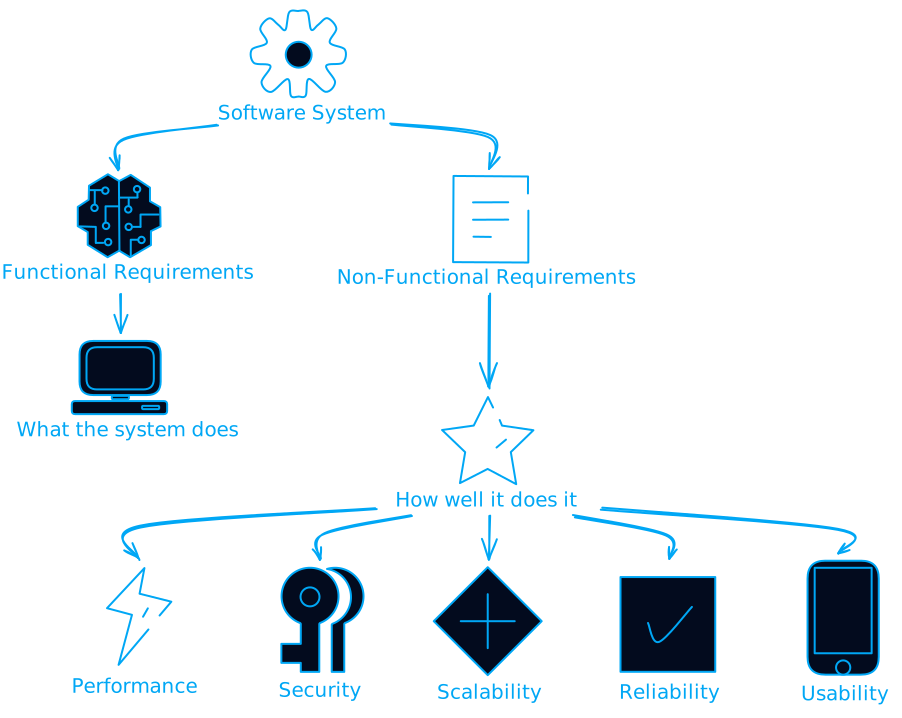
Think of building software like constructing a house. Functional requirements are like saying "I need a kitchen, two bedrooms, and a bathroom." Non-functional requirements are more like "the house should stay standing during earthquakes, keep me warm in winter, and not cost a fortune to maintain."
Non-functional requirements (NFRs) define how your system should behave, not what it should do. They're the difference between a system that works and a system that works well under pressure.
The Real Cost of Ignoring NFRs
Let me tell you a story. A friend of mine built this amazing food delivery app. Great UI, smooth ordering process, everything worked perfectly during testing. Then they launched.
Within hours, the app was down. Not because of bugs in the ordering logic, but because they never considered what happens when 10,000 people try to order pizza at the same time on a Friday night. They had functional requirements nailed down but completely ignored performance and scalability NFRs.
The result? Angry customers, bad reviews, and a very expensive emergency scaling operation at 2 AM.
This isn't uncommon. Studies show that addressing NFRs after deployment costs 10-100 times more than building them in from the start.
The Big Players: Core NFR Categories
Performance: The Need for Speed
Performance isn't just about making things fast. It's about making them consistently fast under real-world conditions.
What to consider:
- Response time under normal load
- Response time under peak load
- Throughput (how many requests per second)
- Resource utilization (CPU, memory, disk)
Real-world example: Your API might respond in 100ms when one person uses it, but what happens when Black Friday hits and you get 1000x the traffic?
Security: The Digital Fortress
Security NFRs aren't just "add HTTPS and call it a day." They're about building a system that can withstand attacks while remaining usable.

Key areas:
- Authentication and authorization
- Data encryption (at rest and in transit)
- Input validation and sanitization
- Audit logging
- Compliance with regulations (GDPR, HIPAA, etc.)
Scalability: Growing Pains
Scalability is your system's ability to handle growth gracefully. It's not just about handling more users, it's about handling more everything.
Two types to consider:
- Vertical scaling: Adding more power to existing machines
- Horizontal scaling: Adding more machines
Most successful systems use a combination of both.
Reliability: The Always-On Challenge
Reliability is about your system doing what it's supposed to do, when it's supposed to do it, every single time.
Key metrics:
- Uptime: How often is your system available?
- MTBF (Mean Time Between Failures): How long between system failures?
- MTTR (Mean Time To Recovery): How quickly can you recover from failures?
The famous "five nines" (99.999% uptime) means your system can only be down for about 5 minutes per year. That's the gold standard, but it comes with gold-standard costs.
The AI Revolution in NFR Management
Here's where things get interesting. AI is changing how we handle non-functional requirements, and it's not just hype.
AI as Your NFR Assistant
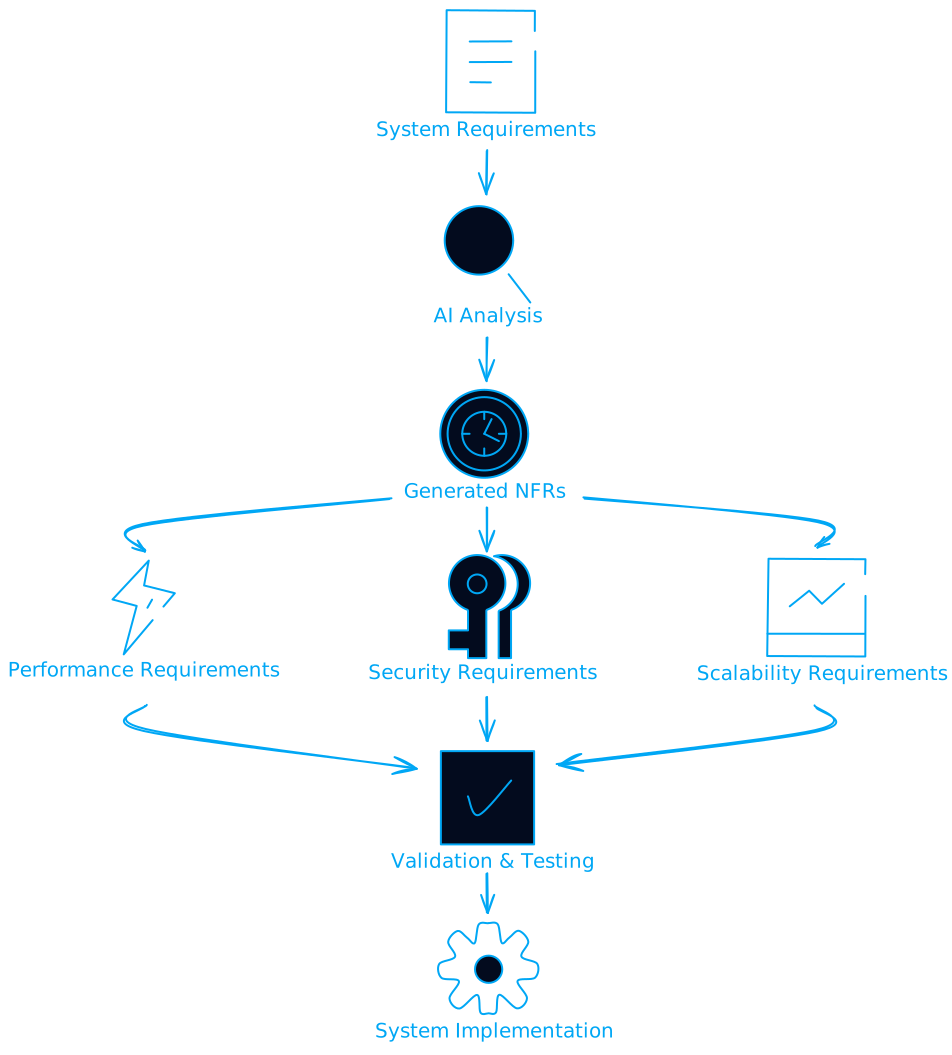
Modern AI tools can actually help generate NFRs based on your functional requirements. Feed GPT-4 your system design, and it can suggest performance benchmarks, security considerations, and scalability requirements you might have missed.
Continuous NFR Monitoring
AI can continuously monitor your system's performance against NFRs and alert you before things go wrong. Instead of finding out your app is slow from angry user reviews, AI can predict performance degradation and suggest optimizations.
But Wait, There's a Catch
Using AI for NFRs introduces new NFR categories:
AI Ethics: Your AI shouldn't be biased or discriminatory Explainability: You need to understand why your AI makes certain decisions AI Performance: Your AI models need their own performance requirements
It's NFRs all the way down!
Emerging Trends: The Future is Green and Accessible
Green Computing: The Environmental NFR
Climate change is making energy efficiency a critical NFR. Your code's carbon footprint matters now.
Consider:
- Energy-efficient algorithms
- Optimized data center usage
- Sustainable software development practices
Some companies are now measuring "carbon per transaction" as seriously as they measure response time.
Accessibility: Building for Everyone
Accessibility isn't just nice to have anymore, it's often legally required. Web Content Accessibility Guidelines (WCAG) compliance is becoming a standard NFR.
Key areas:
- Screen reader compatibility
- Keyboard navigation
- Color contrast ratios
- Alternative text for images
Edge Computing and IoT: The New Frontier
With more computing happening at the edge, new NFRs emerge:
- Offline capability: What happens when connectivity is spotty?
- Battery efficiency: How long can your app run on a device?
- Real-time processing: Can you process data fast enough for real-time decisions?
Practical Tips: How to Actually Implement NFRs
Start Early, Start Simple
Don't wait until the end to think about NFRs. Build them into your planning from day one.
Simple framework:
- Identify: What NFRs matter for your use case?
- Quantify: Turn vague requirements into measurable metrics
- Prioritize: You can't optimize everything, focus on what matters most
- Test: Build NFR testing into your development process
- Monitor: Keep watching these metrics in production
Make NFRs Measurable
"The system should be fast" is not an NFR. "The system should respond to 95% of requests within 200ms under normal load" is.
Good NFR template:
- What: The specific quality attribute
- When: Under what conditions
- How much: The measurable target
- How measured: The testing method
Use the Right Tools
For Performance:
- Load testing tools (JMeter, k6)
- Application Performance Monitoring (New Relic, DataDog)
- Profiling tools for your specific language
For Security:
- Static code analysis tools
- Dependency vulnerability scanners
- Penetration testing tools
For Reliability:
- Chaos engineering tools (Chaos Monkey)
- Health check endpoints
- Circuit breakers and retry logic
The Trade-off Game: You Can't Have Everything
Here's the hard truth: NFRs often conflict with each other. Making something more secure might make it slower. Making it faster might make it less reliable. Making it more scalable might make it more complex.
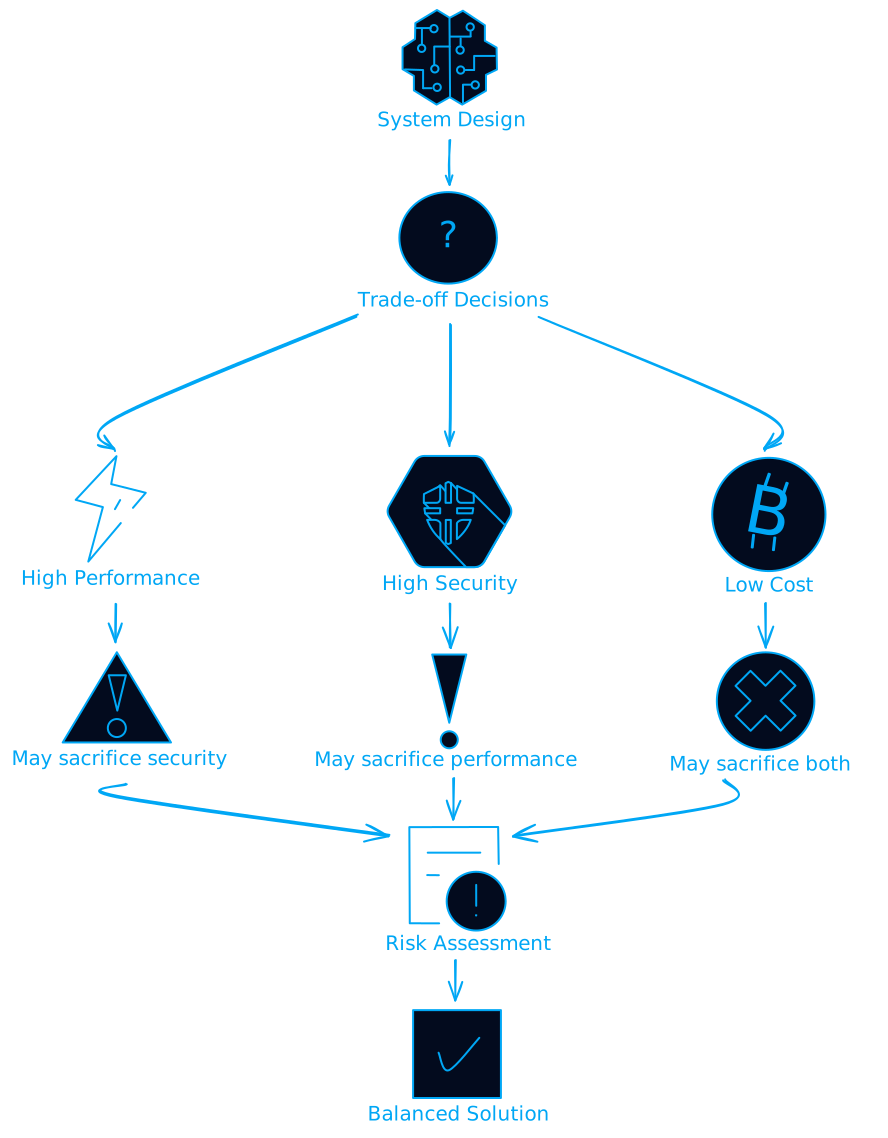
The key is making these trade-offs consciously, not accidentally.
Common trade-offs:
- Security vs. Usability: More security often means more friction
- Performance vs. Reliability: Caching improves performance but can cause consistency issues
- Scalability vs. Simplicity: Distributed systems are more scalable but much more complex
Real-World War Stories
The Netflix Approach
Netflix famously uses chaos engineering, intentionally breaking parts of their system to test resilience. They literally have a tool called "Chaos Monkey" that randomly kills services in production.
Sounds crazy? It works. Netflix has some of the best uptime in the industry because they've built systems that expect failure.
The WhatsApp Scale
When Facebook bought WhatsApp for $19 billion, WhatsApp was handling 42 billion messages per day with just 32 engineers. How? They obsessed over performance and scalability NFRs from day one.
Their secret: Erlang, a language designed for fault-tolerant, distributed systems. They chose their tech stack based on NFRs, not just functional requirements.
The Zoom Pandemic Test
When COVID-19 hit, Zoom went from 10 million daily users to 300 million almost overnight. Their systems held up because they had built scalability NFRs for exactly this scenario (though they probably didn't expect a global pandemic to be the trigger).
The Bottom Line: NFRs Are Your Insurance Policy
Non-functional requirements are like insurance. You don't think about them until you need them, but when you need them, you really need them.
The companies that survive and thrive are the ones that treat NFRs as first-class citizens in their development process. They don't just build features, they build systems that can handle the real world.
Key takeaways:
- Start early: Build NFRs into your planning from day one
- Be specific: Vague requirements lead to vague results
- Test continuously: Don't wait for production to find out your NFRs aren't met
- Embrace trade-offs: You can't optimize everything, so choose wisely
- Use AI wisely: Let AI help with NFR generation and monitoring, but understand the new requirements it introduces
What's Next?
The world of NFRs is evolving rapidly. Quantum computing will introduce new security requirements. Web3 will bring new decentralization and trust requirements. Climate change will make energy efficiency even more critical.
The developers and companies that stay ahead of these trends will be the ones building the systems that power our future.
So next time you're planning a project, don't just ask "what should this system do?" Ask "how well should it do it, and under what conditions?"
Your 3 AM self will thank you.
Want to dive deeper into NFRs? Start by auditing your current systems against the categories mentioned here. You might be surprised by what you find.