JWT Explained: Why Every Developer Should Care About This Authentication Game-Changer
Ever wondered how modern apps keep you logged in across different pages without constantly asking for your password? Or how your favorite social media platform knows it's really you when you're scrolling through posts? The answer is probably sitting right there in your browser's local storage: JSON Web Tokens, or JWTs.
If you're building anything web-related these days, JWTs are basically unavoidable. They're everywhere, from simple blog authentication to complex microservice architectures. But here's the thing - most developers I meet either love them or hate them, and honestly, both camps usually don't fully understand what they're dealing with.
Let me break down everything you need to know about JWTs, why they matter, and how to use them without shooting yourself in the foot.
What Exactly Is a JWT?
Think of a JWT like a digital passport. Just like your passport contains information about you (name, photo, nationality) and has security features to prove it's legitimate, a JWT contains claims about a user and has a signature to prove it hasn't been tampered with.
Here's what makes JWTs special: they're self-contained. Unlike traditional session tokens that are just random strings pointing to server-side data, JWTs carry the actual information with them. It's like the difference between a claim ticket (session token) and actually carrying your stuff with you (JWT).
The Three-Part Structure
A JWT looks like this: xxxxx.yyyyy.zzzzz
Those three parts separated by dots are:
- Header - Metadata about the token
- Payload - The actual claims/data
- Signature - Proof of authenticity
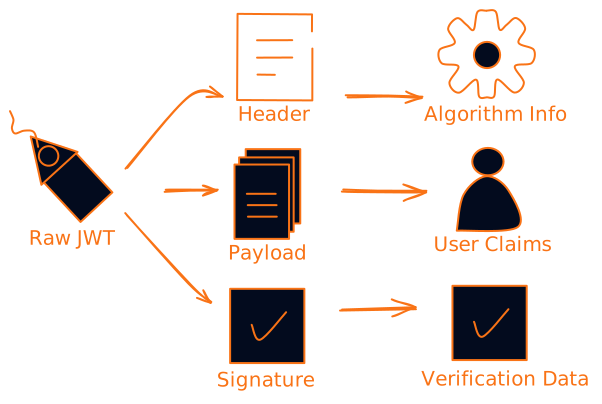
Let's look at each part:
Header Example:
{
  "typ": "JWT",
  "alg": "HS256"
}
This just says "hey, I'm a JWT and I'm signed with HMAC SHA256."
Payload Example:
{
  "sub": "1234567890",
  "name": "John Doe",
  "admin": true,
  "iat": 1516239022
}
This is where the magic happens. You can put whatever claims you want here - user ID, permissions, expiration time, whatever your app needs.
Signature: This is created by taking the encoded header + encoded payload + a secret key and running it through the algorithm specified in the header. It's what prevents someone from just changing the payload and pretending to be an admin.
How JWT Authentication Actually Works
The JWT authentication flow is pretty straightforward once you see it in action:
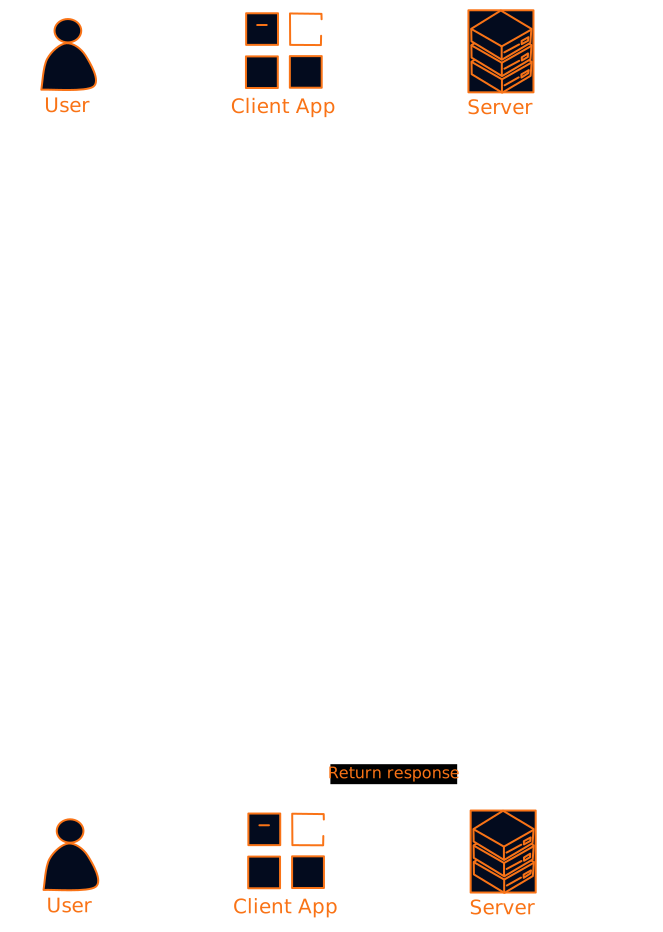
Here's what happens step by step:
- User logs in - They provide username/password or use OAuth
- Server validates - Checks credentials against database
- JWT generation - Server creates a JWT with user info and signs it
- Token delivery - JWT gets sent back to the client
- Storage - Client stores the JWT (usually in localStorage or a cookie)
- Future requests - Client includes JWT in the Authorization header
- Verification - Server checks the signature and claims on each request
The beautiful thing here is that the server doesn't need to store anything. No session data, no lookup tables. The JWT itself contains everything needed to verify the user.
Why JWTs Are Taking Over
Stateless Authentication
Traditional session-based auth requires the server to remember who's logged in. With JWTs, all the information is in the token itself. This means:
- Easier scaling - No shared session storage between servers
- Better performance - No database lookups for every request
- Simpler architecture - Less moving parts to break
Cross-Domain Magic
JWTs work great across different domains and services. Got a microservice architecture? JWTs can be shared between services without each one needing to call back to a central auth server.
Mobile-Friendly
Mobile apps love JWTs because they don't rely on cookies (which can be finicky on mobile) and work great with REST APIs.
Real-World Use Cases
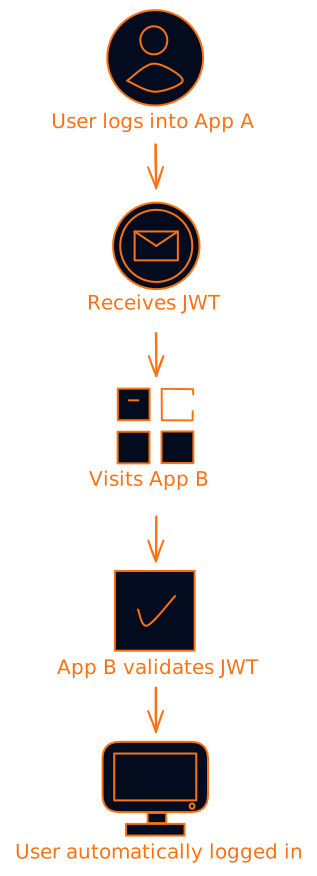
Single Sign-On (SSO)
This is where JWTs really shine. Log into one app, and boom - you're logged into all related apps. The JWT can be shared across different subdomains or even completely different services.
API Authentication
Perfect for REST APIs where you need stateless authentication. The client gets a JWT and includes it in every API call.
Microservices
In a microservice architecture, JWTs can carry user context between services without each service needing to call back to a central auth service.
The Security Stuff You Can't Ignore
Here's where things get serious. JWTs are secure when used correctly, but there are some gotchas that can bite you:
Use Strong Algorithms
Never use none as your algorithm (yes, that's actually an option). Stick with:
- RS256 (RSA with SHA-256) - Best for most cases
- ES256 (ECDSA with SHA-256) - Good alternative
- HS256 (HMAC with SHA-256) - Only if you can securely manage the secret
Keep Secrets Secret
This should be obvious, but I've seen too many apps with JWT secrets hardcoded in the frontend. Your signing secret should be:
- Long and random (at least 256 bits)
- Stored securely (environment variables, key management service)
- Rotated regularly
Validate Everything
Don't just check the signature. Validate:
- Expiration time (
expclaim) - Issuer (
issclaim) - Audience (
audclaim) - Not before (
nbfclaim)
Handle Token Expiration
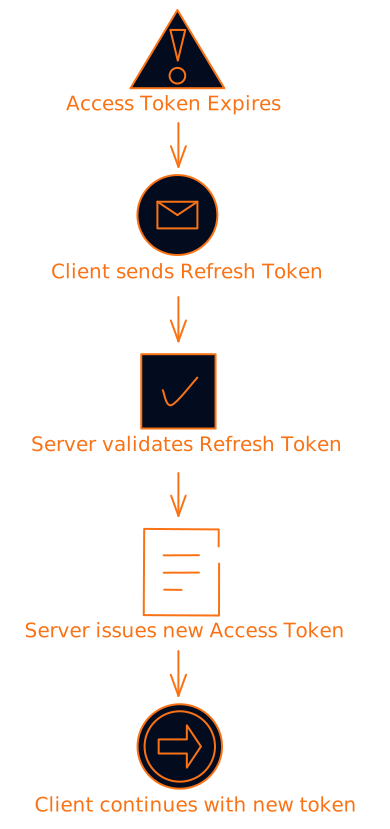
JWTs should have short lifespans (15-30 minutes for access tokens). Use refresh tokens for longer sessions:
Common Pitfalls (And How to Avoid Them)
Storing Sensitive Data in JWTs
Remember, JWTs are just base64 encoded - anyone can decode them. Don't put passwords, credit card numbers, or other sensitive data in the payload.
Bad:
{
  "user_id": 123,
  "password": "secret123",
  "credit_card": "4111-1111-1111-1111"
}
Good:
{
  "user_id": 123,
  "role": "admin",
  "exp": 1516239022
}
Making Tokens Too Long-Lived
I've seen JWTs with expiration times of months or even years. This is dangerous because:
- If compromised, they can't be revoked easily
- User permissions might change
- Security vulnerabilities might be discovered
Not Implementing Proper Logout
Since JWTs are stateless, you can't just "delete" them from the server. You need to either:
- Keep a blacklist of revoked tokens
- Use short expiration times
- Implement token versioning
JWT vs. Sessions: The Eternal Debate
Let me settle this once and for all. Both have their place:
Use JWTs when:
- Building APIs or microservices
- Need cross-domain authentication
- Want stateless architecture
- Building mobile apps
Use sessions when:
- Building traditional web apps
- Need immediate revocation
- Want simpler security model
- Have sensitive data that shouldn't be in tokens
Best Practices That Actually Matter
1. Use HTTPS Everywhere
JWTs should never be transmitted over HTTP. Ever. The token itself might not contain sensitive data, but it's still a key to your kingdom.
2. Implement Proper Key Management
Use a proper key management service like AWS KMS, HashiCorp Vault, or Azure Key Vault. Don't just throw secrets in environment variables and call it a day.
3. Monitor and Log
Keep track of:
- Failed token validations
- Expired token usage attempts
- Unusual token patterns
4. Use Libraries, Don't Roll Your Own
There are battle-tested JWT libraries for every language. Use them. Don't try to implement JWT parsing and validation yourself.
Popular libraries:
- Node.js: jsonwebtoken
- Python: PyJWT
- Java: java-jwt
- Go: golang-jwt
- PHP: firebase/php-jwt
Debugging JWT Issues
When JWTs go wrong (and they will), here's your debugging checklist:
- Check the signature - Is it valid?
- Verify the algorithm - Does it match what you expect?
- Validate claims - Are exp, iss, aud correct?
- Check encoding - Is the JWT properly base64url encoded?
- Time sync - Are your servers' clocks synchronized?
The Future of JWTs
JWTs aren't going anywhere. If anything, they're becoming more important as we move toward:
- Zero-trust architectures - Where every request needs verification
- Edge computing - Where stateless auth is crucial
- Serverless functions - Where session storage is impractical
New standards like PASETO (Platform-Agnostic Security Tokens) are emerging as alternatives, but JWTs have too much momentum to disappear anytime soon.
Wrapping Up
JWTs are powerful tools that solve real problems in modern web development. They're not perfect, and they're not always the right choice, but when used correctly, they can make your authentication system more scalable, flexible, and maintainable.
The key is understanding what you're working with. JWTs aren't magic - they're just a standardized way of packaging and signing data. Treat them with the respect they deserve, follow security best practices, and they'll serve you well.
Remember: with great power comes great responsibility. JWTs give you a lot of flexibility, but that also means there are more ways to mess things up. Start simple, validate everything, and always prioritize security over convenience.
Next steps:
- Try implementing JWT auth in a simple project
- Experiment with different claims and see how they affect your app
- Set up proper monitoring and logging for your JWT usage
- Consider implementing refresh token rotation for better security
The authentication landscape is always evolving, but understanding JWTs gives you a solid foundation for whatever comes next. Now go forth and authenticate responsibly!
Want to dive deeper? Check out jwt.io for interactive JWT debugging and the official RFC 7519 specification for all the gory details.