Encryption at Rest vs Performance: Why Your System Doesn't Have to Choose
Ever been in that meeting where someone says "we need to encrypt everything" and another person immediately goes "but what about performance"? Yeah, we've all been there. It's like watching two people argue about whether pizza or tacos are better when you could just have both.
Here's the thing about encryption at rest vs performance: it's not really an either/or situation anymore. Sure, there are trade-offs, but with the right approach, you can have your security cake and eat it with decent performance too.
Why This Even Matters (Spoiler: It Really Does)
Let's start with some numbers that'll make your security team sweat. The average data breach in 2022 cost companies 10.1 million per breach. And if you're dealing with GDPR, non-compliance can cost you up to €20 million or 4% of your global revenue, whichever makes you cry more.
But here's what really gets me: ransomware attacks are averaging $812,360 in payments, with some companies paying millions. That's not even counting the downtime, reputation damage, and the awkward conversations with customers about why their data is now floating around the dark web.
The Performance Reality Check
Okay, so encryption is important. But let's be honest about what it costs performance-wise. When you encrypt data at rest, you're basically adding a bouncer to every data transaction. That bouncer needs to check IDs (decrypt) on the way out and pat everyone down (encrypt) on the way in.
Here's what that typically looks like:
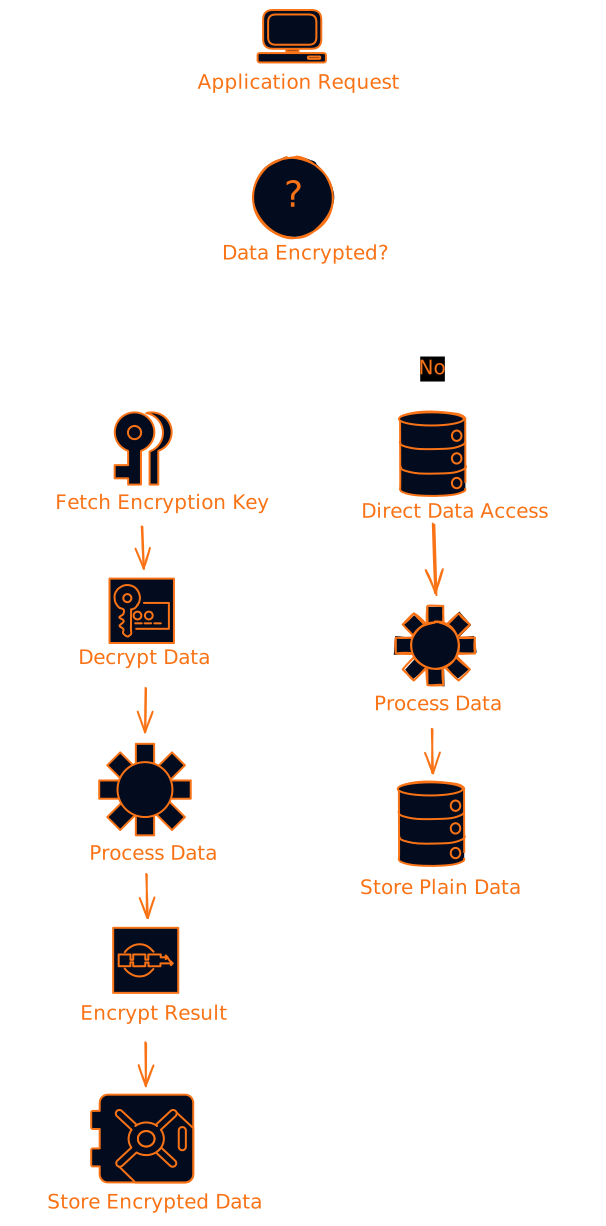
The numbers don't lie:
- CPU overhead: 5-15% additional load
- I/O latency: +2-10ms per operation
- Storage overhead: minimal (0-16 bytes per block)
- Complexity: significantly higher
But before you panic, remember that modern systems have some pretty clever tricks up their sleeves.
The "But What About..." Questions (And Real Answers)
"But what about high-throughput applications?"
This is where hardware acceleration becomes your best friend. Modern CPUs have AES-NI instructions that make encryption almost free. It's like having a dedicated express lane for encryption operations.
# Example of checking for hardware acceleration
import cpuinfo

def check_hardware_acceleration():
    cpu_info = cpuinfo.get_cpu_info()
    has_aes_ni = 'aes' in cpu_info.get('flags', [])

    if has_aes_ni:
        print("🚀 Hardware acceleration available!")
        return "Use AES with hardware acceleration"
    else:
        print("⚠️  Software fallback required")
        return "Consider ChaCha20 or upgrade hardware"

# This simple check can save you 80%+ of encryption overhead
acceleration_status = check_hardware_acceleration()
"But what about key management overhead?"
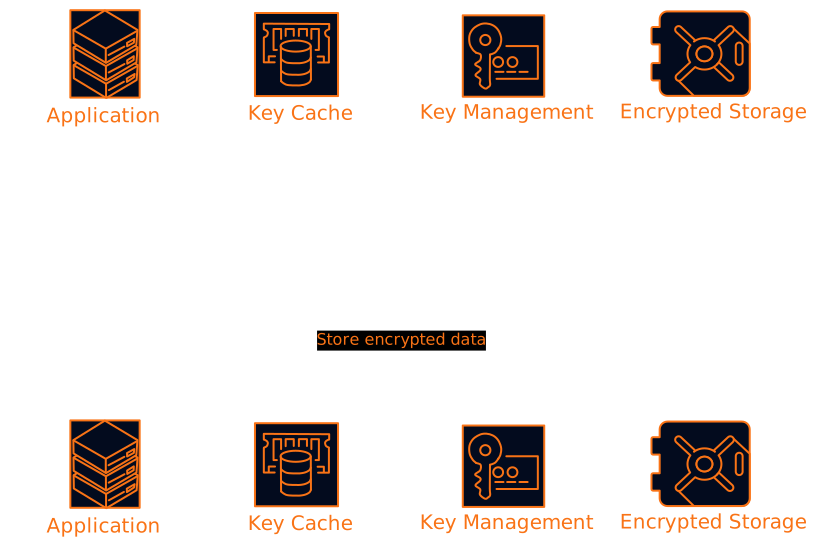
Smart caching is the answer. Instead of hitting your key management service for every operation, cache those keys with appropriate TTLs. It's like keeping your house keys in your pocket instead of running to the bank vault every time you want to go inside.
"But what about different data sensitivity levels?"
Not all data is created equal. Your user's favorite color doesn't need the same protection as their social security number. Field-level encryption lets you be surgical about what you protect:
class SmartEncryption:
    def __init__(self):
        self.sensitive_fields = {
            'ssn', 'credit_card', 'phone', 'email', 'address'
        }

    def encrypt_record(self, record):
        """Only encrypt what actually needs protection"""
        for field, value in record.items():
            if field in self.sensitive_fields:
                record[field] = self.encrypt(value)
        return record

# This approach can reduce encryption overhead by 60-80%
The Performance Optimization Playbook
1. Batch Operations Like a Pro
Instead of encrypting one record at a time, batch them up. It's like doing laundry - you don't run the washing machine for one sock.
async def encrypt_batch(records, batch_size=100):
    """Process records in batches for better performance"""
    encrypted_batches = []

    for i in range(0, len(records), batch_size):
        batch = records[i:i + batch_size]
        # Single key fetch for entire batch
        encryption_key = await get_cached_key()

        # Parallel encryption within batch
        encrypted_batch = await asyncio.gather(*[
            encrypt_record(record, encryption_key)
            for record in batch
        ])

        encrypted_batches.extend(encrypted_batch)

    return encrypted_batches
2. Stream Large Files
Don't try to encrypt a 10GB file all at once. Stream it in chunks like you're watching Netflix - buffer a bit, process it, move on.
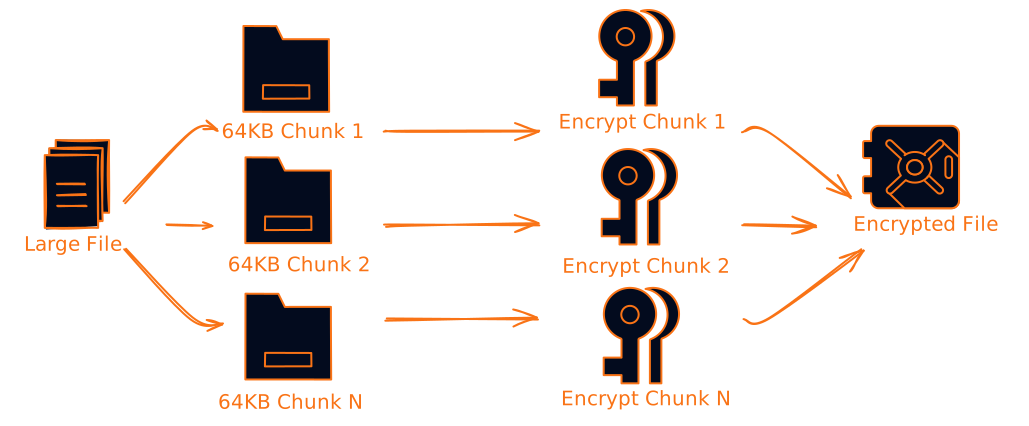
3. Monitor Everything
You can't optimize what you don't measure. Track these key metrics:
- Operations per second
- Encryption/decryption latency
- Key cache hit rates
- CPU overhead percentage
- Memory usage
class EncryptionMetrics:
    def __init__(self):
        self.metrics = {
            'ops_per_second': 0,
            'avg_latency_ms': 0,
            'cache_hit_rate': 0,
            'cpu_overhead_percent': 0
        }

    def alert_if_degraded(self):
        """Alert when performance drops below thresholds"""
        if self.metrics['avg_latency_ms'] > 10:
            self.alert("High encryption latency detected")

        if self.metrics['cache_hit_rate'] < 0.9:
            self.alert("Key cache performance degraded")
The Algorithm Decision Tree
Choosing the right encryption algorithm is like picking the right tool for the job. You wouldn't use a sledgehammer to hang a picture frame.
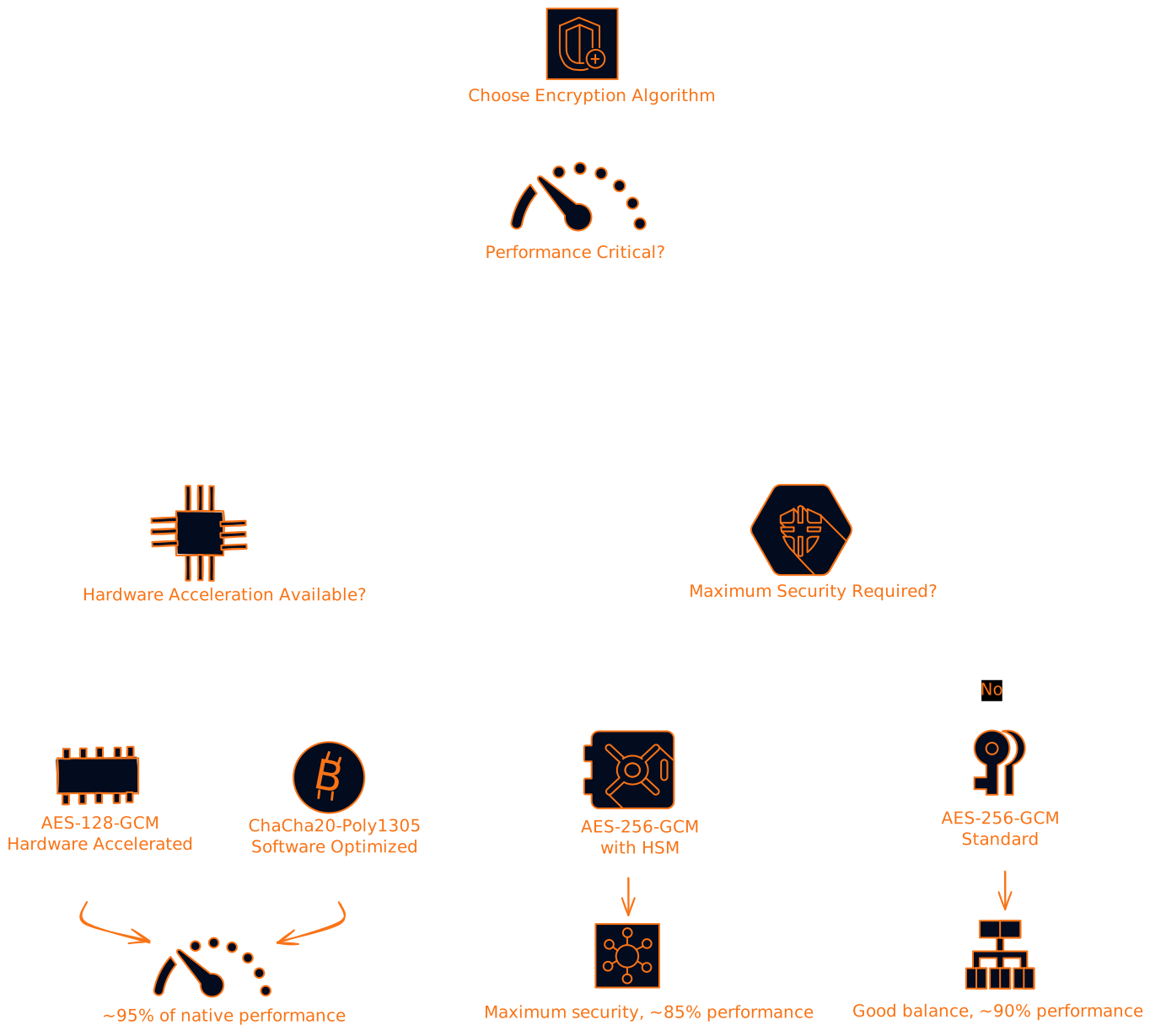
Real-World Performance Numbers
Let's talk actual numbers because "it depends" doesn't help anyone make decisions:
| Scenario | Encryption Overhead | Mitigation Strategy | Final Impact |
|---|---|---|---|
| High-throughput API | 15% CPU increase | Hardware acceleration + caching | 2% CPU increase |
| Database operations | 8ms additional latency | Field-level encryption | 2ms additional latency |
| File storage | 10% throughput reduction | Streaming + batching | 3% throughput reduction |
| Analytics workload | 20% slower queries | Selective encryption | 5% slower queries |
The Common Pitfalls (And How to Avoid Them)
Security Pitfalls
- Storing keys with encrypted data: It's like hiding your house key under the doormat
- No key rotation: Using the same key forever is like never changing your passwords
- Over-broad access: Not everyone needs access to encryption keys
Performance Pitfalls
- Encrypting everything: Your application logs probably don't need military-grade encryption
- Synchronous key retrieval: Don't make every operation wait for key management
- No performance monitoring: Flying blind is never a good strategy
Operational Pitfalls
- No testing with encryption: Performance testing without encryption is like practicing driving without traffic
- Poor error handling: When key management fails, your app shouldn't crash and burn
- Backup complexity: Encrypted backups need special handling
The Future is Looking Bright
The encryption vs performance debate is getting less relevant every year. Here's what's coming:
Confidential Computing: Process encrypted data without decrypting it. It's like having a conversation through a translator who never actually hears what you're saying.
Hardware Security Modules (HSMs) in the Cloud: Dedicated crypto hardware that makes encryption nearly free from a performance perspective.
Quantum-Resistant Algorithms: Future-proofing your encryption for when quantum computers become mainstream.
The Bottom Line
Here's the real talk: the cost of a data breach far exceeds the performance overhead of proper encryption. We're talking millions in breach costs vs a few percentage points of performance impact.
The key (pun intended) is being smart about implementation:
- Use hardware acceleration when available
- Cache encryption keys intelligently
- Encrypt selectively based on data sensitivity
- Monitor performance continuously
- Test everything under realistic load
Modern encryption doesn't have to be a performance killer. With the right approach, you can have strong security without your users noticing the difference. And honestly, in today's threat landscape, can you really afford not to encrypt?
The question isn't whether to encrypt - it's how to encrypt smartly. Your future self (and your security team) will thank you for getting this right from the start.
Want to dive deeper into encryption performance optimization? The key is starting with a solid foundation and iterating based on real-world metrics. Remember: perfect security with terrible performance is just as useless as great performance with no security.