DNS: The Internet's Phone Book That Actually Makes Sense
DNS: The Internet's Phone Book That Actually Makes Sense
Ever wondered how typing "google.com" magically takes you to Google's homepage instead of some random error page? That's DNS working behind the scenes, and honestly, it's way cooler than most people realize.
Think of DNS like the world's most efficient phone book, except instead of looking up phone numbers, it's translating human-friendly website names into the numerical addresses that computers actually understand. But here's the thing - it's not just a simple lookup table. It's a distributed, hierarchical system that handles billions of requests every day without breaking a sweat.
Let me walk you through why DNS is absolutely crucial to everything we do online, and why understanding it can make you a better developer, system admin, or just a more informed internet user.
What Exactly Is DNS and Why Should You Care?
DNS stands for Domain Name System, but that formal definition doesn't really capture what it does. At its core, DNS is the translation layer between human language and computer language for internet addresses.
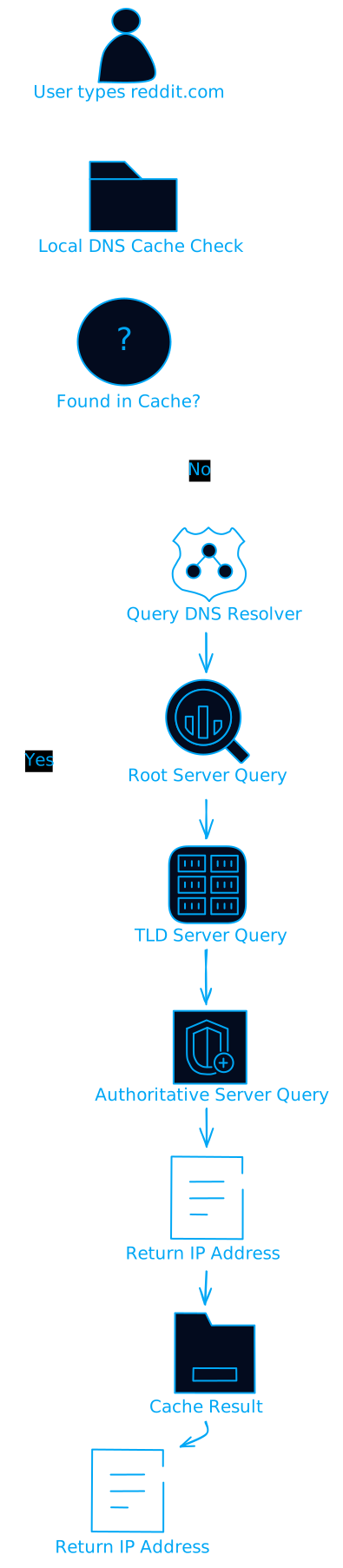
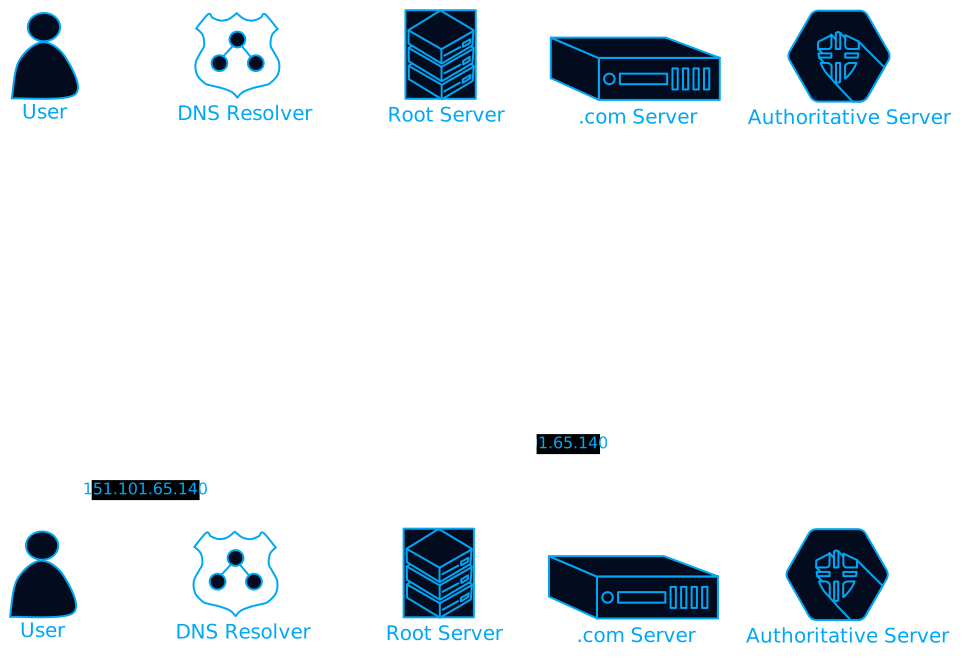
When you type "reddit.com" into your browser, your computer doesn't actually know where Reddit lives on the internet. It needs an IP address - something like 151.101.65.140. DNS is the system that makes this translation happen, and it does it so fast you never even notice.
But here's where it gets interesting: DNS isn't just about websites. It handles email routing, service discovery, load balancing, and even security features. It's basically the backbone that makes the modern internet usable.
The DNS Hierarchy: It's Trees All the Way Down
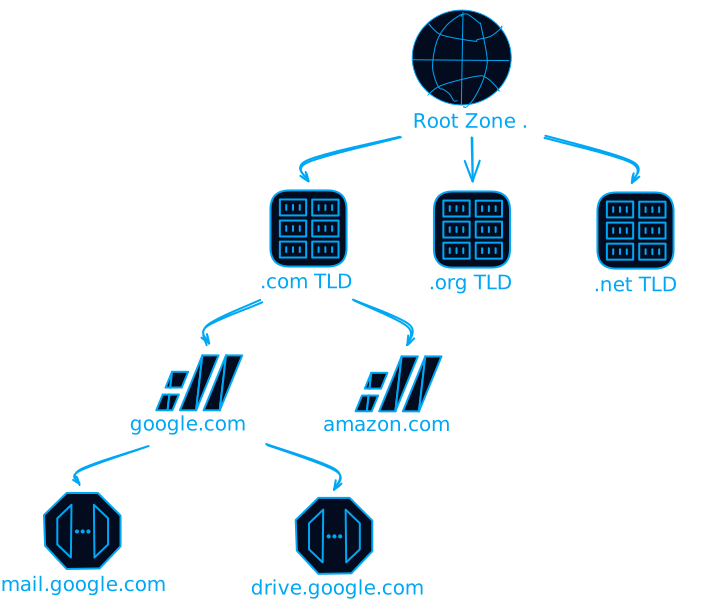
DNS works because it's organized like an upside-down tree. At the very top, you have the root zone (represented by a single dot), then top-level domains like .com and .org, then second-level domains like google.com, and finally subdomains like mail.google.com.
This hierarchical structure is genius because it distributes the workload. No single server has to know about every domain on the internet. Instead, each level only needs to know about the level directly below it.
Root Servers: The Internet's Foundation
At the top of this hierarchy are 13 root DNS servers (well, technically 13 IP addresses, but hundreds of actual servers). These servers are operated by different organizations worldwide and they're basically the starting point for every DNS query that can't be resolved locally.
Here's something that blew my mind when I first learned it: these 13 root servers handle queries for the entire internet, yet they're incredibly reliable. They use anycast routing, which means when you query a root server, you're automatically routed to the closest one geographically.
Top-Level Domains: The Big Categories
Below the root servers, you have Top-Level Domains (TLDs). These come in two main flavors:
Generic TLDs (gTLDs): The ones you know - .com, .org, .net, .edu. These aren't tied to any specific country.
Country Code TLDs (ccTLDs): Country-specific ones like .uk, .de, .jp. Fun fact: some countries have made bank by marketing their ccTLDs creatively (looking at you, .tv and .me).
The Delegation Game
Here's where DNS gets really clever. Each level delegates authority to the level below it. The root servers don't know where google.com is, but they know which servers handle .com domains. The .com servers don't know about specific Google services, but they know which servers Google uses for their domain.
This delegation creates a distributed system where no single point of failure can take down the entire internet's naming system.
How DNS Resolution Actually Works (The Journey of a Query)
When you type a domain name, your computer goes through a specific process to resolve it. Let me break down what actually happens in those milliseconds between hitting enter and seeing a webpage.
Step 1: Check the Local Cache
First, your computer checks its local DNS cache. This is like your browser's memory of recent lookups. If you visited reddit.com earlier today, there's a good chance the IP address is still cached locally, and boom - instant resolution.
The cache has something called TTL (Time To Live), which determines how long entries stay valid. This prevents your computer from using outdated information if a website changes its IP address.
Step 2: Ask Your DNS Resolver
If the domain isn't in your local cache, your computer asks your DNS resolver. This is usually provided by your ISP or a service like Cloudflare (1.1.1.1) or Google (8.8.8.8).
The resolver acts like a middleman. It's going to do the heavy lifting of actually tracking down the IP address for you.
Step 3: The Recursive Journey
Here's where things get interesting. Your resolver starts at the top of the DNS hierarchy and works its way down:
- Root Server Query: "Hey root server, where can I find information about .com domains?"
- TLD Server Query: "Hey .com server, where can I find information about reddit.com?"
- Authoritative Server Query: "Hey reddit.com's server, what's the IP address for reddit.com?"
Each step narrows down the search until you get the final answer.
But Wait, There's More: Iterative vs Recursive
DNS actually supports two different resolution methods:
Recursive Resolution: Your resolver does all the work. You ask once, and it handles the entire chain of queries.
Iterative Resolution: Your resolver gets referrals at each step and has to make each query itself.
Most of the time, you're using recursive resolution because it's more efficient for end users.
DNS Record Types: The Different Flavors of DNS Data
DNS isn't just about mapping domain names to IP addresses. There are different types of DNS records that serve different purposes. Let me walk you through the most important ones.
A and AAAA Records: The Basic Address Records
A Records: Map a domain to an IPv4 address (like 192.168.1.1) AAAA Records: Map a domain to an IPv6 address (like 2001:db8::1)
These are the bread and butter of DNS. When you visit a website, you're usually looking up an A or AAAA record.
CNAME Records: The Alias System
CNAME (Canonical Name) records create aliases. They're super useful for things like:
- Pointing www.example.com to example.com
- Creating subdomains that point to CDN endpoints
- Managing multiple domain names that should go to the same place
One gotcha: you can't use CNAME records for the root domain (example.com), only for subdomains (www.example.com).
MX Records: Email Routing
MX (Mail Exchange) records tell the internet where to deliver email for your domain. They include a priority number, so you can have backup mail servers.
example.com. MX 10 mail.example.com.
example.com. MX 20 backup.mail.example.com.
Lower numbers have higher priority, so mail goes to the first server first.
TXT Records: The Swiss Army Knife
TXT records store arbitrary text data. They're used for:
- Domain verification (proving you own a domain)
- Email authentication (SPF, DKIM records)
- Service discovery
- Really, anything that needs to store text data in DNS
NS Records: Delegation Pointers
NS (Name Server) records specify which servers are authoritative for a domain. These are crucial for the delegation system I mentioned earlier.
The Performance Magic: Caching and Load Balancing
One of the coolest things about DNS is how it handles performance optimization. It's not just about finding the right IP address - it's about finding the best IP address for you, right now.
Caching: Speed Through Memory
DNS caching happens at multiple levels:
- Your browser caches DNS lookups
- Your operating system caches them
- Your router might cache them
- Your ISP's resolver definitely caches them
This creates a hierarchy of caches that makes repeat lookups incredibly fast. The TTL values control how long each cache level holds onto information.
Load Balancing: Distributing the Load
DNS can return different IP addresses for the same domain name. This enables:
- Round-robin load balancing: Cycling through multiple servers
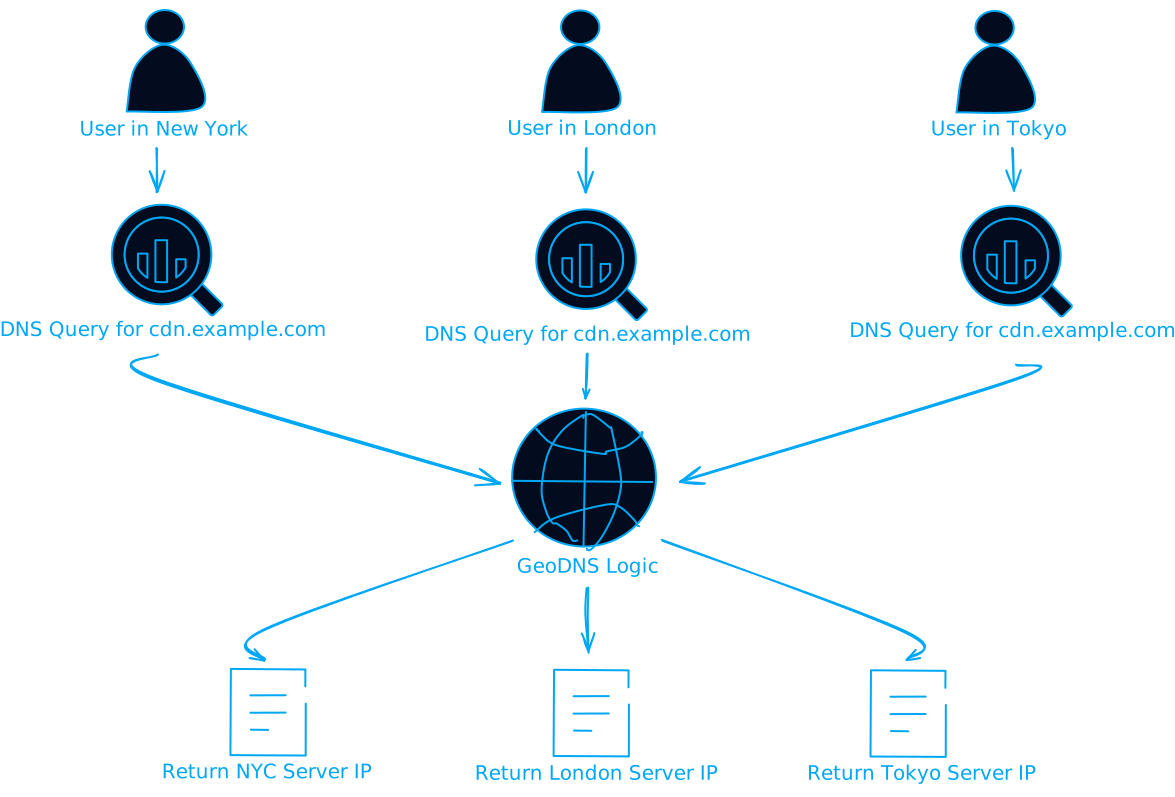
- Geographic load balancing: Sending users to the nearest server
- Failover: Automatically switching to backup servers
Large websites like Google and Facebook use sophisticated DNS setups that consider your location, server load, and network conditions to give you the best possible experience.
CDN Integration: Global Performance
Content Delivery Networks (CDNs) rely heavily on DNS for their magic. When you request a file from a CDN, DNS doesn't just give you any server - it gives you the server that's closest to you and has the best performance characteristics.
Security: DNS as a Defense Layer
DNS isn't just about performance and functionality - it's also a critical security component. Let me explain how DNS helps protect you and how attackers try to abuse it.
DNSSEC: Cryptographic Verification
DNSSEC (DNS Security Extensions) adds cryptographic signatures to DNS records. This prevents attackers from tampering with DNS responses and redirecting you to malicious sites.
Think of it like a digital signature on every DNS response that proves it came from the legitimate source and hasn't been modified.
DNS Filtering: Blocking Bad Stuff
Many DNS resolvers (like Cloudflare for Families or OpenDNS) include filtering that blocks known malicious domains. When you try to visit a phishing site, the DNS resolver can return a "blocked" page instead of the real IP address.
Common DNS Attacks and How They Work
DNS Spoofing: Attackers send fake DNS responses to redirect you to malicious sites DNS Cache Poisoning: Corrupting DNS caches with false information DNS Tunneling: Using DNS queries to exfiltrate data or establish covert channels
Understanding these attacks helps you appreciate why DNSSEC and secure DNS resolvers are important.
IPv4 vs IPv6: The Transition Challenge
One of the biggest challenges DNS faces today is managing the transition from IPv4 to IPv6. Most websites support both protocols, which means DNS needs to handle both A records (IPv4) and AAAA records (IPv6).
Your computer might prefer IPv6 if it's available, but fall back to IPv4 if needed. This is called "dual-stack" networking, and DNS makes it seamless.
The interesting part is that IPv6 addresses are much longer and harder to remember than IPv4 addresses, which makes DNS even more important in an IPv6 world.
Real-World DNS: What Happens When Things Go Wrong
DNS is incredibly reliable, but when it breaks, it breaks spectacularly. Let me share some examples of what DNS failures look like and why they happen.
The Great DNS Outages
Remember when half the internet went down because of a DNS provider outage? That's what happens when too many websites rely on a single DNS provider. It's a reminder that DNS, while distributed by design, can still have single points of failure if you're not careful.
Propagation Delays: The Waiting Game
When you change DNS records, the changes don't happen instantly everywhere. DNS propagation can take anywhere from a few minutes to 48 hours, depending on TTL values and caching behavior.
This is why DNS changes are often planned carefully, especially for high-traffic websites.
Debugging DNS Issues
When DNS goes wrong, here are the tools that save the day:
nslookupanddigfor manual DNS queriespingto test basic connectivity- Online DNS propagation checkers
- DNS monitoring services
The Future of DNS: What's Coming Next
DNS continues to evolve. Here are some trends that are shaping its future:
DNS over HTTPS (DoH) and DNS over TLS (DoT)
Traditional DNS queries are sent in plain text, which means your ISP can see every website you visit. DoH and DoT encrypt DNS queries, improving privacy.
Edge Computing Integration
As edge computing becomes more popular, DNS is evolving to support more sophisticated routing decisions based on real-time conditions.
AI-Powered DNS
Some DNS providers are starting to use machine learning to predict and prevent DNS-based attacks, optimize routing decisions, and improve overall performance.
Practical DNS Tips for Developers and System Admins
Let me share some practical advice for working with DNS in the real world:
Choosing TTL Values
- Short TTLs (300-900 seconds): Use when you're planning changes or need flexibility
- Long TTLs (3600+ seconds): Use for stable records to improve performance
- Very long TTLs (86400+ seconds): Use for records that rarely change
DNS Monitoring
Set up monitoring for your DNS records. You want to know immediately if:
- Your DNS servers go down
- Your records get changed unexpectedly
- Resolution times increase significantly
Redundancy Planning
Always have backup DNS providers. If your primary DNS provider goes down, you want your website to stay accessible.
Testing Changes
Before making DNS changes in production:
- Test with low TTL values first
- Use staging environments
- Have a rollback plan ready
Why DNS Matters More Than Ever
As our digital infrastructure becomes more complex, DNS becomes more critical. It's not just about websites anymore - it's about:
- Microservices discovery: Containers finding each other in cloud environments
- IoT device management: Smart devices connecting to services
- Security enforcement: Blocking malicious traffic at the DNS level
- Performance optimization: Routing users to the best available resources
Understanding DNS helps you build more resilient, performant, and secure systems. Whether you're a developer building web applications, a system administrator managing infrastructure, or just someone who wants to understand how the internet works, DNS knowledge is incredibly valuable.
Wrapping Up: DNS Is Everywhere
DNS might seem like a boring technical detail, but it's actually one of the most elegant and important systems on the internet. It's a perfect example of how good engineering can make complex problems look simple.
The next time you type a URL and instantly get to where you want to go, take a moment to appreciate the incredible distributed system that made it possible. DNS is working behind the scenes, making the internet usable for billions of people every day.
And if you're building anything that connects to the internet, understanding DNS will make you a better engineer. It's one of those foundational technologies that touches everything else.
Want to dive deeper? Start by exploring your own DNS setup. Check what DNS servers you're using, experiment with tools like dig and nslookup, and maybe set up your own authoritative DNS server for a domain. There's no better way to understand DNS than to get your hands dirty with it.
The internet is built on protocols and systems that are decades old, but DNS proves that good design stands the test of time. It's been quietly powering the internet since the 1980s, and it'll probably still be doing its job long after we're all gone.
Pretty cool for a "phone book," right?