The Complete Guide to Databases: Everything You Need to Know in 2026
The Complete Guide to Databases: Everything You Need to Know in 2026
So you're trying to wrap your head around databases? Trust me, I get it. When I first started diving into this stuff, it felt like everyone was speaking a different language. But here's the thing - databases are literally everywhere, and once you understand the basics, everything else starts clicking into place.
Let me walk you through everything you need to know about databases, from the ground up. No fluff, just the real stuff that actually matters.
What Are Databases Really? (And Why Should You Care?)
Think of a database like a super organized filing cabinet, but instead of paper files, you're storing digital information. But here's where it gets interesting - it's not just about storage. A good database system is like having a really smart librarian who knows exactly where everything is, can find what you need instantly, and makes sure nothing gets lost or corrupted.
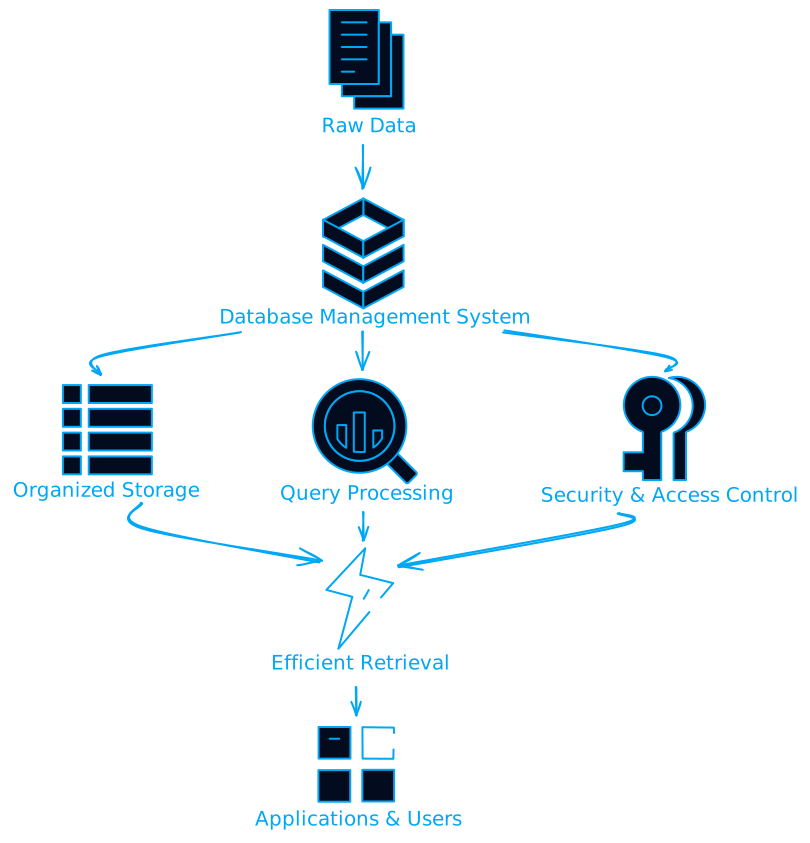
The real magic happens with Database Management Systems (DBMS). These are the software systems that handle all the heavy lifting - storing your data, keeping it organized, making sure it's secure, and serving it up when you need it.
But what if you're dealing with massive amounts of data? That's where things get really interesting. Modern databases can handle everything from a simple contact list to petabytes of information across multiple servers worldwide.
The Architecture That Makes It All Work
Here's something most people don't realize - every database system is built on a specific architecture that determines how it handles your data. Let me break down the key components:
Query Processor: Your Data Translator
The query processor is like having a universal translator for your data requests. You write something in SQL (or whatever query language), and it figures out the most efficient way to actually get that information from storage.
Database Engine: The Workhorse
This is where the real work happens. The database engine manages the physical storage, handles all the reading and writing, and makes sure your data integrity constraints are enforced. Think of it as the engine in your car - you don't see it working, but nothing happens without it.
Transaction Manager: The Safety Net
Ever wonder how databases handle multiple people trying to access the same data simultaneously? That's the transaction manager's job. It ensures ACID properties:
- Atomicity: Either everything in a transaction happens, or nothing does
- Consistency: Your data stays valid according to all rules
- Isolation: Concurrent transactions don't interfere with each other
- Durability: Once committed, your data stays committed
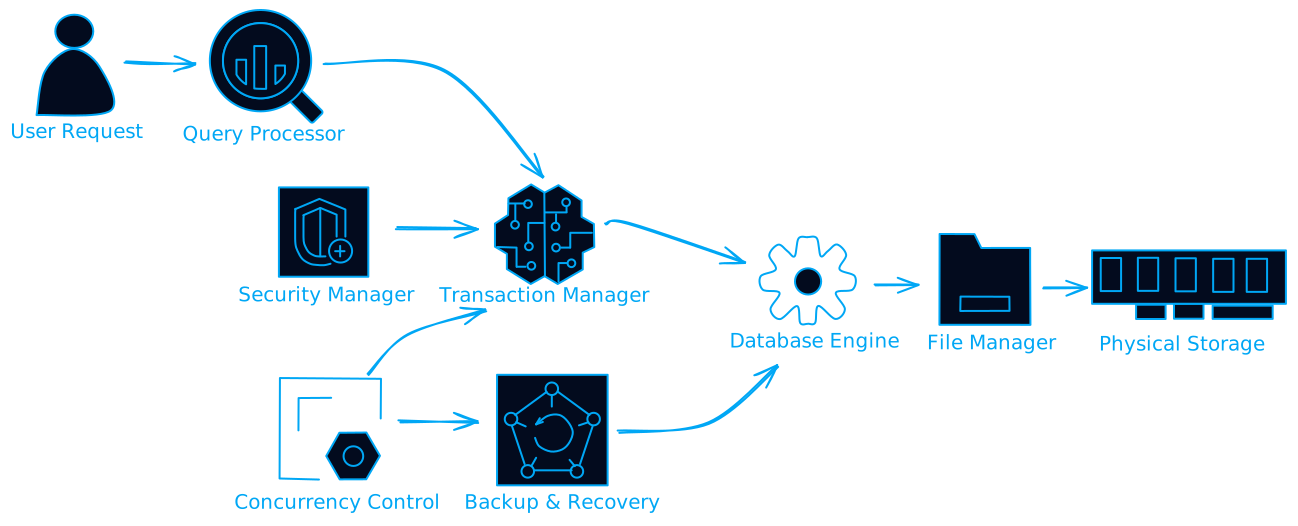
But what happens when your system crashes? That's where the backup and recovery manager comes in. It's constantly keeping track of changes and can restore your database to a consistent state even after catastrophic failures.
Types of Databases: Choosing Your Weapon
Not all databases are created equal. The type you choose depends on what you're trying to accomplish. Let me walk you through the main categories:
Relational Databases: The Old Reliable
These are your traditional databases - think MySQL, PostgreSQL, Oracle. Data is stored in tables with rows and columns, and everything is connected through relationships.
When should you use relational databases? They're perfect when you need:
- Strong consistency guarantees
- Complex queries with joins
- ACID transactions
- Well-defined schemas
-- Example: Finding all orders for a specific customer
SELECT o.order_id, o.order_date, p.product_name, oi.quantity
FROM orders o
JOIN order_items oi ON o.order_id = oi.order_id
JOIN products p ON oi.product_id = p.product_id
WHERE o.customer_id = 12345;
NoSQL Databases: The Flexible Alternative
NoSQL databases threw the rulebook out the window. Instead of rigid tables, you get flexible document storage, key-value pairs, or graph structures.
But when does NoSQL make sense? Consider it when you're dealing with:
- Rapidly changing data structures
- Massive scale requirements
- Unstructured or semi-structured data
- Need for horizontal scaling
// Example: MongoDB document
{
  "_id": "507f1f77bcf86cd799439011",
  "customer": {
    "name": "John Doe",
    "email": "john@example.com",
    "preferences": ["electronics", "books"]
  },
  "orders": [
    {
      "date": "2025-01-15",
      "items": ["laptop", "mouse"],
      "total": 1299.99
    }
  ]
}
In-Memory Databases: Speed Demons
These databases store everything in RAM instead of on disk. The result? Lightning-fast performance, but at a cost.
When is the extra cost worth it? In-memory databases shine for:
- Real-time analytics
- High-frequency trading systems
- Gaming leaderboards
- Session storage
Cloud Databases: The Modern Approach
Cloud databases have changed the game completely. Instead of managing your own hardware, you get databases as a service.
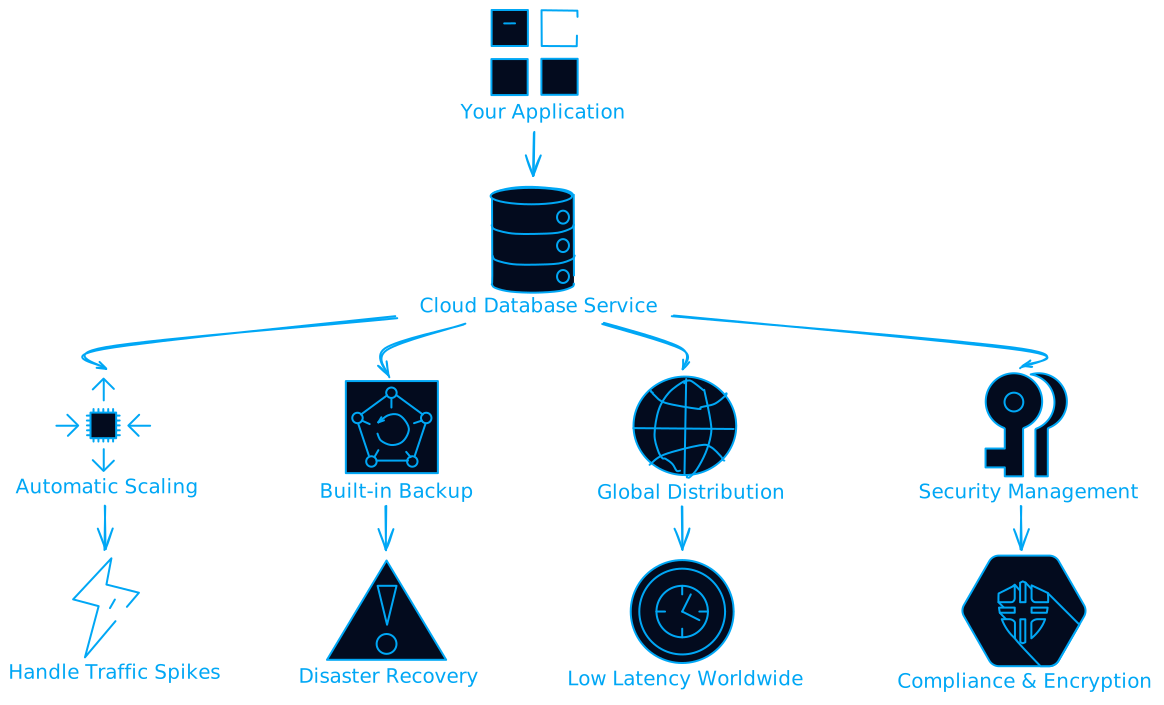
But what about vendor lock-in? That's a real concern. Cloud databases often use proprietary features that make migration challenging. Plan your exit strategy from day one.
Database Design: Getting It Right From the Start
Here's where a lot of people mess up - they jump into building without proper design. Database design is like architecture for your data. Get it wrong, and you'll be dealing with performance issues and data inconsistencies forever.
Normalization: The Art of Organizing Data
Normalization is about eliminating redundancy and organizing your data efficiently. Let me show you how it works:
First Normal Form (1NF): No repeating groups
-- Bad: Multiple values in one column
CREATE TABLE bad_customers (
    id INT,
    name VARCHAR(100),
    phone_numbers VARCHAR(500) -- "555-1234, 555-5678, 555-9012"
);

-- Good: Separate table for phone numbers
CREATE TABLE customers (
    id INT PRIMARY KEY,
    name VARCHAR(100)
);

CREATE TABLE customer_phones (
    customer_id INT,
    phone_number VARCHAR(20),
    FOREIGN KEY (customer_id) REFERENCES customers(id)
);
Second Normal Form (2NF): Eliminate partial dependencies Third Normal Form (3NF): Remove transitive dependencies
But what if normalization hurts performance? Sometimes you need to denormalize for speed. It's a trade-off between storage efficiency and query performance.
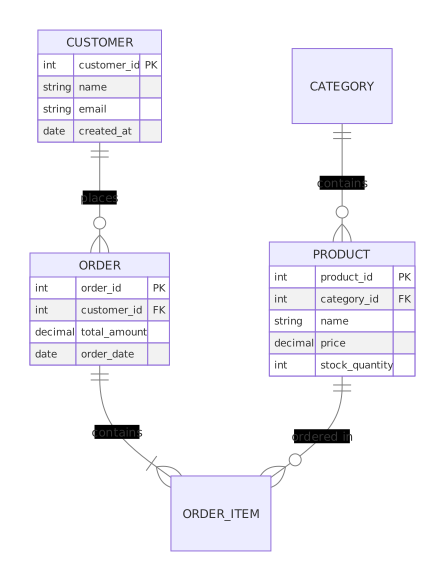
Entity-Relationship Modeling
Before you write a single line of SQL, map out your entities and their relationships:
Security: Protecting Your Most Valuable Asset
Data breaches make headlines for a reason. Your database security strategy needs to be bulletproof from day one.
Access Control: Who Gets What
Implement role-based access control (RBAC):
-- Create roles with specific permissions
CREATE ROLE read_only_analyst;
GRANT SELECT ON sales_data TO read_only_analyst;

CREATE ROLE data_manager;
GRANT SELECT, INSERT, UPDATE ON customer_data TO data_manager;

-- Assign users to roles
GRANT read_only_analyst TO john_doe;
GRANT data_manager TO jane_smith;
Encryption: Defense in Depth
Data at rest encryption: Your stored data should be encrypted on disk Data in transit encryption: All communication should use TLS/SSL Application-level encryption: Sensitive fields encrypted before storage
But what about performance impact? Modern encryption has minimal overhead, and the security benefits far outweigh any performance costs.
Auditing: Know What's Happening
-- Enable auditing for sensitive operations
CREATE AUDIT POLICY sensitive_data_access
FOR SELECT, INSERT, UPDATE, DELETE
ON customer_personal_info
BY ALL USERS;
Performance Optimization: Making It Fast
A slow database kills user experience. Here's how to keep things snappy:
Indexing Strategy
Indexes are like the index in a book - they help you find information quickly without scanning everything.
-- Create indexes on frequently queried columns
CREATE INDEX idx_customer_email ON customers(email);
CREATE INDEX idx_order_date ON orders(order_date);

-- Composite indexes for multi-column queries
CREATE INDEX idx_order_customer_date ON orders(customer_id, order_date);
But indexes aren't free. They speed up reads but slow down writes. Choose wisely.
Query Optimization
-- Bad: This will scan the entire table
SELECT * FROM orders WHERE YEAR(order_date) = 2025;

-- Good: This can use an index
SELECT * FROM orders WHERE order_date >= '2025-01-01' AND order_date < '2026-01-01';
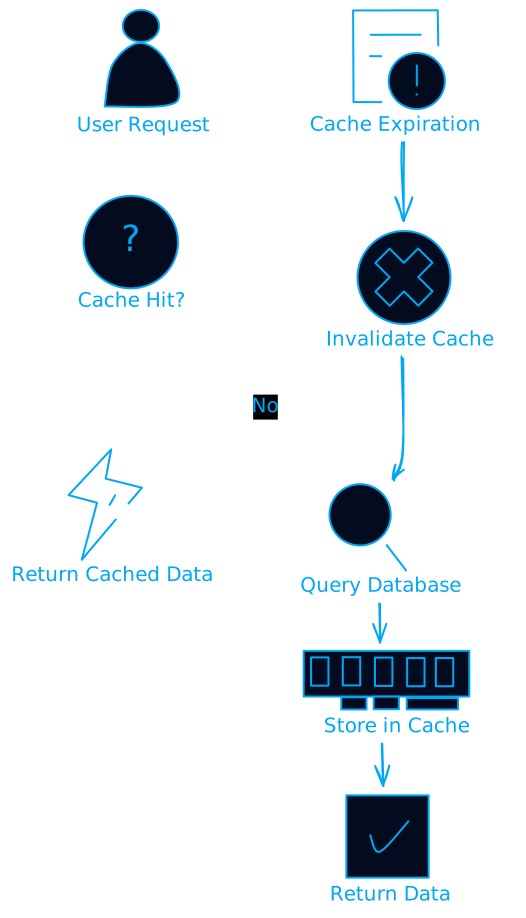
Caching Strategies
Scaling: When You Outgrow a Single Machine
Eventually, you'll hit the limits of what one database server can handle. Here's how to scale:
Vertical Scaling (Scale Up)
Add more CPU, RAM, or storage to your existing server. Simple but has limits.
Horizontal Scaling (Scale Out)
Distribute your data across multiple servers. More complex but unlimited potential.
Read Replicas: Route read queries to replica servers
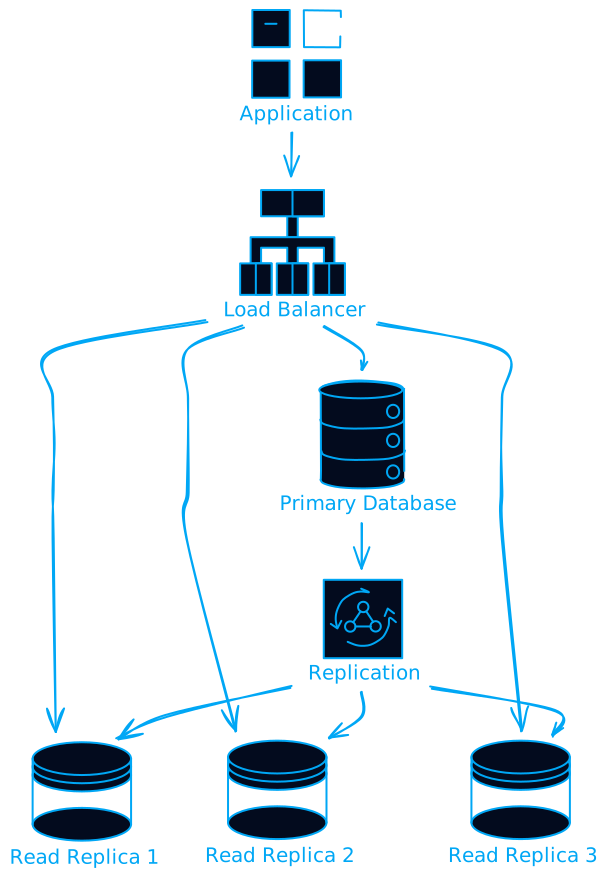
Sharding: Split your data across multiple databases
# Example: Sharding by customer ID
def get_shard(customer_id):
    return customer_id % 4  # 4 shards

# Route queries to the appropriate shard
shard_id = get_shard(customer_id)
database = get_database_connection(shard_id)
But what about consistency across shards? This is where things get tricky. You might need to give up some consistency for availability (CAP theorem in action).
Real-World Applications: Where Databases Shine
Let me show you how different industries use databases:
E-commerce Platforms
- Product catalogs: NoSQL for flexible product attributes
- Order processing: Relational databases for ACID transactions
- Recommendation engines: Graph databases for relationship analysis
Financial Services
- Transaction processing: High-consistency relational databases
- Risk analysis: In-memory databases for real-time calculations
- Regulatory reporting: Data warehouses for historical analysis
Healthcare Systems
- Patient records: Secure relational databases with strict access controls
- Medical imaging: Object storage with metadata in traditional databases
- Research data: NoSQL for flexible, evolving data structures
Common Pitfalls (And How to Avoid Them)
The N+1 Query Problem
# Bad: This generates N+1 queries
customers = get_all_customers()  # 1 query
for customer in customers:
    orders = get_orders_for_customer(customer.id)  # N queries

# Good: Use joins or eager loading
customers_with_orders = get_customers_with_orders()  # 1 query
Ignoring Database Constraints
-- Don't rely on application logic alone
CREATE TABLE orders (
    id INT PRIMARY KEY,
    customer_id INT NOT NULL,
    total_amount DECIMAL(10,2) CHECK (total_amount > 0),
    order_date DATE DEFAULT CURRENT_DATE,
    FOREIGN KEY (customer_id) REFERENCES customers(id)
);
Poor Backup Strategies
The 3-2-1 rule: 3 copies of your data, on 2 different media types, with 1 offsite backup.
The Future of Databases
The database landscape keeps evolving. Here's what's coming:
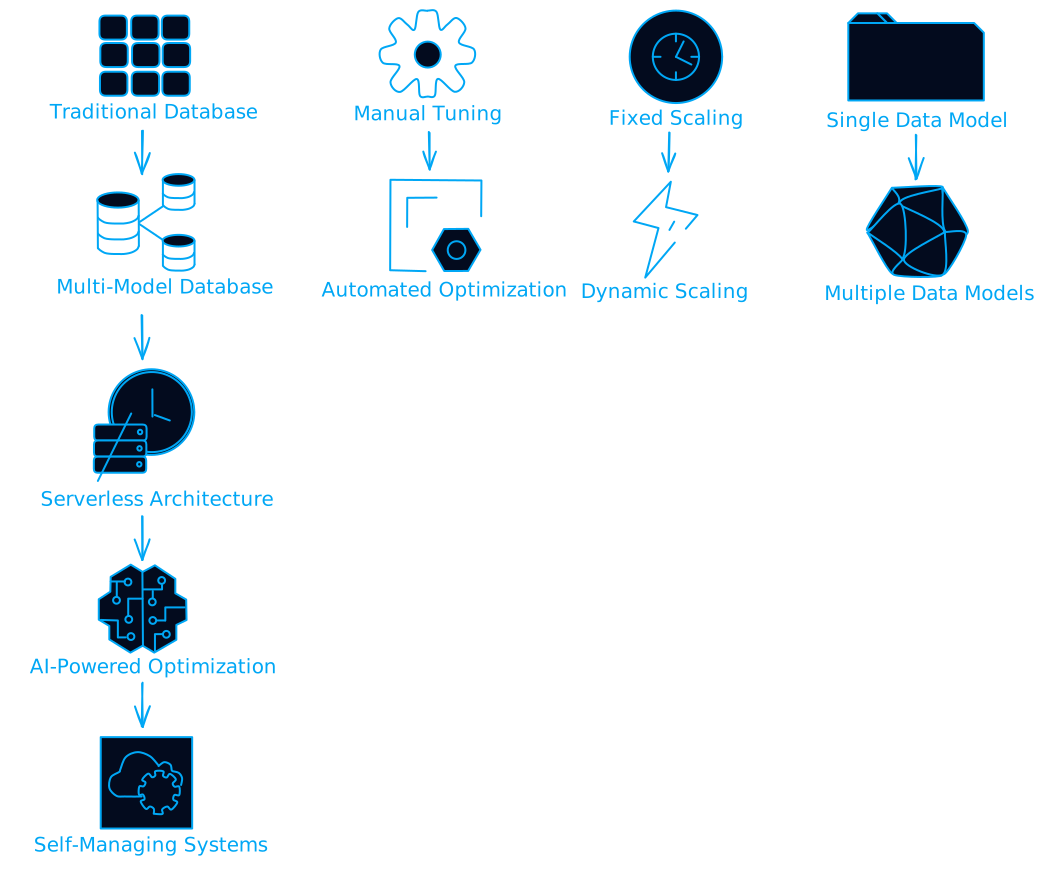
Multi-Model Databases
Single systems that can handle relational, document, graph, and key-value data models.
Serverless Databases
Pay-per-query pricing with automatic scaling to zero when not in use.
AI-Powered Optimization
Databases that automatically tune themselves based on usage patterns.
Getting Started: Your Next Steps
Ready to dive deeper? Here's what I recommend:
-
Pick a database system and get hands-on experience. PostgreSQL is a great starting point for relational databases, MongoDB for NoSQL.
-
Practice database design with real-world scenarios. Design a database for a library, e-commerce site, or social media platform.
-
Learn SQL thoroughly. Even if you're using NoSQL, understanding SQL concepts will make you a better database designer.
-
Understand your data access patterns before choosing a database type. How you'll query your data should drive your design decisions.
-
Start small, plan for scale. Begin with simple solutions and add complexity only when needed.
Wrapping Up
Databases might seem complex at first, but they're really just tools for organizing and accessing information efficiently. The key is understanding your requirements and choosing the right tool for the job.
Whether you're building a simple web app or a complex enterprise system, the principles remain the same: design thoughtfully, secure properly, optimize for your use case, and plan for growth.
The database world keeps evolving, but these fundamentals will serve you well regardless of which specific technologies you end up using. Start with the basics, get your hands dirty with real projects, and don't be afraid to experiment.
What's your next database project going to be?
Want to dive deeper into specific database technologies? Check out the official documentation for PostgreSQL, MongoDB, or your database of choice. The best way to learn is by building something real.