Building APIs for Millions: 7 Lessons Learned the Hard Way
So you're building an API and thinking "how hard can it be?" Trust me, I've been there. You start with a simple REST endpoint, everything works great with 10 users, and then suddenly you're dealing with thousands of requests per second and your beautiful API is falling apart like a house of cards.
After years of building APIs that have served millions of requests (and fixing the ones that didn't), I've learned that scalable API design isn't just about handling more traffic. It's about creating systems that can evolve, adapt, and grow without breaking everything your users have built on top of them.
Let me share the 7 battle-tested practices that have saved my sanity and kept my APIs running smoothly, even when things get crazy.
Why Most APIs Fail at Scale (And How to Avoid It)
Before we dive into the solutions, let's talk about why APIs break. It's rarely about the server hardware or even the code itself. Most API failures happen because of three things:
- Inconsistent design that confuses developers and leads to misuse
- Poor versioning strategy that breaks existing integrations
- No performance optimization for real-world usage patterns
The good news? All of these are preventable if you know what to look for.
1. Embrace RESTful Consistency
Here's the thing about REST - it's not just a buzzword. When done right, it creates APIs that developers can actually understand without reading 50 pages of documentation.
Think in Resources, Not Actions
Instead of creating endpoints like /getUserPosts or /deleteComment, think about your data as resources:
GET /users/123/posts        # Get posts for user 123
DELETE /comments/456        # Delete comment 456
POST /posts                 # Create a new post
PUT /posts/789              # Update post 789
This isn't just cleaner - it's predictable. Once a developer understands your pattern, they can guess how other endpoints work.
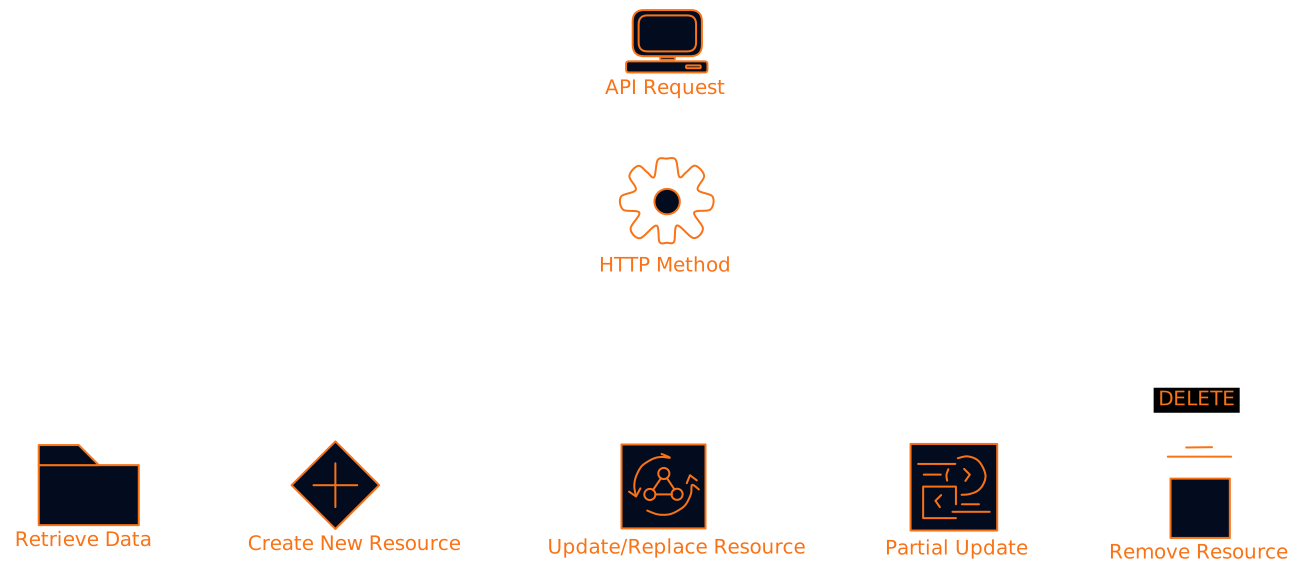
HTTP Methods Are Your Friends
Each HTTP method has a specific purpose, and sticking to these conventions makes your API intuitive:
Keep It Stateless
This one's crucial for scaling. Each request should contain everything the server needs to process it. No session state, no "remember what I asked for last time."
Why? Because when you need to scale horizontally (and you will), any server should be able to handle any request. Stateless design makes load balancing trivial.
But what about authentication? Use tokens (JWT, API keys) that contain or reference all the auth info you need. Pass them in headers, not in server-side sessions.
2. Version Like Your Business Depends on It
Nothing kills developer trust faster than breaking their integration with an unannounced API change. I've seen companies lose major clients because they didn't handle versioning properly.
Semantic Versioning Saves Lives
Use the Major.Minor.Patch format:
- Major (2.0.0): Breaking changes that require code updates
- Minor (1.1.0): New features that don't break existing code
- Patch (1.0.1): Bug fixes and small improvements

URL Path Versioning (The Clear Winner)
I've tried different versioning approaches, and URL path versioning wins for clarity:
https://api.example.com/v1/users
https://api.example.com/v2/users
Yes, it can lead to URL bloat as you add versions. But the trade-off is worth it because:
- It's immediately obvious which version you're using
- Caching works properly
- Debugging is straightforward
The Deprecation Dance
When you need to sunset an old version, give developers plenty of warning:
- Announce early - at least 6 months notice for major versions
- Provide migration guides with code examples
- Add deprecation headers to responses
- Monitor usage to see who's still on old versions
HTTP/1.1 200 OK
Deprecation: true
Sunset: Wed, 11 Nov 2024 23:59:59 GMT
Link: <https://api.example.com/v2/users>; rel="successor-version"
3. Performance Optimization: Pagination, Filtering, and Caching
This is where things get interesting. You can have the most beautiful API design in the world, but if it takes 30 seconds to return a list of users, nobody's going to use it.
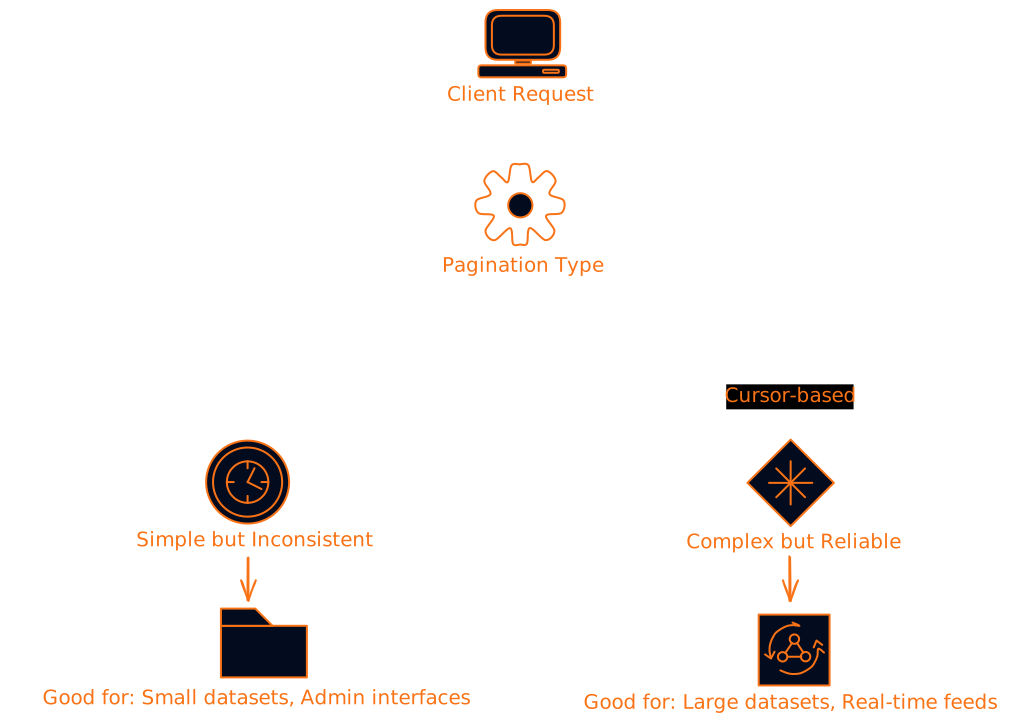
Pagination: Choose Your Fighter
Offset-based pagination is simple but has problems:
GET /posts?offset=20&limit=10
The issue? If someone adds a new post while you're paginating, you might see duplicates or miss items. It also gets slow with large offsets.
Cursor-based pagination is more robust:
GET /posts?cursor=eyJpZCI6MTIzfQ&limit=10
The cursor contains encoded information about where you left off. It's consistent even when data changes and performs well at any scale.
Filtering and Sorting That Actually Works
Don't just dump all your data and hope for the best. Give developers the tools to get exactly what they need:
GET /posts?status=published&author=john&sort=created_at:desc&limit=20
Pro tip: Always validate and sanitize filter parameters. SQL injection through API filters is more common than you'd think.
Caching Strategy: The Performance Multiplier
Caching can turn a slow API into a fast one, but you need to be strategic about it.
Client-side caching with proper HTTP headers:
Cache-Control: public, max-age=3600
ETag: "abc123"
Server-side caching for expensive operations:
# Pseudocode
def get_user_posts(user_id):
    cache_key = f"user_posts:{user_id}"
    cached = redis.get(cache_key)
    if cached:
        return cached

    posts = database.query(user_id)
    redis.setex(cache_key, 300, posts)  # Cache for 5 minutes
    return posts
CDN caching for static or semi-static content. If your API serves the same data to many users, put a CDN in front of it.
4. Documentation: Your API's Best Friend
I used to think good code was self-documenting. Then I watched developers struggle with my "obvious" API design for hours. Good documentation isn't just helpful - it's essential for adoption.
Interactive Documentation Wins
Tools like Swagger/OpenAPI let developers test your API right from the docs:
paths:
  /users/{id}:
    get:
      summary: Get user by ID
      parameters:
        - name: id
          in: path
          required: true
          schema:
            type: integer
      responses:
        '200':
          description: User found
          content:
            application/json:
              schema:
                $ref: '#/components/schemas/User'
Code Examples in Multiple Languages
Don't just show the endpoint - show how to use it:
// JavaScript
const response = await fetch('/api/v1/users/123', {
  headers: {
    'Authorization': 'Bearer your-token-here'
  }
});
const user = await response.json();
# Python
import requests

response = requests.get(
    'https://api.example.com/v1/users/123',
    headers={'Authorization': 'Bearer your-token-here'}
)
user = response.json()
Error Documentation (The Forgotten Hero)
Document your error responses too. Developers need to know what went wrong and how to fix it:
{
  "error": {
    "code": "VALIDATION_ERROR",
    "message": "Invalid input data",
    "details": [
      {
        "field": "email",
        "message": "Must be a valid email address"
      }
    ]
  }
}
5. Authentication and Security
Security isn't optional, and it's not something you can bolt on later. Build it in from day one.
Token-Based Authentication
Use JWT tokens or API keys, not sessions:
Authorization: Bearer eyJhbGciOiJIUzI1NiIsInR5cCI6IkpXVCJ9...
Why tokens? They're stateless, they can contain user info, and they work across multiple servers.
Rate Limiting (Your API's Bodyguard)
Implement rate limiting to prevent abuse:
HTTP/1.1 200 OK
X-RateLimit-Limit: 1000
X-RateLimit-Remaining: 999
X-RateLimit-Reset: 1609459200
Different limits for different endpoints make sense:
- Authentication: 5 requests per minute
- Data retrieval: 1000 requests per hour
- Data modification: 100 requests per hour
Input Validation (Trust Nobody)
Validate everything that comes in:
from marshmallow import Schema, fields, validate

class UserSchema(Schema):
    email = fields.Email(required=True)
    age = fields.Integer(validate=validate.Range(min=13, max=120))
    name = fields.String(validate=validate.Length(min=1, max=100))
6. Error Handling That Doesn't Suck
Bad error messages are the fastest way to frustrate developers. Good ones turn problems into learning opportunities.
Consistent Error Format
Pick a format and stick to it:
{
  "error": {
    "type": "validation_error",
    "message": "The request data is invalid",
    "code": 40001,
    "details": {
      "email": ["This field is required"],
      "password": ["Must be at least 8 characters"]
    },
    "documentation_url": "https://docs.api.com/errors/40001"
  }
}
HTTP Status Codes That Make Sense
Use the right status codes:
200- Success201- Created successfully400- Bad request (client error)401- Unauthorized403- Forbidden404- Not found422- Validation error429- Rate limited500- Server error
Helpful Error Messages
Instead of "Invalid input", try "Email address must be in valid format (example: user@domain.com)".
7. Monitoring and Analytics (Know Before Your Users Do)
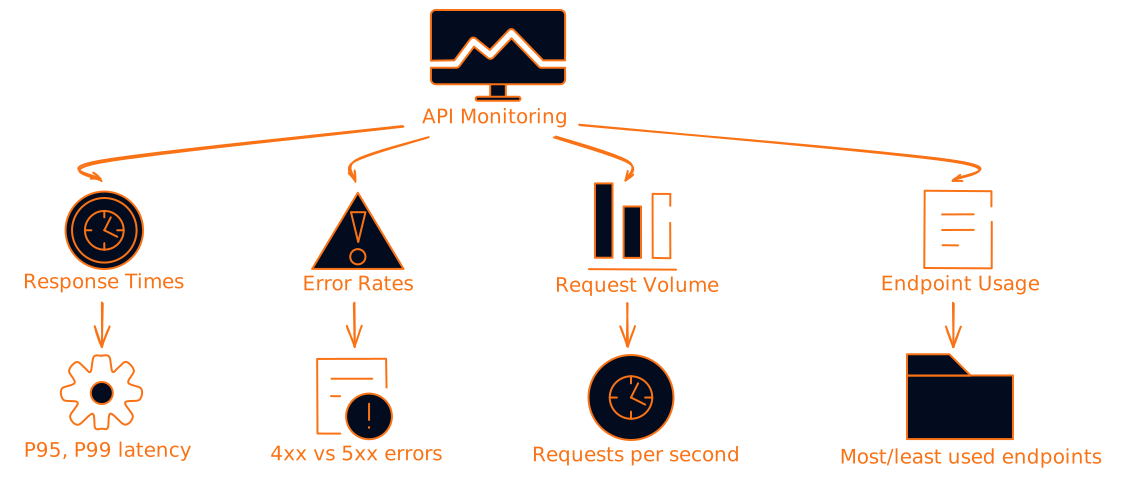
You can't improve what you don't measure. Set up monitoring from day one.
Key Metrics to Track
Logging That Actually Helps
Structure your logs:
{
  "timestamp": "2024-11-12T20:15:47Z",
  "level": "INFO",
  "endpoint": "/api/v1/users/123",
  "method": "GET",
  "status_code": 200,
  "response_time_ms": 45,
  "user_id": "user_456",
  "request_id": "req_789"
}
Alerting (Sleep Better at Night)
Set up alerts for:
- Error rate above 5%
- Response time above 2 seconds
- Request volume drops by 50%
- Any 5xx errors
Putting It All Together: A Real-World Example
Let's say you're building a blog API. Here's how these principles work together:
# Well-designed endpoints
GET /api/v1/posts?status=published&limit=20&cursor=abc123
POST /api/v1/posts
PUT /api/v1/posts/123
DELETE /api/v1/posts/123

# With proper headers
Cache-Control: public, max-age=300
X-RateLimit-Remaining: 95
Content-Type: application/json; charset=utf-8
{
  "data": [
    {
      "id": 123,
      "title": "Building Scalable APIs",
      "slug": "building-scalable-apis",
      "status": "published",
      "created_at": "2024-11-12T20:15:47Z",
      "author": {
        "id": 456,
        "name": "John Doe"
      }
    }
  ],
  "pagination": {
    "next_cursor": "def456",
    "has_more": true,
    "total_count": 1250
  }
}
The Bottom Line
Building scalable APIs isn't about following every best practice perfectly from day one. It's about making thoughtful decisions that won't bite you later.
Start with consistency and good documentation. Add proper versioning before you need it. Optimize performance when you have real usage data. And always, always monitor what's happening in production.
The developers using your API will thank you, your future self will thank you, and your 3 AM on-call shifts will be a lot more peaceful.
What's your biggest API design challenge? I'd love to hear about the problems you're solving and the lessons you've learned along the way.
Want to dive deeper into any of these topics? Check out the resources below or drop a comment with your questions.