API Versioning : The Developer's Guide to Not Breaking Everything
So you've built an API that people actually use. Congrats! Now comes the fun part: changing it without making everyone hate you. API versioning isn't just about slapping a "v2" on your endpoints and calling it a day. It's about keeping your users happy while you evolve your system.
Let's dive into how to version APIs properly, what works in the real world, and how to avoid the common pitfalls that make developers want to throw their laptops out the window.
Why API Versioning Actually Matters (And It's Not Just About Being Fancy)
Think of API versioning like renovating a house while people are still living in it. You can't just tear down walls without warning, but you also can't keep the same 1970s shag carpet forever. You need a plan that lets you improve things without making everyone homeless.
Here's what good API versioning gets you:
Backward compatibility - Your existing users don't wake up to broken integrations. Nobody likes surprise 500 errors with their morning coffee.
Controlled rollouts - You can test new features with a subset of users instead of going full YOLO on production.
Security patches - When you find a vulnerability, you can fix it in a new version without forcing everyone to migrate immediately.
Developer sanity - Both yours and your users'. Clear versioning means fewer angry support tickets and more time for actual development.
The Main Versioning Strategies (And When Each One Makes Sense)
URL Path Versioning: The "What You See Is What You Get" Approach
This is probably what you think of first when someone mentions API versioning:
GET /v1/users/123
GET /v2/users/123
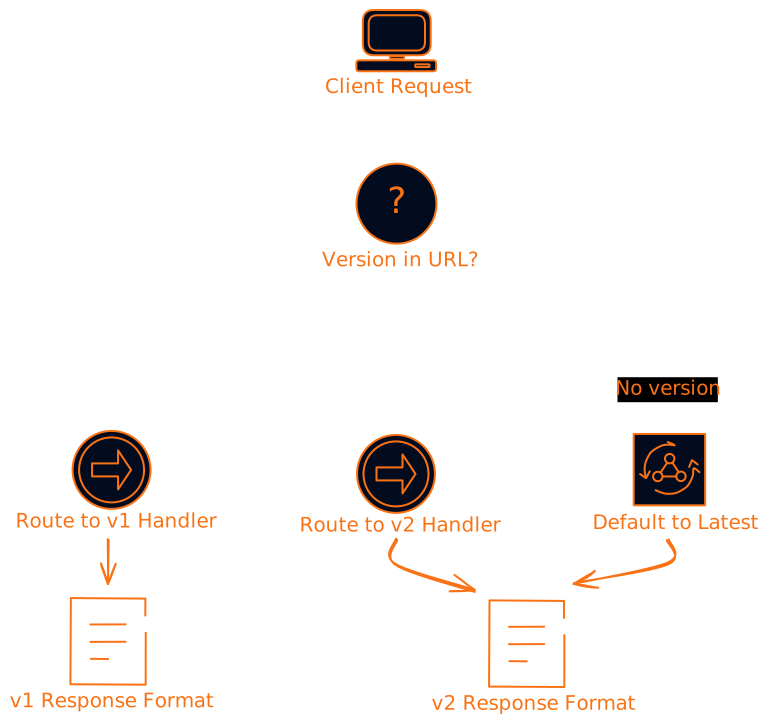
It's straightforward, visible, and works great with caching and logging systems. Most developers can figure out what's happening just by looking at the URL.
When to use it:
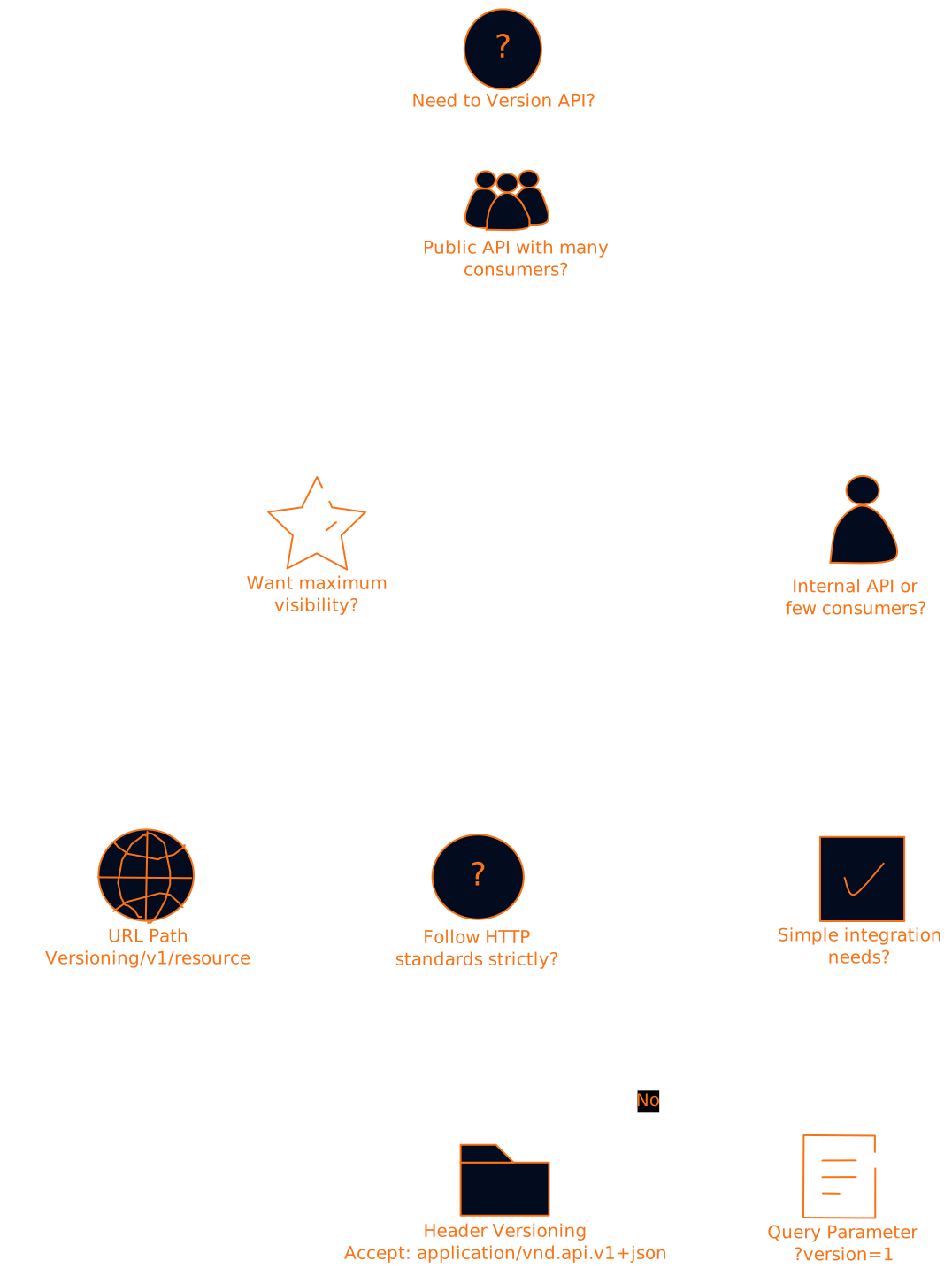
- You have a public API with lots of different consumers
- You want maximum clarity about which version is being used
- Your API gateway can easily route based on URL paths
When to avoid it:
- You're planning frequent version releases (you'll end up with /v47/users eventually)
- URL length is a concern
- You want to keep URLs "clean"
Query Parameter Versioning: The "Hidden in Plain Sight" Method
Instead of changing the URL structure, you add the version as a parameter:
GET /users/123?version=1
GET /users/123?version=2
This keeps your base URLs clean but can get messy with caching. Some CDNs treat different query parameters as different resources, which might not be what you want.
The good: Single endpoint handles multiple versions, easier to implement initially The bad: Less visible, can complicate caching, might get lost in complex query strings
Header-Based Versioning: The "Professional" Choice
This approach uses HTTP headers to specify the version:
GET /users/123
Accept: application/vnd.myapi.v1+json

GET /users/123
Accept: application/vnd.myapi.v2+json
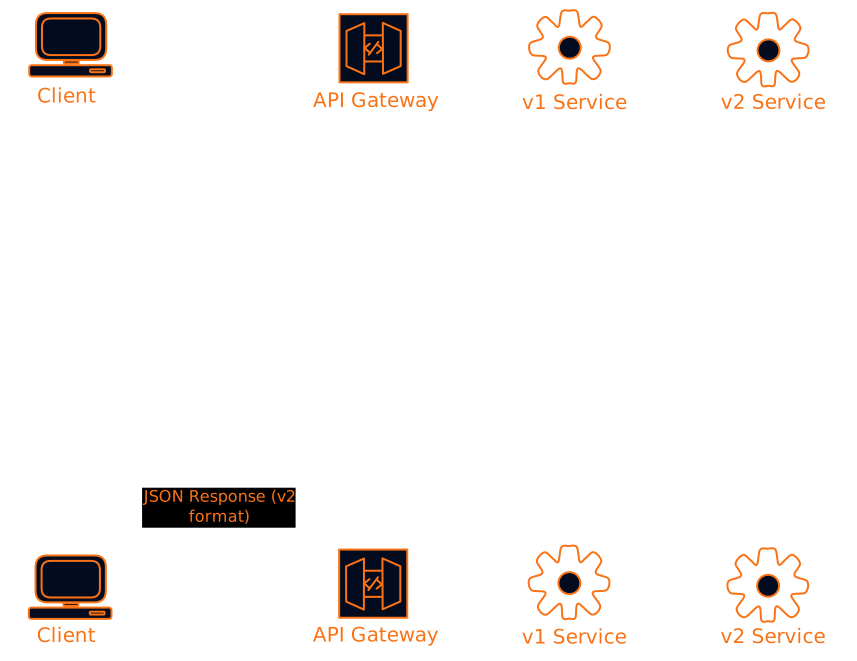
It follows HTTP standards more closely and keeps URLs completely clean. But it's also less obvious to developers who are just looking at URLs.
When this works well:
- You're building a REST API that follows HTTP standards strictly
- You want clean, unchanging URLs
- Your consumers are sophisticated enough to handle custom headers
When it doesn't:
- You're dealing with simple integrations or webhooks
- Debugging needs to be super straightforward
- Your API consumers prefer simplicity over standards compliance
Semantic Versioning: Making Version Numbers Actually Mean Something
Here's where a lot of teams mess up. They use version numbers like they're just counting up: v1, v2, v3, v47. But semantic versioning (SemVer) gives those numbers actual meaning.
The format is MAJOR.MINOR.PATCH:
- MAJOR (2.0.0): Breaking changes that will break existing code
- MINOR (1.1.0): New features that don't break existing functionality
- PATCH (1.0.1): Bug fixes and small improvements
So if you see version 2.3.1, you know:
- There have been 2 major breaking changes since the beginning
- 3 minor feature additions in this major version
- 1 patch/bugfix since the last minor release
// Version 1.0.0 - Initial release
{
  "user": {
    "id": 123,
    "name": "John Doe"
  }
}

// Version 1.1.0 - Added email field (backward compatible)
{
  "user": {
    "id": 123,
    "name": "John Doe",
    "email": "john@example.com"  // New field, doesn't break existing code
  }
}

// Version 2.0.0 - Changed structure (breaking change)
{
  "user": {
    "id": 123,
    "profile": {  // Moved fields into nested object
      "name": "John Doe",
      "email": "john@example.com"
    }
  }
}
This tells your users exactly what to expect when they upgrade. No surprises, no broken integrations.
Real-World Examples: How the Big Players Do It
AWS: Date-Based Versioning That Actually Works
AWS does something interesting with their APIs. Instead of v1, v2, v3, they use dates like 2006-03-01 and 2014-05-16. This tells you exactly when that API version was released and gives you a sense of how old it is.
# S3 API versions by date
https://s3.amazonaws.com/?version=2006-03-01
https://s3.amazonaws.com/?version=2014-05-16
Why this works: You immediately know if you're using a 10-year-old API version. It creates natural pressure to upgrade without being pushy about it.
Google: Simple and Consistent URL Versioning
Google keeps it straightforward with URL path versioning:
https://maps.googleapis.com/maps/api/directions/json?v=2
https://maps.googleapis.com/maps/api/directions/json?v=3
They stick to simple incrementing numbers and make the version highly visible. No confusion about what you're using.
Twitter: The Mixed Approach
Twitter uses both URL path versioning and header versioning depending on the API:
# v2 API - URL path versioning
https://api.twitter.com/2/tweets

# v1.1 API - Header versioning
Accept: application/json
This shows you can mix approaches as long as you're consistent within each API family.
The Practical Implementation Guide
Step 1: Choose Your Strategy (And Stick With It)
Pick one versioning approach and use it everywhere. Don't mix URL versioning for some endpoints and header versioning for others. Your developers will thank you for the consistency.
Here's a decision tree to help:
Step 2: Plan Your Deprecation Timeline
Don't just release new versions and hope people migrate. Give them a clear timeline:
Version 1.0: Released January 2024
Version 2.0: Released June 2024
Version 1.0 deprecation notice: September 2024 (6 months to migrate)
Version 1.0 sunset: January 2025 (12 months total lifespan)
Communicate this early and often. Put it in your API responses, documentation, and developer newsletters.
Step 3: Implement Proper Error Handling
When someone uses a deprecated or unsupported version, don't just return a generic 404. Give them actionable information:
{
  "error": {
    "code": "VERSION_DEPRECATED",
    "message": "API version 1.0 is deprecated and will be removed on January 15, 2025",
    "details": {
      "current_version": "1.0",
      "latest_version": "2.1",
      "migration_guide": "https://docs.example.com/migration/v1-to-v2",
      "sunset_date": "2025-01-15"
    }
  }
}
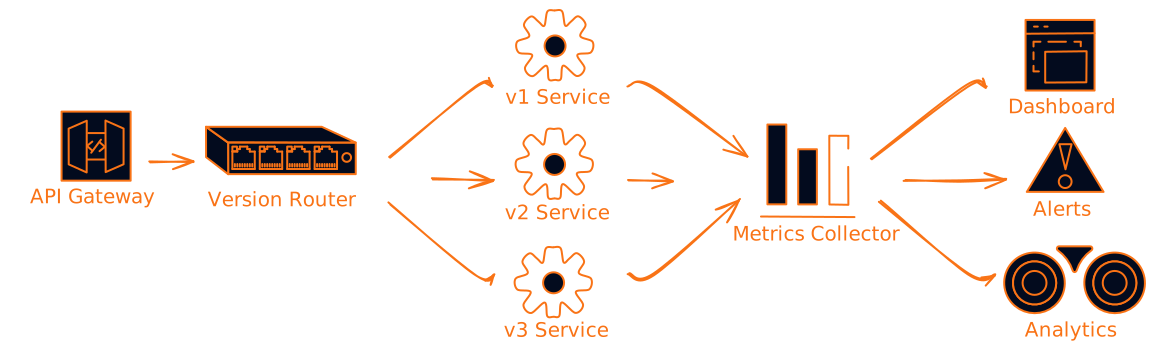
Step 4: Monitor Version Usage
Track which versions your users are actually using. This helps you:
- Decide when it's safe to sunset old versions
- Identify users who might need migration help
- Plan capacity for different API versions
// Example monitoring data you should track
{
  "version_usage": {
    "v1.0": {
      "requests_last_30_days": 1250000,
      "unique_clients": 45,
      "percentage_of_traffic": 15.2
    },
    "v2.0": {
      "requests_last_30_days": 6800000,
      "unique_clients": 234,
      "percentage_of_traffic": 82.1
    },
    "v2.1": {
      "requests_last_30_days": 220000,
      "unique_clients": 12,
      "percentage_of_traffic": 2.7
    }
  }
}
Common Pitfalls (And How to Avoid Them)
The "Version Everything" Trap
Not every change needs a new version. Adding optional fields, fixing bugs, or improving performance usually doesn't require versioning. Save versioning for changes that actually affect how clients interact with your API.
Version when:
- Removing or renaming fields
- Changing data types
- Modifying required parameters
- Altering response structure
Don't version when:
- Adding optional fields
- Fixing bugs
- Improving performance
- Adding new optional endpoints
The "Breaking Changes in Minor Versions" Mistake
If you're using semantic versioning, stick to it religiously. Don't sneak breaking changes into minor or patch releases. Your users rely on those version numbers to make upgrade decisions.
The "No Migration Path" Problem
Always provide a clear migration path between versions. Document what changed, provide code examples, and ideally offer tools to help with the transition.
# Migration Guide: v1 to v2

## Breaking Changes

### User object structure changed
**Before (v1):**
```json
{
  "id": 123,
  "name": "John Doe",
  "email": "john@example.com"
}
After (v2):
{
  "id": 123,
  "profile": {
    "name": "John Doe",
    "email": "john@example.com"
  }
}
Migration: Wrap existing user fields in a "profile" object.
## Testing Your Versioning Strategy

Don't just implement versioning and hope it works. Test it thoroughly:

### Automated Testing for Multiple Versions

```javascript
// Example test structure
describe('API Versioning', () => {
  describe('v1 endpoints', () => {
    it('should return v1 format for user data', async () => {
      const response = await request(app)
        .get('/v1/users/123')
        .expect(200);

      expect(response.body).toMatchSchema(userV1Schema);
    });
  });

  describe('v2 endpoints', () => {
    it('should return v2 format for user data', async () => {
      const response = await request(app)
        .get('/v2/users/123')
        .expect(200);

      expect(response.body).toMatchSchema(userV2Schema);
    });
  });

  describe('version compatibility', () => {
    it('should handle missing version gracefully', async () => {
      const response = await request(app)
        .get('/users/123')  // No version specified
        .expect(200);

      // Should default to latest version
      expect(response.body).toMatchSchema(userV2Schema);
    });
  });
});
Load Testing Different Versions
Make sure your versioning doesn't create performance bottlenecks. If you're routing based on headers or query parameters, test that the routing logic doesn't slow things down.
Advanced Versioning Patterns
Content Negotiation for Gradual Migration
Instead of hard version boundaries, you can use content negotiation to gradually migrate users:
# Client requests v1 but accepts v2
Accept: application/vnd.api.v1+json, application/vnd.api.v2+json;q=0.8

# Server responds with v2 and tells client about the upgrade
Content-Type: application/vnd.api.v2+json
X-API-Version-Used: 2.0
X-API-Version-Requested: 1.0
X-API-Migration-Available: true
This lets you start serving newer versions to clients that can handle them, even if they haven't explicitly upgraded yet.
Feature Flags for Gradual Rollouts
Combine versioning with feature flags for even more control:
// Instead of hard version boundaries
if (apiVersion >= 2.0) {
  return newUserFormat(user);
}

// Use feature flags within versions
if (apiVersion >= 2.0 && featureFlags.newUserFormat) {
  return newUserFormat(user);
} else if (apiVersion >= 2.0) {
  return transitionUserFormat(user);  // Hybrid format
}
This gives you the ability to roll out changes gradually within a version, test with specific users, and roll back quickly if something goes wrong.
Monitoring and Observability
Key Metrics to Track
Version adoption rates: How quickly are users migrating to new versions?
Error rates by version: Are certain versions more error-prone?
Performance by version: Do newer versions perform better or worse?
Support ticket correlation: Which versions generate the most support requests?
Setting Up Alerts
Create alerts for version-specific issues:
# Example alert configuration
alerts:
  - name: "High error rate on deprecated version"
    condition: "error_rate > 5% AND api_version = '1.0'"
    action: "notify_team"

  - name: "Slow migration to new version"
    condition: "v2_adoption_rate < 10% AND days_since_release > 30"
    action: "review_migration_strategy"

  - name: "Unexpected traffic on sunset version"
    condition: "request_count > 100 AND api_version IN sunset_versions"
    action: "immediate_notification"
The Future of API Versioning
GraphQL and Schema Evolution
GraphQL takes a different approach to versioning. Instead of versioning the entire API, you evolve the schema gradually:
type User {
  id: ID!
  name: String!
  email: String!
  # New field added without breaking existing queries
  profile: UserProfile
  # Deprecated field - still works but marked for removal
  fullName: String @deprecated(reason: "Use 'name' instead")
}
This allows for more granular evolution but requires careful schema design and client cooperation.
API Gateways and Automated Versioning
Modern API gateways can handle a lot of versioning complexity automatically:
- Route requests based on headers, URLs, or query parameters
- Transform requests and responses between versions
- Implement gradual rollouts and A/B testing
- Provide detailed analytics on version usage
Wrapping Up: Your API Versioning Checklist
Before you implement API versioning, make sure you have:
✅ A clear versioning strategy that fits your use case and team capabilities
✅ Semantic versioning rules that everyone on your team understands and follows
✅ Deprecation timelines that give users enough time to migrate without being indefinite
✅ Comprehensive documentation including migration guides and examples
✅ Monitoring and alerting to track version usage and identify issues
✅ Automated testing that covers all supported versions
✅ A communication plan for announcing new versions and deprecations
Remember, API versioning isn't just a technical decision. It's a contract with your users about how you'll evolve your system. Get it right, and you'll have happy developers building great things on top of your API. Get it wrong, and you'll spend your time dealing with angry support tickets instead of building new features.
The key is to start simple, be consistent, and always think about the developer experience. Your future self (and your users) will thank you for taking the time to do versioning right from the beginning.
Want to dive deeper into API design patterns? Check out our guides on [REST API best practices] and [GraphQL schema design]. And if you're dealing with microservices, our [service versioning strategies] post covers the unique challenges of versioning in distributed systems.