A Practical Guide to Fault-Tolerant System Design
A Practical Guide to Fault-Tolerant System Design
Look, I'm gonna be straight with you. Your system is going to fail. Not if, when. That server you're so proud of? It's gonna crash. That database you spent weeks optimizing? It's gonna corrupt. That network connection you trust? It's gonna drop packets like a clumsy waiter drops plates.
But here's the thing - the best engineers I know aren't the ones who build systems that never fail. They're the ones who build systems that fail gracefully, recover quickly, and keep running even when everything's on fire.
Welcome to the world of fault tolerance, where Murphy's Law isn't just a saying, it's your design philosophy.
What Actually Is Fault Tolerance?
Think of fault tolerance like having a really good backup plan for everything. You know how you always carry a phone charger because your battery might die? That's fault tolerance thinking. But instead of just one backup charger, imagine having three chargers, two power banks, and a hand-crank generator just in case.
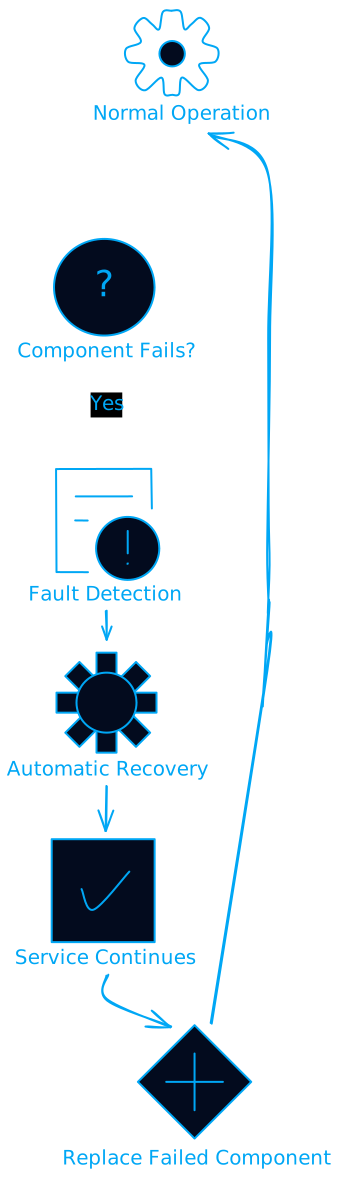
In tech terms, fault tolerance is your system's ability to keep working when parts of it break down. It's not about preventing failures (though that's nice too), it's about making sure failures don't bring down your entire operation.
Why Should You Care? (Spoiler: Money and Sleep)
Your Business Won't Stop for Your Downtime
Remember when Facebook went down for six hours in 2021? They lost an estimated $100 million. Per hour. That's not just big tech problems either. A small e-commerce site losing sales during Black Friday, a SaaS platform going down during peak hours, or a payment processor failing during lunch rush - these all translate to real money walking out the door.
But it's not just about the immediate revenue loss. Customer trust is like a house of cards - it takes forever to build and seconds to collapse. One bad outage can turn your loyal customers into your competitors' success stories.
Compliance Isn't Optional
If you're handling healthcare data, financial information, or anything remotely sensitive, fault tolerance isn't a nice-to-have feature. It's literally required by law. HIPAA, SOX, PCI-DSS - they all have availability requirements that basically say "your system better work when people need it."
I've seen companies get hit with massive fines not because their data was breached, but because their systems were down when auditors came knocking. That's a expensive lesson you don't want to learn firsthand.
Sleep Is Underrated
Here's something they don't tell you in engineering school: being on-call for a system without fault tolerance is like being a parent to a colicky baby. You'll get woken up at 3 AM, 4 AM, and 5 AM by alerts that could have been prevented with better design.
Good fault tolerance means your system handles problems automatically, escalating to humans only when it really needs help. Your future self will thank you for those uninterrupted nights.
The Building Blocks: How to Actually Build Fault-Tolerant Systems
Redundancy: The "Two Is One, One Is None" Principle
Military folks have this saying: "Two is one, one is none." It means if you only have one of something critical, you effectively have zero because it will fail when you need it most.
In system design, this translates to having multiple copies of everything important:
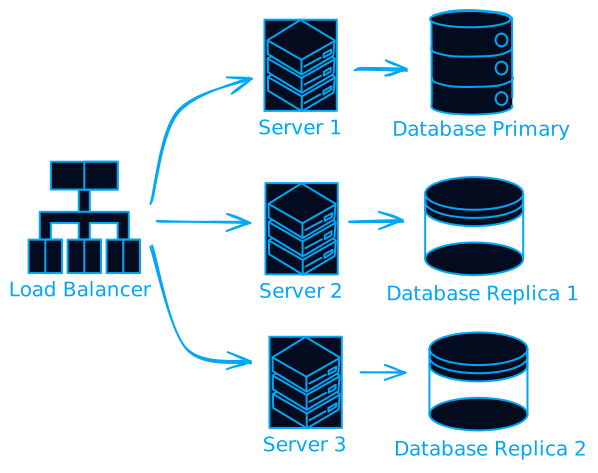
But here's where it gets tricky - redundancy isn't just about having multiple servers. You need to think about:
- Geographic redundancy: Don't put all your servers in the same data center. Natural disasters, power outages, and construction accidents are real things.
- Vendor redundancy: Using multiple cloud providers or ISPs so you're not dependent on one company's uptime.
- Component redundancy: Multiple power supplies, network cards, and storage devices in each server.
Load Balancing: Spreading the Love (and the Load)
Load balancing is like having multiple checkout lanes at a grocery store. Instead of everyone waiting in one long line, you distribute customers across multiple lanes to keep things moving smoothly.
# Simple round-robin load balancer concept
class LoadBalancer:
    def __init__(self, servers):
        self.servers = servers
        self.current = 0

    def get_server(self):
        server = self.servers[self.current]
        self.current = (self.current + 1) % len(self.servers)
        return server

    def remove_failed_server(self, server):
        if server in self.servers:
            self.servers.remove(server)
            # Adjust current index if needed
            if self.current >= len(self.servers):
                self.current = 0
But load balancing isn't just about distributing requests. Modern load balancers are smart enough to:
- Health check your servers and remove failed ones from rotation
- Route requests based on server capacity and response times
- Handle SSL termination and caching
- Provide detailed metrics about your traffic patterns
Circuit Breakers: Failing Fast to Succeed Later
The circuit breaker pattern is borrowed from electrical engineering. Just like a circuit breaker in your house trips to prevent electrical fires, a software circuit breaker stops making requests to a failing service to prevent cascading failures.
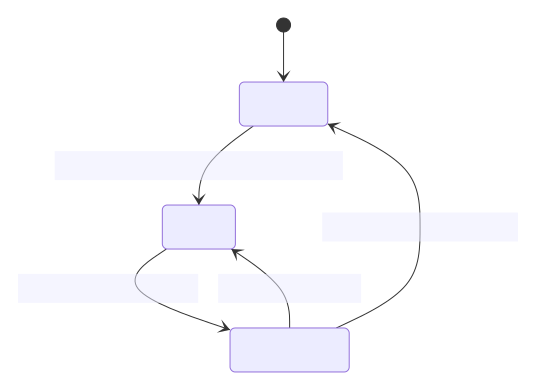
Here's how it works:
- Closed state: Everything's normal, requests flow through
- Open state: Too many failures detected, stop making requests
- Half-open state: Try a few requests to see if the service recovered
This prevents your system from hammering a failing service, giving it time to recover while protecting your users from long timeouts.
Checkpointing: Save Early, Save Often
Remember playing video games and forgetting to save before a boss fight? Checkpointing in systems is like having automatic save points. If something goes wrong, you can roll back to the last known good state instead of starting over.
class CheckpointManager:
    def __init__(self):
        self.checkpoints = {}

    def save_checkpoint(self, process_id, state):
        self.checkpoints[process_id] = {
            'state': state,
            'timestamp': time.time()
        }

    def restore_checkpoint(self, process_id):
        if process_id in self.checkpoints:
            return self.checkpoints[process_id]['state']
        return None
This is especially important for long-running processes. Imagine a data migration that takes 6 hours - without checkpointing, a failure at hour 5 means starting over. With checkpointing, you can resume from the last save point.
Hardware vs Software: Two Sides of the Same Coin
Hardware Fault Tolerance: When Silicon Fails
Hardware failures are like death and taxes - inevitable. The question isn't if your hard drive will fail, but when. Good hardware fault tolerance planning assumes everything will break and plans accordingly.
Hot-swappable components are your friend here. Being able to replace a failed drive, power supply, or network card without shutting down the system is like being able to change a tire while driving. It sounds impossible, but it's standard practice in enterprise hardware.
RAID arrays are probably the most common example of hardware fault tolerance. RAID 1 mirrors your data across multiple drives, RAID 5 can survive one drive failure, and RAID 6 can survive two. But remember - RAID is not a backup. It protects against drive failures, not against accidentally deleting files or ransomware.
Software Fault Tolerance: When Code Misbehaves
Software failures are trickier because they're often not random - they're systematic. A bug doesn't just affect one request; it affects all requests that trigger that code path.
N-Version Programming is like having multiple teams solve the same problem independently, then voting on the answer. It's expensive and complex, but for critical systems, it can catch bugs that would slip through normal testing.
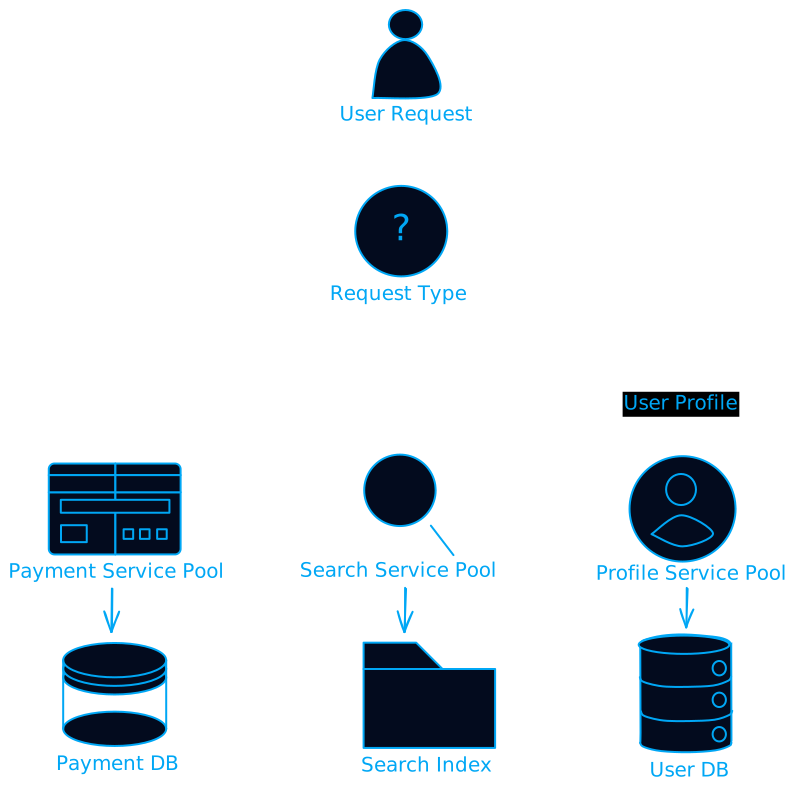
Bulkhead isolation is about containing failures. Just like a ship has watertight compartments to prevent one leak from sinking the whole vessel, your software should isolate different functions so one failure doesn't bring down everything.
Real-World Battle Stories
The Great AWS Outage of 2017
In February 2017, a simple typo during routine maintenance took down a huge chunk of the internet. An AWS engineer was debugging the S3 billing system and accidentally removed more servers than intended. The result? Websites, apps, and services across the internet went dark for hours.
The lesson? Even the best companies with the smartest engineers make mistakes. The difference is how quickly they can recover and what they learn from it.
Netflix's Chaos Engineering
Netflix takes a unique approach to fault tolerance - they intentionally break their own systems. Their "Chaos Monkey" randomly terminates services in production to ensure their systems can handle failures gracefully.
It sounds crazy, but it works. By constantly testing their fault tolerance in real conditions, Netflix has built one of the most resilient streaming platforms in the world. They've had major outages, but they're rare and usually short-lived.
The Dark Side: When Fault Tolerance Goes Wrong
Over-Engineering: The Goldilocks Problem
I've seen teams get so paranoid about failures that they build systems with 99.999% uptime requirements for internal tools that get used twice a month. That's like buying a Formula 1 car for your daily commute - technically impressive, but completely unnecessary.
The key is understanding your actual requirements. A blog that goes down for an hour isn't the end of the world. A payment processor going down for five minutes could cost millions.
Complexity Creep
Every layer of fault tolerance adds complexity. More complexity means more things that can go wrong, more things to monitor, and more things to understand when debugging issues.
I've debugged systems where the fault tolerance mechanisms were more complex than the actual business logic. At that point, you're not solving problems, you're creating them.
False Sense of Security
Having redundant systems doesn't mean you can ignore monitoring and maintenance. I've seen "fault-tolerant" systems fail catastrophically because all the redundant components had the same bug or configuration error.
Diversity is key - different hardware vendors, different software versions, different deployment strategies. If all your redundant systems are identical, they'll all fail in identical ways.
Building Your Fault Tolerance Strategy
Start with the Basics
Before you start implementing complex distributed consensus algorithms, make sure you've got the fundamentals covered:
- Monitoring and alerting: You can't fix what you don't know is broken
- Automated backups: Test them regularly - a backup you can't restore is just expensive storage
- Documentation: When things go wrong at 3 AM, you'll be grateful for clear runbooks
- Testing: Regularly test your failure scenarios - if you don't test it, it doesn't work
Know Your SLAs
Service Level Agreements aren't just numbers you put in contracts - they should drive your architecture decisions. Here's what different availability levels actually mean:
- 99% uptime: 3.65 days of downtime per year (probably not acceptable for anything important)
- 99.9% uptime: 8.77 hours of downtime per year (acceptable for many internal tools)
- 99.99% uptime: 52.6 minutes of downtime per year (what most customer-facing services should aim for)
- 99.999% uptime: 5.26 minutes of downtime per year (expensive to achieve, only needed for critical systems)
Each additional "9" roughly doubles your costs and complexity. Choose wisely.
Plan for Disasters
Disaster recovery isn't just about technical failures. You need to plan for:
- Natural disasters (earthquakes, floods, hurricanes)
- Human errors (accidental deletions, misconfigurations)
- Security incidents (breaches, ransomware)
- Vendor failures (cloud provider outages, ISP issues)
Your disaster recovery plan should be tested regularly. A plan that only exists on paper is just expensive documentation.
The Future of Fault Tolerance
Chaos Engineering Goes Mainstream
What Netflix pioneered with Chaos Monkey is becoming standard practice. Tools like Gremlin, Litmus, and Chaos Toolkit make it easier to inject failures into your systems and test your resilience.
The idea is simple: if you're going to have failures anyway (and you are), it's better to have them during business hours when your team is awake and ready to respond.
AI-Powered Recovery
Machine learning is starting to play a bigger role in fault tolerance. Instead of just detecting failures, AI systems can predict them before they happen and automatically take corrective action.
Imagine a system that notices unusual patterns in your database performance and automatically scales up resources before users notice any slowdown. We're not quite there yet, but we're getting close.
Edge Computing Challenges
As more computing moves to the edge (closer to users), fault tolerance becomes more challenging. You can't just rely on centralized redundancy when your services are distributed across thousands of edge locations.
This is driving innovation in distributed consensus algorithms, edge-to-edge replication, and autonomous recovery systems.
Wrapping Up: Your Fault Tolerance Checklist
Building fault-tolerant systems isn't about implementing every technique in this post. It's about understanding your risks, knowing your requirements, and making smart tradeoffs.
Here's your starting checklist:
- Identify single points of failure in your current architecture
- Implement monitoring and alerting for critical components
- Set up automated backups and test restoration procedures
- Create runbooks for common failure scenarios
- Implement health checks and automatic failover for critical services
- Test your disaster recovery plan at least quarterly
- Monitor your SLAs and adjust your architecture as needed
Remember, the goal isn't to build a system that never fails - that's impossible. The goal is to build a system that fails gracefully, recovers quickly, and learns from its mistakes.
Your users don't care about your uptime statistics. They care about whether your service works when they need it. Focus on that, and the rest will follow.
Now go forth and build systems that can survive the chaos of the real world. Your future self (and your sleep schedule) will thank you.
Want to dive deeper into fault tolerance? Check out "Release It!" by Michael Nygard and "Building Secure and Reliable Systems" by Google's SRE team. Both are excellent resources for understanding how to build resilient systems at scale.